
1. Introduction
This manual provides detailed instructions for the installation, operation, and maintenance of the NPQPNAFC TOQ5-63/4P 3 Phase Din Rail ATS Dual Power Automatic Transfer Switch. This device is designed to automatically switch between two power sources, typically city power and a generator, ensuring continuous power supply to critical loads. It is suitable for applications requiring reliable power transfer without interruption.
The TOQ5 series includes models TOQ5-63/4P, TOQ5-100/4P, and TOQ5-125/4P, with this specific manual focusing on the 63A, 220V variant (TOQ5-63/4P).
2. Safety Information
WARNING: Electrical shock hazard. Installation and maintenance must be performed by qualified personnel only. Disconnect all power sources before working on the device.
- Always ensure the main power supply is disconnected before installation or maintenance.
- Verify correct wiring connections to prevent damage to the device and connected equipment.
- Do not operate the switch in environments with excessive moisture or corrosive gases.
- This device is designed for city power and generator applications only. It is not suitable for PV systems or inverters.
- Ensure proper grounding of the electrical system.
3. Product Overview
3.1 Components
The NPQPNAFC ATS is a compact device designed for Din Rail mounting. Key components include input terminals for Source A (City Power) and Source B (Generator), output terminals for the load, and a manual/automatic selector switch.

Figure 1: Overview of the NPQPNAFC Dual Power Automatic Transfer Switch. Shows the main terminals for Source A and Source B, the load side, and the manual/auto selector switch.
3.2 Features
- Dual Power Source Compatibility: Designed for seamless switching between city power and a generator.
- Automatic Transfer: Automatically detects power loss and transfers to the backup source.
- Manual Operation: Allows for manual selection of power source when needed.
- Fast Transfer Speed: Switches in less than 8ms, ensuring minimal interruption.
- Din Rail Mounting: Easy installation in standard electrical panels.
- PC Level Switch: High reliability and durability.
4. Installation
Proper installation is crucial for the safe and reliable operation of the ATS. Always ensure power is disconnected before proceeding.
4.1 Mounting
- Mount the ATS on a standard 35mm Din Rail within an electrical enclosure.
- Ensure adequate ventilation around the device.
- Secure the device firmly to prevent movement.
4.2 Wiring Diagram
Refer to the following diagram for correct wiring connections. All connections must be tight and secure.
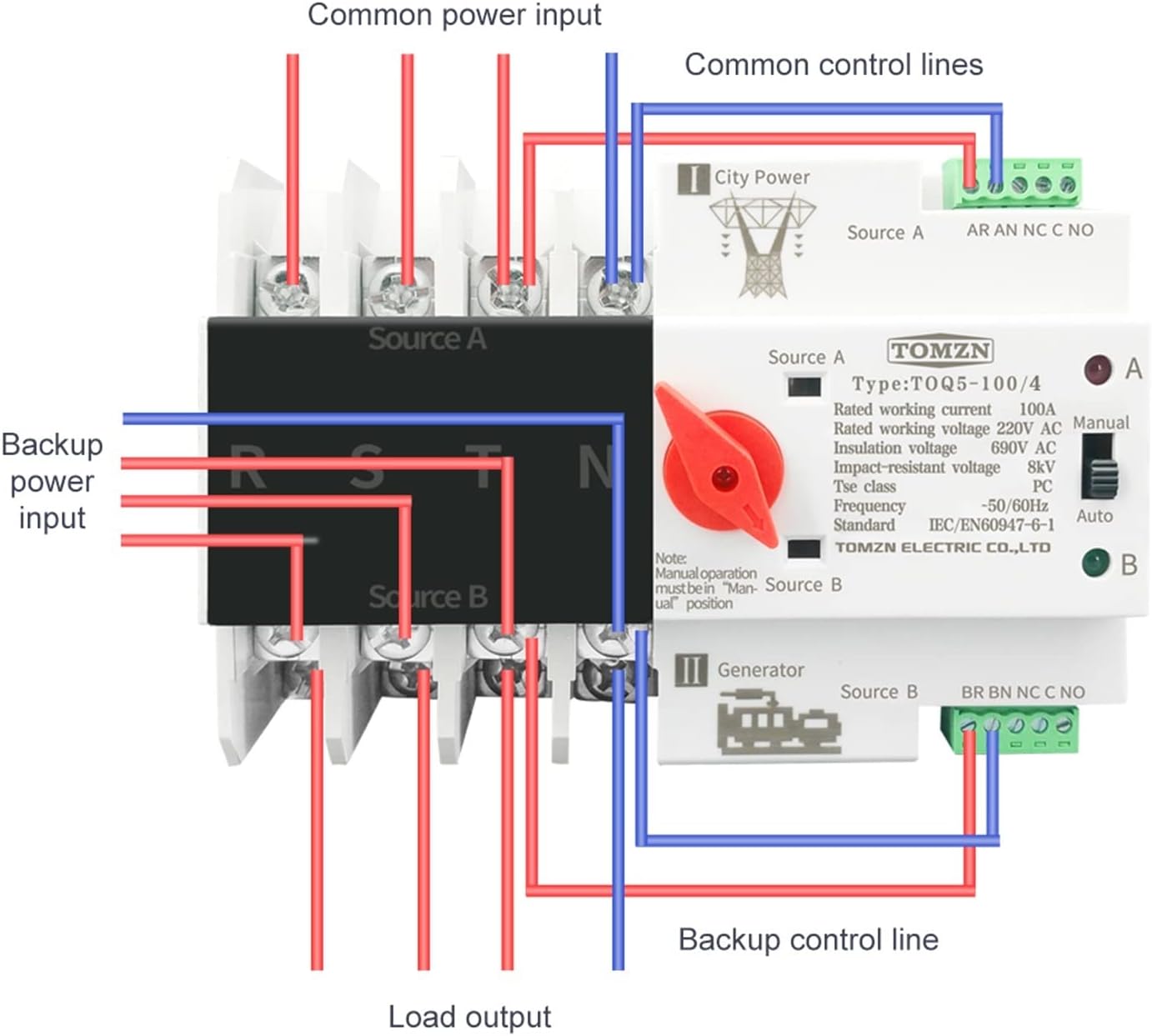
Figure 2: Wiring diagram showing connections for Common Power Input (Source A), Backup Power Input (Source B), Common Control Lines, Backup Control Line, and Load Output.
- Source A (City Power): Connect the main utility power supply to the 'Source A' terminals.
- Source B (Generator): Connect the generator power supply to the 'Source B' terminals.
- Load Side: Connect the load circuits to the 'Load Side' terminals.
- Control Lines: Connect the common control lines and backup control line as indicated in the diagram for automatic operation.
- Ensure all wire gauges are appropriate for the current rating (63A) and local electrical codes.
5. Operating Instructions
The ATS offers both automatic and manual operating modes.

Figure 3: Detail of the manual handle and the manual/automatic selector switch on the ATS.
5.1 Operating Modes
- Automatic Mode: Set the selector switch to 'Auto'. In this mode, the ATS will automatically detect the presence of power from Source A (City Power). If Source A fails, it will automatically transfer the load to Source B (Generator). When Source A is restored, the ATS will automatically switch the load back to Source A.
- Manual Mode: Set the selector switch to 'Manual'. Use the red manual handle to physically switch between Source A and Source B. The manual operation must be in the 'Main' or 'Source B' position. This mode is typically used for testing or in situations where automatic transfer is not desired.
6. Maintenance
Regular maintenance ensures the longevity and reliable operation of your ATS.
- Visual Inspection: Periodically inspect the device for any signs of physical damage, loose connections, or overheating.
- Cleaning: Keep the device free from dust and debris. Use a dry, soft cloth for cleaning. Do not use liquids or abrasive cleaners.
- Connection Check: Ensure all terminal connections remain tight. Loose connections can cause overheating and device failure.
- Functionality Test: Periodically test the automatic transfer function by simulating a power outage (if safe to do so and with proper precautions).
7. Troubleshooting
If you encounter issues with your ATS, refer to the following common troubleshooting steps:
- No Power Transfer:
- Check if both Source A and Source B have power.
- Ensure the selector switch is in 'Auto' mode for automatic transfer.
- Verify all control wiring connections are correct and secure.
- Overheating:
- Check for loose terminal connections.
- Ensure the load current does not exceed the device's rated current (63A).
- Verify adequate ventilation around the device.
- Device Not Responding:
- Ensure all power sources are connected and active.
- If in manual mode, ensure the handle is fully engaged in either Source A or Source B position.
If problems persist after attempting these steps, contact qualified electrical personnel or NPQPNAFC customer support for assistance.
8. Specifications
| Parameter | Value |
|---|---|
| Brand | NPQPNAFC |
| Model | TOQ5-63/4P |
| Rated Working Current | 63A |
| Rated Working Voltage | 220V AC |
| Insulation Voltage | 690V AC |
| Impact-Resistant Voltage | 8kV |
| Tie Class | PC |
| Frequency | 50/60Hz |
| Standard | IEC/EN60947-6-1 |
| Number of Poles | 4P |
| Transfer Time | Less than 8ms |
| Mounting Type | Din Rail |
| Item Weight | 500 Grams |
9. Warranty and Support
This product comes with a standard manufacturer's warranty. For specific warranty details, please refer to the documentation included with your purchase or contact NPQPNAFC customer support. For technical assistance or further inquiries, please reach out to the manufacturer directly.