1. Introduction
This manual provides comprehensive instructions for the installation, operation, and maintenance of the Sekelo High-Power Temperature Control Switch, Model EHS-THERM-63A. This rail-mounted digital thermostat is designed for precise temperature management in a variety of applications, offering robust control for both heating and cooling systems.
Key Features:
- Wide Temperature Range: Supports control from -40°C to 140°C, suitable for diverse environments like greenhouses, aquaculture, and geothermal heating.
- High-Power Compatibility: Handles up to 63A, with 8kW for inductive loads (motors) and 18kW for resistive loads (heating/lighting).
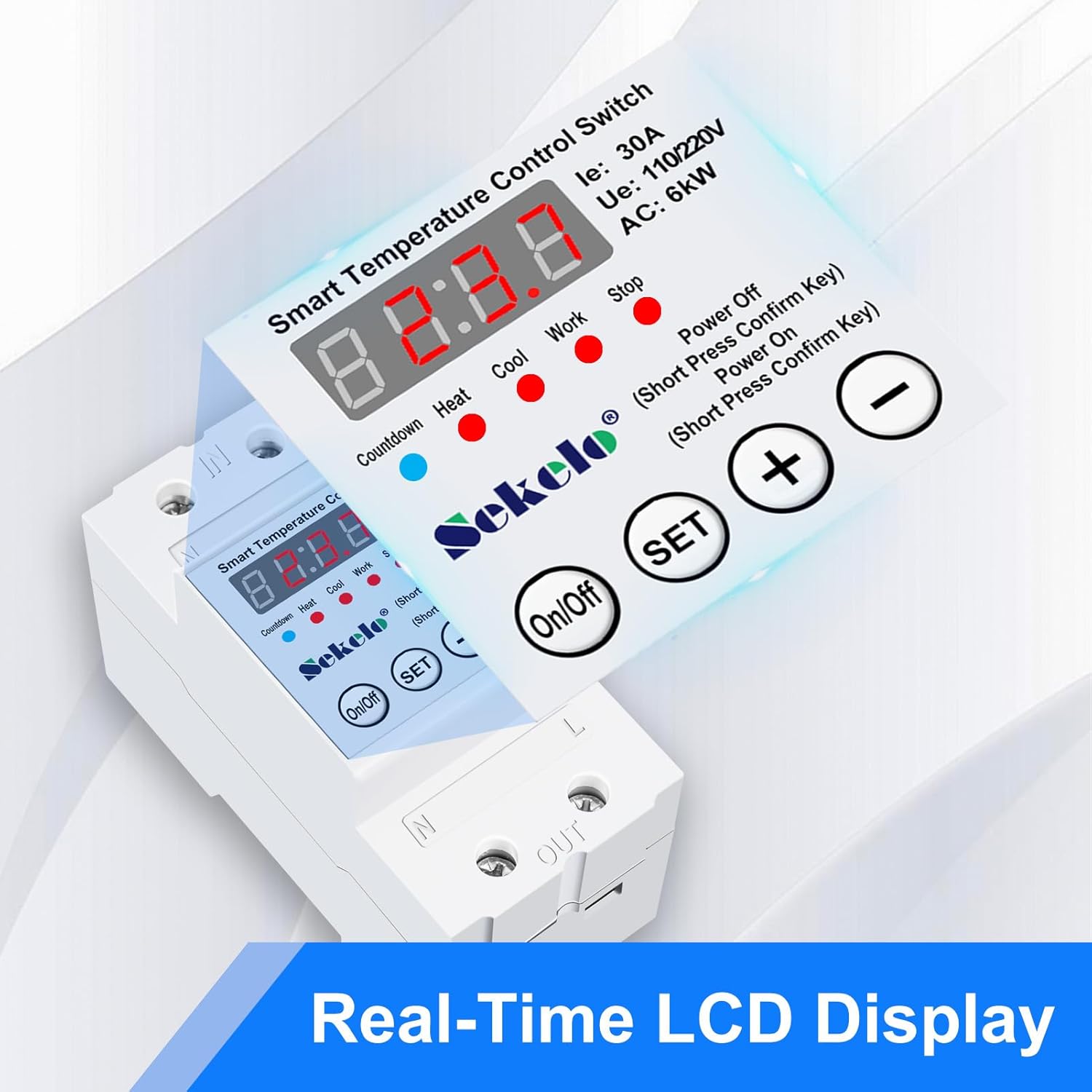
- Real-Time LCD Display: Clear display for current temperature monitoring and easy adjustments.
- Rail-Mounted Installation: Designed for secure and easy installation on standard DIN rails.
- Safe and Durable: Built with safety features, operating reliably in ambient temperatures from -25°C to 60°C and humidity below 95%.

2. Safety Information
Please read all safety warnings and instructions carefully before installing or operating this device. Failure to follow these instructions may result in electric shock, fire, or serious injury.
- Electrical Safety: Installation should only be performed by a qualified electrician. Ensure power is disconnected before any wiring.
- Circuit Protection: This switch cannot be used as a main disconnection switch. Always install a miniature circuit breaker or leakage protection device with overload and short-circuit protection upstream of this product.
- Voltage Compatibility: Verify that the supply voltage (110V/220V AC) matches the product's specifications.
- Environmental Conditions: Do not expose the device to direct water, excessive humidity (above 95%), or temperatures outside the specified ambient range (-25°C to 60°C).
- Load Limits: Do not exceed the maximum inductive load (8kW for motors) or resistive load (18kW for heating/lighting) to prevent damage and ensure safe operation.
- Wiring: Ensure all wiring connections are secure and correctly terminated to prevent loose connections and potential hazards.
3. Product Overview
Components:
- Main Control Unit with LCD Display
- Temperature Probe
- DIN Rail (for mounting)
Front Panel and Display:
The front panel features a clear LCD display for real-time temperature readings and operational status, along with control buttons for configuration.
- LCD Display: Shows current temperature in Celsius, and indicates active modes (Countdown, Heat, Cool, Work, Stop).
- On/Off Button: Powers the device on or off.
- SET Button: Used to enter programming mode and confirm settings.
- '+' Button: Increases values or navigates options.
- '-' Button: Decreases values or navigates options.

4. Specifications
| Parameter | Value |
|---|---|
| Brand | Sekelo |
| Model Number | EHS-THERM-63A |
| Rated Voltage | 110/220V AC |
| Rated Current | 63A |
| Rated Frequency | 50/60Hz |
| Inductive Load (Motor Type) | Max 8kW |
| Resistive Load (Heating/Lighting) | Max 18kW |
| Power Consumption | <2W |
| Temperature Control Range | -40°C to 140°C |
| Ambient Operating Temperature | -25°C to 60°C |
| Ambient Operating Humidity | <95% (non-condensing) |
| Display Type | LCD |
| Mounting Type | Rail Mount (DIN Rail) |
| Material | Aluminum (housing) |
| Dimensions (Approx.) | 93mm (H) x 45mm (W) x 66mm (D) |
| Item Weight | 7 ounces |

5. Setup and Installation
5.1 Mounting:
The Sekelo Temperature Control Switch is designed for rail-mounted installation. Secure the provided DIN rail in your control box or desired location. Snap the thermostat onto the DIN rail until it clicks into place.
5.2 Wiring Diagram:
Refer to the wiring diagram below for correct electrical connections. Ensure all power is off before beginning wiring. Connect the temperature probe to the designated jack at the top of the module.
Important Note: This switch is not a main disconnection switch. A miniature circuit breaker or leakage protection device with overload and short-circuit protection must be installed before this product in the electrical circuit.

The Line (L) and Neutral (N) terminals for input are located at the top side of the module. The load output terminals are located at the bottom. Ensure correct polarity and secure connections for both input and output wiring.
6. Operating Instructions
The Sekelo Temperature Control Switch offers modes for heating, cooling, and a countdown timer. The display shows temperature in Celsius only.
6.1 Basic Operation:
- Power On/Off: Press the On/Off button to turn the device on or off. When on, the red LED numbers will display the current temperature in Celsius.
- Accessing Settings: Press and release the SET button repeatedly to cycle through different settings and modes.
- Adjusting Values: Use the + and - buttons to increase or decrease values when in setting mode.
6.2 Setting Cooling Control (Example for an Attic Fan):
This example demonstrates how to configure the switch to turn on a cooling device (e.g., a fan) when the temperature rises above a set point and turn it off when it falls below another.
- Ensure the switch is powered ON. The display will show the current temperature.
- Press and release the SET button repeatedly until the red LED light is illuminated under the word COOL. This indicates the cooling mode is selected.
- Press the SET button again. The "WORK" temperature (turn-on temperature) will start flashing. Use the + or - buttons to set your desired turn-on temperature (e.g., 32.2°C for 90°F).
- Press the SET button once more. The "STOP" temperature (turn-off temperature) will flash. Use the + or - buttons to set your desired turn-off temperature (e.g., 28.9°C for 84°F).
- Press the SET button again to save the settings and exit programming mode. Ensure the COOL LED remains lit for cooling operation.
6.3 Setting Heating Control:
To configure for heating, follow similar steps as cooling, but ensure the HEAT LED is illuminated. In heating mode, the device will activate when the temperature falls below the "WORK" temperature and deactivate when it rises above the "STOP" temperature.
6.4 Countdown Function:
The device also features a countdown timer function, typically ranging from 1 minute to 24 hours. Consult the on-screen prompts or cycle through the SET button options to access and configure this mode.
7. Maintenance
The Sekelo Temperature Control Switch requires minimal maintenance. Follow these guidelines to ensure optimal performance and longevity:
- Cleaning: Gently wipe the device with a dry, soft cloth. Do not use abrasive cleaners, solvents, or immerse the device in water.
- Connections: Periodically check all electrical connections to ensure they remain tight and secure. Loose connections can lead to overheating or malfunction.
- Temperature Probe: Keep the temperature probe clean and free from debris. Ensure it is positioned correctly to accurately measure the desired temperature.
- Environmental Check: Ensure the operating environment remains within the specified temperature and humidity ranges.
8. Troubleshooting
If you encounter issues with your Sekelo Temperature Control Switch, refer to the following common problems and solutions:
| Problem | Possible Cause | Solution |
|---|---|---|
| Device does not power on. | No power supply; incorrect wiring; faulty unit. | Check power source and circuit breaker. Verify wiring connections. If problem persists, contact support. |
| Temperature readings are inaccurate. | Temperature probe is dirty, damaged, or improperly placed; sensor calibration issue. | Clean and properly position the temperature probe. Compare readings with another reliable thermometer. Note that minor discrepancies may occur. |
| Load (e.g., fan/heater) does not turn on/off as expected. | Incorrect temperature settings; wrong operating mode (Heat/Cool); wiring issue; load exceeding capacity. | Verify WORK and STOP temperature settings. Ensure correct mode (Heat/Cool) is selected. Check load wiring and ensure load does not exceed 8kW (inductive) or 18kW (resistive). |
| Display shows error code or behaves erratically. | Internal malfunction; power fluctuation. | Try cycling power off and on. If the issue persists, contact customer support. |
9. Applications
The Sekelo High-Power Temperature Control Switch is versatile and can be used in a wide range of applications requiring precise temperature regulation:
- Greenhouses: Maintaining optimal growing temperatures for plants.
- Aquaculture: Regulating water temperature in fish farms or aquariums.
- Boiler Systems: Controlling heating elements for water or space heating.
- Hatcheries: Ensuring stable temperatures for incubation.
- Geothermal Heating Systems: Managing heat distribution.
- Industrial Processes: Any application requiring automated temperature control for high-power equipment.

10. Warranty and Support
For warranty information or technical support, please refer to the contact details provided with your purchase or visit the official Sekelo website. Keep your purchase receipt as proof of purchase for any warranty claims.
Sekelo is committed to providing high-quality electrical solutions and customer satisfaction. If you have any questions or require assistance, do not hesitate to reach out to our support team.


