
1. Introduction
The EMAX ES08AII Micro Servo is a high-performance analog servo designed for various RC model applications. It offers precise control, reliable operation, and a compact, lightweight design. This manual provides essential information for the proper setup, operation, and maintenance of your ES08AII Micro Servo.
2. Package Contents
Verify that all items listed below are included in your package:
- 1 x EMAX ES08AII Micro Servo
- Assorted Servo Horns/Arms (e.g., cross, disc, single arm)
- Mounting Screws
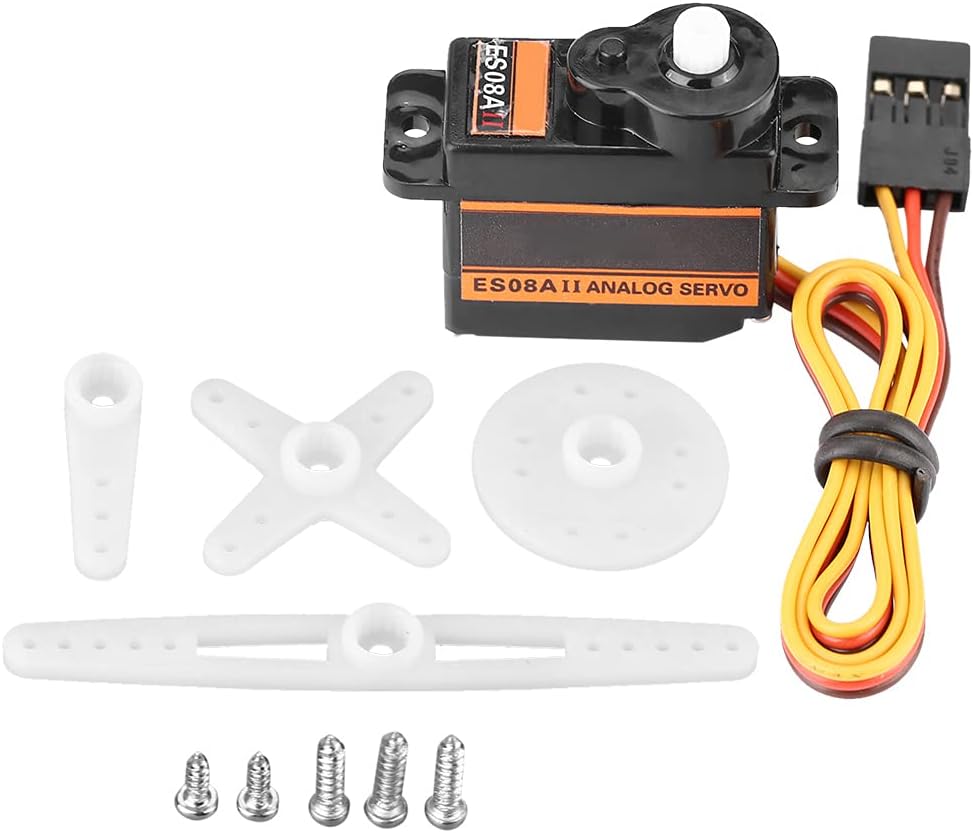
Image: The EMAX ES08AII Micro Servo shown with its various white plastic servo horns/arms and small metal mounting screws.
3. Specifications
| Feature | Specification |
|---|---|
| Model | EMAX ES08A II |
| Operating Voltage | 4.8V - 6.0V |
| Operating Speed (4.8V) | 0.12 sec/60° |
| Operating Speed (6.0V) | 0.10 sec/60° |
| Stall Torque (4.8V) | 1.5 kg/cm |
| Stall Torque (6.0V) | 1.8 kg/cm |
| Dimensions (L x W x H) | 3.2 x 2.4 x 1.2 cm (1.3 x 0.9 x 0.5 inches) |
| Weight | 9g (0.32 oz) |
| Cable Length | 23 cm (9.1 inches) |
4. Setup
Follow these steps to properly set up your EMAX ES08AII Micro Servo:
- Mounting the Servo: Secure the servo in your RC model using the provided mounting screws. Ensure it is firmly attached to prevent vibration and movement during operation.
- Attaching Servo Horns: Select the appropriate servo horn (arm) for your application from the included accessories. Attach it to the servo's output shaft. Ensure the horn is centered before powering on the servo for the first time, or adjust its position after initial power-up and centering.
- Connecting to Receiver/Controller: Connect the servo's 3-wire cable to the corresponding channel on your RC receiver or flight controller. The standard color coding is:
- Brown/Black: Ground (GND)
- Red: Positive Power (VCC)
- Orange/Yellow: Signal (SIG)

Image: A close-up view of the 3-pin servo connector, showing the brown, red, and yellow wires.
5. Operating Instructions
The EMAX ES08AII Micro Servo is controlled by a Pulse Width Modulation (PWM) signal. The pulse width determines the angular position of the servo arm.
- Power Supply: Ensure your power supply (e.g., battery, BEC) provides a stable voltage within the 4.8V to 6.0V range. Operating outside this range can damage the servo or lead to inconsistent performance.
- Signal Input: The servo expects a PWM signal, typically from an RC receiver or microcontroller. A pulse width of approximately 1.5ms usually corresponds to the center position, while shorter or longer pulses move the servo to its minimum or maximum angular limits.
- Load Management: While the ES08AII has a stall torque of up to 1.8 kg/cm, avoid continuously operating the servo under heavy load or allowing it to stall for extended periods. This can cause overheating and reduce the servo's lifespan.
- Mechanical Limits: Do not force the servo arm beyond its mechanical limits. This can strip the internal gears. Adjust your linkages or electronic endpoints to prevent over-travel.
6. Maintenance
Proper maintenance ensures the longevity and reliable performance of your servo:
- Cleaning: Keep the servo casing clean and free from dust, dirt, and debris. Use a soft, dry cloth for cleaning. Avoid using solvents or harsh chemicals.
- Moisture Protection: Protect the servo from moisture and water exposure. While robust, it is not waterproof.
- Connection Checks: Periodically inspect the servo cable and connector for any signs of wear, fraying, or corrosion. Ensure all connections are secure.
- Gear Inspection: If you suspect gear issues (e.g., grinding noises, excessive play), it may indicate worn gears. Disassembly for inspection and replacement should only be performed by experienced users.
7. Troubleshooting
If you encounter issues with your EMAX ES08AII Micro Servo, consider the following troubleshooting steps:
- Servo Not Responding:
- Check the power supply to ensure it is connected and providing the correct voltage (4.8V-6.0V).
- Verify that the servo's 3-wire cable is correctly connected to the receiver/controller with the correct polarity.
- Confirm that the receiver/controller is powered on and transmitting a valid signal.
- Erratic or Jittery Movement:
- A weak or unstable power supply can cause erratic behavior. Ensure your power source can deliver sufficient current.
- Check for electrical interference from other components.
- Inspect the servo's mechanical linkages for any binding or obstruction.
- Servo Overheating:
- Excessive load or continuous stalling can lead to overheating. Reduce the load or adjust mechanical limits.
- Ensure adequate airflow around the servo if it's enclosed.
- Noisy Operation:
- Some gear noise is normal, but excessive grinding may indicate worn or damaged gears.
- Check for foreign objects obstructing the gears.
8. Warranty and Support
For specific warranty terms and conditions, please refer to the documentation provided at the time of purchase or contact your retailer. For technical assistance or further inquiries, please reach out to the manufacturer or authorized service centers.
Manufacturer: Bognajin