
Discala B0DKNZBJQR
Discala Rechargeable Ozone Generator with Negative Ion User Manual
Model: B0DKNZBJQR
1. Introduction and Product Overview
This manual provides detailed instructions for the safe and effective use of your Discala Rechargeable Ozone Generator with Negative Ion. This portable device is designed to eliminate odors and purify air in small spaces such as shoe cabinets, wardrobes, refrigerators, and pet houses. It combines ozone deodorization with negative ion purification to provide a fresh and odor-free environment.

Image: The Discala Rechargeable Ozone Generator, a compact black device with a glowing green handle, indicating its air purification function.

Image: A banner highlighting key features of the portable mini ozone generator, including negative ions, ozone output, intelligent timer, long-lasting performance, and different purification modes.
2. Safety Warnings and Important Information
WARNING: Ensure people and pets stay away from the device when the ozone function is activated. Never use an ozone generator in occupied spaces. Ensure that people, pets, and plants are out of the room or area being treated.
- Do not touch the negative ion diffusion brush. Although it is not dangerous, it may cause a tingling sensation.
- Children should not use or play with this product. Supervise children to ensure they do not play with these products.
- The device contains a battery. Do not disassemble it to avoid danger.
Legal Disclaimer: Statements regarding dietary supplements have not been evaluated by the FDA and are not intended to diagnose, treat, cure, or prevent any disease or health condition.

Image: A graphic illustrating important tips and warnings, including not touching the negative ion brush, supervising children, and the critical warning about ozone function in occupied spaces.
3. Product Features
- Ozone Generator with Negative Ion: Ozone output of 1000mg/h, suitable for small spaces. Effective in eliminating various odors including tobacco smoke, pet odors, food odors, and renovation odors.
- Negative Ion Purification: Generates over millions of negative ions, which can help reduce stress, provide antioxidant effects, and promote sleep.
- 3 Mode Function Indicator Light:
- Green light: Negative Ion Purification Mode
- Blue light: Ozone Deodorization Mode
- Red light: Negative Ion Purification & Ozone Deodorization Mode
- Rechargeable Design: Built-in 3,000mAh large capacity lithium battery for long-lasting performance.
- Universal TYPE-C Charging: Compatible with DC5V-2A chargers. The device can be used while charging.
- Intelligent Timer Button: Offers timing options of 30 minutes, 1 hour, and 2 hours.
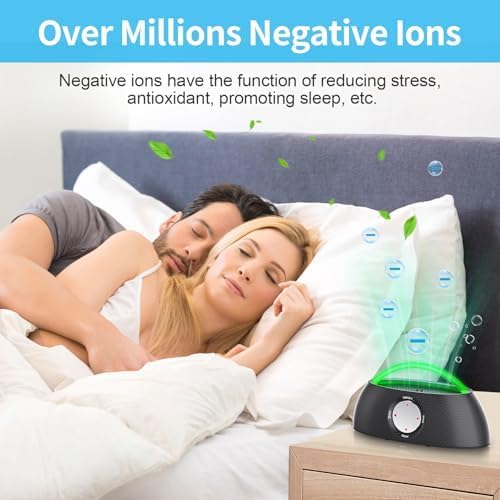
Image: The ozone generator placed on a nightstand next to a bed, illustrating the negative ion release for improved air quality and sleep.
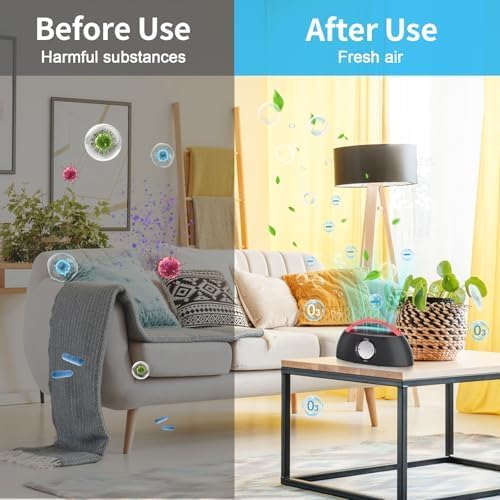
Image: A split image showing a room with visible harmful substances in the air before using the device, and a clean, fresh air environment after use.
4. Setup and Charging
4.1 Initial Charging
Before first use, fully charge the device. Connect the provided TYPE-C charging cable to the device and a DC5V-2A charger (not included). The device can be used normally while charging without consuming battery power.
4.2 Placement
Place the ozone generator in the small space you wish to treat, such as a shoe cabinet, wardrobe, refrigerator, pet house, car, or toilet area. Ensure the area is unoccupied by people, pets, or plants when using the ozone function.

Image: A graphic showing the compact dimensions of the device, its TYPE-C charging port, and the 3,000mAh battery capacity.
5. Operating Instructions
- Power On/Off: Press and hold the ON/OFF button for 3 seconds to power the device on or off.
- Switch Functions/Modes: Short press the ON/OFF button to cycle through the three working modes (Negative Ion, Ozone, Negative Ion & Ozone). The indicator light color will change accordingly.
- Select Timer: Use the timer button to select the desired operating duration: 30 minutes, 1 hour, or 2 hours.

Image: A step-by-step guide on how to use the device, showing how to power on/off, select working modes, choose timer settings, and a warning to ensure spaces are clear during ozone activation.
6. Modes of Operation
The device features three distinct operating modes, indicated by the color of the light:
- Negative Ion Purification Mode (Green Light): When you turn on the machine, it defaults to this mode. Negative ions are colorless and odorless gases that help purify the air. The green breathing light indicates normal operation of negative ions.
- Ozone Deodorization Mode (Blue Light): This mode activates the ozone generator to eliminate strong odors. Remember the safety warnings regarding unoccupied spaces when using this mode.
- Negative Ion Purification & Ozone Deodorization Mode (Red Light): This mode combines both functions for comprehensive air treatment.
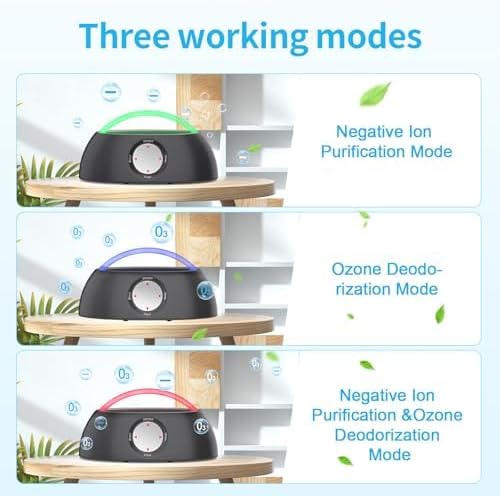
Image: Three separate images of the device, each showing a different colored light (green, blue, red) corresponding to the Negative Ion, Ozone Deodorization, and combined modes.

Image: A graphic illustrating the three working modes with corresponding light colors and descriptions.
7. Maintenance
To ensure optimal performance and longevity of your Discala Ozone Generator, follow these simple maintenance guidelines:
- Cleaning: Wipe the exterior of the device with a soft, dry cloth. Do not use abrasive cleaners or immerse the device in water.
- Storage: When not in use for extended periods, store the device in a cool, dry place away from direct sunlight and extreme temperatures.
- Ozone Plate: While the product description does not specify a replaceable ozone plate, if you notice a decrease in ozone output over time, consult the manufacturer for potential service or replacement options.
8. Troubleshooting
If you encounter any issues with your Discala Ozone Generator, please refer to the following common solutions:
- Device not turning on: Ensure the battery is charged. Press and hold the ON/OFF button for 3 seconds.
- No odor elimination: Ensure the correct mode (Ozone Deodorization or combined mode) is selected. Verify the device is placed in an appropriate small, enclosed space.
- Short operating time: The battery may need recharging. Ensure you are using a DC5V-2A charger for optimal charging.
If the problem persists, please contact Discala customer support for further assistance.
9. Specifications
| Product Dimensions | 2.4 x 6 x 3 inches (2.4"D x 6"W x 3"H) |
| Weight | 9.6 ounces |
| Batteries | 1 Lithium Ion battery (included) |
| Battery Capacity | 3,000mAh |
| Ozone Output | 1000mg/h |
| Color | Black |
| Controller Type | Touch Control |
10. Warranty and Support
For any questions, concerns, or technical support regarding your Discala Rechargeable Ozone Generator, please contact the seller or manufacturer directly. Please refer to your purchase documentation for specific warranty details and contact information.
You can often find support information on the product's Amazon listing page or by visiting the official Discala store on Amazon: Discala Store
Ask a question about this manual
Ask about setup, troubleshooting, compatibility, parts, safety, or missing instructions. Manuals+ will review the question and use this page’s manual context to help answer it.