
1. Introduction
This manual provides instructions for the safe and effective operation of your CARSUN T2225-BK-A Portable Jump Starter with Air Compressor. This device is designed to provide emergency vehicle starting, tire inflation, lighting, and mobile device charging. Please read this manual thoroughly before use and retain it for future reference.
2. Safety Information
Always observe the following safety precautions to prevent injury or damage to the device or vehicle.
- Ensure the device is fully charged before first use.
- Do not use the air pump continuously for more than 15 minutes. Allow it to cool down for at least 10 minutes after each 15-minute use.
- It is recommended to start the car when the jump starter's power is greater than 75%.
- Charge the jump starter every 2-3 months to maintain battery health and extend its service life.
- Connect the red clamp to the positive (+) terminal and the black clamp to the negative (-) terminal of the vehicle battery.
- The smart jumper cable features 10 built-in safety protection technologies, including reverse polarity, spark protection, short circuit, overcharge, overcurrent, low temperature, high temperature, overvoltage, overload, and reverse charging.
- Do not immerse the device in water.
- Keep out of reach of children.

Image 2.1: Illustration of the 10 smart clamp safety protections, including spark resistance, extreme temperature, over-charge, over-voltage, over-current, reverse connection, short-circuit, reverse polarity, over-heat, and over-power protection.
3. Package Contents
Verify that all items are present in your package:
- CARSUN T2225-BK-A Jump Starter with Air Compressor
- Smart Jumper Cables
- Air Hose
- Various Nozzles for inflation (e.g., for cars, bicycles, balls)
- TYPE-C Charging Cable
- User Manual (this document)

Image 3.1: The CARSUN T2225-BK-A jump starter unit displayed with its smart jumper cables, air hose, various inflation nozzles, and a USB-C charging cable.
4. Product Overview
The CARSUN T2225-BK-A combines multiple functionalities into a compact device:
- Jump Starter: Capable of restarting 12V vehicles with up to 9.0L gasoline or 6.5L diesel engines.
- Air Compressor: Digital tire inflator with preset and auto shut-off, providing 36L/Min airflow.
- LED Lighting: Features continuous lighting (flashlight), strobe, and SOS (red and blue) modes.
- Power Bank: USB output for charging mobile devices (5V/3A, 9V/2A).
- Digital Display: Large LCD display for real-time data, including tire pressure and battery level.
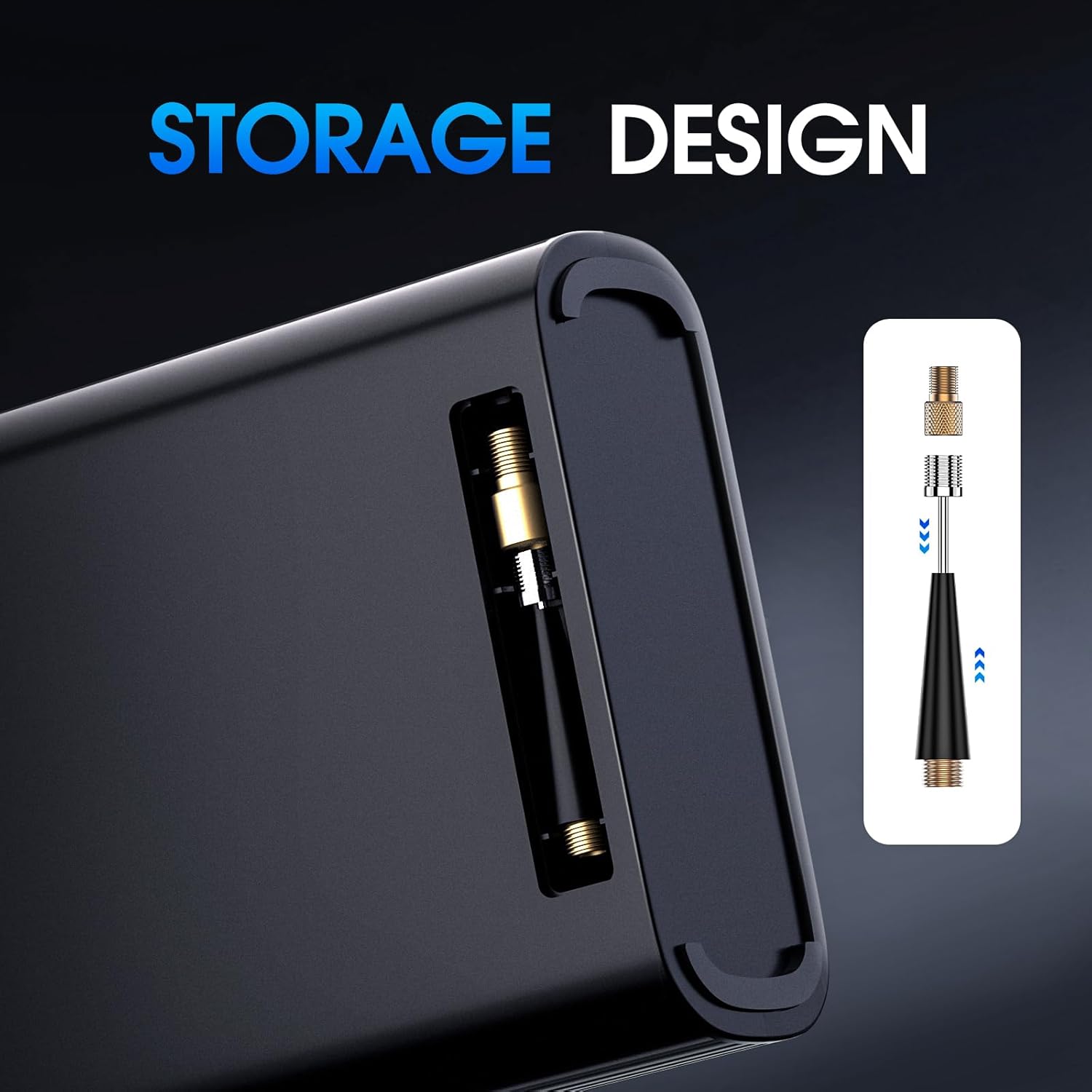
Image 4.1: Side view of the CARSUN jump starter, highlighting the integrated storage compartment for inflation nozzles.
5. Setup and Initial Charging
- Unpack: Remove all components from the packaging.
- Initial Charge: Before first use, fully charge the CARSUN jump starter using the provided TYPE-C charging cable. Connect the cable to the device's input port and a suitable USB power adapter (not included). The LCD display will indicate charging status.
- Familiarize: Locate the power button, mode button, +/- buttons, and output ports on the device.
6. Operating Instructions
6.1. Jump Starting a Vehicle
Ensure the jump starter has at least 75% charge before attempting to jump start a vehicle.
- Connect Clamps: Connect the smart jumper cable's red clamp to the positive (+) terminal of the vehicle battery and the black clamp to the negative (-) terminal.
- Connect to Device: Plug the smart jumper cable connector into the jump starter's designated port. The jumper cable indicator light should turn green.
- Start Vehicle: Start your vehicle's engine.
- Disconnect: Once the vehicle starts, immediately disconnect the smart jumper cable from the jump starter, then remove the clamps from the vehicle battery.

Image 6.1: The CARSUN jump starter connected to a vehicle battery, demonstrating the process of jump starting an engine. The device is shown with its cables attached to the battery terminals.
6.2. Using the Digital Tire Inflator
The inflator supports 4 optional unit switching and features intelligent preset and automatic shut-off.
- Attach Hose: Connect the air hose to the inflator port on the device.
- Select Nozzle: Choose the appropriate nozzle for your tire or inflatable item and attach it to the air hose.
- Connect to Tire: Securely attach the nozzle to the tire valve. The LCD display will show the current tire pressure.
- Set Pressure: Use the +/- buttons to set the desired pressure. Press the 'M' button to cycle through pressure units (PSI, BAR, KPA, kg/cm²).
- Start Inflation: Press the power button to begin inflation. The inflator will automatically stop when the preset pressure is reached.
- Disconnect: Remove the nozzle from the tire valve and detach the air hose from the device.
Important: Do not use the air pump continuously for more than 15 minutes. Allow it to cool down for at least 10 minutes after each 15-minute use.

Image 6.2: The CARSUN jump starter actively inflating a car tire, with the digital display showing pressure readings. The air hose is connected to the tire valve.
6.3. Using the LED Light
The device features a 300-lumen LED light with multiple modes.
- Activate: Press the dedicated light button (often marked with a flashlight icon) to turn on the continuous lighting (flashlight) mode.
- Cycle Modes: Press the light button again to cycle through strobe mode, then SOS (red and blue) mode.
- Turn Off: Press the light button a final time to turn off the LED light.

Image 6.3: The CARSUN jump starter demonstrating its 3-in-1 lighting capabilities, including flashlight, strobe, and SOS (red) modes, useful for emergencies or general illumination.
6.4. Charging Mobile Devices
Use the device as a power bank to charge your mobile electronics.
- Connect Cable: Connect your mobile device's charging cable to the USB output port on the CARSUN jump starter.
- Start Charging: The device should automatically begin charging your mobile device.

Image 6.4: The CARSUN jump starter connected via USB-C to a smartphone, illustrating its capability to charge external mobile devices.
7. Maintenance
- Regular Charging: To ensure optimal performance and extend battery life, charge the jump starter every 2-3 months, even if not in use.
- Cleaning: Wipe the device with a dry, soft cloth. Do not use harsh chemicals or abrasive cleaners.
- Storage: Store the device in a cool, dry place, away from direct sunlight and extreme temperatures.
8. Troubleshooting
| Problem | Possible Cause | Solution |
|---|---|---|
| Device does not turn on. | Battery is depleted. | Charge the device fully. |
| Vehicle does not start after jump attempt. | Low device charge; incorrect clamp connection; vehicle battery severely damaged. | Ensure device is >75% charged. Verify correct clamp polarity (red to +, black to -). Consult a mechanic if vehicle still won't start. |
| Air compressor stops prematurely. | Preset pressure reached; device overheated. | Check preset pressure. If overheated, allow device to cool for 10 minutes before resuming use. |
| Jumper cable indicator light not green. | Incorrect connection; faulty cable. | Ensure clamps are correctly connected to battery terminals. Check cable for damage. |
9. Specifications
- Model: T2225-BK-A
- Brand: CARSUN
- Peak Amperage: 3500 Amps
- Engine Compatibility (Gas): Up to 9.0L
- Engine Compatibility (Diesel): Up to 6.5L
- Tire Inflator Airflow: 36L/Min
- Operating Temperature: -4°F to 140°F (-20°C to 60°C)
- Battery Type: Lithium Polymer
- Charging Cycles: >1000
- USB Output: 5V/3A, 9V/2A (TYPE-C)
- LED Light Output: 300 Lumens
- Product Dimensions: 13.7D x 10W x 19H Centimeters
- Item Weight: 1.19 kg
10. Warranty and Support
For warranty information or technical support, please refer to the documentation provided with your purchase or contact CARSUN customer service directly. Contact details can typically be found on the manufacturer's official website or product packaging.
Manufacturer: CARSUN