
Introduction
This manual provides detailed instructions for the Fitonme F128 Smartwatch for Women. It covers setup, operation, maintenance, and troubleshooting to ensure optimal use of your device. The smartwatch features a 1.8-inch HD touch screen, Bluetooth calling, comprehensive health monitoring, and over 100 sport modes, all within an IP68 waterproof design.
The device comes with two interchangeable straps, allowing for personalization. Its intuitive interface ensures easy navigation and quick access to features.
Getting Started: Setup
1. Initial Charging
Before first use, fully charge your smartwatch. Connect the magnetic charging cable to a USB charger and attach it to the charging points on the back of the smartwatch. A full charge typically takes about 2 hours and provides 5-7 days of normal use or up to 30 days on standby.
2. App Installation and Pairing
- Scan the QR code provided in the product packaging or on the watch screen to download the 'FitCloudPro' app.
- Ensure Bluetooth is enabled on your smartphone (Android 5.0+ or iOS 9.0+).
- Open the 'FitCloudPro' app, create an account if necessary, and follow the on-screen instructions to pair your smartwatch.
- During pairing, enable message and call notifications within the 'FitCloudPro' app to receive alerts on your wrist.
Operating Instructions
1. Screen Navigation
The smartwatch features a 1.8-inch HD full touch screen. Swipe left, right, up, or down to navigate through menus and features. Tap to select options. The screen brightness is freely adjustable for optimal viewing in various lighting conditions.
2. Customizing Watch Faces
The app offers over 100 watch faces. You can also upload your own photos to create custom watch faces directly from the 'FitCloudPro' app.

Image: The smartwatch screen displaying various customizable watch faces and an overview of the long battery life, showing 5-7 days of normal use and 2 hours for a full charge.
3. Bluetooth Calling and Notifications
Once paired via Bluetooth 5.2, you can make and answer calls directly from your wrist. The watch also displays SMS and app notifications (e.g., Facebook, WhatsApp, Twitter). Ensure call and message notifications are enabled in the 'FitCloudPro' app.
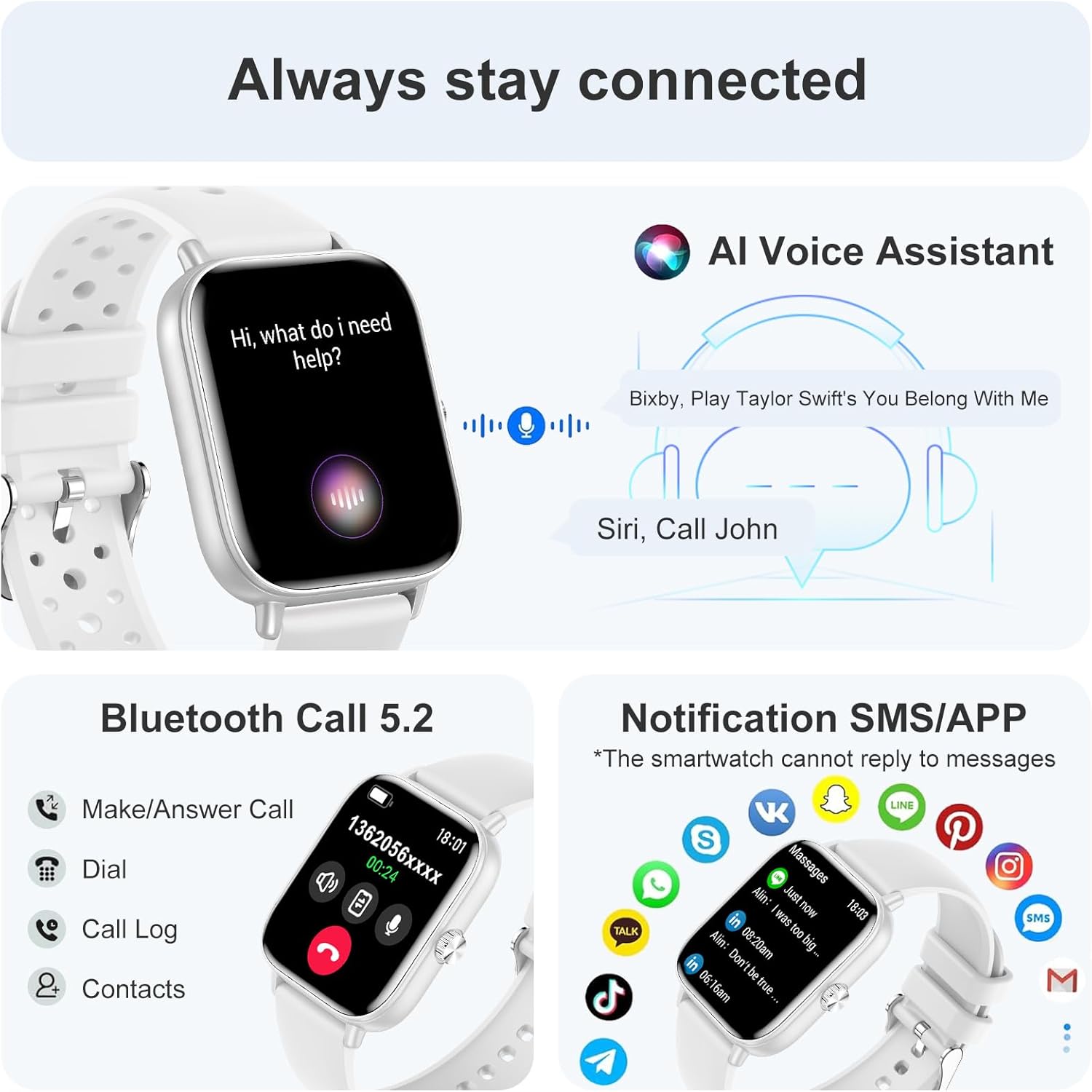
Image: The smartwatch interface demonstrating the AI Voice Assistant feature, Bluetooth 5.2 call functionality (make/answer calls, dial, call log, contacts), and various app notifications (WhatsApp, Facebook, Twitter, Instagram, SMS, etc.).
4. Voice Assistant
Utilize the integrated AI Voice Assistant for hands-free control. Ask questions, set reminders, or control smart devices directly from your wrist.
Health Monitoring Features
The Fitonme F128 smartwatch provides continuous 24-hour health tracking to help you monitor your well-being.
- Heart Rate Monitoring: Tracks your heart rate throughout the day.
- Blood Oxygen (SpO2) Monitoring: Measures your blood oxygen saturation levels.
- Sleep Monitoring: Analyzes your sleep patterns, including deep sleep, light sleep, and REM, to help improve sleep habits.
- Female Cycle Tracking: Accurately tracks and reminds you of your menstrual periods.
- Breath Training: Guided breathing exercises to help manage stress.
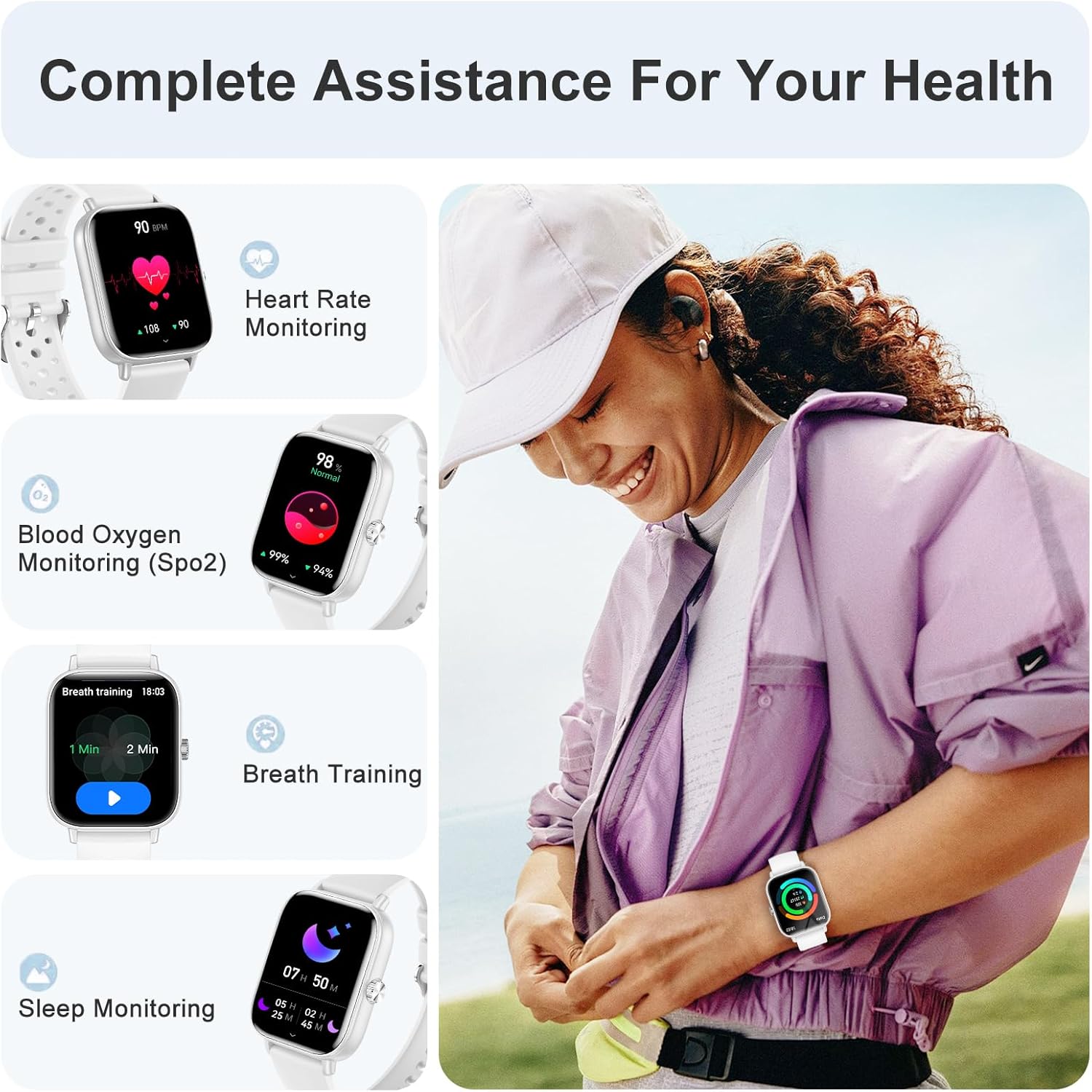
Image: The smartwatch and a user demonstrating various health monitoring features: heart rate tracking, blood oxygen saturation (SpO2) measurement, guided breath training, and sleep monitoring data.
Sport Modes and Activity Tracking
The smartwatch supports over 100 indoor and outdoor sport modes, including skiing, running, jogging, cycling, and football. It records key metrics such as calories burned, steps, training time, and distance for a variety of activities.

Image: The smartwatch interface showing a selection of over 100 sport modes, including walking, running, climbing, and cycling. Activity tracking data such as calories, heart rate, steps, and distance are also displayed.
IP68 Waterproof Rating
With an IP68 waterproof rating, the smartwatch is resistant to dust and can withstand immersion in water up to 1.5 meters for 30 minutes. This allows you to train without worry, making it suitable for various activities, including swimming (not suitable for hot water or diving).
Additional Features
- Music Control: Control music playback on your smartphone.
- Camera Control: Use your watch as a remote shutter for your phone's camera.
- Weather Forecasts: Get real-time weather updates.
- Alarm Clock & Stopwatch: Essential timekeeping tools.
- Find Phone: Locate your misplaced smartphone.
- Mini-Games: Enjoy simple games on your wrist.
- Sedentary Reminder: Reminds you to move after periods of inactivity.
- Medication Reminder: Helps you remember to take your medication.
- Flashlight: A convenient light source.
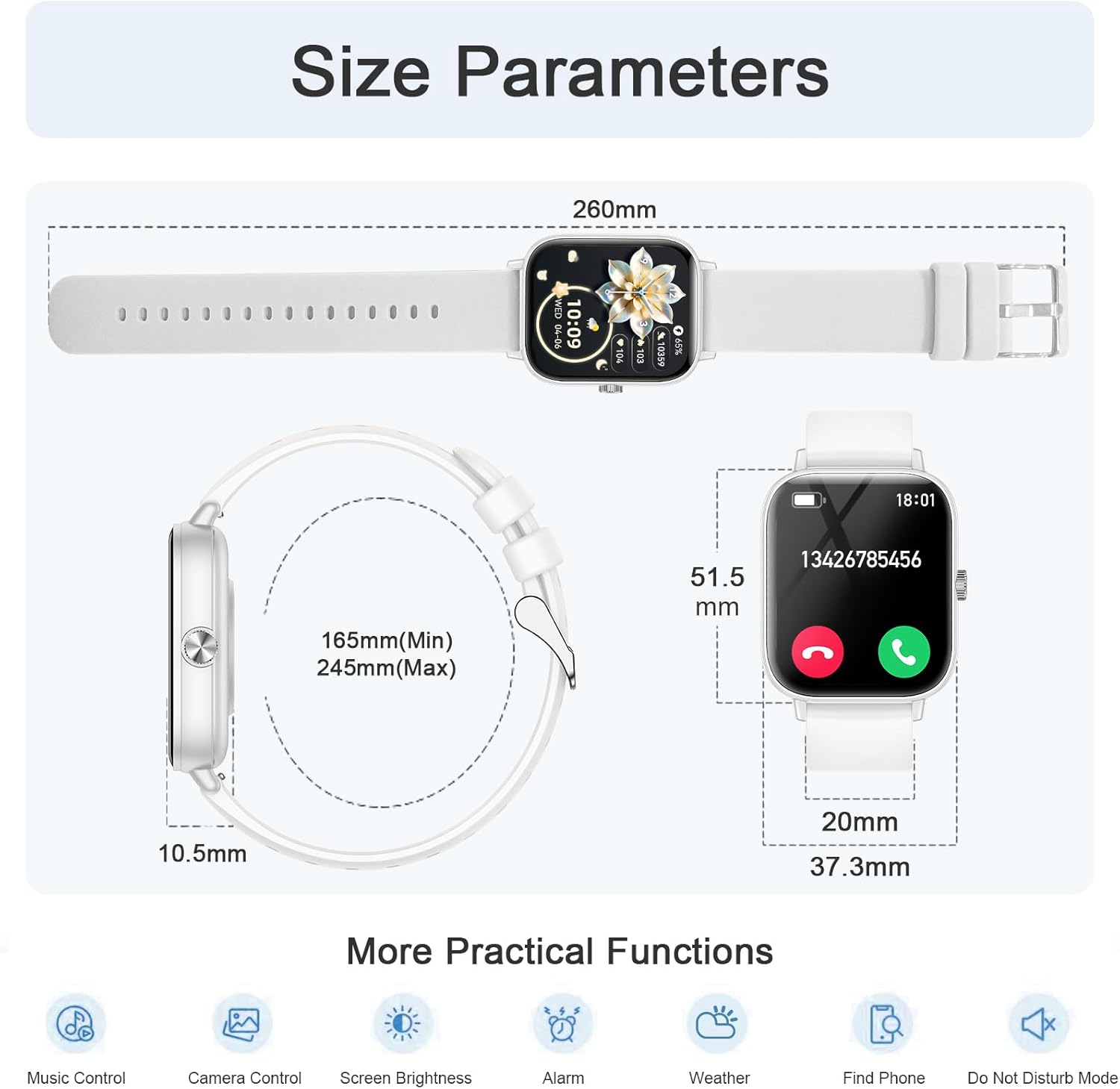
Image: Detailed size parameters of the smartwatch (260mm total length, 165mm-245mm strap range, 51.5mm height, 37.3mm width, 10.5mm thickness) and icons representing additional practical functions like music control, camera control, screen brightness, alarm, weather, find phone, and do not disturb mode.
Maintenance
- Cleaning: Regularly clean the watch and straps with a soft, dry cloth. For silicone straps, a damp cloth with mild soap can be used, then rinse and dry thoroughly.
- Charging: Use only the provided magnetic charging cable. Ensure the charging points on the watch and cable are clean and dry before charging.
- Water Exposure: While IP68 waterproof, avoid prolonged exposure to hot water, steam, or strong water jets. Dry the watch thoroughly after exposure to water.
- Storage: Store the smartwatch in a cool, dry place when not in use. Avoid extreme temperatures.
- Strap Replacement: The straps are interchangeable. Gently detach the current strap and attach the new one, ensuring it clicks securely into place.
Troubleshooting
| Problem | Solution |
|---|---|
| Watch does not turn on | Ensure the watch is fully charged. Connect to the charger for at least 30 minutes. |
| Cannot pair with phone | Make sure Bluetooth is on, the 'FitCloudPro' app is open, and the watch is within range. Restart both the phone and the watch. Forget the device in your phone's Bluetooth settings and try pairing again. |
| No notifications received | Check if notifications are enabled in the 'FitCloudPro' app settings and your phone's system settings for the app. Ensure the watch is connected via Bluetooth. |
| Inaccurate health data | Ensure the watch is worn snugly on your wrist, not too tight or too loose. Clean the sensor on the back of the watch. Note that the data is for reference and not for medical use. |
| Short battery life | Reduce screen brightness, turn off unnecessary features, and limit frequent screen wake-ups. Ensure the watch is fully charged each time. |
If problems persist, please contact customer support via Amazon for assistance.
Specifications
- Model Number: F128
- Screen Size: 1.83 inches
- Screen Type: IPS HD Full Touch
- Resolution: 240 x 286
- Dimensions: 10.2 x 2 x 28.7 cm (Product); 51.5mm (Height), 37.3mm (Width), 10.5mm (Thickness)
- Weight: 180 Grams
- Connectivity: Bluetooth 5.2
- Compatible Operating Systems: Android 5.0+ / iOS 9.0+ (for smartphones only, not tablets or computers)
- Battery Capacity: 250 mAh Lithium Polymer
- Charging Time: Approximately 2 hours
- Battery Life: 5-7 days (normal use), 30 days (standby)
- Water Resistance: IP68
- Memory Storage: 128 MB
- GPS: Via smartphone
- Shape: Square
Warranty and Support
This product comes with a standard manufacturer's warranty. For specific warranty details, please refer to the documentation included in your product packaging or contact the seller directly.
If you encounter any issues or have questions regarding your Fitonme F128 Smartwatch, please contact our customer service team through Amazon. Our professional customer service is available to assist you within 24 hours.
Please provide your order number and a detailed description of the issue when contacting support to ensure a prompt resolution.


