
1. Introduction
Thank you for choosing the JUOVI J2651 Portable Charger. This 35W 20000mAh power bank is designed to provide high-speed charging for a wide range of devices, including mobile phones, tablets, Bluetooth earbuds, and smartwatches. Its compact design and versatile charging options make it an ideal companion for travel, work, and daily use. Please read this manual carefully to ensure proper operation and to maximize the lifespan of your device.
2. Package Contents
- JUOVI J2651 Portable Charger
- USB-C to USB-C Charging Cable
- User Manual
3. Product Overview
Ports and LED Display
The JUOVI J2651 Portable Charger features multiple ports for versatile charging and a clear LED display to show battery status.
- 2 x USB-C Ports (C1/IN/OUT, C2/IN/OUT): These ports support bi-directional high-speed charging (up to 35W), allowing you to charge the power bank itself or charge compatible devices.
- 2 x USB-A Ports (USB1/OUT, USB2/OUT): These ports provide output for charging various USB-A compatible devices.
- Power Button: Located on the side, used to turn on the device and activate/deactivate trickle charging mode.
- LED Digital Display: Shows the remaining battery percentage of the power bank.

Image: Straightforward LED Display on JUOVI J2651 Portable Charger, showing battery percentage.

Image: JUOVI J2651 Portable Charger demonstrating 35W two-port simultaneous charging with input and output labels.
4. Charging the Power Bank
Before first use, fully charge your JUOVI J2651 Portable Charger. It takes approximately 2 hours to fully recharge the power bank from 0% to 100% using a compatible 35W power adapter (not included).
- Connect the provided USB-C to USB-C cable to one of the USB-C ports (C1/IN/OUT or C2/IN/OUT) on the power bank.
- Plug the other end of the USB-C cable into a compatible 35W (or higher) USB-C power adapter.
- Plug the power adapter into a wall outlet.
- The LED digital display will show the charging progress, indicating the battery percentage.

Image: JUOVI J2651 Portable Charger illustrating bidirectional charging via Type-C ports, showing both power bank recharging and device charging.
5. Charging Your Devices
Standard Charging Mode
The power bank can charge up to four devices simultaneously using its 2 USB-C and 2 USB-A ports.
- Connect your device's charging cable to the appropriate port (USB-C or USB-A) on the power bank.
- Connect the other end of the cable to your device.
- The power bank will automatically begin charging your device. The LED display will show the power bank's remaining charge.
Trickle Charging Mode for Low-Current Devices
This mode is ideal for charging low-current devices such as Bluetooth earbuds, smartwatches, or other small electronics, protecting their batteries from overcharging.
- To Enter Trickle Charging Mode: Double-click the power button. The LED indicator will start cycling to confirm activation.
- To Exit Trickle Charging Mode: Double-click the power button again. The LED indicator will switch back to the power display.

Image: JUOVI J2651 Portable Charger demonstrating versatile charging options with 2x Type C and 2x USB A ports connected to a phone, tablet, and earbuds.
6. Product Features
- 35W High-Speed Charging: With 35W fast charging and PD 3.0 technology, quickly power up your devices.
- 4 Charging Ports: Equipped with 2 USB-C and 2 USB-A ports, allowing simultaneous charging of up to four devices.
- Bi-Directional USB-C Ports: Both USB-C ports support input and output, offering flexibility for charging the power bank or your devices.
- 20,000mAh Ultra Capacity: Provides ample power to keep your devices charged throughout the day, suitable for air travel.
- Wide Compatibility: Supports a broad range of 3C digital electronic products, including phones, tablets, smartwatches, and earbuds.
- Transparent Power Rating: Delivers a true 13,000mAh (5V/3A) to devices, accounting for energy loss from the internal 20,000mAh battery.
- Multi-Protection System: Built-in smart identifying chip system provides over-heat, over-current, over-discharge, over-voltage, short-circuit, and over-charge protection.
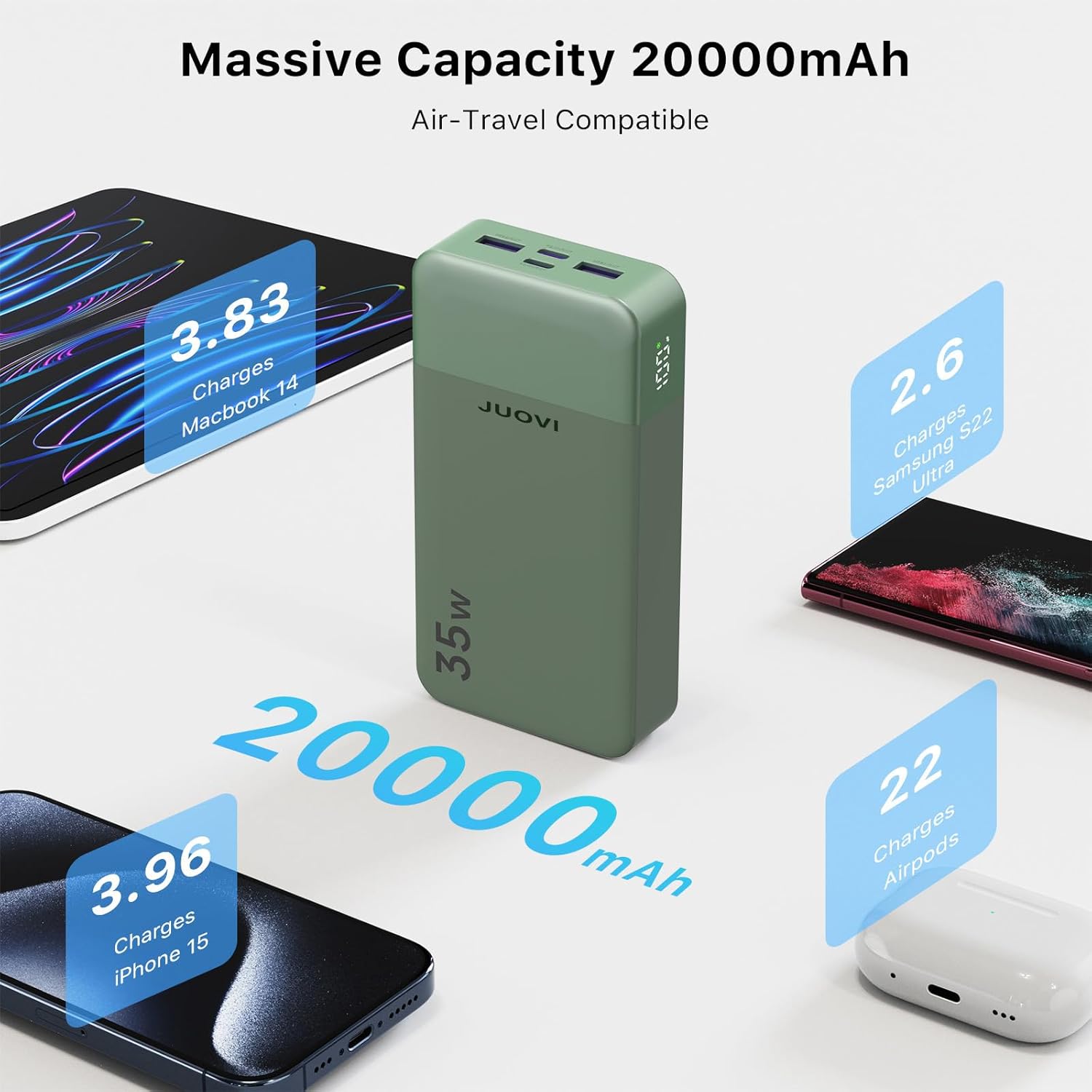
Image: JUOVI J2651 Portable Charger highlighting its 20000mAh capacity and air-travel compatibility, showing estimated charges for various devices.

Image: Diagram illustrating the multi-protection features of the JUOVI J2651 Portable Charger, including safeguards against over-heat, over-current, and short-circuit.
7. Specifications
| Feature | Detail |
|---|---|
| Model Number | J2651 |
| Battery Capacity | 20000 Milliamp Hours (mAh) |
| Rated Capacity (Output) | 13000mAh (5V/3A) |
| Max Output Power | 35W |
| Connector Type | USB Type C*2 (In/Out), USB Type A*2 (Out) |
| Product Dimensions | 5.39 x 2.76 x 1.02 inches |
| Item Weight | 13.8 ounces |
| Special Features | Auto Shut-Off, Digital Display, Fast Charging, Over Charging Protection, Short Circuit Protection |
8. Safety Information
Please follow these safety guidelines to prevent damage to the product or injury to yourself:
- Do not expose the product to heat or fire.
- Do not store the product in hot or humid environments.
- Use of a power supply or charger not recommended by the product manufacturer may result in a risk of fire or injury.
- Operating temperature should be between 0°C and 45°C (32°F and 113°F).
- Do not disassemble the product. Take it to a qualified service person when service or repair is required.
- If the product is not used for long periods, charge and discharge it every three months.
- When charging devices, the product may become warm. This is normal operating condition.
- Dispose of the product responsibly according to local regulations.
9. Troubleshooting
- Device not charging: Ensure the power bank is sufficiently charged. Check cable connections and try a different cable or port.
- Slow charging: Verify that your device supports fast charging and that you are using a compatible cable. Ensure trickle charging mode is not accidentally activated for high-power devices.
- Power bank not turning on: Press and hold the power button for a few seconds. If it still doesn't turn on, it may need to be recharged.
10. Maintenance
- Keep the power bank clean and dry. Avoid contact with liquids.
- Store in a cool, dry place away from direct sunlight and extreme temperatures.
- Charge the power bank fully at least once every three months to maintain battery health if not in regular use.
11. Warranty and Support
For warranty information or technical support, please refer to the documentation included with your purchase or contact JUOVI customer service directly. Keep your purchase receipt as proof of purchase for any warranty claims.