
Skechers SR1172
Skechers Macafee Digital Watch User Manual
Model: SR1172
Introduction
Thank you for choosing the Skechers Macafee Digital Watch. This manual provides detailed instructions for setting up, operating, and maintaining your watch. Designed for an active lifestyle, this watch features a durable polycarbonate case, a comfortable polyurethane band, and is water-resistant up to 100 meters, making it suitable for swimming and snorkeling.
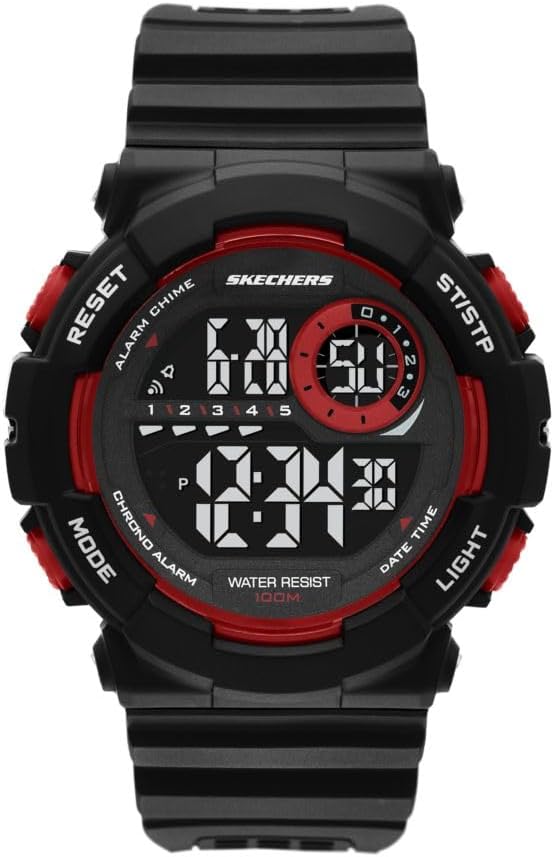
Front view of the Skechers Macafee Digital Watch, showcasing its black case, red accents, and digital display.
Setup
Battery Information
Your Skechers Macafee Digital Watch comes with a pre-installed Lithium Ion battery. No initial battery installation is required. If the display dims or functions become erratic, the battery may need replacement by a qualified technician.
Initial Time Setting
- Press the MODE button repeatedly until the time setting mode is displayed (usually indicated by flashing digits).
- Use the RESET button to select the digit you wish to adjust (hours, minutes, seconds).
- Use the ST/STP button to increase the selected digit. Hold to advance rapidly.
- Once the time is set, press the MODE button again to exit the setting mode.

Side view of the watch, highlighting the placement of the control buttons used for setting and operating functions.
Operating Instructions
Time and Date Display
In normal timekeeping mode, the watch displays the current time (hours, minutes, seconds) and date. Press the DATE TIME button to toggle between different date display formats if available.
Alarm Function
- From normal timekeeping mode, press the MODE button until the alarm setting mode is displayed.
- Use the RESET button to select the hour or minute digits.
- Use the ST/STP button to adjust the alarm time.
- Press the ALARM CHIME button to activate or deactivate the alarm and hourly chime. An icon will appear on the display when activated.
- Press MODE to return to normal timekeeping.
Chronograph (Stopwatch)
- Press the MODE button until the chronograph mode is displayed (often indicated by "CHRONO" or "STW").
- Press ST/STP to start the stopwatch.
- Press ST/STP again to pause the stopwatch.
- Press RESET to reset the stopwatch to zero.
- Press MODE to return to normal timekeeping.
Backlight Function
Press the LIGHT button to illuminate the display for easy viewing in low-light conditions. The backlight will typically stay on for a few seconds.

The Skechers Macafee Digital Watch worn on a wrist, illustrating its size and how the digital display appears during use.
Maintenance
Cleaning Your Watch
To clean your watch, wipe it gently with a soft, damp cloth. Avoid using harsh chemicals, solvents, or abrasive cleaners, as these can damage the watch's finish or seals. For the polyurethane band, a mild soap solution can be used, followed by rinsing with clean water and drying thoroughly.
Water Resistance (100m / 10 ATM)
Your Skechers Macafee watch is water-resistant up to 100 meters (10 ATM). This means it is suitable for bathing, swimming, snorkeling, and shallow diving. Do not operate the buttons while the watch is submerged in water, as this can compromise the water resistance. Avoid exposing the watch to hot water or steam, which can damage the seals.
Battery Replacement
When the battery needs replacement, it is recommended to take your watch to an authorized service center or a reputable watch repair shop. This ensures proper battery installation and re-sealing to maintain the watch's water resistance.
Storage
When not in use, store your watch in a cool, dry place away from direct sunlight and extreme temperatures. Keeping it in its original packaging or a watch box can help protect it from dust and scratches.

The Skechers watch box, suitable for storing your watch when not in use.
Troubleshooting
| Problem | Possible Cause / Solution |
|---|---|
| Display is dim or blank. | Battery may be low or depleted. Replace the battery. |
| Time is incorrect. | Time needs to be reset. Follow "Initial Time Setting" instructions. |
| Buttons are unresponsive. | Ensure the watch is not in a locked mode (if applicable, though not specified for this model). Try resetting the watch by holding all buttons for a few seconds (consult a professional if unsure). |
| Water inside the watch. | Water resistance may have been compromised. Avoid operating buttons underwater. Seek professional repair immediately to prevent further damage. |
Specifications
| Feature | Detail |
|---|---|
| Model Number | SR1172 |
| Case Diameter | 52mm |
| Band Width | 28mm |
| Movement | Digital |
| Crystal Material | Mineral Crystal |
| Case Material | Polycarbonate |
| Band Material | Polyurethane |
| Water Resistance | 100 meters (10 ATM) |
| Battery Type | 1 Lithium Ion (included) |
| Country of Origin | China |
Warranty and Support
Skechers watches are manufactured to high-quality standards. For information regarding warranty coverage, service, or support, please refer to the warranty card included with your purchase or visit the official Skechers website. Keep your proof of purchase for any warranty claims.
For further assistance, you may contact Skechers customer service through their official channels.
Ask a question about this manual
Ask about setup, troubleshooting, compatibility, parts, safety, or missing instructions. Manuals+ will review the question and use this page’s manual context to help answer it.