
LAUNCH CRP123 V2.0 PLUS
LAUNCH CRP123 V2.0 Plus Elite OBD2 Scanner User Manual
Model: CRP123 V2.0 PLUS
1. Introduction
The LAUNCH CRP123 V2.0 Plus Elite OBD2 Scanner is a powerful and affordable diagnostic tool designed for comprehensive vehicle system analysis. It offers full system diagnostics, three essential reset services (Oil Service, Throttle Adaptation, and SAS Relearn), and lifetime free updates, making it suitable for both professional technicians and DIY enthusiasts.

Figure 1: LAUNCH CRP123 V2.0 Plus Elite OBD2 Scanner.
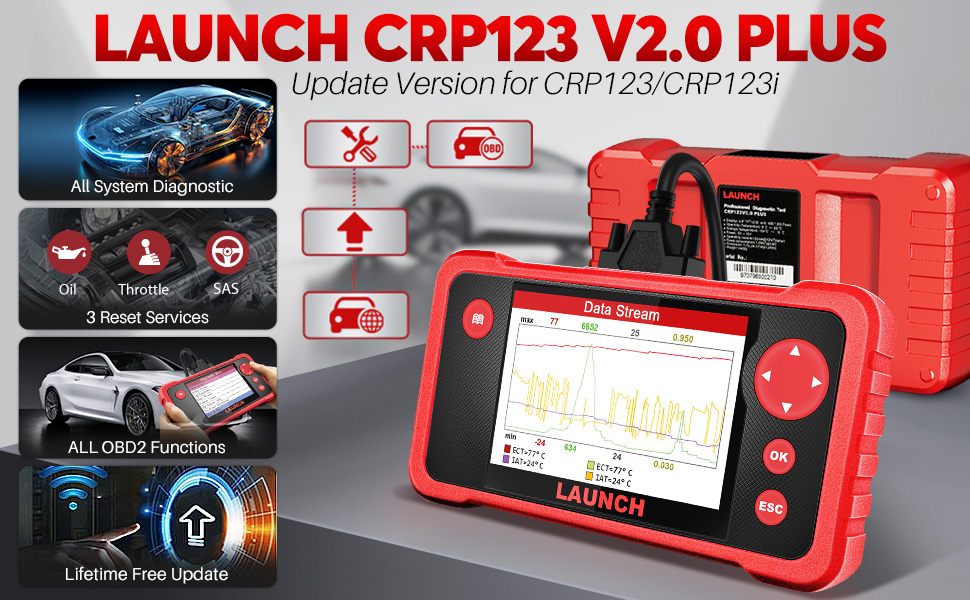
Figure 2: Key features of the LAUNCH CRP123 V2.0 Plus Elite.
2. Setup and First Use
The CRP123 V2.0 Plus Elite is designed for immediate use right out of the box. Follow these simple steps to begin your diagnostic process:
- Step 1: Plug into OBD2 Port (16 pin)
Locate your vehicle's OBD2 diagnostic port, typically found under the dashboard on the driver's side. Connect the scanner's OBDII cable to this port. - Step 2: Turn on ignition of your car
Ensure your vehicle's ignition is turned to the "ON" position (engine off). This powers the scanner. - Step 3: Select Menu to Start
The scanner will boot up automatically. Navigate the menu using the directional buttons and select "Diagnose" to begin.
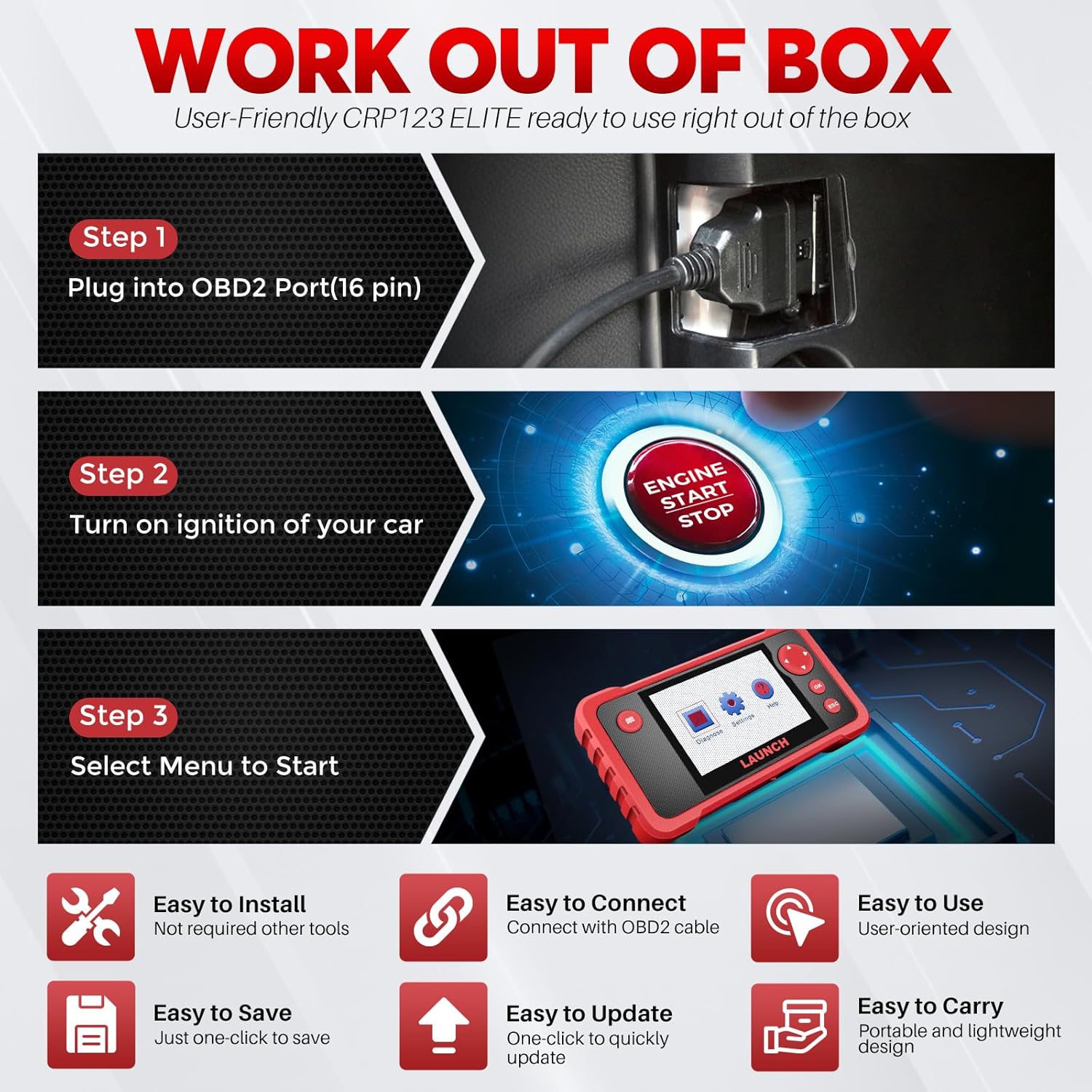
Figure 3: Quick start guide for the CRP123 V2.0 Plus Elite.
Unboxing and Package Contents
The package includes everything you need to get started. Watch the video below for a detailed look at the contents.
Video 1: This video demonstrates the unboxing and shows all items included in the LAUNCH CRP123 V2.0 PLUS package, such as the main unit, OBDII cable, charging cable, TF card, TF card reader, user manual, and quick start guide.
The standard package typically includes:
- 1* LAUNCH CRP123 V2.0 PLUS
- 1* OBDII Cable & 1*Charging Cable
- 1* TF Card &1*TF Card Reader
- 1* User Manual
- 1* Quick Start
3. Operating the Device
3.1 Full System Diagnostic
The CRP123 V2.0 Plus Elite provides comprehensive full system diagnostics, allowing you to read and clear diagnostic trouble codes (DTCs) and view live data streams for various vehicle systems, including Engine (ENG), Anti-lock Braking System (ABS), Supplemental Restraint System (SRS), Electronic Parking Brake (EPB), Steering Angle Sensor (SAS), Electronic Stability Program (ESP), and more. This helps in identifying the root cause of vehicle issues.

Figure 4: Overview of full system diagnostic capabilities.

Figure 5: Extensive list of vehicle systems supported for diagnosis.
3.2 Three Hot Reset Functions
The CRP123 V2.0 Plus Elite offers three crucial reset functions to assist with common maintenance tasks:
- Oil Reset: Resets the oil service light and calculates the optimal oil life change interval based on driving conditions and climate. This helps extend engine oil life.
- Throttle Adaptation: Initializes the throttle actuator to the default state, ensuring proper regulation of intake air volume and optimizing engine performance.
- SAS (Steering Angle Sensor) Relearn: Clears the fault steering angle sensor memories and performs steering angle sensor calibration, which is essential for maintaining vehicle handling and safety.
Access these functions via the "Diagnose" -> "Reset" menu on the device. The number of available services may expand with future updates.

Figure 6: Visual representation of the three hot reset services.

Figure 7: Benefits and continuous development of the reset services.
3.3 Full OBD2 Modes
The scanner supports all 10 OBDII test modes, providing comprehensive engine diagnostics for vehicles manufactured from 1996 to 2025. These modes include:
- Read Codes: Retrieves generic (P0, P2, P3, and U0) and manufacturer-specific (P1, P3, and U1) codes.
- Clear Codes: Clears Diagnostic Trouble Codes (DTCs) and turns off the Malfunction Indicator Light (MIL).
- View Live Data: Displays real-time data stream from the vehicle's PCM (Powertrain Control Module).
- View Freeze Frame: Shows a snapshot of operating conditions at the time of an emission-related fault.
- O2 Sensor Test: Retrieves O2 sensor monitor test results for the most recently completed tests.
- On-Board Monitor Test: Retrieves results for emission-related powertrain components and systems.
- I/M Readiness: Checks the readiness of the emission monitoring systems to determine if the vehicle is ready for an annual test.
- DTC Look Up: Provides definitions for diagnostic trouble codes.
- EVAP System Test: Initiates a test of the evaporative emission control system.
- VIN Information: Retrieves Vehicle Identification Number, Calibration ID, and Calibration Verification Number.

Figure 8: Comprehensive OBD2 diagnostic functions.
3.4 4-in-1 Live Data Stream
The device allows for the display of up to four live data streams simultaneously, enabling a detailed analysis of various parameters such as Engine Coolant Temperature, Long/Short Fuel Trim, Throttle Valve Position, Fuel Tank Pressure, and Engine RPM. This graphical representation helps in identifying intermittent problems and monitoring system performance over time.

Figure 9: Example of 4-in-1 live data stream display.
3.5 Additional Helpful Functions
Beyond core diagnostics, the CRP123 V2.0 Plus Elite includes several features to enhance usability and diagnostic efficiency:
- Built-in DTC Look Up Library: Quickly access definitions for diagnostic trouble codes directly on the device, speeding up diagnosis.
- Real Live Data Record & Playback: Record live data streams for later review and analysis, which is useful for diagnosing intermittent issues.
- Data Share & Printing: Generate diagnostic reports and print them for record-keeping or sharing with clients/mechanics.

Figure 10: Overview of multiple add-on functions.

Figure 11: DTC Look Up function for quick code definitions.

Figure 12: Data recording and playback functionality.

Figure 13: Data sharing capability.

Figure 14: Diagnostic report generation and printing.
3.6 Wide Vehicle Coverage and Language Support
The LAUNCH CRP123 V2.0 Plus Elite supports over 60 car brands and 100,000+ car models, covering vehicles from 1996 to 2025. It also supports 10 different languages for user convenience.

Figure 15: Extensive vehicle compatibility list.

Figure 16: Language support for global users.
4. Maintenance and Updates
The LAUNCH CRP123 V2.0 Plus Elite OBD2 scanner supports lifetime software upgrades, ensuring that your device always has the latest vehicle data and functions. Regular updates provide continuous improvements and expanded capabilities.
Updating the Device Software
To update the device, you will need a computer running Windows 7, Windows 8, or Windows 10, and an SD card reader. The update process typically involves downloading the update package from the official LAUNCH website to your computer, transferring it to the device's TF card via the card reader, and then installing it on the scanner.
Note: For detailed instructions on the update process, please refer to the dedicated "Guide to Register & Upgrade" document included in your package or visit the official LAUNCH support website. Users with Apple (macOS) systems may encounter difficulties as the update software is primarily designed for Windows environments.

Figure 17: Hardware components and accessories, including the card reader for updates.
5. Troubleshooting
This section provides solutions to common issues you might encounter with your LAUNCH CRP123 V2.0 Plus Elite OBD2 Scanner.
Common Issues and Solutions:
- Device Not Powering On:
- Ensure the OBDII cable is securely connected to both the scanner and the vehicle's OBD2 port.
- Verify that the vehicle's ignition is in the "ON" position (engine off). The scanner draws power from the vehicle's battery.
- Check the vehicle's battery voltage. If the battery is too low, the scanner may not power on.
- Communication Error with Vehicle:
- Confirm the OBDII cable is not damaged and is properly connected.
- Ensure the vehicle's ignition is on.
- Verify that the vehicle supports the OBD2 protocol (most vehicles from 1996 onwards do).
- Try connecting the scanner to a different OBD2 compliant vehicle to rule out a scanner issue.
- Difficulty Updating Software (especially for Apple users):
- The update tool is primarily designed for Windows operating systems (Windows 7/8/10).
- If you are an Apple (macOS) user, you may need to use a virtual machine (e.g., Parallels Desktop, VMware Fusion) running Windows, or access a Windows PC to perform the update.
- Ensure your internet connection is stable during the download and update process.
- Use the provided TF card reader and ensure the TF card is properly inserted and recognized by your computer.
- Inaccurate Readings or Missing Data:
- Ensure the vehicle's VIN is correctly identified by the scanner.
- Verify that the software on your scanner is up to date. Outdated software might not have the latest vehicle protocols.
- Some advanced functions or specific parameters might not be supported by all vehicle models or ECUs.
If you continue to experience issues, please refer to the "Warranty and Support" section for contact information.
6. Specifications
Key technical specifications for the LAUNCH CRP123 V2.0 Plus Elite OBD2 Scanner:
| Feature | Detail |
|---|---|
| Brand | LAUNCH |
| Model | CRP123 V2.0 PLUS |
| Product Dimensions | 9.2"L x 8"W x 1.8"H |
| Item Weight | 1.7 pounds |
| Operating System (for updates) | Windows 7/8/10 |
| Display Resolution | 720p |
| Automotive Fit Type | Universal Fit |
| Battery | 1 Lithium Ion battery (included) |
| Memory | 16GB (internal, likely for storage) |
7. Warranty and Support
LAUNCH is committed to providing reliable products and excellent customer service.
- Lifetime Free Updates: The CRP123 V2.0 Plus Elite comes with lifetime free software updates, ensuring your device remains current with the latest vehicle models and diagnostic features.
- 5 Years Backup: The product includes 5 years of backup support, indicating long-term commitment to product reliability and customer assistance.
- Customer Service: LAUNCH provides 24/7 customer service to assist with any inquiries or technical support needs. Please refer to the contact information provided in your product packaging or on the official LAUNCH website for support.
For further assistance, please visit the official LAUNCH store or contact their customer support team.
Ask a question about this manual
Ask about setup, troubleshooting, compatibility, parts, safety, or missing instructions. Manuals+ will review the question and use this page’s manual context to help answer it.