
1. Introduction
This manual provides detailed instructions for the Nitecore EDC29 rechargeable flashlight and the Nitecore NC10000 portable power charger. The EDC29 is an ultra-thin, high-performance flashlight designed for everyday carry, featuring a maximum output of 6,500 lumens and a beam distance of 400 meters. The NC10000 is a compact 10,000mAh power charger with a built-in flashlight, designed to provide portable power for various devices.

Image 1.1: The Nitecore EDC29 flashlight and NC10000 power charger, along with a USB-C charging cable and lanyard.
2. Package Contents and Setup
2.1 Package Contents
- Nitecore EDC29 Flashlight
- Nitecore NC10000 Power Charger
- USB-C Charging Cable
- Lanyard (for EDC29)
2.2 Initial Charging
Before first use, it is recommended to fully charge both the EDC29 flashlight and the NC10000 power charger.
- EDC29 Flashlight: Connect the USB-C charging cable to the flashlight's USB-C port and to a USB power source. The OLED display will indicate charging status.
- NC10000 Power Charger: Connect the USB-C charging cable to the NC10000's USB-C input port and to a USB power source. The indicator lights will show charging progress.
3. Operating Instructions
3.1 Nitecore EDC29 Flashlight
The EDC29 features dual tail switches for intuitive control and an OLED display for real-time information.

Image 3.1: The Nitecore EDC29 Luminblade flashlight emitting a powerful beam.
3.1.1 Power On/Off and Brightness Levels
- To Turn On/Off: Use the dual tail switches. A full press typically activates or deactivates the light.
- Brightness Adjustment: Cycle through the 4 available brightness levels by partially pressing the tail switch when the light is on. The OLED display will show the current brightness level.
3.1.2 Special Modes
The EDC29 offers three specialized modes for various situations:
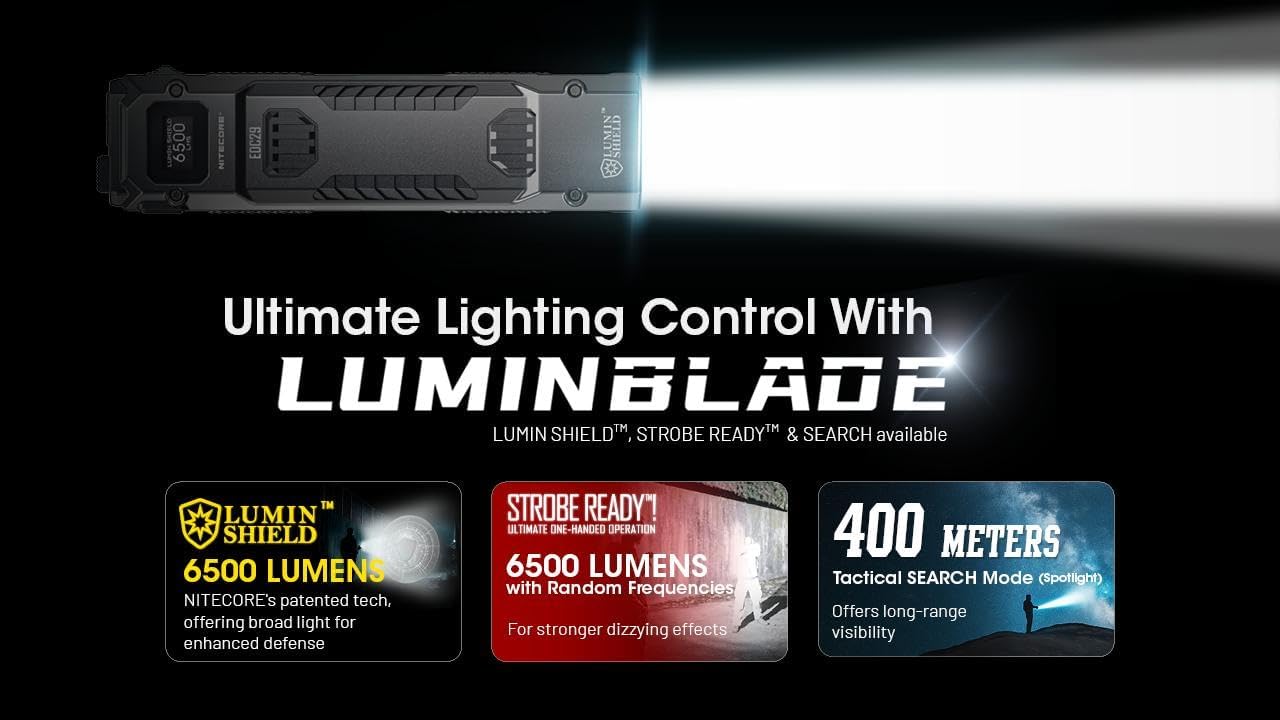
Image 3.2: Overview of LUMIN SHIELD, STROBE READY, and Search Mode features.
- LUMIN SHIELD (6,500 Lumens): This mode provides a wide, high-intensity light for immediate area illumination or self-defense. Access this mode via a customizable button setting (e.g., a full press).
- STROBE READY: Generates randomly changing frequencies between 16 Hz and 20 Hz, designed to cause stronger disorienting effects. Access this mode via a customizable button setting.
- Search Mode (3,000 Lumens, 400 Meters): Activates the two primary LED cores to produce a focused, long-range beam. This mode is suitable for identifying distant objects. Access this mode via a customizable button setting (e.g., a half press).

Image 3.3: Illustration of the disorienting effect of the 2nd Generation STROBE READY mode.

Image 3.4: A person using the Nitecore EDC29 in Tactical SEARCH Mode to illuminate a distant area.
3.1.3 Rapid Lock Function
The Rapid Lock switch allows for quick locking and unlocking to prevent accidental activation. Slide the switch to engage full lock, semi-lock, or unlock the flashlight.
3.1.4 OLED Display
The integrated OLED display provides real-time information including brightness level, battery voltage, and remaining runtime.

Image 3.5: Key features of the EDC29, including the Multifunctional OLED Display, Rapid Lock, and dual UHi 20 MAX LEDs.
3.1.5 Advanced Temperature Regulation (ATR)
The EDC29 incorporates an ATR module that adjusts output based on the flashlight's internal temperature to prevent overheating and maintain optimal performance.
3.2 Nitecore NC10000 Power Charger
The NC10000 is a versatile power bank with a 10,000mAh capacity and a built-in flashlight.
3.2.1 Charging External Devices
Connect your device to the NC10000's USB-C output port using a compatible charging cable. The NC10000 will automatically begin charging the connected device.
3.2.2 Built-in Flashlight
The NC10000 includes a 50-lumen flashlight. Refer to the device's specific instructions for activating and deactivating this feature, typically via a button press.
4. Maintenance
4.1 Cleaning
Wipe the devices with a soft, damp cloth. Avoid using abrasive cleaners or solvents that could damage the finish or internal components.
4.2 Battery Care and Storage
Both devices contain built-in Lithium-Ion batteries. To prolong battery life:
- Avoid fully discharging the battery frequently.
- Recharge the devices regularly, even if not in use, to maintain a partial charge (e.g., 50-80%).
- Store the devices in a cool, dry place away from direct sunlight and extreme temperatures.
5. Troubleshooting
If you encounter issues with your Nitecore EDC29 or NC10000, consider the following:
- Device Not Turning On: Ensure the battery is charged. Check if the EDC29's Rapid Lock is disengaged.
- Not Charging: Verify that the USB-C cable is securely connected to both the device and the power source. Try a different USB-C cable or power adapter.
- Reduced Brightness/Runtime: This may indicate a low battery. Recharge the device. Extreme temperatures can also affect performance.
- OLED Display Not Working (EDC29): Ensure the flashlight is powered on and has sufficient battery. If the issue persists, contact customer support.
For persistent issues not resolved by these steps, please refer to the warranty and support section.
6. Specifications
6.1 Nitecore EDC29 Flashlight Specifications
| Feature | Specification |
|---|---|
| Max Output | 6,500 Lumens |
| Max Beam Distance | 370 Meters |
| Max Beam Intensity | 35,360 cd |
| Max Runtime | 61 hours |
| LED | 2 x UHi 20 MAX LEDs |
| Battery | Built-in 2,500mAh Li-ion Battery |
| Length | 133.5 mm (5.26 in) |
| Width | 34.6 mm (1.36 in) |
| Weight | 160 g (5.64 oz) |
| Water Resistance | IP54 |
| Impact Resistance | 1 Meter |
| Charging Port | USB-C |
6.2 Nitecore NC10000 Power Charger Specifications
| Feature | Specification |
|---|---|
| Cell Type | Li-ion |
| Capacity | 10,000mAh 3.6V (36Wh) |
| Rated Energy | 6,000mAh 5V (TYP 1A) |
| Input (USB-C) | 5V⎓2.4A / 9V⎓2A |
| Output (USB-C) | 5V⎓3A / 9V⎓2.22A / 12V⎓1.68A |
| Dimensions | 89mm x 45.2mm x 22.6mm (35.0" x 17.8" x 8.9") |
| Weight | 168.5g ±3g (5.94oz ±0.1oz) |
| Built-in Flashlight | 50 Lumens / Dual LED / 30 Hrs Runtime |
7. Warranty and Support
Nitecore products are covered by a warranty from the date of purchase. Please refer to the official Nitecore website or your local distributor for specific warranty terms and conditions.
For technical support, service, or warranty claims, please contact your authorized Nitecore dealer or visit the official Nitecore website for contact information.


