
1. Introduction and Overview
Thank you for choosing the A-OK AM68-1.5/100-EM-GP Smart Curtain Motor. This device is designed to automate your curtains, providing convenience and smart home integration. It features a silent operation, adjustable speed, and various control options, including manual override and obstacle detection for enhanced safety and functionality.
Key features include:
- Adjustable speed control
- Group control capability
- Obstacle detection stop function
- Manual switch function
- Diverse control options (e.g., touch control)
- Memory function for open/close positions
- Ultra-quiet, flexible design
- Wide voltage power supply
- Fabric rebound path correction
- High voltage current control
- Third stop position setting

Image 1: The A-OK AM68-1.5/100-EM-GP Smart Curtain Motor, a white cylindrical device designed for automated curtain systems.
2. Safety Information
Please read all safety instructions carefully before installation and operation. Failure to follow these instructions may result in electric shock, fire, or serious injury.
- Ensure the power supply is disconnected before installation or maintenance.
- Installation should be performed by a qualified electrician or technician.
- Do not expose the motor to water or excessive humidity.
- Keep hands and loose clothing away from moving parts during operation.
- Do not attempt to repair or modify the motor yourself. Contact customer support for assistance.
- This device is designed for indoor use only.
3. Package Contents
Verify that all components are present in the package:
- A-OK AM68-1.5/100-EM-GP Smart Curtain Motor
- Remote control unit
- Mounting brackets and hardware (specifics may vary)
- User Manual (this document)
4. Setup and Installation
The AM68-1.5/100-EM-GP motor is designed for self-assembly and custom tracks. Professional installation is recommended for optimal performance and safety.
4.1 Mounting the Motor
Securely attach the motor to the curtain track system using the provided mounting brackets. Ensure the motor is level and aligned with the track for smooth operation.
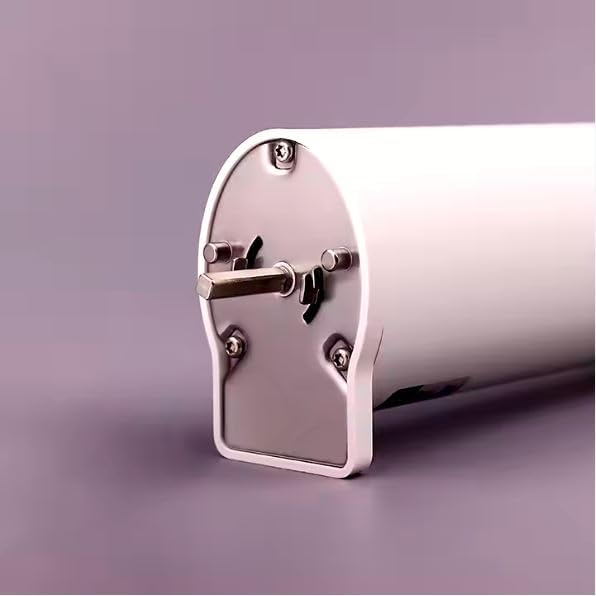
Image 2: Close-up view of the motor's end cap, showing mounting points and the drive shaft.
4.2 Wiring (RS 485, Five Wires)
This motor utilizes an RS 485 communication protocol with a five-wire connection. Connect the motor to your smart home system or control unit according to the wiring diagram provided with your specific curtain track system and smart home hub. Ensure correct polarity and secure connections for data transmission and power.
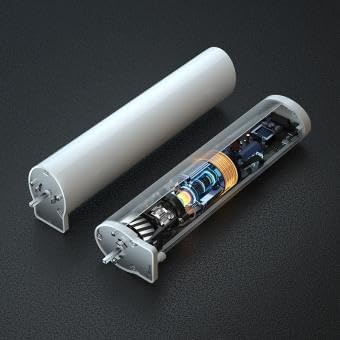
Image 3: An internal view of the motor, revealing its intricate electronic components and gear mechanism.
4.3 Initial Power-On and Limit Setting
After installation and wiring, connect the motor to the power supply. Follow the instructions provided with your remote control or smart home system to set the open and close limits for your curtains. The motor's memory function will store these positions, eliminating the need for frequent re-adjustment.
5. Operating Instructions
5.1 Remote Control Operation
Use the provided remote control unit to open, close, or stop the curtains at any desired position. Refer to the remote control's specific manual for pairing and button functions.
5.2 Manual Operation (Touch Control)
When the motor is powered on, you can manually pull the curtain approximately 10 cm in the desired direction. The motor will then automatically open or close the curtain completely.
5.3 Manual Operation (No Power)
In the event of a power outage, the curtain can still be operated manually by pulling it along the track.
5.4 Intermediate Stop Position
The motor supports setting an intermediate stop position between fully open and fully closed. Consult your smart home system or remote control instructions for setting this feature.
5.5 Obstacle Detection
The motor is equipped with an obstacle detection function. If the curtain encounters an obstruction during movement, the motor will stop automatically to prevent damage to the system or the curtain fabric.
6. Maintenance
To ensure the longevity and optimal performance of your A-OK Smart Curtain Motor, follow these maintenance guidelines:
- Cleaning: Wipe the motor casing with a soft, dry cloth. Do not use abrasive cleaners or solvents.
- Track Maintenance: Periodically inspect the curtain track for any debris or obstructions that might hinder smooth operation. Keep the track clean.
- Lubrication: The motor is designed for maintenance-free operation. Do not attempt to lubricate internal components.
- Inspection: Regularly check all wiring connections to ensure they are secure.
7. Troubleshooting
If you encounter issues with your smart curtain motor, refer to the following common problems and solutions:
| Problem | Possible Cause | Solution |
|---|---|---|
| Motor does not respond to remote/app. | No power, remote battery low, motor not paired, wiring issue. | Check power supply, replace remote batteries, re-pair motor with control unit, inspect wiring connections. |
| Curtain stops unexpectedly. | Obstruction detected, limit switch issue. | Check for obstructions in the curtain path. Re-set open/close limits if necessary. |
| Curtain moves unevenly or makes unusual noise. | Track obstruction, motor misalignment, worn components. | Clean the curtain track. Ensure motor is securely mounted and aligned. If problem persists, contact support. |
| Manual pull does not activate motor. | Motor not powered on, sensor issue. | Ensure motor has power. If powered, contact support. |
If the problem persists after attempting these solutions, please contact customer support.
8. Specifications
Detailed technical specifications for the A-OK AM68-1.5/100-EM-GP Smart Curtain Motor:
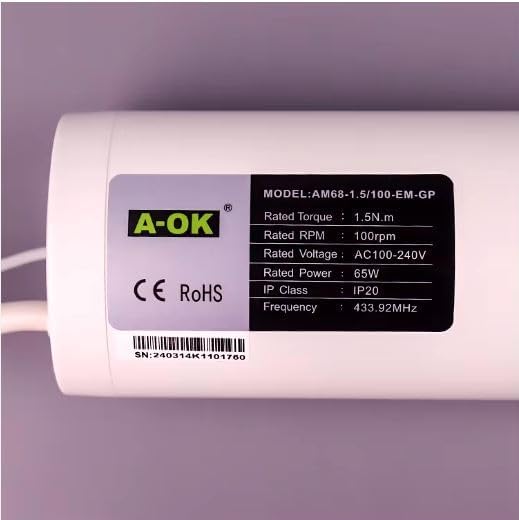
Image 4: Product label displaying model number, rated torque, RPM, power, voltage, IP class, and frequency.
| Attribute | Value |
|---|---|
| Manufacturer | A-OK |
| Item Model Number | AM68-1.5/100-EM-GP |
| Item Weight | 1.2 Kilograms |
| Product Dimensions | 31.6 x 6.8 x 5.3 cm |
| Color | White |
| Included Components | Remote control unit |
| First Available Date | October 21, 2024 |
| Country of Origin | China |
| Rated Torque | 1.5 N.m |
| Rated RPM | 100 rpm |
| Rated Power | 65W |
| Rated Voltage | AC100-240V |
| IP Class | IP20 |
| Frequency | 433.92 MHz |
| Usage | Motorized Curtain track drive |
| Batteries Required | NO |
| Application | Home, Hotel, Hospital, Cafe, Office, etc. |
| Plastic Type | PC |
| Type | Smart Curtain Motor |
| Material | Metal (Aluminum alloy) |
| Capacity | 5000 - 10000 (unspecified units, likely cycles or weight) |
| Power Supply | AC100-240V |
| Smart Type | Digital, Electronic, Voice control |
| Control Mode | Mijia (Xiaomi Home) |

Image 5: A table detailing additional product attributes such as place of origin, usage, application, and control mode.
9. Warranty and Support
For warranty information, please refer to the documentation provided at the time of purchase or contact your retailer. If you require technical support, have questions about installation, or need assistance with troubleshooting, please contact A-OK customer service or your local distributor. Keep your purchase receipt and model number handy for faster service.

