
BINBOND YXC-US-G920-QH
BINBOND YXC-US-G920-QH Men's Watch Instruction Manual
Model: YXC-US-G920-QH
Introduction
Thank you for choosing the BINBOND YXC-US-G920-QH Men's Watch. This timepiece combines classic design with practical features, including a rotatable bezel, luminous display, and water resistance. This manual provides essential information for setting up, operating, maintaining, and troubleshooting your watch to ensure optimal performance and longevity.

Image: The BINBOND YXC-US-G920-QH watch displayed on a man's wrist, showcasing its design and fit.
Setup
1. Adjusting the Watch Band
The watch comes with a stainless steel bracelet and a DIY adjustment tool. To adjust the length of the strap:
- Identify the pins on the side of the watch band links.
- Use the provided tool to push out the pins in the direction of the arrows marked on the inside of the band.
- Remove the desired number of links to achieve a comfortable fit.
- Reinsert the pins to secure the band. Ensure pins are fully seated.

Image: A composite image showing the watch's 30M waterproof rating, high hardness mirror, stainless steel band clasp, and the HD luminous dial.
2. Setting Time and Date
The watch features a crown on the right side for setting the time and date.
- Setting the Date: Gently pull the crown out to the first click position. Rotate the crown either clockwise or counter-clockwise to adjust the date.
- Setting the Time: Pull the crown out to the second click position. Rotate the crown to move the hour and minute hands to the correct time.
- Once set, push the crown back in completely to its original position to start the watch movement.
Operating Instructions
Rotatable Bezel
The watch is equipped with a rotatable bezel. This bezel can be turned counter-clockwise and is typically used for timing events, such as elapsed time for diving or other activities. Align the bezel's marker with the minute hand to track time.
Luminous Function
The watch hands and markers feature an HD luminous display, allowing you to read the time in low-light conditions. For optimal luminosity, expose the watch dial to a light source (natural or artificial) for a period before entering a dark environment.
Water Resistance (3ATM)
This watch is rated for 3ATM (30 meters) water resistance. This means it is suitable for daily use and can withstand splashes, hand washing, and brief immersion in water, such as during swimming. It is not suitable for hot showers, hot tubs, snorkeling, or diving, as steam and pressure changes can compromise the seals.
Maintenance
Cleaning
To maintain the appearance of your watch, wipe it regularly with a soft, dry cloth. For the stainless steel band, a slightly damp cloth can be used, followed by immediate drying. Avoid using harsh chemicals or abrasive materials.
Water Resistance Care
Always ensure the crown is fully pushed in before any contact with water. If the watch is exposed to saltwater, rinse it with fresh water and dry it thoroughly. Avoid operating the crown or pushers while the watch is wet.
Battery Replacement
This watch utilizes a Quartz movement, which is powered by a battery. The battery typically lasts for several years. If you notice the watch losing time or stopping, the battery may need replacement. It is recommended to have battery replacement performed by a qualified watch technician to ensure proper sealing and water resistance.
Troubleshooting
- Watch Not Running: Check if the crown is fully pushed in. If it is, the battery may be depleted and require replacement.
- Inaccurate Time: Ensure the time is set correctly. If the watch consistently gains or loses time, the battery may be low, or the movement may require servicing.
- Condensation Inside Crystal: This indicates a breach in the watch's water resistance. Avoid further contact with water and seek professional service immediately to prevent damage to the movement.
Specifications
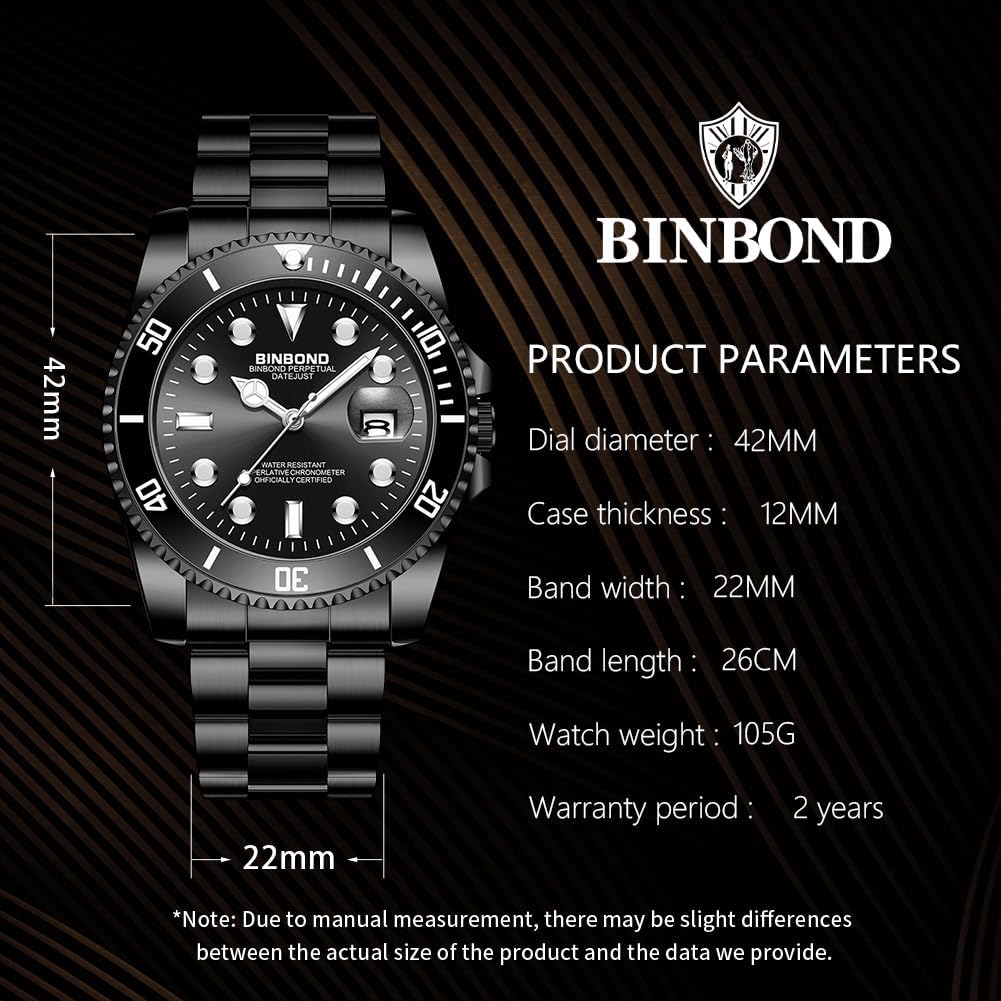
Image: A visual representation of the watch's dimensions and key specifications.
| Feature | Detail |
|---|---|
| Model Name | YXC-US-G920-QH |
| Brand | BINBOND |
| Movement Type | Quartz |
| Display Type | Analog |
| Case Material | Stainless Steel |
| Band Material | Stainless Steel |
| Case Diameter | 42 Millimeters |
| Case Thickness | 12 Millimeters |
| Band Width | 22 Millimeters |
| Band Length | 26 Centimeters |
| Crystal Material | Hardlex |
| Water Resistance Depth | 30 Meters (3ATM) |
| Clasp Type | Push Button Foldover Clasp With Safety |
| Additional Features | Luminous hands/markers, Rotatable Bezel, Date Display |
Warranty Information
BINBOND offers a 2-year movement warranty from the date of purchase. This warranty covers manufacturing defects in the watch movement. It does not cover damage resulting from improper use, accidents, unauthorized repairs, normal wear and tear, or battery replacement.
Additionally, a 30-day unconditional return and exchange policy is provided for watches purchased directly from authorized sellers. Please refer to your purchase documentation for specific terms and conditions.
Customer Support
For any questions, concerns, or warranty claims regarding your BINBOND YXC-US-G920-QH watch, please contact the retailer or the manufacturer's customer service department. Refer to your purchase receipt or product packaging for contact details.
Ask a question about this manual
Ask about setup, troubleshooting, compatibility, parts, safety, or missing instructions. Manuals+ will review the question and use this page’s manual context to help answer it.