
1. Introduction
Thank you for choosing the JISULIFE FA13R Auto-Oscillating Clip-on Fan. This versatile fan is designed to provide personal cooling comfort in various settings, functioning as both a clip-on and a stand-up desk fan. With its powerful battery, multiple speed settings, and oscillation features, it offers a convenient and efficient cooling solution. Please read this manual carefully before use to ensure proper operation and maintenance.
2. Safety Instructions
To prevent damage to the product or injury to yourself and others, please observe the following safety precautions:
- Do not immerse the fan in water or other liquids.
- Keep the fan away from open flames, heat sources, and direct sunlight.
- Do not insert fingers or any objects into the fan grille while it is operating.
- Ensure the fan is placed on a stable surface when used as a stand-up fan, or securely clipped when used as a clip-on fan.
- Use only the provided USB-A to USB-C cable for charging.
- This appliance is not intended for use by persons (including children) with reduced physical, sensory or mental capabilities, or lack of experience and knowledge, unless they have been given supervision or instruction concerning use of the appliance by a person responsible for their safety.
- Do not attempt to disassemble, repair, or modify the fan. Contact customer support if service is required.
- Unplug the fan from the power source when not in use for extended periods or before cleaning.
3. Package Contents
Please check the package for the following items:
- JISULIFE FA13R Fan x1
- USB-A to USB-C Cable x1
- User Manual x1
4. Product Overview
The JISULIFE FA13R fan features a robust design with multiple functionalities for enhanced user experience.

The JISULIFE FA13R fan in its stand-up configuration, showcasing its compact design and green color.
Key Features:
- Dual Functionality: Can be used as a stand-up desk fan or a clip-on fan.
- 5 Speed Settings: Includes a Nature Wind Mode for gentle, fluctuating airflow.
- Auto-Oscillation: 90-degree horizontal oscillation for wider coverage.
- Vertical Rotation: Manual 25-degree vertical adjustment.
- Timer Function: Set for 1, 2, or 4 hours.
- Quiet Operation: Equipped with a brushless DC motor for powerful yet quiet performance.
- Long Battery Life: 8000mAh battery provides 5 to 28 hours of runtime.
- Durable Construction: Made from ABS Plastic and Alloy Metal.

A composite image detailing various aspects of the fan: LED indicators for clear display of settings, a silicone base for stable desktop or clip use, and the use of premium ABS material for durability and comfort.

An exploded diagram illustrating the internal structure of the fan, highlighting features such as the double-layer enclosed electric engine room, brushless motor, deflector fan cover, and flexible airfoil fan blades, all contributing to noise reduction.
5. Setup
Using as a Stand-up Fan:
- Place the fan on a flat, stable surface such as a desk or table.
- Ensure the silicone base is fully in contact with the surface for maximum stability.
Using as a Clip-on Fan:
- Open the strong clasp clip at the base of the fan.
- Attach the clip securely to the edge of a table, shelf, stroller, or any suitable surface. Ensure the clip has a firm grip to prevent the fan from falling.
Adjusting Fan Angle:
- The fan head can be manually tilted up or down by 25 degrees to direct airflow.
- For horizontal oscillation, refer to the Operating Instructions section.
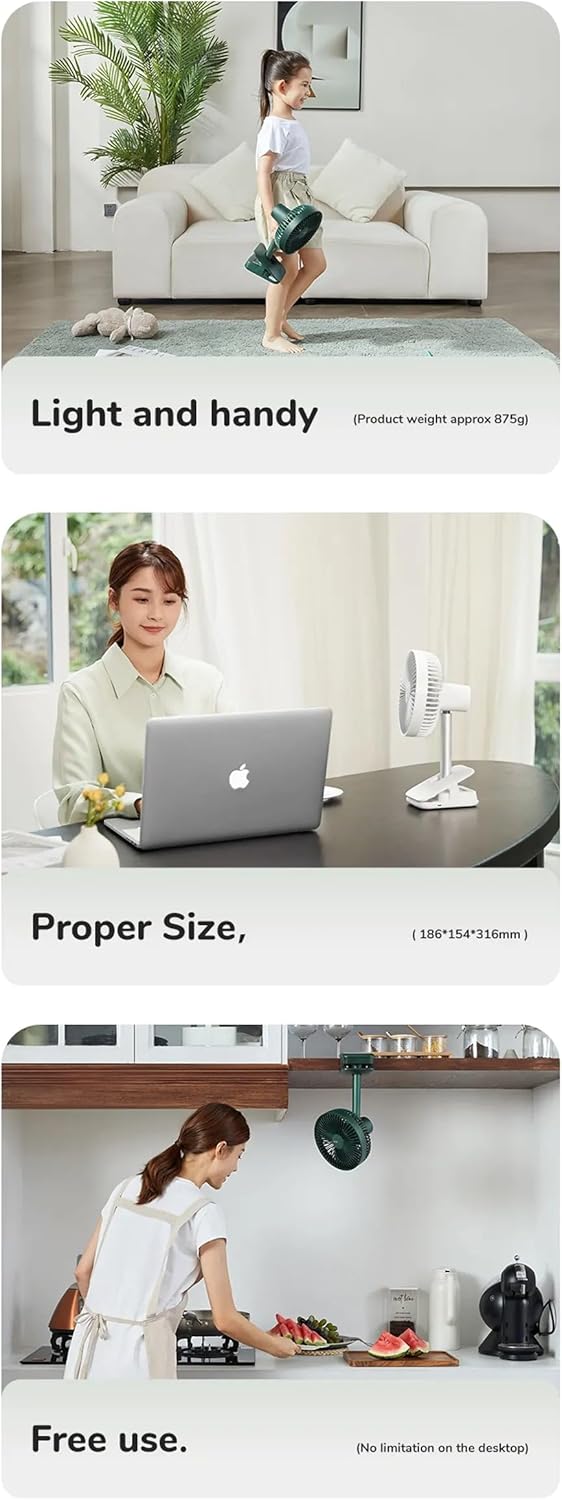
This series of images illustrates the fan's practical applications: its light and handy design (approx. 875g), its proper size for desktop use (18.6D x 31.6W x 15.4H cm), and its free use capability, including clipping under a cabinet, showing no limitation on desktop placement.
6. Operating Instructions
The fan features a simple button control interface located on its base.

Detail of the fan's control panel, featuring buttons for power and fan speed, along with LED lights indicating active timer settings (1h, 2h, 4h) and fan speeds (1-4).
Power On/Off and Speed Control:
- Press the Power Button (right button) once to turn the fan on at Speed 1.
- Press the Power Button repeatedly to cycle through Speed 1, Speed 2, Speed 3, Speed 4, Speed 5 (Nature Wind Mode), and then Off.
- The LED indicators on the control panel will show the current speed setting.
Oscillation Control:
- While the fan is on, press the Oscillation/Timer Button (left button) once to activate 90-degree horizontal auto-oscillation.
- Press the Oscillation/Timer Button again to stop oscillation.
Timer Setting:
- While the fan is on, press and hold the Oscillation/Timer Button (left button) to set the timer.
- Each press will cycle through 1 hour, 2 hours, 4 hours, and then turn the timer off.
- The corresponding LED indicator (1h, 2h, 4h) will light up to show the active timer setting. The fan will automatically turn off after the set time.
Charging the Fan:
- Connect the provided USB-A to USB-C cable to the charging port on the fan's base.
- Connect the other end of the cable to a USB power adapter (DC5V-2A/1A recommended) or a computer USB port.
- The charging indicator light will illuminate during charging and turn off when fully charged.
- A full charge typically takes 6-10 hours. The 8000mAh battery provides 5-28 hours of operation depending on the speed setting.
7. Maintenance
Regular cleaning helps maintain the fan's performance and extends its lifespan.
Cleaning the Fan:
- Ensure the fan is turned off and unplugged from any power source before cleaning.
- The front fan cover is detachable for easy cleaning. Gently twist or unclip the cover as indicated in the diagram to remove it.
- Use a soft, dry cloth to wipe dust from the fan blades and the interior of the fan cover. For stubborn dirt, a slightly damp cloth can be used, but ensure no water enters the motor housing.
- Important: Do not wash the main body of the fan with water. Use a dry cloth to wipe it.
- Once clean, reattach the front fan cover securely.

The fan's front cover is shown detached, indicating its removable design for easy cleaning. A warning symbol advises against washing the main body with water.
Storage:
When not in use for extended periods, store the fan in a cool, dry place, away from direct sunlight and extreme temperatures.
8. Troubleshooting
If you encounter issues with your JISULIFE FA13R fan, please refer to the following common problems and solutions:
- Fan does not turn on:
- Ensure the battery is charged. Connect the fan to a power source using the USB-C cable.
- Press the Power Button firmly.
- Weak airflow:
- Increase the fan speed using the Power Button.
- Check if the fan grille or blades are obstructed by dust or debris. Clean the fan as described in the Maintenance section.
- Fan not oscillating:
- Press the Oscillation/Timer Button to activate oscillation.
- Ensure the fan is on a stable surface and not obstructed.
- Fan not charging:
- Ensure the USB-C cable is properly connected to both the fan and the power source.
- Try a different USB power adapter or USB port.
- Check if the charging cable is damaged.
If the problem persists, please contact JISULIFE customer support for assistance.
9. Specifications
| Feature | Specification |
|---|---|
| Brand | JISULIFE |
| Model | FA13R |
| Battery Capacity | 8000mAh / 3.7V / 29.6Wh |
| Runtime | 5-28 hours (depending on speed) |
| Charging Time | 6-10 hours |
| Input | DC5V-2A/1A (Type-C) |
| Rated Power | 5.5W |
| Max Fan Speed | 4.0m/s |
| Oscillation | 90 degrees horizontal |
| Vertical Rotation | 25 degrees manual |
| Material | ABS Plastic, Alloy Metal |
| Dimensions | 18.6D x 31.6W x 15.4H centimetres |
| Weight | Approx. 875g |
10. Warranty and Support
JISULIFE products are designed and manufactured to the highest quality standards. For information regarding warranty coverage, technical support, or service inquiries, please refer to the warranty card included with your purchase or visit the official JISULIFE website. Please retain your proof of purchase for warranty claims.