
YUNCHI 12V 2A
YUNCHI 2.0 Ah Replacement Battery for Bosch 12V Professional System - Instruction Manual
1. Introduction
This manual provides essential information for the safe and effective use of your YUNCHI 2.0 Ah Lithium-Ion Replacement Battery. This battery is designed to be compatible with the Bosch Professional 12V System, offering reliable power for your tools. Please read this manual thoroughly before first use and keep it for future reference.
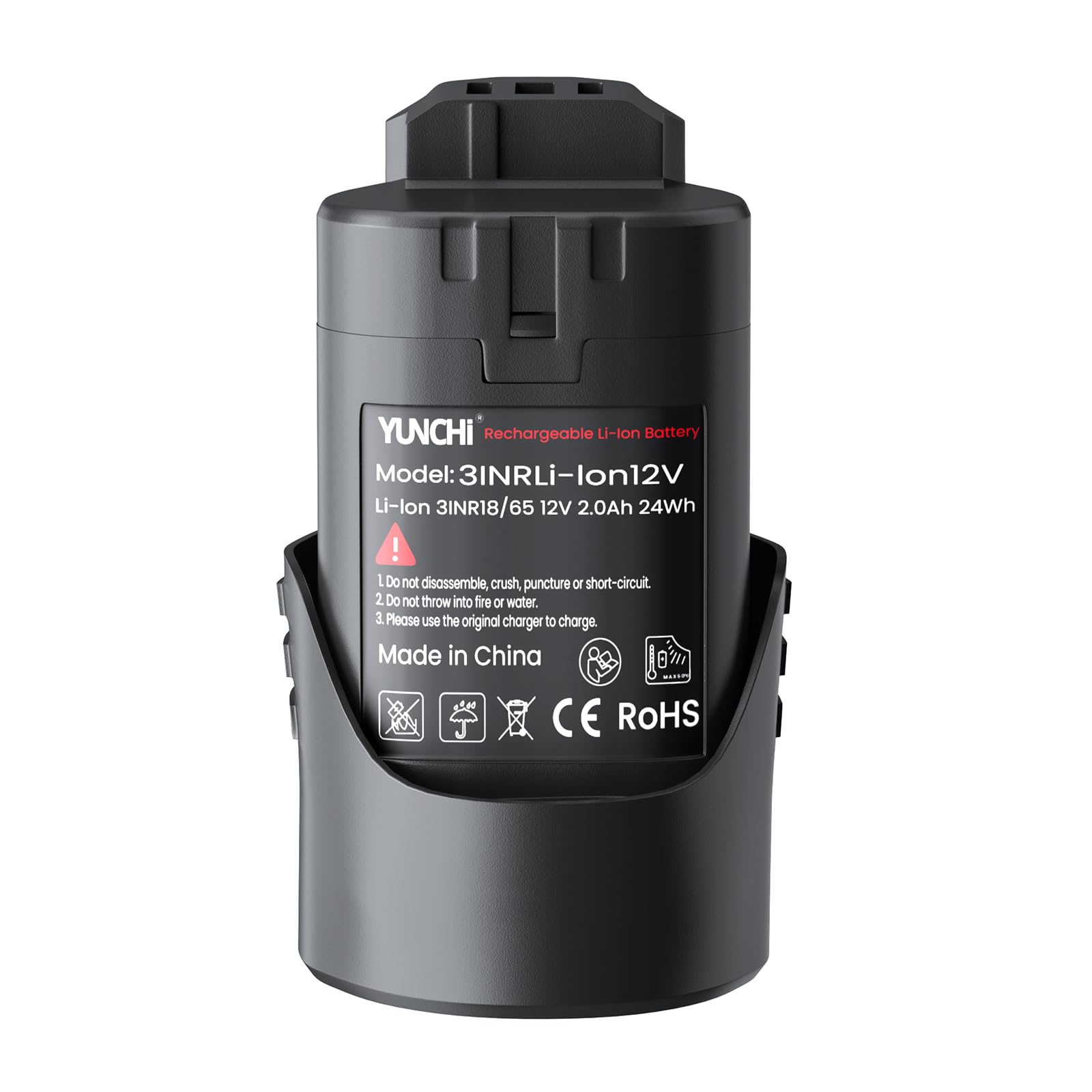
Image 1: YUNCHI 2.0 Ah Lithium-Ion Replacement Battery.
2. Key Features
- Battery Specifications: Voltage: 12 V, Capacity: 2000 mAh, Battery Type: Lithium-ion.
- Optimized Compatibility: Specifically designed as a replacement battery for Bosch 12V cordless tools, ensuring perfect fit and optimal performance.
- Enhanced Performance & Durability: Constructed with high-quality materials and advanced technology, this lithium-ion battery delivers robust performance comparable to original batteries, ensuring long-term reliability even under demanding work conditions.
- Lightweight & Compact Design: Lithium-ion technology allows for a lightweight and compact design, improving handling and reducing fatigue during extended use. Dimensions: 8.8 x 4.4 x 4.4 cm, Weight: 185 g.
- Multiple Protection Features: Integrated protection against overheating, overcharging, over-discharge, and short-circuiting ensures safe operation and extends battery life.

Image 2: Comparison of YUNCHI battery performance with original branded batteries.

Image 3: The battery features 6-in-1 full protection for enhanced safety and longevity.
3. Compatibility
The YUNCHI 2.0 Ah replacement battery is specifically designed for the Bosch Professional 12V System (Blue Series) power tools. It is not compatible with the Bosch Home & Garden Series (Green Series).

Image 4: Compatibility overview for Bosch Professional Blue Series tools.

Image 5: The YUNCHI battery is compatible with a range of Bosch Professional 12V tools.
4. Safety Instructions
Always observe the following safety precautions when handling and using the battery:
- Do not disassemble, crush, puncture, or short-circuit the battery.
- Do not throw the battery into fire or water.
- Use only the original charger provided with your Bosch tool to charge this battery.
- Keep the battery away from children and pets.
- If the battery shows signs of damage, leakage, or overheating, discontinue use immediately.
- Dispose of batteries responsibly according to local regulations.
5. Setup and Installation
To install the YUNCHI replacement battery into your compatible Bosch 12V Professional tool:
- Ensure the tool is switched off and disconnected from any power source.
- Align the battery with the battery slot on the tool.
- Slide the battery firmly into the slot until it clicks securely into place. Ensure it is fully seated and does not wobble.
To remove the battery:
- Press the battery release button(s) on the tool.
- Slide the battery out of the tool.
Video 1: This video demonstrates the general features and handling of a Bosch 12V battery, similar to the YUNCHI replacement.
Video 2: This video shows the Bosch GBA 12V 3.0 Ah battery, providing context for the YUNCHI replacement.
Video 3: This video demonstrates the Bosch Professional 12V System drill driver GSR 12V-15, a tool compatible with this battery.
Video 4: This video showcases the Bosch GSR 120-LI cordless drill driver, another compatible tool.
Video 5: A 360-degree view of a Bosch battery, illustrating its physical characteristics.
6. Operating Instructions
Once the battery is securely installed in your tool, operate the tool according to its specific instruction manual. The YUNCHI battery provides consistent power output for optimal tool performance. Always ensure the battery is fully charged before starting any significant work to maximize efficiency and runtime.
7. Maintenance and Storage
Charging
Always use the original Bosch 12V charger designed for lithium-ion batteries. Do not use chargers intended for other battery types or voltages. A complete full charge/discharge cycle prior to first use is recommended to condition the battery performance.
Storage
For long-term storage, always fully charge the battery to activate its balancing function. Store the battery in a cool, dry place, away from direct sunlight and extreme temperatures. Avoid storing the battery in a completely discharged state for extended periods, as this can reduce its lifespan.
Cleaning
Keep the battery contacts clean and free from dirt or debris. Use a dry, soft cloth to wipe the battery. Do not use liquids or abrasive cleaners.
8. Troubleshooting
| Problem | Possible Cause | Solution |
|---|---|---|
| Battery not charging | Incorrect charger; poor contact; charger malfunction; battery too hot/cold. | Ensure correct charger is used. Check contacts for debris. Allow battery to reach room temperature. Try a different charger if available. |
| Tool not operating with battery | Battery not fully inserted; battery discharged; tool malfunction; battery fault. | Ensure battery is clicked into place. Charge the battery fully. Test with another known-good battery. If problem persists, consult tool manual or contact support. |
| Reduced runtime | Battery not fully charged; battery aging; heavy load on tool. | Ensure full charge. Consider replacing battery if significantly aged. Reduce load on tool if possible. |
9. Specifications
| Attribute | Value |
|---|---|
| Brand | YUNCHI |
| Manufacturer | YUNCHI |
| Package Dimensions | 9.5 x 5.9 x 5.6 cm |
| Batteries Required | 1 Lithium-ion battery (included) |
| Voltage | 12 Volts |
| Battery Capacity | 2000 Milliamper-hour (mAh) |
| Battery Cell Composition | Lithium-ion |
| Item Weight | 200 g |
| Recommended Uses | Power Tool |
10. Warranty and Support
This product is subject to a return policy that allows for refund or replacement within 14 days. For specific warranty details or technical support, please refer to the seller's information on the purchase platform or contact YUNCHI customer service directly. Keep your purchase receipt as proof of purchase.
Ask a question about this manual
Ask about setup, troubleshooting, compatibility, parts, safety, or missing instructions. Manuals+ will review the question and use this page’s manual context to help answer it.