
1. Product Overview
The Eurannit E12 Mini Handheld Inkjet Printer is a versatile and portable device designed for printing various content on a wide range of surfaces. Its compact design and quick-dry ink system make it suitable for industrial, commercial, and personal use.
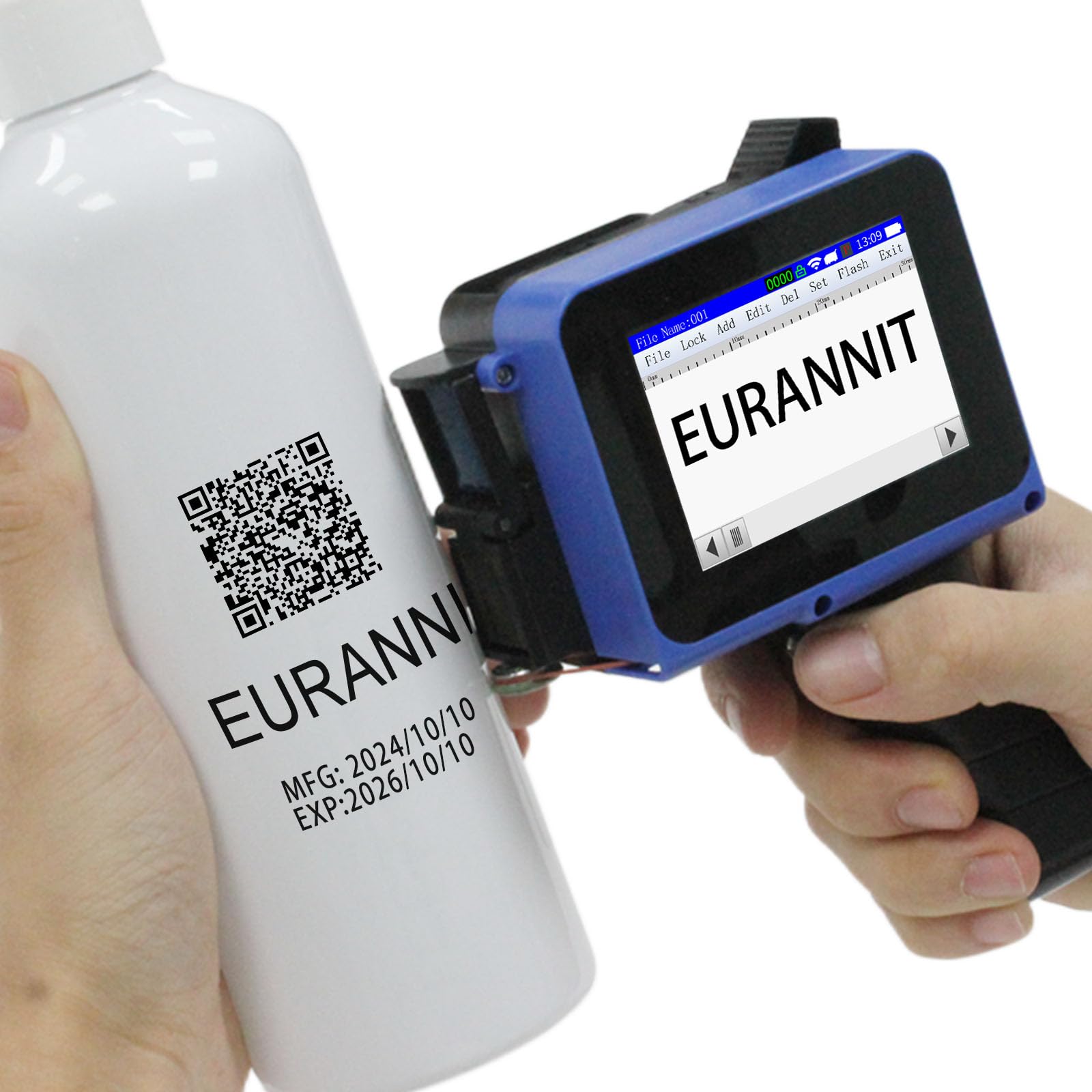
Image: Eurannit E12 Mini Handheld Inkjet Printer, showcasing its compact form factor.
2. Package Contents
The complete kit includes all necessary components for immediate use:
- Printer Main Unit
- 1 x 42ml Original Black Ink Cartridge
- Precision Stylus
- Power Adapter
- Positioning Board

Image: A visual representation of the Eurannit E12 printer and its included accessories, such as the charging line, ink cartridge, touch pen, rubber band, and positioning plate.
3. Setup
3.1 Installing the Ink Cartridge
- Open the cartridge cover.
- Open the ink cartridge slot back cover.
- Insert the ink cartridge at a 45-degree angle.
- Close the ink cartridge slot back cover.
Video: This video demonstrates the process of installing and removing the ink cartridge, including how to open the cover, insert the cartridge, and close the cover. It also shows how to properly store the cartridge when not in use.
3.2 Attaching/Detaching the Handle
The E12 printer features a detachable handle, allowing for quick conversion between full handheld and compact mini modes. This enhances portability for various tasks.
Video: This video illustrates the simple steps to attach and detach the handle from the E12 printer, demonstrating its dual-use portable design.
3.3 Powering On/Off
Press and hold the control button (power button) for a few seconds to turn the printer on or off.
4. Operating Instructions
4.1 Creating and Editing Print Content
The E12 printer allows for 360° full-range content printing, including dynamic dates, sequential serial numbers, scannable barcodes/QR codes, and custom logos. Adjustable text fonts/sizes are available with a 0.5-inch max print height and unlimited length capability.
Video: This video demonstrates how to edit various formats on the E12 printer, including text, dates, and other customizable content.
4.2 Printing on Various Surfaces
The printer is engineered for challenging surfaces such as corrugated cardboard, metal components, plastic packaging, wooden pallets, fabric tags, and curved containers (bottles/tubes). Its industrial-grade performance is suitable for manufacturing, logistics, retail labeling, and warehouse inventory management.
Video: This video showcases the E12 printer's versatility across a wide range of materials, demonstrating its ability to print on various surfaces.

Image: The Eurannit E12 printer demonstrating its capability to print on diverse materials including wood, carton, pipe, ceramic, stone, metal, egg, plastic, cloth, and foam.
4.3 Using the Positioning Board
The included positioning board can be used to achieve precise and straight prints, especially on flat surfaces or when consistent placement is required.
5. Maintenance
5.1 Ink Cartridge Care
- Always exit the print page before removing or disassembling the cartridge.
- If the ink cartridge is not in use for over 10 minutes, it must be covered with a protective cover to prevent drying.
- As it is a fast-drying cartridge, if a few missing or white lines appear during use, gently wipe the cartridge nozzle with a soft cloth dampened with alcohol.

Image: Step-by-step guide on how to install the ink cartridge and important warm tips for cartridge maintenance, including covering when not in use and cleaning the nozzle.
6. Troubleshooting
For common issues such as print quality degradation (missing lines, white lines), refer to the ink cartridge care instructions in Section 5.1. Ensure the cartridge is properly installed and covered when not in use.
For further assistance, please refer to the official operation manual or contact Eurannit technical support.

Image: A QR code linking to the E12 Printer Operation Manual for detailed instructions and troubleshooting.
7. Specifications
| Feature | Specification |
|---|---|
| Model Name | Mini Handheld Inkjet printer |
| Model Series | E12 |
| Brand | Eurannit |
| Printing Technology | Inkjet |
| Printer Output | Monochrome |
| Max Print Speed (Monochrome) | 80 ppm |
| Max Print Height | 0.5 inch (12.7 cm) |
| Ink Color | Black (Quick-Dry) |
| Ink Cartridge Capacity | 42ml (approx. 80,000 characters at 10mm height) |
| Item Weight | 1.3 pounds |
| Product Dimensions | 4.33 x 1.81 x 5.51 inches |
| Hardware Interface | USB Type C |
| Batteries | 2 Lithium Ion batteries (included) |
8. Warranty and Support
The Eurannit E12 Mini Handheld Inkjet Printer comes with a limited warranty. For technical support, setup assistance, or any product-related inquiries, please contact Eurannit's customer service team. Step-by-step video tutorials are also available for instant setup and troubleshooting.
8.1 Contacting Seller Support
To contact the seller on Amazon:
- Go to the product page on Amazon.
- Click on the seller's name (e.g., "EURANNIT Coding & Marking Solution").
- On the seller's page, look for an option like "Ask a question" or "Contact Seller."

Image: A visual guide demonstrating the steps to contact the seller on Amazon for support.
For additional resources and products, visit the official Eurannit store: Eurannit Store