
Karlak K52
Karlak K52 Smart Watch User Manual
Model: K52
Introduction
This manual provides comprehensive instructions for the setup, operation, maintenance, and troubleshooting of your Karlak K52 Smart Watch. Please read this manual carefully before using the device to ensure proper functionality and longevity.

Figure 1: Karlak K52 Smart Watch. This image shows the watch face with various health metrics and time displayed, highlighting its sleek design.
Setup
1. Initial Charging
Before first use, fully charge your K52 Smart Watch. The watch is equipped with a 400mAh battery and uses magnetic charging.
- Connect the magnetic charging cable to the charging points on the back of the watch.
- Plug the USB end of the cable into a standard USB power adapter (not included) or a computer USB port.
- A full charge typically takes approximately 2 hours. The watch can provide about 30 days of standby time and 5-10 days of normal use on a single charge.

Figure 2: Battery Charging and Music Playback. This image illustrates the watch's charging indicator and its capability to control music.
2. App Installation and Pairing
To unlock the full features of your K52 Smart Watch, you need to install the companion application on your smartphone.
- Scan the QR code provided in the watch's packaging or search for the official app in your phone's app store (compatible with Android 4.4 and higher versions, and iOS 8.0 or higher).
- Install the application and open it.
- Ensure Bluetooth is enabled on your smartphone.
- In the app, follow the on-screen instructions to search for and pair with your K52 Smart Watch. The watch uses a BT5.0 chip for stable connection.
- Once paired, the watch will synchronize time and data with your phone.
Operating Instructions
1. Display and Navigation
The K52 Smart Watch features a 1.39-inch IPS display with a high resolution of 360x360 pixels, offering clear and bright visuals. It provides 4 different menu options for navigation.
- Touch Screen: Swipe left/right, up/down to navigate through menus and functions.
- Side Buttons: Use the physical buttons on the side for quick access to specific functions or to return to the home screen.

Figure 3: Key Features Overview. This image highlights the watch's display quality, various exercise modes, health monitoring capabilities, and Bluetooth calling function.
2. Bluetooth Call Functionality
With its BT5.0 chip and high-quality speaker, the K52 Smart Watch allows for direct call management.
- Answering Calls: When a call comes in, the watch will display the caller ID. Tap the green icon on the screen to answer the call directly from your watch.
- Making Calls: Access the dialer or contact list on your watch to initiate calls. You can store friend number information for quick access.
- Message Notifications: Receive real-time notifications for SMS and social media apps (e.g., WhatsApp, WeChat, Twitter) directly on your watch.

Figure 4: Bluetooth Call Interface. This image shows the watch's screen during an incoming call, demonstrating its hands-free communication feature.

Figure 5: Contact Sync and Message Reminders. This image illustrates the watch's ability to sync contacts for direct dialing and receive real-time message notifications.
3. Health Monitoring and Sports Modes
The K52 Smart Watch is designed to be a comprehensive health monitor, offering detailed recordings of various essential data points.
- Health Metrics: Monitor your heart rate, blood oxygen levels, calories burned, step count, and sleep patterns. Access these readings through the dedicated health monitoring sections in the watch or the companion app.
- Sports Modes: The watch supports over 100 sports modes. Select the appropriate mode before starting an activity to get accurate tracking of your performance and health data during exercise.
4. Multifunctional Features
Beyond health and communication, the K52 Smart Watch offers several convenient functions:
- Weather Forecasts: Get real-time weather updates directly on your wrist.
- Alarms: Set multiple alarms for reminders throughout your day.
- Timers: Utilize stopwatch and countdown timer functions for various activities.
- Music Control: Control music playback on your connected smartphone directly from the watch.

Figure 6: Sport Smart Watch and Weather Forecast. This image highlights the watch's sports tracking capabilities and its ability to display current weather conditions.
Maintenance
1. Durability and Water Resistance
The K52 Smart Watch features a robust design with a dustproof, waterproof, and drop-resistant body, suitable for both indoor and outdoor use. It is constructed from polycarbonate, glass fiber, and zinc alloy metal frame, ensuring high strength and hardness.
- While the watch is waterproof, it is recommended to avoid prolonged submersion in water or exposure to hot water/steam.
- Do not press buttons underwater.
- After exposure to water, wipe the watch dry with a soft cloth.
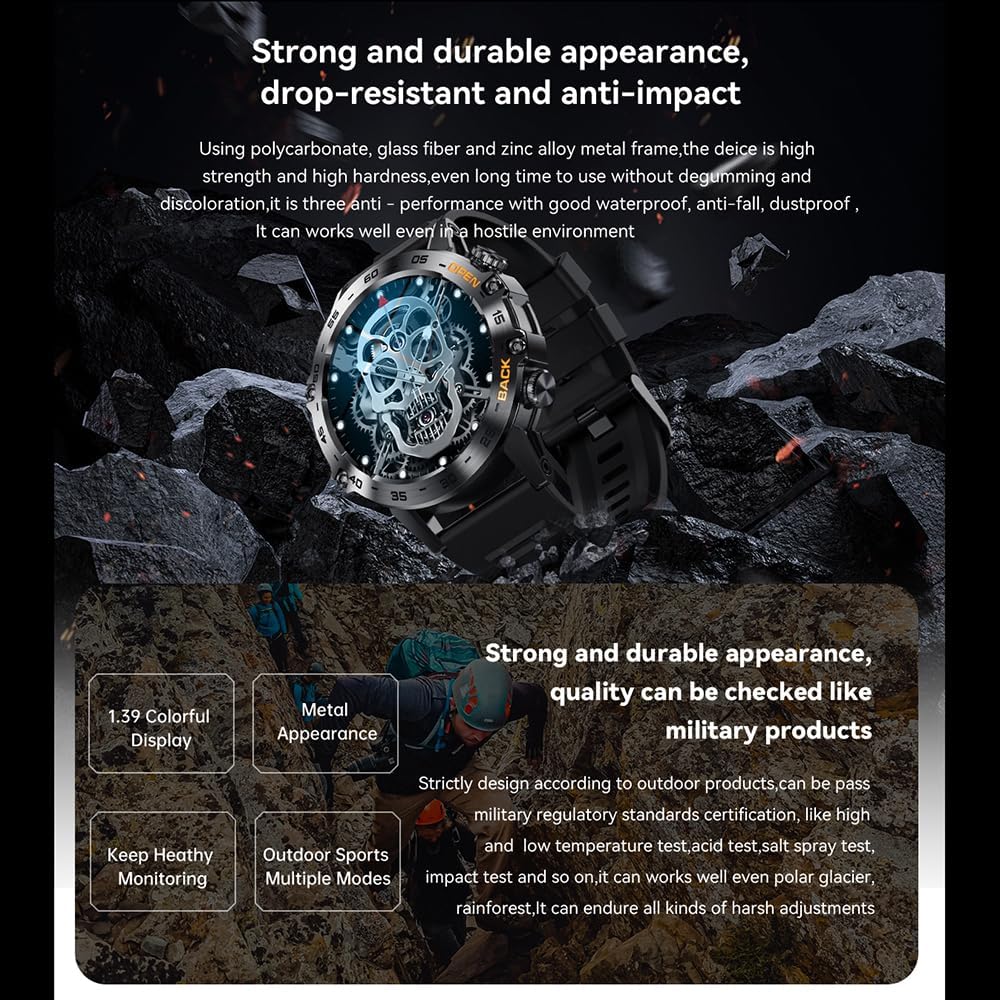
Figure 7: Durability Features. This image emphasizes the watch's robust build quality, designed to be resistant to drops and impacts, and suitable for challenging conditions.
2. Cleaning and Care
- Regularly clean the watch screen and body with a soft, dry, lint-free cloth.
- If necessary, slightly dampen the cloth with water. Avoid using harsh chemicals or abrasive cleaners.
- Keep the charging contacts on the back of the watch clean and dry to ensure efficient charging.
3. Battery Care
- Avoid completely draining the battery frequently.
- Store the watch in a cool, dry place when not in use for extended periods.
- Use only the provided magnetic charging cable.
Troubleshooting
If you encounter issues with your K52 Smart Watch, please refer to the following common solutions:
| Problem | Possible Cause / Solution |
|---|---|
| Watch does not turn on | Battery might be depleted. Charge the watch for at least 30 minutes. |
| Cannot pair with phone | Ensure Bluetooth is enabled on both devices. Make sure the watch is within range. Restart both the watch and phone. Check the app for pairing instructions. |
| Inaccurate health data | Ensure the watch is worn snugly on your wrist. Clean the sensor on the back of the watch. |
| Notifications not received | Check app permissions on your phone to ensure notifications are enabled for the watch app. Ensure the watch is connected via Bluetooth. |
| Short battery life | Reduce screen brightness, disable unnecessary features, or limit frequent heart rate monitoring. Ensure the watch is fully charged. |
If the problem persists, please contact Karlak customer support.
Specifications
| Feature | Detail |
|---|---|
| Model | K52 |
| Display | 1.39-inch IPS, 360x360 resolution |
| Battery Capacity | 400mAh |
| Battery Life | Approx. 30 days standby, 5-10 days normal use |
| CPU | Realtek8763EW |
| Memory | 128M |
| Connectivity | Bluetooth 5.0 (BT5.0) |
| Charging Method | Magnetic charging |
| Compatibility | Android 4.4+ / iOS 8.0+ |
| Item Size | 59 x 48 x 12.5 mm (2.32 x 1.89 x 0.49 inches) |
| Product Dimensions | 3.94 x 3.15 x 2.36 inches (Package Size) |
| Item Weight | 7.4 ounces / 210.43 Grams (Package Weight: 200g/7.05oz) |
| Material | Silicone, Metal (Polycarbonate, glass fiber, zinc alloy metal frame) |
| Manufacturer | Karlak |

Figure 8: Available Color Options. This image displays the K52 Smart Watch in both Orange and Black variants.
Warranty and Support
Warranty Information
Specific warranty details for the Karlak K52 Smart Watch are typically provided with your purchase documentation or on the manufacturer's official website. Please refer to these resources for information regarding warranty period, coverage, and terms.
Customer Support
For technical assistance, troubleshooting beyond this manual, or warranty claims, please contact Karlak customer support. Contact information can usually be found on the product packaging, the official Karlak website, or through your point of purchase.