
CNYST 02024102002
CNYST Rebar Corrosion Meter User Manual
Model: 02024102002
1. Introduction
This user manual provides detailed instructions for the operation, maintenance, and troubleshooting of the CNYST Rebar Corrosion Meter. This instrument is designed to measure the probability of corrosion of steel reinforcement within concrete structures such as walls, beams, and columns.
The meter utilizes advanced technology to provide accurate and reliable data for structural integrity assessment. Please read this manual thoroughly before operating the device to ensure proper usage and to maximize its lifespan.
2. Safety Information
Always adhere to the following safety guidelines to prevent injury and damage to the instrument:
- Do not expose the instrument to extreme temperatures or direct sunlight for prolonged periods.
- Ensure the working environment is free from strong alternating electromagnetic fields, which can interfere with measurements.
- Handle the electrodes and sensors with care. The permanent fixed metal electrodes eliminate the need for copper sulfate solution, reducing chemical exposure risks.
- Keep the device dry and clean. Avoid contact with water or other liquids.
- Only use the provided power adapter and cables for charging and data transfer.
- Do not attempt to disassemble or repair the instrument yourself. Refer to qualified service personnel.
3. Product Components
The CNYST Rebar Corrosion Meter package includes the following components:
- Main Host Unit
- Potential Electrode Sensor
- Gradient Electrode Sensor
- Connecting Cables (2)
- Bracket
- Transmission Line
- Software CD-ROM
- Carrying Case
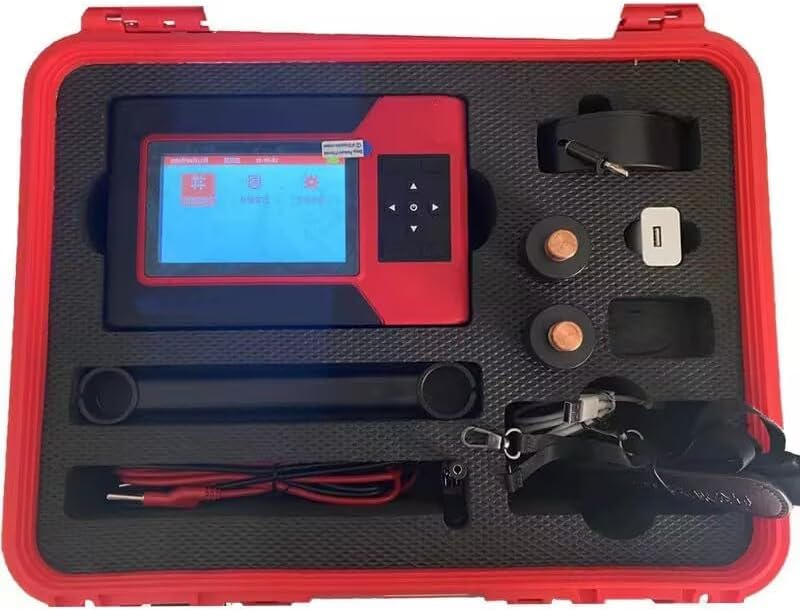
Figure 3.1: Complete set of the CNYST Rebar Corrosion Meter and its accessories, neatly organized within the protective red carrying case.
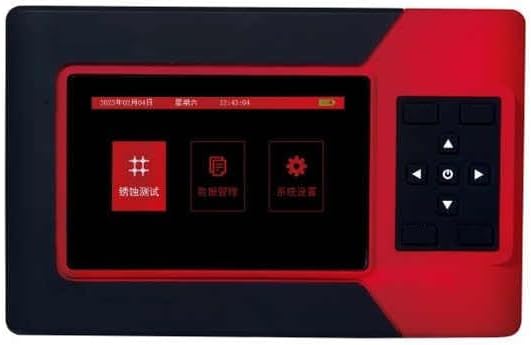
Figure 3.2: The main host unit of the corrosion meter, featuring its display screen and control buttons.

Figure 3.3: The main unit shown with one of the specialized sensors, likely the gradient electrode, used for specific measurement methods.

Figure 3.4: The main unit displayed with another sensor, possibly the potential electrode, essential for potential method measurements.
4. Setup
- Unpacking: Carefully remove all components from the protective carrying case. Inspect for any visible damage.
- Charging the Battery: The main host unit contains a built-in rechargeable lithium battery. Connect the provided power adapter to the charging port on the unit and plug it into a suitable power outlet. Allow the battery to fully charge before first use (up to 50 hours of operation on a full charge).
- Connecting Sensors: Identify the appropriate sensor (Potential or Gradient) for your measurement method. Connect the sensor to the main host unit using the provided connecting cables. Ensure connections are secure.
- Software Installation (Optional): If you plan to transfer data to a computer, install the software from the included CD-ROM onto your WinXP, Win7, or Win8 operating system.
5. Operating Instructions
5.1 Powering On/Off
- To Power On: Press and hold the power button on the main host unit until the display screen illuminates.
- To Power Off: Press and hold the power button until the unit shuts down.
5.2 Navigating the Interface
Use the directional buttons and the 'OK' button on the control panel to navigate through the menu options on the LCD display (160 x 128 resolution).
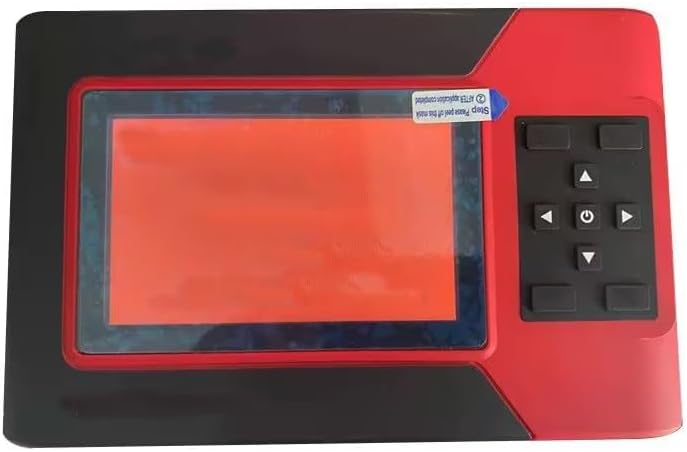
Figure 5.1: The meter's user interface and navigation buttons.
5.3 Measurement Methods
The instrument supports two primary measurement methods:
- Potential Method: This method measures the potential difference to assess corrosion probability. Connect the potential electrode sensor for this measurement.
- Gradient Method: This method measures the gradient of potential for corrosion detection. Connect the gradient electrode sensor for this measurement.
Refer to the on-screen prompts and the software manual for detailed steps on performing each measurement type.
5.4 Data Storage and Transfer
The device has a large data storage capacity, capable of storing data from 5400 measurement areas and 228,000 measurement points. Data can be transferred to a computer using the provided transmission line and software for further analysis and reporting.
6. Maintenance
- Cleaning: Use a soft, dry cloth to clean the main unit and sensors. Do not use abrasive cleaners or solvents.
- Storage: When not in use, store the instrument and all accessories in the provided protective carrying case in a cool, dry place, away from direct sunlight and extreme temperatures.
- Battery Care: To prolong battery life, avoid fully discharging the battery frequently. Recharge the battery regularly, even if the device is not in active use.
- Sensor Inspection: Periodically inspect the sensors and connecting cables for any signs of wear or damage. Replace damaged components immediately.
7. Troubleshooting
| Problem | Possible Cause | Solution |
|---|---|---|
| Device does not power on. | Battery is discharged or faulty. | Connect the power adapter and charge the battery. If the problem persists, contact support. |
| Inaccurate readings. | Loose sensor connection; strong electromagnetic interference; damaged sensor. | Ensure all cables are securely connected. Move to an area free from strong electromagnetic fields. Inspect sensors for damage. |
| Data transfer failure. | Incorrect cable connection; software not installed or corrupted; incompatible operating system. | Verify transmission line connection. Reinstall software from CD-ROM. Ensure your OS is WinXP, Win7, or Win8. |
| Screen is blank or frozen. | System error; low battery. | Recharge the battery. Perform a hard reset by holding the power button for 10 seconds. If issue persists, contact support. |
8. Specifications
| Parameter | Value |
|---|---|
| Measuring Potential | ±1000mV |
| Test Accuracy | ±1mV |
| Measurement Point Spacing | 1-100cm |
| Data Storage Capacity | 5400 measurement areas, 228,000 measurement points |
| Measuring Area | 8100 m² |
| Ambient Temperature | -10 °C ~ +50 °C |
| Relative Humidity | ≤ 90%RH |
| Power Supply | Built-in rechargeable lithium battery (up to 50 hours) |
| LCD Resolution | 160 × 128 |
| Host Volume (Dimensions) | 220mm × 162mm × 91mm |
| Item Weight | 14.3 pounds |
9. Warranty and Support
For warranty information, technical support, or service inquiries, please refer to the documentation included with your purchase or contact CNYST customer service. Keep your purchase receipt as proof of purchase.
Manufacturer: CNYST
Model Number: 02024102002
Date First Available: October 19, 2024