
1. Introduction
This manual provides essential instructions for the proper installation, use, and maintenance of your Oulice replacement inner blade. Adhering to these guidelines will ensure optimal performance and longevity of the product. Please read this manual thoroughly before installation and retain it for future reference.
2. Product Compatibility
The Oulice replacement inner blade is designed for compatibility with the following Panasonic electric razor models:
- ES8093
- ES8092
- ES8094
- ES8152
- ES8097
- ES8096
- ES8095
- ES8153
- ES8154
- ES8155
- WES9063Y
- WES9063
- ES8156
Ensure your razor model matches one of the listed compatible models to guarantee proper fit and function.
3. Setup and Installation
Follow these steps to correctly install the replacement inner blade:
- Preparation: Ensure your electric razor is turned off and disconnected from any power source.
- Remove Outer Foil: Gently press the release buttons on the sides of the razor head to detach the outer foil frame.
- Remove Worn Inner Blade: Carefully lift out the old inner blade unit from the razor body. Dispose of the old blade responsibly.
- Install New Inner Blade: Align the new Oulice inner blade with the drive shaft of the razor. Press down firmly until it clicks securely into place.
- Reattach Outer Foil: Place the outer foil frame back onto the razor head, ensuring it snaps into position.
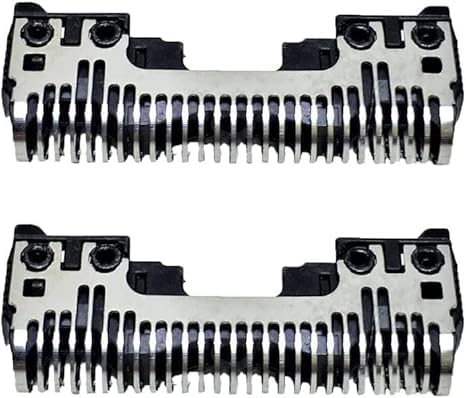
Image 1: Oulice Replacement Inner Blades. This image displays two identical replacement inner blades, highlighting their design and structure for easy identification during installation.
After installation, perform a quick test to ensure the blade unit is properly seated and the razor operates smoothly.
4. Operating Instructions
The replacement inner blade functions identically to the original blade. For optimal shaving performance:
- Ensure the razor is fully charged before use.
- Shave against the direction of hair growth for a closer shave.
- Apply light pressure; excessive force is not necessary and can cause skin irritation or damage to the blade.
- This blade supports both wet and dry shaving. For wet shaving, use with shaving foam or gel.
5. Maintenance
Regular cleaning and proper maintenance will extend the life of your replacement inner blade and maintain shaving efficiency.
5.1. Daily Cleaning
- After each use, turn off the razor and remove the outer foil.
- Rinse the inner blade and outer foil under running water to remove hair clippings and debris.
- Shake off excess water and allow both components to air dry completely before reassembling or storing.
5.2. Deep Cleaning (Weekly/Bi-weekly)
- For a more thorough clean, use a mild soap solution with water.
- Gently brush away any stubborn debris from the blade using a soft brush (often included with the original razor).
- Rinse thoroughly and ensure no soap residue remains.
- Allow to air dry completely.
5.3. Blade Replacement Frequency
Inner blades typically require replacement every 12-18 months, depending on usage frequency and hair type. Replace the blade when you notice a decrease in shaving performance, pulling of hair, or discomfort during shaving.
6. Troubleshooting
If you encounter issues with your replacement inner blade, consider the following:
| Problem | Possible Cause | Solution |
|---|---|---|
| Poor Shaving Performance / Hair Pulling | Blade not seated correctly; Blade is dull or damaged; Razor not fully charged. | Re-install the inner blade ensuring it clicks into place. If performance does not improve, the blade may need replacement. Ensure razor battery is charged. |
| Razor Not Turning On | Not related to inner blade; Battery issue. | Check razor's power source and battery charge. Refer to your original Panasonic razor manual for power-related troubleshooting. |
| Excessive Noise / Vibration | Blade not seated correctly; Debris lodged in blade mechanism. | Remove and re-install the inner blade. Perform a thorough cleaning to remove any trapped hair or debris. |
If issues persist after attempting these solutions, contact customer support for further assistance.
7. Specifications
- Product Type: Replacement Inner Blade
- Brand: Oulice
- Compatibility: Panasonic ES8093, ES8092, ES8094, ES8152, ES8097, ES8096, ES8095, ES8153, ES8154, ES8155, WES9063Y, WES9063, ES8156, ES8152 Electric Razors
- Material: Stainless Steel cutting elements, plastic housing
- Usage: Wet and Dry
- Package Contents: 1x Inner Blade
8. Warranty and Support
For warranty information or technical support regarding your Oulice replacement inner blade, please refer to the seller's return policy or contact the seller directly through the platform where the purchase was made. Keep your purchase receipt as proof of purchase.
Note: This replacement part is manufactured by Oulice and is not an original Panasonic product.