
1. Introduction
Thank you for choosing the imagitarium Freshwater Aquarium LED Strip Light. This manual provides essential information for the safe and effective installation, operation, and maintenance of your new aquarium lighting system. This LED strip light is designed to provide brilliant freshwater lighting for both framed and frameless aquariums, enhancing the visual appeal of your aquatic environment.
The light features a sleek, low-profile design and includes a dynamic controller for adjusting lumens, Kelvin temperature, and timer functions. Please read this manual thoroughly before use and retain it for future reference.
2. Safety Information
- Read all instructions: Before operating the appliance, read and follow all safety instructions.
- Water Safety: This product is designed for use with aquariums. To avoid possible electric shock, special care should be taken when handling water near the light.
- Electrical Safety: Always unplug the light from the power outlet before performing any maintenance, installation, or when not in use. Do not operate any appliance if it has a damaged cord or plug, or if it malfunctions or has been dropped or damaged in any manner.
- Indoor Use Only: This product is intended for indoor use only. Do not use outdoors.
- Proper Placement: Ensure the light is securely placed on the aquarium. Do not immerse the light fixture in water. While the light is waterproof, the power adapter and controller are not.
- Children: This appliance is not intended for use by children. Close supervision is necessary when any appliance is used near children.
- Power Cord: Position the power cord to prevent tripping hazards and to avoid contact with hot surfaces. Do not pull the cord to disconnect from the outlet.
3. Package Contents
Carefully unpack all components and inspect them for any damage. If any items are missing or damaged, please contact customer support.
- imagitarium Freshwater Aquarium LED Strip Light
- Dynamic Controller with integrated power cord
- Power Adapter
- Adjustable Mounting Legs (2)

Image: The imagitarium LED Strip Light, showing the main light bar, the inline dynamic controller, and the power adapter connected via the power cord.

Image: The imagitarium LED Strip Light as it appears in its retail packaging, a long blue box.
4. Setup
4.1 Attaching Mounting Legs
- Carefully remove the LED strip light from its packaging.
- Locate the two adjustable mounting legs.
- Slide one mounting leg onto each end of the LED light fixture. Ensure they are securely attached and facing the correct direction to rest on your aquarium rim.
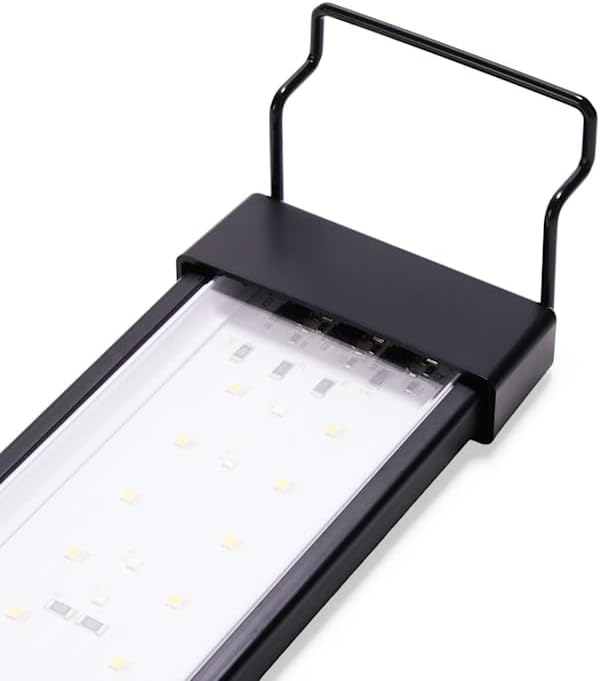
Image: A close-up view of one end of the imagitarium LED light fixture, showing the clear LED panel and the black adjustable mounting leg attached.
4.2 Placement on Aquarium
- Place the assembled LED light fixture onto the rim of your freshwater aquarium. The adjustable legs allow the light to sit approximately 1 inch above the aquarium surface.
- This light typically fits standard aquarium sizing of 55-120 gallons. For frameless or cube-sized aquariums, verify the opening measurement to ensure proper fit. The light fixture itself is 43 inches long.
- Ensure the light is stable and level on the aquarium.
4.3 Connecting Power
- Connect the power adapter to the dynamic controller's input.
- Plug the power adapter into a suitable electrical outlet. The 7-foot electrical cord provides ample length for flexible placement.
- Ensure a drip loop is formed with the power cord to prevent water from traveling along the cord and reaching the electrical outlet.
5. Operating Instructions
Your imagitarium LED Strip Light features a dynamic controller to customize your aquarium's lighting.
5.1 Dynamic Controller Functions
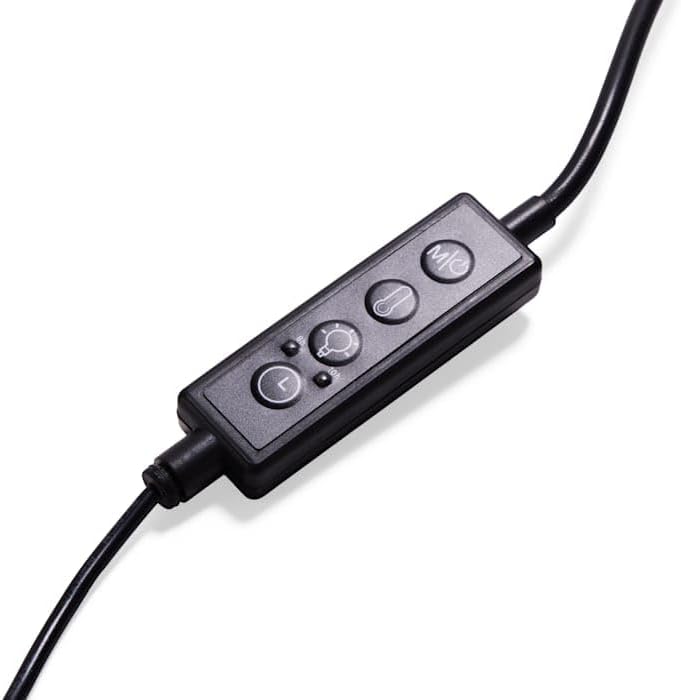
Image: A close-up view of the inline dynamic controller for the imagitarium LED light, showing buttons for power, light mode, brightness, and timer.
- Power Button: Press to turn the light ON or OFF.
- Light Mode Button: Cycle through different light spectrums (e.g., white, blue, red, or combinations). The light spectrum is achieved using a combination of red, blue, and white LEDs.
- Brightness Adjustment: Use the '+' and '-' buttons to increase or decrease the light intensity (Lumens).
- Kelvin Adjustment: Some modes may allow adjustment of the color temperature (Kelvin) to fine-tune the light's appearance. Refer to the controller's specific markings.
- Timer Function: Set the light to turn on and off automatically at specific intervals. Consult the controller's instructions for detailed timer setup.

Image: The imagitarium LED light strip illuminated with a blue light spectrum, suitable for nighttime viewing or specific aquatic environments.
6. Maintenance
Regular maintenance ensures optimal performance and longevity of your LED light.
- Cleaning: Always unplug the light before cleaning. Use a soft, damp cloth to wipe the exterior of the light fixture. Do not use abrasive cleaners or solvents.
- Lens Care: Gently wipe the LED lens cover to remove any water spots or debris that may accumulate and reduce light output.
- Cord Inspection: Periodically inspect the power cord and controller for any signs of damage, fraying, or wear. Replace if necessary.
- Water Exposure: While the light fixture is waterproof, avoid submerging the controller or power adapter in water. If they become wet, unplug immediately and allow to dry completely before reuse.
7. Troubleshooting
If you encounter issues with your imagitarium LED Strip Light, refer to the following common problems and solutions:
| Problem | Possible Cause | Solution |
|---|---|---|
| Light does not turn on. | No power to the unit. Damaged power cord/adapter. Controller malfunction. | Check if the power adapter is securely plugged into the outlet and the controller. Inspect the power cord and adapter for visible damage. If damaged, discontinue use and contact support. Ensure the power button on the controller is pressed. |
| Light flickers or dims unexpectedly. | Loose connection. Power supply issue. Controller malfunction. | Check all connections between the light, controller, and power adapter. Try plugging into a different electrical outlet. Ensure the brightness settings are not set too low. |
| Controller buttons are unresponsive. | Controller malfunction. Water damage to controller. | Unplug the unit for 5 minutes, then plug back in to reset. Ensure the controller is dry and has not been exposed to water. |
If the problem persists after attempting these solutions, please contact imagitarium customer support.
8. Specifications
| Feature | Specification |
|---|---|
| Model Number | AQUA43/FW/PET |
| Product Dimensions (Light Fixture) | 43 x 3.2 x 0.5 inches (L x W x H) |
| Compatible Aquarium Size | Typically 55-120 gallons (44.5-55 inch opening) |
| Wattage | 45 watts |
| Light Source Type | LED (Red, Blue, White) |
| Lamp Type | LED |
| Switch Type | Remote (Inline Controller) |
| Included Components | LED Light Strip, Dynamic Controller, Power Adapter |
| Waterproof | Light fixture is waterproof |
| Mounting Type | Tabletop (on aquarium rim) |
| Indoor/Outdoor Usage | Indoor |
| Efficiency | Energy-efficient |
| Cord Length | 7 feet |
| Item Weight | 2.15 Pounds |
| UPC | 800443693018 |
9. Warranty and Support
For warranty information, technical support, or to inquire about replacement parts, please refer to the contact information provided with your purchase or visit the official imagitarium website. Keep your proof of purchase for warranty claims.