
1. Product Overview
The KOMIGAN KMG-3233 Intelligent Motion Triggered LED Stair Lighting Kit provides automated, sequential lighting for your staircase. Designed for indoor use, this system enhances safety and adds a modern aesthetic to your home. The kit features high-density COB LED strips that deliver uniform, bright illumination without visible spots. Lights activate as you approach and gradually turn off as you leave, creating a smooth lighting effect.
Key features include motion-activated lighting, customizable settings for step count, brightness, speed, and delay times, and the ability to switch between 'Motion Trigger Mode' and 'Stay On Mode'. The 40-inch flexible LED strips are cuttable at 1-inch intervals for a precise fit on 36-inch or 42-inch wide stair treads.
2. Package Contents
Verify that all components are present in your package:
- 1x Instruction Manual
- 8x Light Extension Cords (9.84 ft)
- N-8x Light Extension Cords (16.4 ft) (where N is step count)
- 1x Power Supply
- 1x Power Cord
- 1x Controller
- 7x Nylon Cable Ties
- 2x Motion Sensors
- 1x Daylight Sensor
- 3x Sensor Fixing Brackets
- 3x Sensor Extension Cables (16.4 ft)
- 1x Screw Accessories Kit
- 1x LED Strip Light (40 inches x N, where N is step count)
- 1x Number Stickers

Image: All components included in the KOMIGAN LED Stair Lighting Kit.
3. Setup & Installation
Careful planning and installation are crucial for optimal performance and safety. It is recommended to test all components before permanent installation.
3.1. LED Strip Preparation
- Measure the width of each stair tread.
- The 40-inch COB LED strips can be cut to size at designated 1-inch cutting units. Ensure cuts are made precisely at the marked points to avoid damaging the strip.
- Peel the adhesive backing and firmly attach the LED strips to the underside of each stair nose or riser, ensuring they are straight and secure.

Image: Illustration of the cuttable LED strip and its dimensions.
3.2. Sensor Installation
Install the two motion sensors at the top and bottom of your staircase. The daylight sensor should be placed in an area that receives ambient room light to prevent activation during the day.
- Flush Mounting: Drill appropriate holes for the sensors to sit flush with the wall or stair structure.
- Surface Mounting: Use the provided sensor fixing brackets to mount the sensors on the surface.

Image: Different installation methods for the motion sensors.
3.3. Wiring Diagram
Connect the LED strips, motion sensors, daylight sensor, and power supply to the controller according to the wiring diagram. Ensure all connections are secure and correctly oriented.

Image: Comprehensive wiring diagram for the stair lighting system.
3.4. Installation Videos
Video: Overview of the Motion Sensor LED Stair Lighting Kit KMG-3233 in action, demonstrating sequential lighting.
Video: Demonstration of the KOMIGAN Intelligent Motion Sensor LED Stair Lighting Kit's functionality.
Video: Another view of the KOMIGAN Motion Sensor LED Stair Lighting Kit KMG-3233 in operation.
4. Operating Instructions
4.1. Motion Trigger Mode
In Motion Trigger Mode, the lights will automatically turn on in sequence as a person approaches the stairs from either the top or bottom. The lights will then gradually turn off step by step after a set delay when no motion is detected.
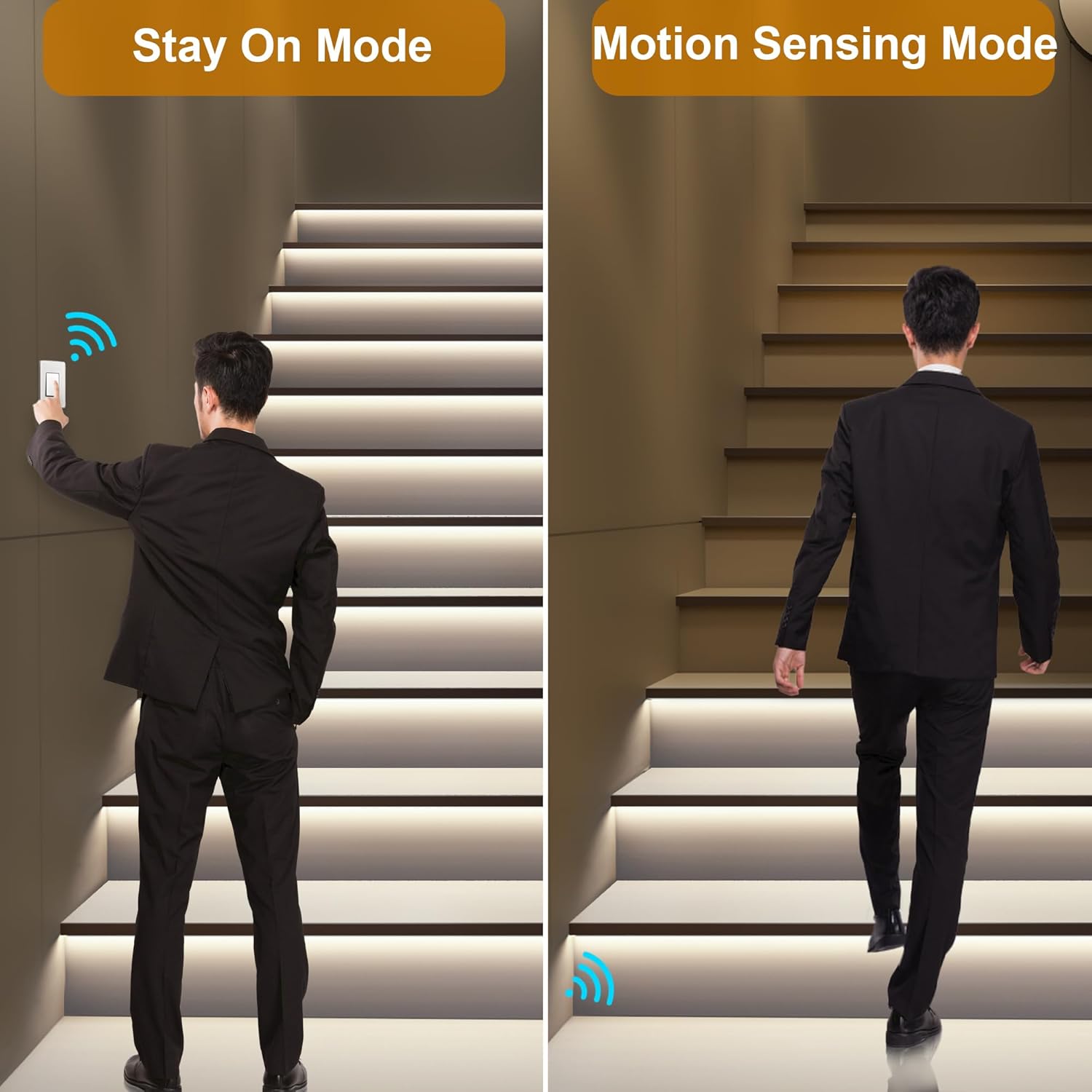
Image: Motion Sensing Mode (right) and Stay On Mode (left).
4.2. Stay On Mode
For continuous illumination, switch to Stay On Mode. In this mode, all stair lights will remain illuminated until manually switched off or returned to Motion Trigger Mode.
4.3. Daylight Detection
The integrated daylight sensor prevents the lights from activating during daylight hours, conserving energy. The system will automatically switch to active mode when ambient light levels drop.

Image: Daylight Detection feature, showing lights off by day and on by night.
4.4. Customizable Settings
The controller allows for adjustment of various parameters:
- Step Count: Adjust to match the number of stairs in your installation.
- Brightness: Control the intensity of the LED lights.
- Speed: Adjust the speed at which the lights turn on and off sequentially.
- Delay Time: Set the duration the lights remain on after motion detection ceases.
5. Maintenance
To ensure the longevity and optimal performance of your LED stair lighting kit, follow these maintenance guidelines:
- Cleaning: Gently wipe the LED strips and sensors with a soft, dry cloth. Avoid using abrasive cleaners or excessive moisture, which can damage electrical components.
- Connection Checks: Periodically inspect all wiring connections to ensure they remain secure. Loose connections can lead to intermittent operation or component failure.
- Sensor Obstruction: Ensure that the motion sensors are free from obstructions (e.g., furniture, decorations) that could block their field of detection.
- Environmental Conditions: This product is designed for indoor use only. Avoid exposure to water, high humidity, or extreme temperatures.
6. Troubleshooting
If you encounter issues with your stair lighting kit, refer to the following troubleshooting steps:
- Lights not turning on:
- Check if the power supply is properly connected and receiving power.
- Verify all wiring connections to the controller and LED strips.
- Ensure motion sensors are not obstructed and are correctly positioned.
- Check the daylight sensor; if it detects too much ambient light, the system may not activate.
- Lights flickering or inconsistent:
- Inspect for loose wiring connections.
- Ensure the power supply is adequate for the number of LED strips installed.
- Check for any damage to the LED strips.
- Motion sensor not responding:
- Confirm the sensor is clean and free from dust or debris.
- Ensure the sensor is within the detection range and not facing direct light sources that could interfere.
- Verify the sensor is correctly wired to the controller.
- Incorrect sequential lighting:
- Ensure LED strips are connected to the controller in the correct numerical order (Step 1, Step 2, etc.).
- Adjust the step count setting on the controller to match your staircase.
If problems persist after following these steps, please contact KOMIGAN customer support for further assistance.
7. Specifications
| Feature | Specification |
|---|---|
| Brand | KOMIGAN |
| Model Number | KMG-3233-40IN6K14 |
| Color Temperature | Cool White 6000K |
| Material | Plastic |
| Light Fixture Form | Wall |
| Room Type | Staircase |
| Product Dimensions | 3.94"L x 1.97"W x 0.98"H (Controller) |
| Specific Uses | Indoor use only |
| Power Source | AC |
| Installation Type | Surface Mount |
| Control Method | Touch (via controller) |
| Light Source Type | LED (COB) |
| Number of Light Sources | 320 LEDs per strip |
| Voltage | 110 Volts (AC) |
| Wattage | 70 watts |
| Brightness | 9800 Lumen (Max) |
| Efficiency | 1400 lumens/watt |
| Water Resistance Level | Not Water Resistant |
| Assembly Required | Yes |
8. Warranty and Support
This product is covered by KOMIGAN's standard manufacturer warranty. For specific warranty details, including duration and coverage, please refer to the warranty card included in your package or visit the official KOMIGAN website.
For technical support, troubleshooting assistance, or inquiries regarding replacement parts, please contact KOMIGAN customer service. Contact information can typically be found in the product packaging or on the KOMIGAN brand store page.


