
Introduction
This manual provides detailed instructions for the installation, operation, and maintenance of your YITAYMLI Wall Mounted Glass Display Cabinet. Please read this manual thoroughly before installation and use to ensure proper function and safety. This cabinet is designed to offer versatile storage and display solutions for various rooms, including kitchens, bathrooms, and living areas.

Figure 1: YITAYMLI Wall Mounted Glass Display Cabinet (White)
Safety Information
Your safety is paramount. Please adhere to the following safety guidelines:
- Assembly Instructions: Always follow the assembly instructions provided.
- Safety Gear: Use appropriate safety gear, such as eye protection and gloves, when drilling into walls.
- Sliding Doors: Be cautious when using the sliding doors to prevent injury from pinch points.
- Weight Capacity: Do not overload the cabinet as it may cause it to become unstable or detach from the wall. Distribute weight evenly.
- Wall Type: Ensure the wall material is suitable for mounting and can support the weight of the cabinet and its contents. Consult a professional if unsure.
Package Contents
Upon opening the package, verify that all components are present and undamaged. The package should contain:
- Cabinet frame (solid wood ecological board)
- Tempered glass sliding doors
- Intelligent sensor light module
- Mounting hardware (screws, wall anchors)
- Dedicated power cord for sensor light charging
- Instruction manual
Setup and Installation
This cabinet is designed for wall-mounted installation. Proper installation is crucial for stability and safety.
1. Before You Begin
- Tools Required: Drill, drill bits suitable for your wall type, level, measuring tape, pencil, screwdriver.
- Location Selection: Choose a sturdy wall location free from electrical wires or plumbing. Consider the desired height and accessibility.
- Dimensions: Refer to the product dimensions to ensure it fits your chosen space.

Figure 2: Product Dimensions (120*30*24cm / 47.2*11.8*9.4in and 80*30*24cm / 31.5*11.8*9.4in)
2. Mounting Instructions
- Marking: Hold the cabinet against the wall at the desired height and use a pencil to mark the drilling points for the mounting brackets. Use a level to ensure the marks are perfectly horizontal.
- Drilling: Drill pilot holes at the marked points using an appropriate drill bit for your wall material. Insert wall anchors if necessary (e.g., for drywall).
- Secure Mounting: Align the cabinet with the drilled holes and secure it to the wall using the provided screws. Ensure the cabinet is firmly attached and does not wobble.
- Install Doors: Carefully slide the tempered glass doors into their designated tracks.
- Sensor Light Installation: Install the intelligent sensor light module inside the cabinet. Connect the dedicated power cord for charging as needed.

Figure 3: Wall-Mounted Cabinet with Sliding Doors
Operating Instructions
1. Sliding Doors
The cabinet features left and right sliding tempered glass doors. To open or close, gently push or pull the door along its track. The smooth mechanism allows for easy access to your items while keeping them protected from dust.

Figure 4: Thickened Explosion-Proof Glass Door
2. Intelligent Sensor Light
The cabinet is equipped with an intelligent sensor light for enhanced visibility. This light operates automatically:
- When the cabinet door is opened, the sensor detects movement and automatically illuminates the interior.
- The light will automatically turn off approximately 30 seconds after the door is closed or no movement is detected.
- The sensor light is rechargeable via the dedicated power cord. Ensure it is charged periodically for optimal performance.

Figure 5: Intelligent Sensor Light Operation
3. Storage and Organization
The cabinet features a double-grid classified storage design, allowing for organized placement of various items. Utilize the internal space efficiently to store kitchen utensils, bathroom necessities, books, or decorative items.
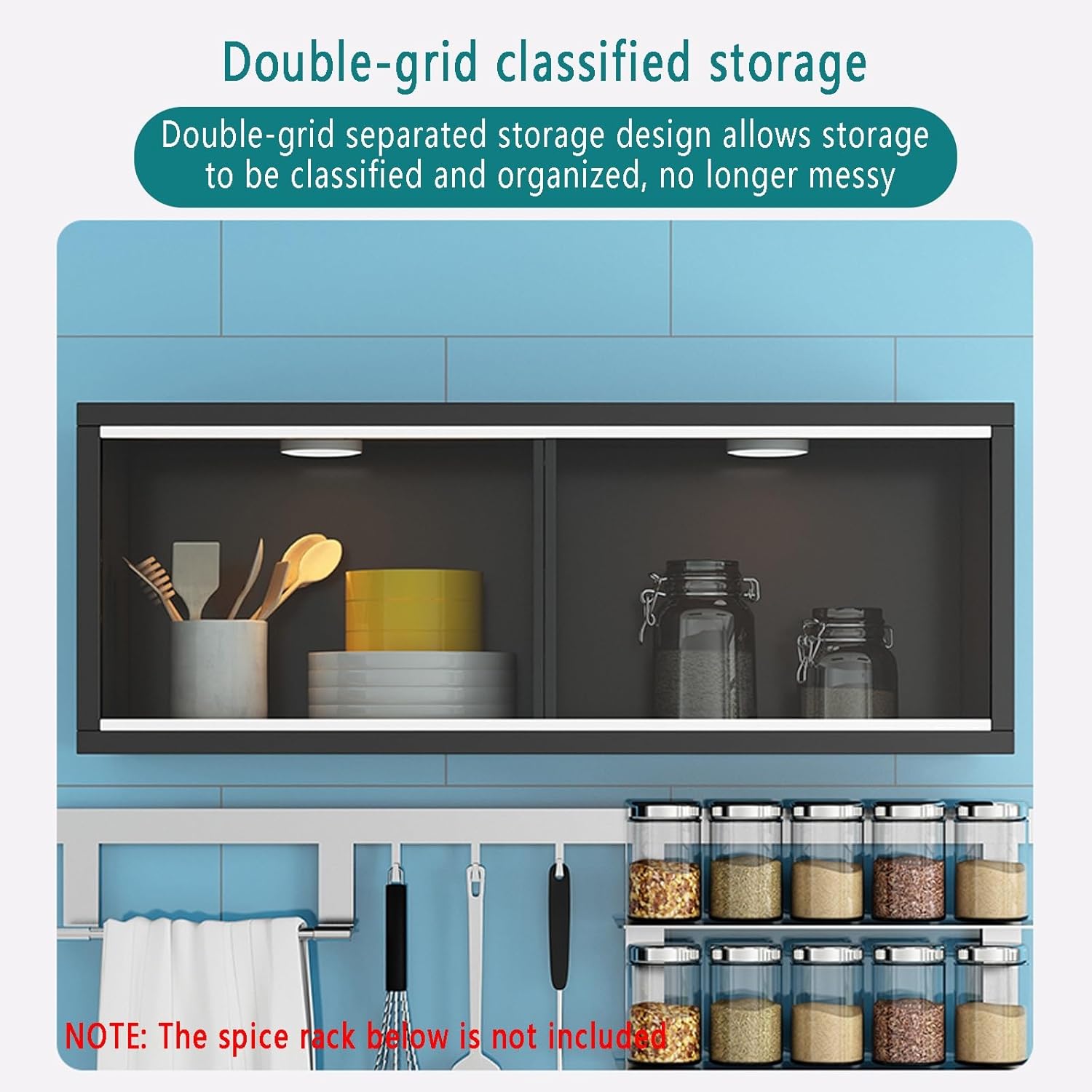
Figure 6: Double-Grid Classified Storage
Maintenance
Regular maintenance will help preserve the appearance and functionality of your cabinet.
- Cleaning the Glass: Use a soft, lint-free cloth and a non-abrasive glass cleaner to wipe the tempered glass doors. Avoid harsh chemicals that may damage the glass or frame.
- Cleaning the Wood: Wipe the solid wood ecological board surfaces with a damp cloth and mild soap if necessary. Dry immediately with a clean, soft cloth. Avoid excessive moisture.
- Dusting: Regularly dust all surfaces with a dry, soft cloth to prevent buildup.
- Sliding Mechanism: Periodically check the sliding door tracks for any debris and clean them to ensure smooth operation.
- Sensor Light: Keep the sensor light clean and free of obstructions to ensure proper function. Recharge as needed.
Troubleshooting
If you encounter any issues with your cabinet, refer to the following common problems and solutions:
| Problem | Possible Cause | Solution |
|---|---|---|
| Sliding doors stick or are difficult to move. | Debris in tracks, misaligned doors. | Clean the tracks thoroughly. Ensure doors are properly seated in their grooves. |
| Sensor light does not turn on. | Battery low/dead, sensor obstructed, faulty module. | Recharge the sensor light using the dedicated power cord. Ensure the sensor is clean and unobstructed. If problem persists, contact customer support. |
| Cabinet feels unstable after mounting. | Improper installation, insufficient wall support, overloaded. | Re-check mounting screws and wall anchors. Ensure the wall can support the weight. Reduce contents if overloaded. Consult a professional if necessary. |
Specifications
Detailed specifications for the YITAYMLI Wall Mounted Glass Display Cabinet:
| Feature | Detail |
|---|---|
| Brand | YITAYMLI |
| Model Number | KKCGBCCGB-AC2625668D31A7609C110D7957C |
| Color | White |
| Material | Solid Wood Ecological Board, Tempered Glass |
| Mounting Type | Wall Mount (Drilling Installation) |
| Dimensions (L*W*H) | 120*30*24cm / 47.2*11.8*9.4in (Also available in 80*30*24cm / 31.5*11.8*9.4in) |
| Item Weight | 8000 Grams / 17.64 pounds |
| Number of Shelves | 1 (creating 2 compartments) |
| Door Style | Left and Right Sliding Doors |
| Lighting Feature | Intelligent Sensor Light (automatic on/off, rechargeable) |
| Finish Type | Glossy |
| Country of Origin | China |

Figure 7: Malacca Ecological Board Material
Warranty and Support
For information regarding warranty coverage, returns, or technical support, please refer to the purchase documentation or contact the seller directly through the platform where the product was purchased. Keep your proof of purchase for any warranty claims.
Manufacturer: YITAYMLI