
ZQRUIZ Wave 100/100R/110R
ZQRUIZ Digital Speedometer Odometer User Manual
For Wave 100, Wave 100R, and Wave 110R Motorcycles
1. Introduction
This manual provides detailed instructions for the installation, operation, and maintenance of your ZQRUIZ Digital Speedometer Odometer. This device is designed for use with Wave 100, Wave 100R, and Wave 110R motorcycles, offering precise digital display of speed, odometer, trip meter, and tachometer functions. Please read this manual thoroughly before installation and use to ensure proper function and safety.
2. Safety Information
Important Safety Instructions:
- Always disconnect the motorcycle's battery before performing any electrical work.
- Ensure all wiring connections are secure and properly insulated to prevent short circuits.
- Consult a qualified motorcycle technician if you are unsure about any installation steps.
- Do not attempt to modify the speedometer's internal components.
- Ensure the speedometer is securely mounted and does not obstruct your view or control of the motorcycle.
3. Package Contents
Verify that all items are present in the package:
- 1 x ZQRUIZ Digital Motorcycle Speedometer Odometer
- 1 x Wiring Harness (pre-attached)
- (Optional: Mounting hardware, if included)

Image 1: Front view of the ZQRUIZ Digital Speedometer Odometer, displaying various digital readouts for speed, RPM, odometer, trip, fuel level, and indicator lights.
4. Setup and Installation
This section outlines the general steps for installing the digital speedometer. Specific wiring may vary slightly depending on your motorcycle's model year. Professional installation is recommended.
4.1 Pre-Installation Checks
- Ensure the motorcycle's ignition is off and the battery is disconnected.
- Identify the existing speedometer location and mounting points.
- Familiarize yourself with the motorcycle's wiring diagram, if available.
4.2 Wiring Connections
The speedometer comes with a pre-attached wiring harness. Refer to the following general color code for connections. Note: This is a general guide; always cross-reference with your motorcycle's specific wiring diagram.
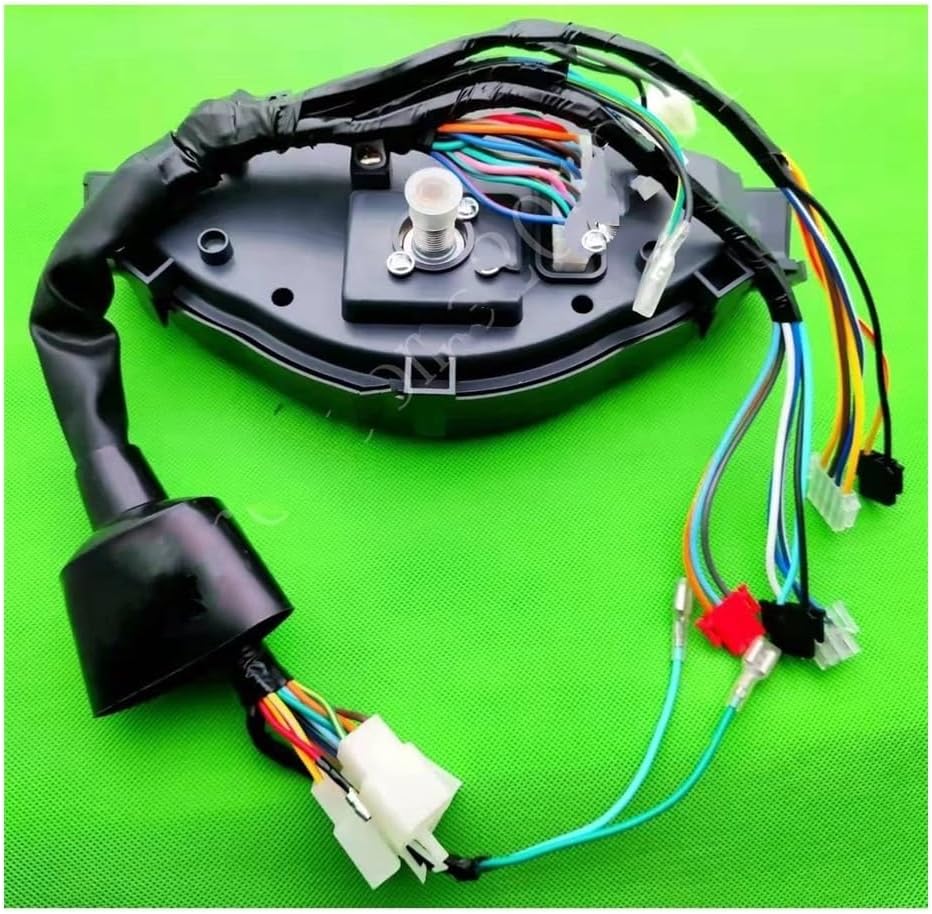
Image 2: Rear view of the speedometer unit, showing the integrated wiring harness with multiple colored wires and connectors.
| Wire Color | Function |
|---|---|
| Red | Positive Power (DC 8-12V) |
| Black | Ground |
| Orange | Left Turn Signal |
| Light Blue | Right Turn Signal |
| Dark Blue | High Beam Indicator |
| Green | Neutral Gear Indicator |
| Yellow/White | Fuel Level Sensor Input |
| Pink/Green | Speed Sensor Input |
| Brown/White | Tachometer Signal Input |
Connect the corresponding wires from the speedometer harness to your motorcycle's electrical system. Ensure all connections are secure and protected from moisture and vibration.
4.3 Mounting
- Secure the speedometer unit to the motorcycle's dashboard or designated mounting bracket using appropriate fasteners.
- Ensure the unit is stable and does not vibrate excessively during operation.
5. Operating Instructions
Once installed, the speedometer will display various information upon turning the ignition on.
5.1 Display Functions

Image 3: Close-up of the digital display, showing the speedometer, tachometer, odometer, trip meter, clock, and various indicator icons.
- Speed Display: Shows current speed in MPH or KM/H.
- Tachometer: Displays engine RPM (revolutions per minute).
- Odometer: Records total distance traveled. This value is typically non-resettable.
- Trip Meter: Records distance for a single journey. This can usually be reset.
- Clock: Displays current time.
- Fuel Gauge: Indicates fuel level.
- Indicator Lights: Neutral, High Beam, Turn Signals, Engine Check (if applicable).
5.2 Setting the Clock and Units
Specific button functions for setting the clock or switching between MPH/KM/H may vary. Typically, there is a button (often labeled "SET" or "MODE") on the unit. Press and hold this button to enter settings mode, then use short presses to cycle through options and another long press to confirm or exit.
- To Set Clock: In settings mode, navigate to the clock setting. Use short presses to adjust hours/minutes, and a long press to move to the next digit or confirm.
- To Change Units (MPH/KM/H): In settings mode, navigate to the unit setting. Use a short press to toggle between MPH and KM/H, and a long press to confirm.
- To Reset Trip Meter: With the trip meter displayed, press and hold the button until the trip value resets to zero.
6. Maintenance
The ZQRUIZ Digital Speedometer Odometer requires minimal maintenance.
- Cleaning: Wipe the display and casing with a soft, damp cloth. Do not use abrasive cleaners or solvents, as these can damage the plastic and display.
- Wiring Inspection: Periodically check all wiring connections for corrosion, fraying, or looseness. Ensure they remain securely insulated.
- Environmental Protection: While designed for motorcycle use, avoid prolonged exposure to extreme weather conditions when possible.
7. Troubleshooting
If you encounter issues with your speedometer, refer to the following common problems and solutions:
| Problem | Possible Cause | Solution |
|---|---|---|
| No display/Power | Loose power connection, blown fuse, faulty wiring. | Check red (positive) and black (ground) wire connections. Inspect motorcycle fuse box. Ensure battery is connected and charged. |
| Incorrect speed reading | Speed sensor not connected, faulty sensor, incorrect calibration (if applicable). | Verify speed sensor wire (Pink/Green) connection. Ensure sensor is clean and properly installed. |
| Tachometer not working | Tachometer signal wire not connected or faulty. | Check tachometer signal wire (Brown/White) connection to the ignition coil or CDI unit. |
| Indicator lights not working | Incorrect wiring for specific indicator, faulty bulb/LED. | Verify connections for turn signals, high beam, neutral, etc. (Orange, Light Blue, Dark Blue, Green wires). |
| Fuel gauge inaccurate | Fuel sensor not connected, incompatible sensor, faulty sensor. | Check fuel level sensor wire (Yellow/White) connection. Ensure your motorcycle's fuel sensor is compatible. |
If problems persist after following these steps, contact customer support or consult a professional technician.
8. Specifications
- Model: ZQRUIZ Digital Speedometer Odometer for Wave 100/100R/110R
- Power Voltage: DC 8-12V
- Display Type: Digital
- Material: ABS
- Functions: Speedometer, Odometer, Trip Meter, Tachometer, Clock, Fuel Gauge, Indicator Lights (Neutral, High Beam, Turn Signals)
- Weight: Approximately 12.5 ounces (355 grams)
- Package Dimensions: Approximately 1.18 x 0.79 x 0.39 inches
9. Warranty and Support
For warranty information and customer support, please refer to the retailer or manufacturer's official website. Keep your purchase receipt as proof of purchase.
Manufacturer: ZQRUIZ
ASIN: B0DK91DPM7
Date First Available: October 18, 2024