
Viaozutis A
Viaozutis Vanity Desk Model A User Manual
Model: A | Brand: Viaozutis
Important Safety Information
Assembly may require tools and safety precautions. Always unplug electrical components before use and follow manufacturer's instructions for safe assembly and usage. Ensure all electrical connections are secure and comply with local electrical codes. Do not overload power outlets.
Product Overview
The Viaozutis Vanity Desk Model A is designed to provide a functional and organized space for personal grooming. It features a sliding LED mirror with adjustable lighting, multiple storage options, integrated power outlets, and a comfortable stool.

Image 1: The Viaozutis Vanity Desk Model A, showcasing its overall design with the illuminated mirror, storage shelves, drawers, and accompanying stool.
Key Features:
- Sliding LED Mirror with three adjustable lighting modes.
- Integrated power outlets and USB ports for electronic devices.
- Spacious storage including a large drawer, three small drawers, and open shelving.
- Included upholstered stool for comfort.
- Durable engineered wood construction with a triamine veneer finish.
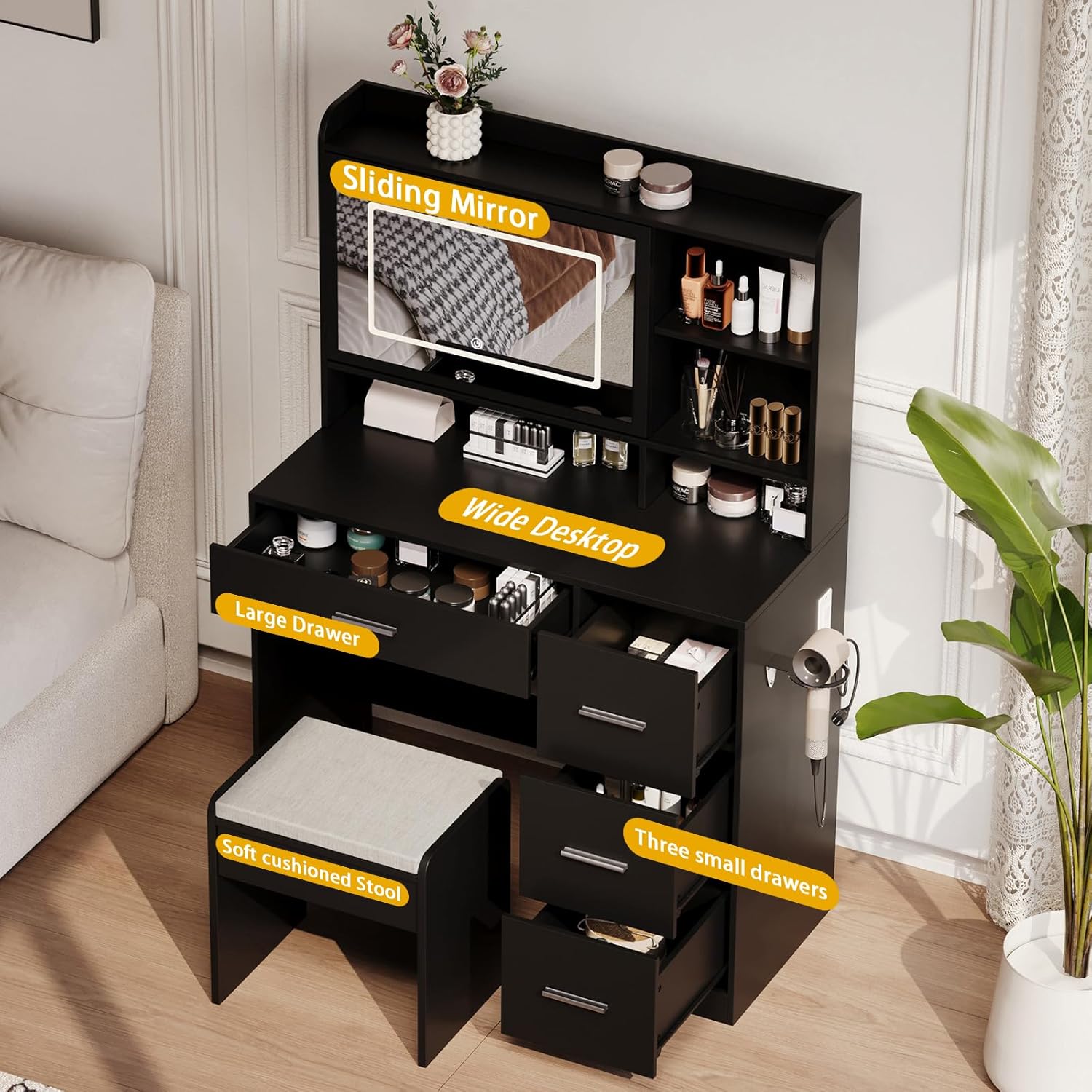
Image 2: Detailed view highlighting key features such as the sliding mirror, wide desktop, large drawer, three small drawers, and soft cushioned stool.
Package Contents
Before assembly, verify that all components are present and undamaged. Refer to the included assembly manual for a complete list of parts.
- Vanity Desk Components (engineered wood panels, hardware)
- Sliding LED Mirror Unit
- Upholstered Stool
- Power Outlet and USB Port Module
- Hair Dryer Rack
- Assembly Instructions
Setup and Assembly
Assembly of the Viaozutis Vanity Desk Model A requires careful attention to the provided instructions. It is recommended to have two people for assembly due to the size and weight of some components.
Required Tools (Not Included):
- Phillips Head Screwdriver
- Hammer (for dowels)
- Measuring Tape (optional, for placement)
Assembly Steps:
- Unpack and Organize: Lay out all parts on a clean, soft surface to prevent scratches. Verify all parts against the parts list in the separate assembly manual.
- Assemble Base Structure: Follow the numerical sequence in the assembly manual to construct the main desk frame and drawer compartments.
- Install Drawers: Assemble the large and small drawers according to instructions and insert them into their respective compartments. Ensure smooth operation.
- Attach Mirror Unit: Secure the LED mirror unit to the top section of the desk. Connect any necessary wiring for the lights and power outlets as directed.
- Install Stool: Assemble the upholstered stool.
- Final Checks: Ensure all screws are tightened, and the desk is stable. Connect the power cord to a suitable electrical outlet.
Note: Using power tools for assembly may cause damage to the furniture if not used carefully. Hand-tighten screws to avoid stripping or cracking wood.

Image 3: Dimensional diagram of the vanity desk and stool, providing measurements for planning placement.
Operating Instructions
LED Mirror Lighting:
The integrated LED mirror features three adjustable lighting modes: Warm White, Warm Yellow, and Cool White.
- Power On/Off: Lightly touch the power button icon on the mirror to turn the lights on or off.
- Change Color Mode: With the lights on, repeatedly touch the power button icon to cycle through Warm White, Warm Yellow, and Cool White modes.
- Adjust Brightness: Press and hold the power button icon to increase or decrease the brightness within the selected color mode. Release when desired brightness is achieved.

Image 4: Illustration of the three adjustable lighting modes (Cold White, Warm White, Warm Yellow) and their corresponding color temperatures (6500K, 4500K, 3500K).
Sliding Mirror Function:
The mirror is designed to slide horizontally, revealing a hidden storage shelf behind it.
- Gently push the mirror to the left or right to access the storage compartment.
- Ensure no items obstruct the mirror's path when sliding.

Image 5: Visual representation of the mirror sliding left and right to reveal or conceal the storage space behind it.
Power Outlets and USB Ports:
The vanity desk is equipped with two standard power outlets and two USB ports for convenient charging and powering of electronic devices.
- Plug in your devices directly into the available outlets or USB ports.
- Do not exceed the maximum power rating of the integrated power strip.

Image 6: A close-up view of the integrated power outlets and USB ports, designed for easy access and charging of electronic devices.
Maintenance and Care
- Cleaning: Wipe surfaces with a soft, damp cloth. Avoid abrasive cleaners or harsh chemicals that may damage the finish.
- Mirror Care: Use a glass cleaner specifically designed for mirrors. Spray cleaner onto a cloth, not directly onto the mirror, to prevent liquid from seeping into the edges.
- Drawer Maintenance: Periodically check drawer slides for smooth operation. If drawers become stiff, apply a small amount of silicone lubricant to the slides.
- Electrical Components: Ensure the power cord is not pinched or damaged. Keep liquids away from power outlets and USB ports.
- Stability: Regularly check all screws and fasteners to ensure they remain tight. Re-tighten if necessary.
Troubleshooting
| Problem | Possible Cause | Solution |
|---|---|---|
| LED Mirror lights not turning on. |
|
|
| Lights not changing color or brightness. |
|
|
| Drawers are stiff or difficult to open/close. |
|
|
| Sliding mirror is not moving smoothly. |
|
|
Specifications
| Feature | Detail |
|---|---|
| Brand | Viaozutis |
| Model Number | A |
| Frame Material | Engineered Wood |
| Furniture Finish | Triamine veneer |
| Product Dimensions (L x W x H) | 40 x 15 x 10 inches (Desk) |
| Item Weight | 30 pounds |
| Mirror Type | Sliding LED Mirror |
| Lighting Modes | 3 (Warm White, Warm Yellow, Cool White) |
| Power Features | 2 Power Outlets, 2 USB Ports |
| Storage | 1 Large Drawer, 3 Small Drawers, Open Shelving, Hidden Mirror Storage |
| Assembly Required | Yes |
| UPC | 014679366268 |
Warranty and Support
For warranty information, product support, or to purchase replacement parts, please contact Viaozutis customer service. Refer to your purchase documentation for specific warranty terms and contact details.
Online Support: Visit the official Viaozutis website for FAQs and support resources.
Ask a question about this manual
Ask about setup, troubleshooting, compatibility, parts, safety, or missing instructions. Manuals+ will review the question and use this page’s manual context to help answer it.