
1. Introduction
Thank you for choosing the MIEKLALE Lii-500S 4-Bay Smart LCD Rechargeable Battery Charger. This device is designed to efficiently charge, discharge, and test a wide range of rechargeable batteries, providing detailed information through its intelligent LCD display. Please read this manual thoroughly before use to ensure safe and optimal operation.

Image 1.1: MIEKLALE Lii-500S Charger with accessories.
2. Safety Information
To prevent injury, property damage, or damage to the charger and batteries, observe the following safety precautions:
- Read all instructions before use.
- Apply only in the inner region.
- Operate only with the supplied AC adapter (12V/3A).
- Disconnect the supply before making or breaking connections to the battery.
- WARNING: Explosive gases. Prevent flames and sparks. Provide adequate ventilation during charging.
- Do not charge AA/AAA Li-ion 1.5V batteries or LiFePO4 batteries with this charger.
- Ensure battery length is less than 72mm (2.8 inches).
- The charger features multi-protection functions including overcharge, over-discharge, short-circuit, over-temperature, OV activation, intelligent identification of bad batteries, and anti-reverse protection.

Image 2.1: MIEKLALE Lii-500S Safety Protections.
3. Package Contents
The MIEKLALE Lii-500S package typically includes:
- MIEKLALE Lii-500S 4-Bay Smart LCD Rechargeable Battery Charger
- Power Adapter (12V/3A)
- Car Charger Adapter (optional, may vary by package)
- User Manual (this document)
4. Product Features
- Fast and Efficient Charging: Includes a 12V/3A power adapter. Supports selectable charging currents up to 2A per slot (2000mA for Li-ion, 1000mA for Ni-MH/Cd) for efficient and fast charging.
- Battery Capacity Tester: Features a TEST mode to accurately determine battery capacity. The process involves fully charging, fully discharging, and then fully recharging the battery.
- Wide Battery Compatibility: Suitable for most rechargeable cylindrical batteries with lengths from 30mm to 72mm. Compatible with Li-ion batteries (e.g., 26650, 21700, 18650, 14500, 17500, RCR123) and Ni-MH/Cd batteries (AA, AAA, A, SC). Note: Not compatible with AA/AAA Li-ion 1.5V batteries or LiFePO4 batteries.
- Intelligent Safety Protections: Equipped with multiple safety features including overcharge, over-discharge, short-circuit, over-temperature, OV activation, intelligent bad battery identification, and anti-reverse protection.
- Smart LCD Display: A clear yellow LCD displays all essential information on one screen, including Voltage (V), Current (mA), Time (h), and Battery Capacity (mAh).
- Multifunctionality: Can also function as a power bank to charge mobile devices via its 5V USB output when batteries are inserted.

Image 4.1: Compatible Battery Types and Sizes.

Image 4.2: Charger functioning as a power bank.
5. Setup
- Connect Power: Plug the provided 12V/3A power adapter into the DC 12V input port on the back of the charger. Then, plug the adapter into a wall outlet. The LCD screen will illuminate.
- Initial Display: Upon power-on, the charger will perform a self-test, and the LCD will display information for a few seconds before entering standby mode.
6. Operating Instructions
6.1 Inserting Batteries
Carefully insert one to four compatible rechargeable batteries into the charging slots. Ensure the positive (+) and negative (-) terminals of the batteries match the markings on the charger slots. The spring-loaded contacts will adjust to different battery lengths.

Image 6.1: Inserting batteries into the charger.
6.2 Understanding the LCD Display
The LCD provides real-time information for each battery slot:
- Voltage (V): Current battery voltage.
- Current (mA): Selected charging/discharging current.
- Time (h): Elapsed time for the current operation.
- Capacity (mAh): Accumulated capacity during charging/discharging or tested capacity.
- Mode: Indicates the current operating mode (CHARGE, DISCHARGE, TEST).
- Battery Icon: Shows the approximate charge level.
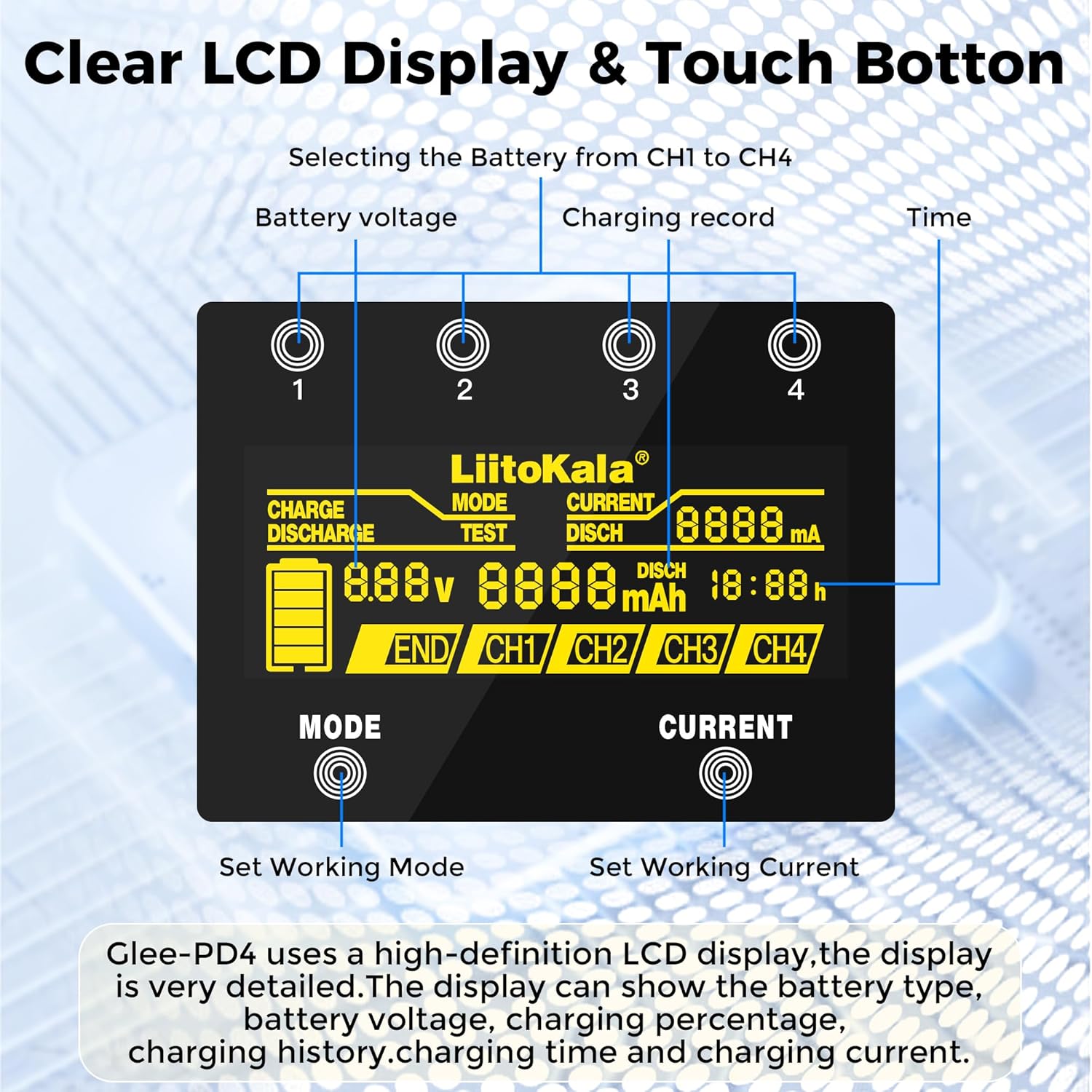
Image 6.2: Detailed view of the LCD display.
6.3 Selecting Operating Modes and Current
Each of the four slots can operate independently. After inserting a battery, the charger will automatically detect the battery type and begin charging at a default current. To change settings:
- Select Slot: Press the corresponding numbered button (1, 2, 3, or 4) above the slot to select it. The display for that slot will become active.
- Change Mode: Press the 'MODE' button to cycle through the available modes: CHARGE, DISCHARGE, and TEST.
- Adjust Current: While a mode is selected, press the 'CURRENT' button to cycle through available charging/discharging currents (e.g., 500mA, 700mA, 1000mA, 2000mA). Note that 2000mA is only available for Li-ion batteries.
- Confirm: If no button is pressed for a few seconds, the selected mode and current will be confirmed, and the operation will begin.

Image 6.3: Mode and Current selection.
6.4 Specific Mode Operations
- CHARGE Mode: The charger will charge the battery to its full capacity. The display will show 'CH' for charge.
- DISCHARGE Mode: The charger will discharge the battery at a selected current (250mA or 500mA). This is useful for conditioning batteries or safely preparing them for disposal. The display will show 'DISCH' for discharge.
- TEST Mode: This mode measures the actual capacity of the battery. The process is:
1. Full Charge
2. Full Discharge (records discharge capacity)
3. Full Charge again.
The final displayed mAh value represents the tested capacity. The display will show 'TEST'.


Image 6.4: Charge, Discharge, and Test Mode displays.
6.5 Power Bank Function
The charger can act as a power bank. Insert charged batteries into the slots, then connect your mobile device to the USB OUT:5V port on the side of the charger using a USB cable. The charger will provide 5V output to charge your device.
7. Maintenance
- Keep the charger clean and dry. Avoid exposure to moisture or extreme temperatures.
- Use a soft, dry cloth to clean the charger's exterior. Do not use abrasive cleaners or solvents.
- Ensure the battery contacts are clean for optimal performance.
- Store the charger in a cool, dry place when not in use.
8. Troubleshooting
- Charger not powering on: Ensure the power adapter is securely connected to both the charger and a working wall outlet. Verify the power adapter is the original 12V/3A unit.
- Battery not detected/charging: Check if the battery is inserted correctly with the correct polarity. Ensure the battery is a compatible type and size (30-72mm length, not 1.5V Li-ion or LiFePO4). Clean battery contacts if necessary.
- Display shows error or behaves erratically: This could indicate a faulty battery or an internal issue. Try a different battery. If the issue persists across multiple batteries and slots, contact customer support.
- Overheating: While the charger has over-temperature protection, ensure adequate ventilation during operation. Do not cover the charger. If excessive heat is detected, disconnect power and remove batteries.
Video 8.1: MIEKLALE 18650 Battery Charger overview by the seller. This video demonstrates the charger's features and operation, which can be helpful for troubleshooting basic usage.
9. Specifications
| Feature | Specification |
|---|---|
| Model Number | M500S |
| Input | DC 12V/3A |
| Output (Li-ion) | DC 4.2V 2000mA*2, 500mA/700mA/1000mA*4 |
| Output (Ni-MH/Cd) | DC 1.48V 500mA/700mA/1000mA*4 |
| USB Output | DC 5V 1000mA |
| Compatible Battery Types | Ni-MH/Cd (AA, AAA, A, SC), 3.7V Li-ion (26650, 22650, 26500, 18650, 18490, 17670, 17500, 17355, 16340, 14500, 10440) |
| Battery Length Support | 30mm - 72mm |
| Product Dimensions | 1.42 x 3.94 x 6.5 inches (or 7.6"D x 1.3"W x 5.5"H) |
| Item Weight | 1.1 pounds |
10. Warranty and Support
Specific warranty information is not provided in the product details. For warranty claims or technical support, please contact MIEKLALE customer service directly through their official channels or the retailer where the product was purchased.