1. Safety Information
Please read and understand all safety instructions and warnings before assembling or operating your AMADA HOMEFURNISHING adjustable bed frame. Failure to do so may result in injury or product damage.
- Keep children and pets away from the bed frame during operation.
- Ensure all electrical connections are secure and properly grounded.
- Do not operate the bed frame if any parts are damaged or missing.
- Avoid placing heavy objects on the adjustable sections of the bed frame.
- Do not attempt to disassemble or repair the motorized components yourself. Contact customer support for assistance.
- Ensure adequate clearance around the bed frame when adjusting positions to prevent pinching or crushing.
2. Package Contents
Verify that all components are present before beginning assembly:
- Adjustable bed frame
- Height adjustable bed legs (2", 3", and 8" sections)
- Wireless Remote Control
- Mattress retainer bar
- Power adapter and cables
- Installation Manual (this document)
3. Setup & Assembly
The AMADA HOMEFURNISHING adjustable bed frame is designed for quick and tool-free assembly. Follow these 3 simple steps:
- Attach the Legs: Carefully unfold the bed frame. Screw the desired leg sections (2", 3", and 8" for various height options) into the designated points on the underside of the frame. Ensure all legs are securely tightened.
- Connect Electronics: Connect the power adapter to the bed frame's control box and then plug it into a grounded electrical outlet. Ensure all motor cables are properly connected.
- Insert Mattress Retainer Bar: Place the mattress retainer bar into the slots at the foot of the bed frame. This prevents the mattress from sliding during adjustments.

Figure 3.1: Attaching the adjustable legs to the bed frame. The legs can be configured for different heights.
Video 3.1: A seller-provided video showcasing the quick and easy 3-step assembly process of the adjustable bed frame.
4. Operating Instructions
4.1. Adjustable Angles (Head & Foot Incline)
The Split King bed frame allows independent adjustment of the head and foot sections for personalized comfort. Use the wireless remote to elevate your head up to 65° and feet up to 45°.
- Head Incline: Press the HEAD UP or HEAD DOWN buttons on the remote to adjust the head section.
- Foot Incline: Press the FOOT UP or FOOT DOWN buttons on the remote to adjust the foot section.
- Zero Gravity: Press the ZG button for a pre-set position that elevates the head and feet, promoting circulation and pressure relief.
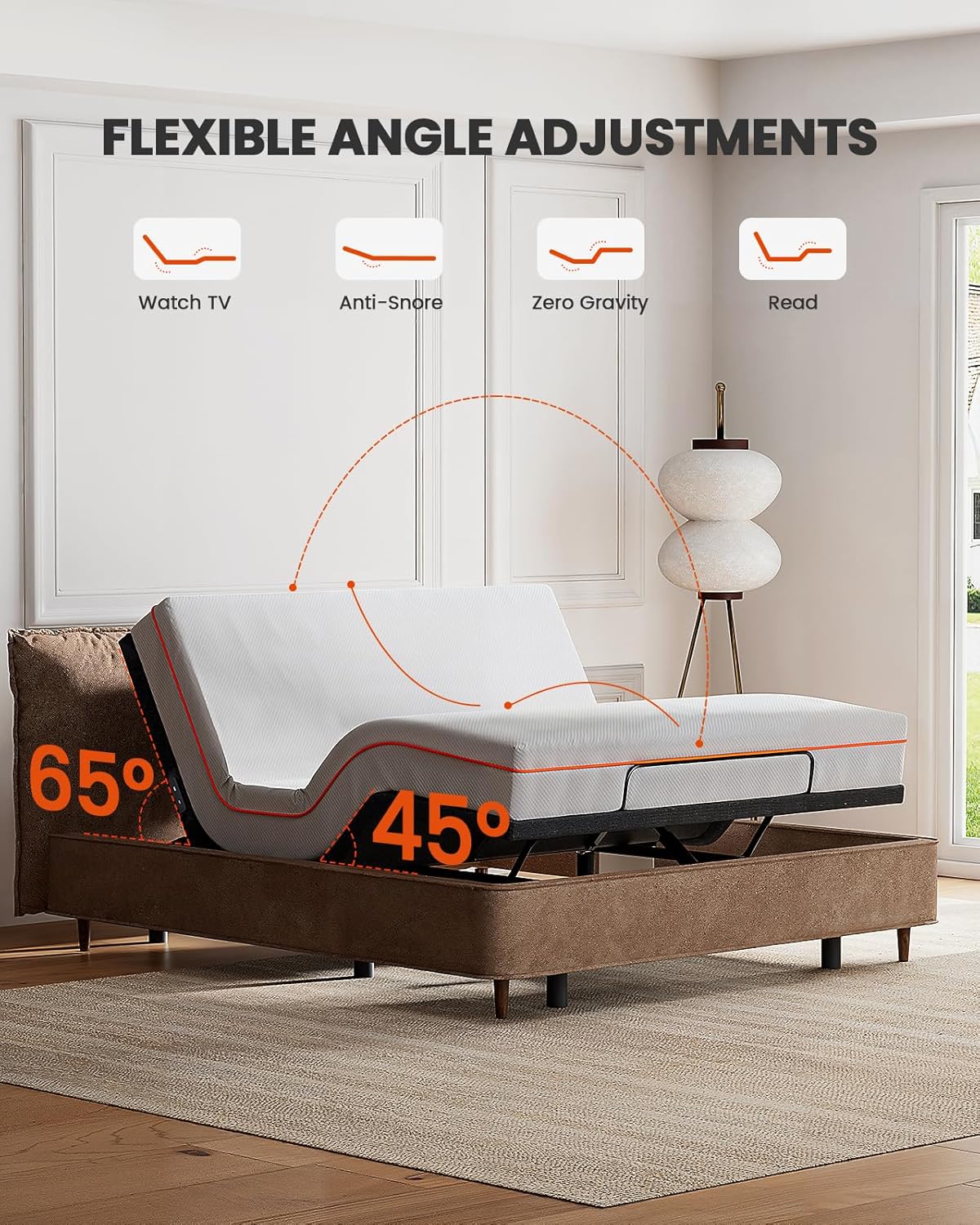
Figure 4.1: Flexible angle adjustments for head (up to 65°) and foot (up to 45°) sections.
Video 4.1: A seller-provided video demonstrating the adjustable head and foot inclines of the bed frame.
4.2. Massage Function
The bed frame includes head and foot massage options to relieve muscle tension and enhance circulation. Control these features using the wireless remote.
- Activate Massage: Press the MODE button to cycle through different massage modes.
- Adjust Intensity: Use the M1, M2, M3 buttons (if available, or repeated MODE presses) to select from three intensity levels.
- Set Timer: Use the TIMER buttons (10MIN, 20MIN, 30MIN) to set the duration of the massage.
4.3. USB Charging Ports & Under-Bed Nightlight
Conveniently charge your devices and illuminate the area around your bed.
- USB Charging: The bed frame features USB-A and USB-C charging ports on each side. Simply plug in your devices to charge.
- Under-Bed Nightlight: Press the LIGHT button on the remote to activate the soft under-bed nightlight. This light provides subtle illumination without disturbing your partner and typically illuminates for 5 minutes.

Figure 4.2: USB-A and USB-C charging ports conveniently located on both sides of the bed frame.
5. Key Features
5.1. Adjustable Height Options
Customize the height of your bed frame to 8", 10", 11", or 13" by combining the three leg sections (2", 3", and 8"). This allows for easy access or additional under-bed storage space.
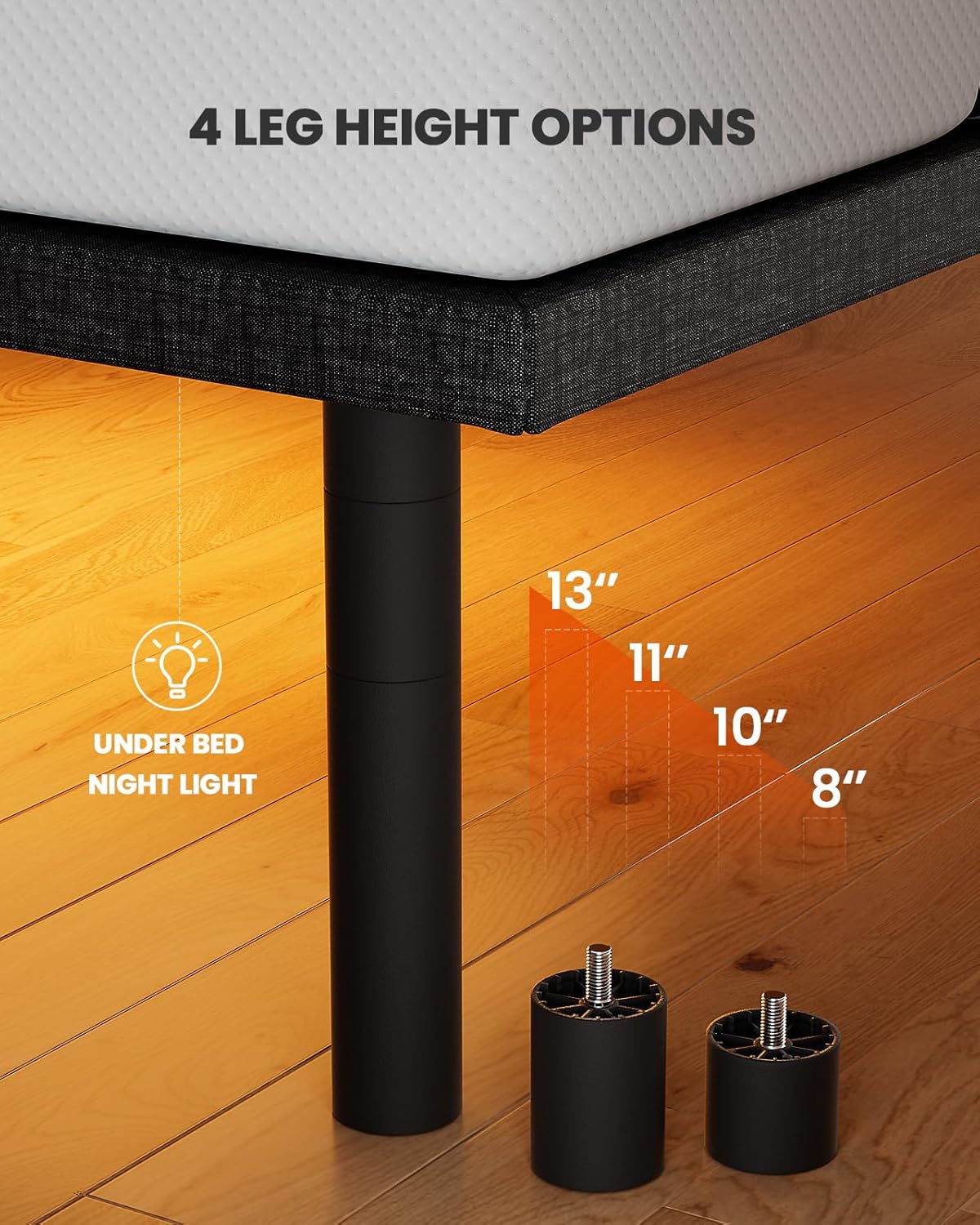
Figure 5.1: Various leg height configurations for personalized bed height.
5.2. Mattress Compatibility
This bed frame provides stable and durable support for memory foam, latex, and hybrid mattresses. It is compatible with 2 Twin XL mattresses (37.4" x 79.3" each) and mattresses of 14 inches or below in thickness.
5.3. Remote Control Features
The wireless remote control offers intuitive access to all bed frame functions:
- Head/Foot Adjustment: Individual buttons for raising and lowering head and foot sections.
- Zero Gravity (ZG): One-touch button for the Zero Gravity preset position.
- Memory Presets (M1, M2): Program and save your favorite positions for quick recall.
- Massage Control: Buttons for activating massage, adjusting intensity, and setting timers.
- Under-Bed Light: Button to turn the nightlight on/off.
- Flat Button: One-touch button to return the bed to a flat position.
- Lock Button: To prevent accidental adjustments.
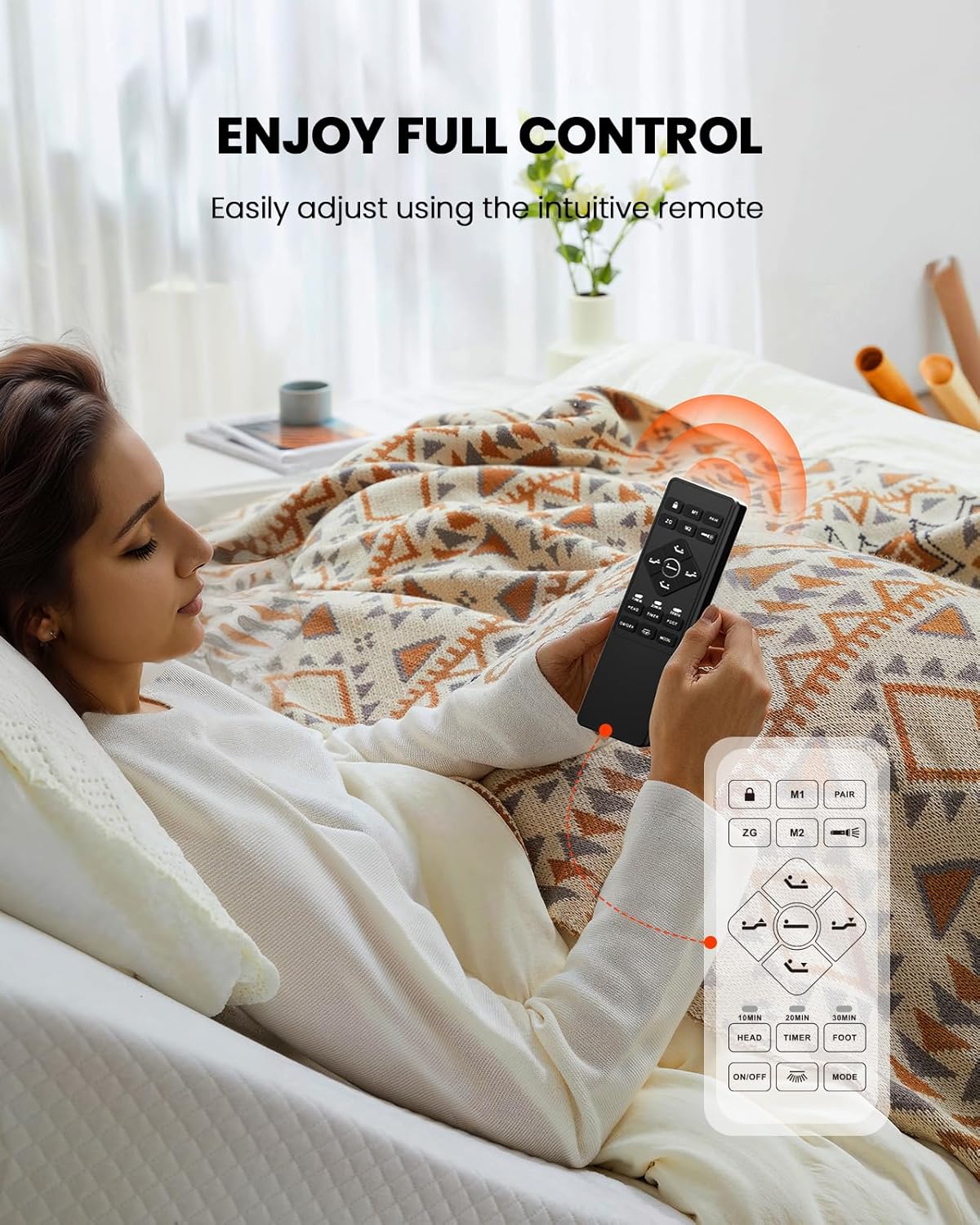
Figure 5.2: Wireless remote control for full bed frame functionality.
6. Maintenance
To ensure the longevity and optimal performance of your adjustable bed frame, follow these maintenance guidelines:
- Cleaning: Wipe the frame with a soft, damp cloth. Avoid harsh chemicals or abrasive cleaners.
- Inspections: Periodically check all bolts, screws, and connections to ensure they are tight.
- Cables: Ensure power cords and motor cables are not pinched or tangled.
- Weight Capacity: Do not exceed the recommended weight capacity of the bed frame.
7. Troubleshooting
If you encounter any issues with your adjustable bed frame, refer to the following common solutions:
| Problem | Possible Cause | Solution |
|---|---|---|
| Bed frame does not operate. | Power cord unplugged; remote control not paired or batteries low. | Check power connections. Replace remote batteries. Re-pair remote control (refer to remote pairing instructions in the full manual). |
| Motor makes noise but bed does not move. | Obstruction under the bed frame; mechanism jammed. | Remove any obstructions. Ensure no cables are tangled. |
| Massage function not working. | Massage unit unplugged; remote issue. | Check connections to the massage unit. Ensure remote batteries are fresh. |
If the problem persists, please contact AMADA HOMEFURNISHING customer support.
8. Specifications
- Model: 01B-SK1
- Size: Split King
- Product Dimensions: 79.53"L x 74.8"W x 14.76"H
- Material: Metal
- Color: Black
- Special Features: Adjustable, Adjustable Leg Height, Massage, USB-A & USB-C Ports, Under Bed Night Light
- Compatible Mattress Sizes: 2 × Twin XL (37.4" × 79.3"), Latex and memory foam mattresses of 14 inches and below
- Assembly Required: Yes (minimal, tool-free)
- UPC: 810174348705
9. Warranty & Support
For warranty information, product support, or to purchase replacement parts, please contact AMADA HOMEFURNISHING customer service. Keep your purchase receipt and model number handy for faster service.
Contact Information: Refer to the contact details provided on the AMADA HOMEFURNISHING official website or your purchase documentation.


