
DISTRIPLAY HB-R1201
DISTRIPLAY RC Drift Racing Rally Car 1/12 (Brushed)
Model: HB-R1201 User Manual
1. Safety Information
Please read and understand all safety instructions before operating the RC car. Failure to follow these instructions may result in injury or damage to the product.
- This product contains small parts and is not recommended for children under 3 years of age due to choking hazards.
- Always use this product under direct adult supervision.
- The manufacturer's recommended age for use is 8 years and up.
- Keep fingers, hair, and loose clothing away from moving parts.
- Do not operate the RC car near people, pets, or obstacles.
- Avoid operating in wet conditions or on public roads.
- Always turn off the RC car and transmitter when not in use.
2. Package Contents
Verify that all items listed below are included in your package:
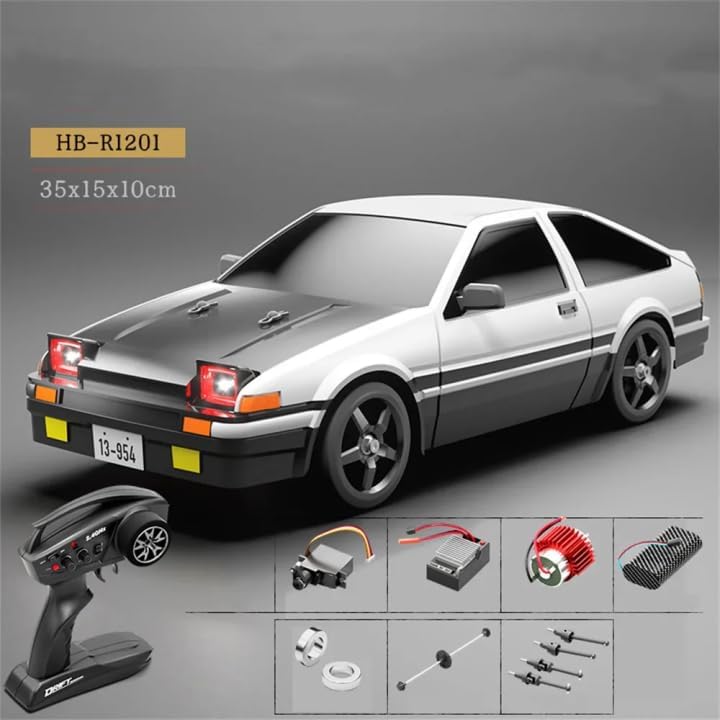
- DISTRIPLAY RC Drift Racing Rally Car (1/12 Scale)
- 2.4Ghz Transmitter (Remote Control)
- 7.4V (2S) 1500 mAh Li-ion Battery
- Battery Charger
3. Product Overview
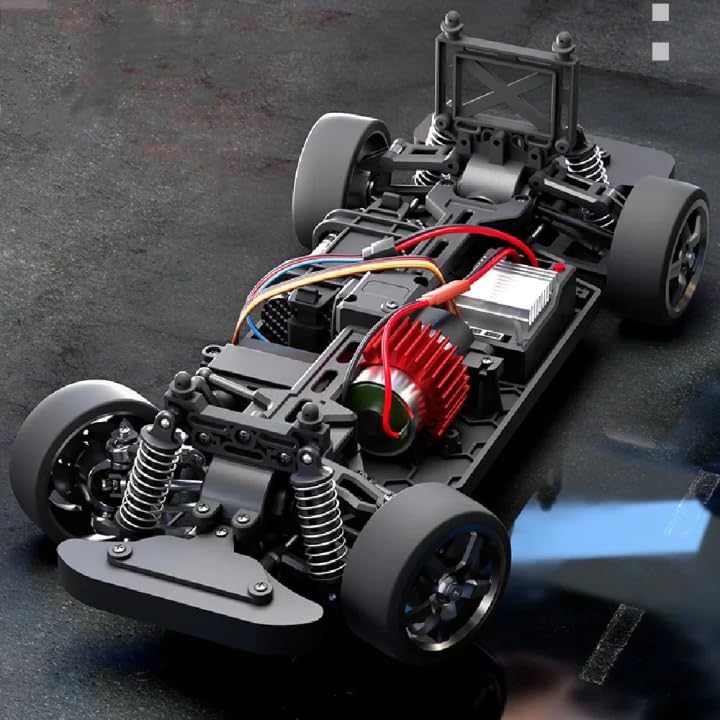
The DISTRIPLAY RC Drift Racing Rally Car is a 1/12 scale remote-controlled vehicle designed for racing and drifting. It features a brushed motor and 4-wheel drive (4WD) for enhanced performance and control.



4. Setup
4.1 Charging the Battery
- Connect the 7.4V Li-ion battery to the provided charger.
- Plug the charger into a suitable power outlet.
- Allow the battery to charge fully. Refer to the charger's indicator lights for charging status (e.g., red for charging, green for fully charged).
- Do not leave the battery charging unattended.
4.2 Installing the Car Battery
- Locate the battery compartment on the RC car.
- Carefully connect the fully charged 7.4V Li-ion battery to the car's power connector.
- Place the battery securely within the compartment and close the cover.
4.3 Installing Transmitter Batteries
- Open the battery cover on the back of the 2.4Ghz transmitter.
- Insert the required batteries (typically AA or AAA, not specified in product details) into the compartment, ensuring correct polarity (+/-).
- Close the battery cover securely.
4.4 Pairing the Transmitter and Car
- Ensure both the car and transmitter batteries are installed and charged.
- Turn on the RC car using its power switch.
- Turn on the transmitter using its power switch (1).
- The transmitter and car should automatically pair. The LED indicator (5) on the transmitter will typically show a solid light once connected.
- If pairing fails, turn both devices off and repeat the process.
5. Operation
5.1 Transmitter Controls

- 1. Power Switch: Turns the transmitter ON/OFF.
- 2. Steering Trim: Adjusts the center point of the steering. If the car pulls to one side when the steering wheel is centered, use this trim to correct it.
- 3. Throttle Trim: Adjusts the neutral point of the throttle. If the car moves slightly forward or backward when the throttle trigger is released, use this trim to stop it.
- 4. D/R (Dual Rate): Adjusts the maximum steering angle, allowing you to control the sensitivity of the steering.
- 5. LED Indicator: Displays the power and connection status of the transmitter.
- 6. Steering Wheel: Turn left or right to control the car's direction.
- 7. Throttle Trigger: Pull the trigger to accelerate forward. Push the trigger forward to brake or reverse.
5.2 Driving the RC Car
- Place the RC car on a flat, open surface free of obstacles.
- Ensure the car and transmitter are powered on and paired.
- Gently pull the throttle trigger (7) to move forward. Push it to brake or reverse.
- Turn the steering wheel (6) to control the car's direction.
- Practice smooth steering and throttle inputs to master control, especially for drifting maneuvers.
- Always maintain a safe distance from the car during operation.
6. Maintenance
6.1 Cleaning
- After each use, gently brush off any dirt, dust, or debris from the car's body, wheels, and chassis.
- Use a soft, dry cloth to wipe down surfaces. Avoid using water or harsh chemicals, as they can damage electronic components.
- Periodically check for debris lodged in the suspension or drivetrain.
6.2 Battery Care
- Always fully charge the Li-ion battery before storage if it will not be used for an extended period.
- Do not overcharge or completely discharge the battery, as this can reduce its lifespan.
- Store batteries in a cool, dry place away from direct sunlight and extreme temperatures.
- Remove batteries from the car and transmitter when not in use to prevent leakage.
6.3 Storage
- Store the RC car and its components in a dry, cool environment.
- Avoid storing in areas with high humidity or extreme temperature fluctuations.
- Keep the car away from direct sunlight to prevent material degradation.
7. Troubleshooting
If you encounter issues with your RC car, refer to the following common problems and solutions:
- Car not responding to transmitter:
- Ensure both the car and transmitter are powered ON.
- Check if the car's battery is charged and properly connected.
- Check if the transmitter batteries are fresh and correctly installed.
- Re-pair the transmitter and car as described in Section 4.4. - Low power or short run time:
- The car's battery may not be fully charged. Ensure it is charged completely before use.
- The battery may be old or damaged. Consider replacing it if performance continues to degrade. - Car pulls to one side:
- Adjust the Steering Trim (2) on the transmitter until the car drives straight when the steering wheel is centered. - Car does not move straight when throttle is released:
- Adjust the Throttle Trim (3) on the transmitter until the car remains stationary when the throttle trigger is in the neutral position. - Unresponsive steering or throttle:
- Check for any obstructions in the steering mechanism or drivetrain.
- Ensure all wires and connectors inside the car are securely attached.
8. Specifications
| Feature | Specification |
|---|---|
| Model Number | HB-R1201 |
| Scale | 1:12 |
| Dimensions (L x W x H) | 35 x 15 x 10 cm |
| Motor Type | Brushed |
| Drive System | 4-Wheel Drive (4WD) |
| Battery | 7.4V (2S) 1500 mAh Li-ion |
| Transmitter Frequency | 2.4Ghz |
| Material | Plastic |
| Recommended Age | 8 years and up |
9. Warranty and Support
Specific warranty details and direct manufacturer support information are not provided within this manual. For warranty claims, technical assistance, or replacement parts, please contact the retailer where you purchased the DISTRIPLAY RC Drift Racing Rally Car HB-R1201. They will be able to provide you with the most accurate and up-to-date support information.