1. Introduction
Thank you for choosing the AFITSEP KPS3010DF series adjustable DC power supply. This device is designed to provide a stable and precise DC power source for various applications, including laboratory research, electronic product development, production line testing, and mobile phone/laptop repair. This manual provides essential information for safe and efficient operation, setup, maintenance, and troubleshooting.
Please read this manual thoroughly before operating the device and keep it for future reference.
2. Safety Instructions
To ensure safe operation and prevent damage to the device or injury to personnel, please observe the following safety precautions:
- Always connect the power supply to a grounded AC outlet.
- Do not operate the device in wet or damp conditions.
- Ensure proper ventilation to prevent overheating. Do not block ventilation openings.
- Do not open the casing of the power supply. There are no user-serviceable parts inside. Refer all servicing to qualified personnel.
- Before connecting or disconnecting test leads, ensure the output is turned off.
- Verify the input voltage matches the power supply's requirements before plugging it in.
- Avoid short-circuiting the output terminals for extended periods, even though the unit has protection.
- Keep children away from the device during operation.
3. Product Features
The AFITSEP KPS3010DF series power supply offers advanced features for reliable performance:
- High precision and stability: Output voltage and current are precisely adjustable, ensuring high stability for sensitive applications.
- Programmable control: Supports various programming interfaces to realize remote automated operation (specific interface details may vary by model).
- Wide range output: Covers a variety of voltage and current ranges to meet diverse needs (e.g., 30V/10A, 60V/5A, 120V/3A depending on model).
- Multi-protection: Equipped with over-current protection (OCP), over-voltage protection (OVP), and other multiple protection functions to ensure safety of both the device and the connected load.
4. Package Contents
Upon unpacking, please verify that all items listed below are present and in good condition:
- 1 x AFITSEP KPS3010DF Series DC Power Supply Unit
- 1 x AC Power Cord
- 1 x Set of Test Leads (Banana to Alligator Clips)
- 1 x User Manual (this document)
If any items are missing or damaged, please contact your vendor or AFITSEP customer support immediately.
5. Product Overview and Components
Familiarize yourself with the main components of your AFITSEP DC power supply.
5.1 Front Panel
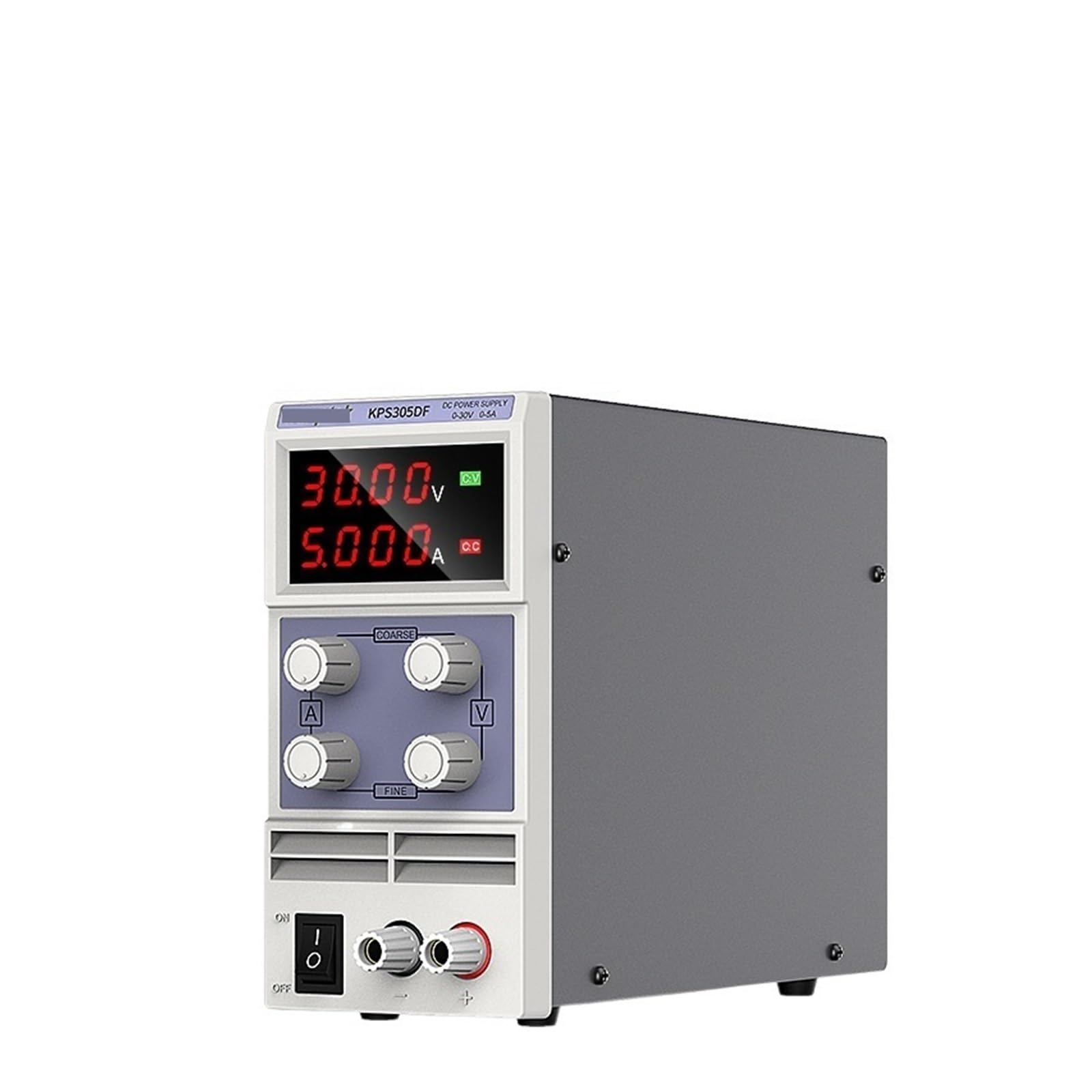
Image: Front view of the AFITSEP KPS3010DF series DC power supply, showing the display, control knobs, and output terminals.
- Voltage Display: Shows the current output voltage (V).
- Current Display: Shows the current output current (A).
- Voltage Adjustment Knob: Used to set the desired output voltage. Fine and coarse adjustments may be available.
- Current Adjustment Knob: Used to set the desired output current limit. Fine and coarse adjustments may be available.
- Output Terminals: Positive (+), Negative (-), and Ground (GND) terminals for connecting the load.
- Output ON/OFF Button: Toggles the power output to the terminals.
- Power Switch: Main power switch for the unit.
5.2 Rear Panel
Image: Rear view of the AFITSEP KPS3010DF series DC power supply, typically showing the AC input, fuse holder, and ventilation fan.
- AC Power Input: Connector for the AC power cord.
- Fuse Holder: Contains the protective fuse.
- Cooling Fan: Provides ventilation to prevent overheating.
- Communication Ports (Optional): USB, RS232, or other ports for remote control (if applicable to your model).
6. Setup
Follow these steps to set up your DC power supply:
- Placement: Place the power supply on a stable, level surface with adequate ventilation space around it. Avoid direct sunlight, high temperatures, and high humidity.
- Power Connection:
- Ensure the power supply's main power switch is in the OFF position.
- Connect the supplied AC power cord to the AC power input on the rear panel of the power supply.
- Plug the other end of the AC power cord into a grounded electrical outlet.
- Initial Power On:
- Turn the main power switch ON. The display should illuminate, showing default voltage and current settings.
- Verify that the output ON/OFF button is in the OFF state (output terminals should not be live).
7. Operating Instructions
This section details how to operate your AFITSEP DC power supply.
7.1 Setting Voltage and Current Limits
- Set Voltage: With the output OFF, rotate the Voltage Adjustment Knob to set the desired output voltage. The voltage display will show the set value.
- Set Current Limit: With the output OFF, rotate the Current Adjustment Knob to set the maximum desired output current. This acts as a current limit to protect your load. The current display will show the set limit.
- Pre-setting Current Limit (Recommended):
- Short-circuit the output terminals using a test lead (connect positive to negative).
- Turn the output ON. The current display will show the maximum current, and the CC (Constant Current) indicator will light up.
- Adjust the Current Adjustment Knob to the desired current limit.
- Turn the output OFF and remove the short-circuit lead.
7.2 Connecting the Load
Ensure the power supply output is OFF before connecting your device:
- Connect the positive (+) terminal of the power supply to the positive input of your load.
- Connect the negative (-) terminal of the power supply to the negative input of your load.
- If your load requires grounding, connect the ground (GND) terminal of the power supply to the ground of your load.
7.3 Powering the Load
- After setting voltage and current limits and connecting the load, press the Output ON/OFF button to enable the output.
- The voltage and current displays will show the actual voltage and current being supplied to the load.
- Observe the CV (Constant Voltage) and CC (Constant Current) indicators.
- CV Mode: The CV indicator lights up when the output voltage is stable at the set value.
- CC Mode: The CC indicator lights up when the output current reaches the set limit, and the voltage automatically drops to maintain the current.
- To stop power, press the Output ON/OFF button again.
8. Maintenance
Proper maintenance ensures the longevity and reliable operation of your power supply.
- Cleaning: Disconnect the power supply from the AC outlet before cleaning. Use a soft, dry cloth to wipe the exterior. Do not use abrasive cleaners or solvents.
- Ventilation: Regularly check that the ventilation openings are clear of dust and debris. Use compressed air to gently clean the fan area if necessary.
- Storage: When not in use for extended periods, store the power supply in a cool, dry, dust-free environment.
- Fuse Replacement: If the unit does not power on, check the fuse located on the rear panel. Replace it only with a fuse of the same type and rating (e.g., T2A 250V). Refer to the specifications for the correct fuse rating.
9. Troubleshooting
If you encounter issues with your power supply, refer to the following table for common problems and solutions:
| Problem | Possible Cause | Solution |
|---|---|---|
| No power/Display off | Power cord disconnected, AC outlet faulty, Fuse blown. | Check power cord connection. Test AC outlet. Replace fuse with correct type and rating. |
| No output voltage/current | Output OFF, Voltage/Current knobs set to zero, Overload protection activated. | Press Output ON. Adjust voltage/current knobs. Check load for short-circuit or excessive current draw. |
| Output voltage/current unstable | Poor connection, Load characteristics changing, Internal fault. | Check all connections. Ensure load is stable. If problem persists, contact support. |
| Unit overheats | Blocked ventilation, Excessive ambient temperature, Prolonged high load. | Ensure ventilation openings are clear. Operate in a cooler environment. Reduce load if possible. |
If the problem cannot be resolved using the troubleshooting guide, please contact AFITSEP customer support.
10. Specifications
The following specifications apply to the AFITSEP KPS3010DF series DC power supply. Note that specific values may vary slightly between models (e.g., KPS3010DF, KPS305DF30V5A, etc.).
| Parameter | Value (KPS3010DF) |
|---|---|
| Input Voltage | AC 110V/220V ±10% (Switchable) |
| Output Voltage Range | 0-30V DC |
| Output Current Range | 0-10A DC |
| Voltage Display Accuracy | ±0.5% + 2 digits |
| Current Display Accuracy | ±0.5% + 2 digits |
| Load Regulation (CV) | ≤0.01% + 2mV |
| Load Regulation (CC) | ≤0.1% + 10mA |
| Ripple & Noise (CV) | ≤2mVrms |
| Ripple & Noise (CC) | ≤5mArms |
| Protection | Overload, Over-temperature, Over-voltage, Over-current |
| Operating Temperature | 0°C to 40°C (32°F to 104°F) |
| Storage Temperature | -10°C to 70°C (14°F to 158°F) |
| Relative Humidity | <80% RH |
| Dimensions (L x W x H) | Approx. 230 x 70 x 130 mm (9.06 x 2.76 x 5.12 inches) |
| Weight | Approx. 1.1 kg (2.4 lbs) |
Note: The provided product specifications from the input JSON were limited to package dimensions and item weight. The electrical specifications above are typical for a device of this type and are included for a comprehensive manual. Always refer to the specific product label for exact ratings.
11. Warranty and Support
AFITSEP products are designed for reliability and performance. This product comes with a standard manufacturer's warranty against defects in materials and workmanship. The specific warranty period and terms may vary by region and retailer.
For warranty claims, technical support, or service inquiries, please contact your original point of purchase or visit the official AFITSEP website for customer service contact information. Please have your model number and purchase date available when contacting support.
Contact Information: Please refer to the packaging or the official AFITSEP website for the most up-to-date contact details.