
TWELSEAVAN 200W
TWELSEAVAN 200W Portable Solar Panel User Manual
Model: 200W
1. Introduction
Thank you for choosing the TWELSEAVAN 200W Portable Solar Panel. This manual provides essential information for the safe and efficient use of your solar panel. Please read it thoroughly before operation and retain it for future reference. This portable solar panel is designed to provide a reliable power source for various devices, making it ideal for outdoor activities, RV use, and emergency power supply.
2. Safety Information
- Do not attempt to disassemble, repair, or modify the solar panel.
- Avoid exposing the solar panel to fire or extreme heat.
- Keep the solar panel away from water and moisture during operation, despite its IP65 rating, to prevent damage to connectors.
- Handle the solar panel with care to prevent physical damage.
- Ensure all connections are secure before use.
- Keep out of reach of children.
3. Package Contents
Verify that all items are present in your package:
- 1 x TWELSEAVAN 200W Portable Solar Panel
- 1 x MC4 Connector Cable (MC4 to Anderson/XT60/8020/7909/5521)
- 3 x DC Adapters
- 1 x User Manual
4. Product Overview
The TWELSEAVAN 200W Portable Solar Panel features high-efficiency monocrystalline solar cells and a durable ETFE laminated case. It is designed for portability and ease of use, offering multiple output options for various devices.

Figure 4.1: TWELSEAVAN 200W Portable Solar Panel and Accessories
Key Features:
- High Conversion Efficiency: Up to 24% conversion rate with A+ grade monocrystalline solar cells.
- Multiple Output Ports: Includes MC4 output, Type-C (PD60W Max), QC3.0 USB (18W Max), and standard USB (5V/3A) for simultaneous charging.
- Wide Compatibility: 5-in-1 MC4 connector cable and 3 DC adapters support most portable power stations.
- Portable Design: Foldable with a magnetic handle, weighing 15.7 lbs, for easy transport and storage.
- Durable Construction: ETFE laminated case and high-density polyester canvas backing provide IP65 waterproof rating and resistance to wear and dust.
- Adjustable Kickstands: Four integrated kickstands allow for optimal angle adjustment (35-60°) to maximize sunlight absorption.

Figure 4.2: Multiple Output Ports for Device Charging

Figure 4.3: Protective ETFE Film Benefits
5. Setup Instructions
- Unfold the Solar Panel: Place the folded solar panel on a flat surface. Gently unfold the panels until they are fully extended. The magnetic handle will assist in quick opening.
- Position for Sunlight: Deploy the four adjustable kickstands on the back of the panel. Adjust the angle of the panel to face the sun directly. Optimal angles (typically 35-60 degrees) maximize energy absorption.

Figure 5.1: Easy Kick-Stand Setup for Optimal Angle
- Connect to Power Station:
- Locate the MC4 output cable from the solar panel's integrated pouch.
- Use the provided 5-in-1 MC4 connector cable and appropriate DC adapters to match your portable power station's input port (e.g., Anderson, XT60, 8020, 7909/8mm, 5.5*2.1, 6.4*4.4, 5.5*2.5, 3.5*1.35).
- Connect the MC4 cable from the solar panel to the MC4 connector cable, then connect the appropriate adapter to your power station.
- Ensure all connections are firm and secure.
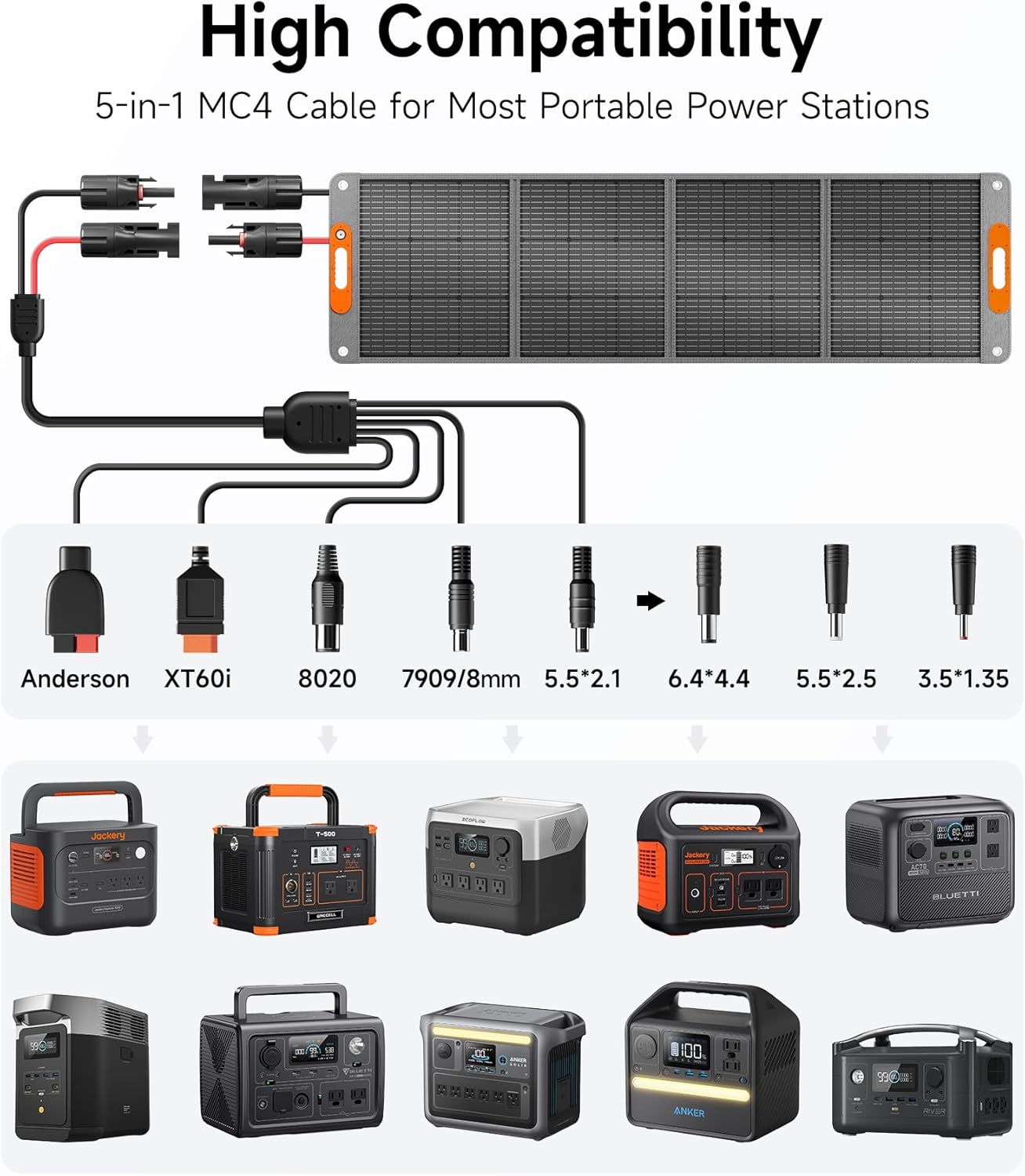
Figure 5.2: High Compatibility with Various Power Stations
6. Operating Instructions
Charging a Power Station:
Once the solar panel is set up and connected to your power station as described in Section 5, the power station will begin charging automatically. Monitor the power station's display for charging status and input wattage.
Charging Mobile Devices Directly:
The solar panel includes dedicated USB ports for charging mobile devices:
- Type-C Port (PD60W Max): Connect compatible USB-C devices for fast charging.
- QC3.0 USB Port (18W Max): Connect Quick Charge 3.0 compatible devices for rapid charging.
- Standard USB Port (5V/3A): Connect other USB-powered devices.
The built-in IC chip detects your devices and adjusts the current for optimal charging while preventing overcharging and overload. You can charge mobile devices simultaneously with a power station.

Figure 6.1: Direct Charging of Mobile Devices
7. Maintenance
- Cleaning: Regularly clean the solar panel surface with a soft, damp cloth to remove dust, dirt, or debris. This ensures maximum light absorption and efficiency. Avoid abrasive cleaners or harsh chemicals.
- Storage: When not in use, fold the solar panel and secure it with the magnetic handle. Store it in a cool, dry place away from direct sunlight and extreme temperatures.
- Inspection: Periodically inspect the cables and connectors for any signs of wear, damage, or corrosion. Replace any damaged components immediately.

Figure 7.1: Durable ETFE Surface and Layered Construction
8. Troubleshooting
- Low Power Output:
- Angle Adjustment: Ensure the panel is angled directly towards the sun. Adjust kickstands for optimal sun exposure.
- Shading: Even partial shading can significantly reduce output. Ensure no objects (trees, buildings, etc.) cast shadows on the panel.
- Weather Conditions: Cloudy or overcast days will naturally result in lower power output.
- Cleanliness: A dirty panel surface can reduce efficiency. Clean the panel as described in Section 7.
- Device Not Charging:
- Cable Connection: Verify all cables are securely connected to both the solar panel and the device/power station.
- Compatibility: Ensure the correct adapter is used for your power station.
- Sufficient Sunlight: The panel requires adequate sunlight to generate power. Check for direct sun exposure.
- Device Power Requirements: Confirm your device's power requirements are within the solar panel's output capabilities.
9. Specifications
| Feature | Specification |
|---|---|
| Brand | TWELSEAVAN |
| Model | 200W |
| Material | Monocrystalline |
| Product Dimensions (Folded) | 23"L x 1.9"W x 22"H |
| Item Weight | 15.7 Pounds |
| Efficiency | 24% |
| Maximum Voltage (Vmp) | 19.8 Volts |
| Maximum Power (Pmax) | 200 Watts |
| Open-Circuit Voltage (Voc) | 23.4 Volts |
| Waterproof Rating | IP65 |
| Output Ports | MC4, Type-C (PD60W), QC3.0 USB (18W), USB (5V/3A) |
10. Warranty and Support
TWELSEAVAN provides the following:
- 24-Month Warranty: Covers manufacturing defects and malfunctions under normal use.
- 30-Day Money-Back Guarantee: For returns within 30 days of purchase.
- Lifelong Friendly Customer Service: For any questions or assistance, please contact TWELSEAVAN customer support. Refer to your purchase documentation for contact details.