
1. Introduction
The DOBE Eggshell Controller Gripcon (Model TNS-1188) is designed to enhance your Nintendo Switch handheld gaming experience. This ergonomic controller provides a comfortable grip, integrates directly with the console, and features advanced functionalities such as 6-axis gyro and dual motor vibration for immersive gameplay. It is compatible with all Nintendo Switch games.
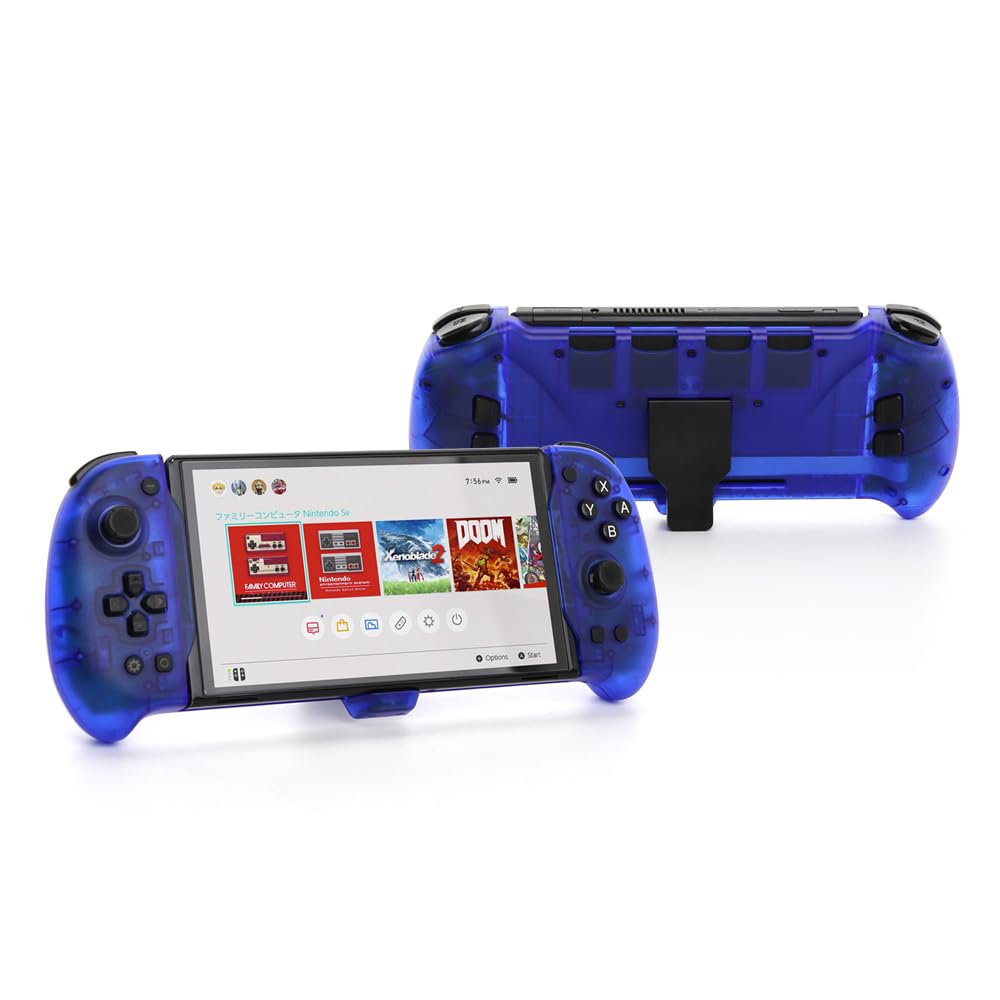
Image 1.1: The DOBE Eggshell Controller Gripcon in blue, designed for Nintendo Switch handheld mode.
2. Setup Instructions
- Insert the Nintendo Switch Console: Carefully slide your Nintendo Switch console into the central slot of the Eggshell Controller Gripcon. Ensure it is securely seated and aligned with the Type-C connector.
- Automatic Connection: Once the Switch console is fully inserted, the controller will automatically connect. For this automatic connection to function correctly, ensure that the controller's internal 'handle upgrade switch' (if present, typically a small physical switch) is in the OFF position.
- Verify Connection: After insertion, check your Nintendo Switch screen to confirm that the controller is recognized and ready for use.

Image 2.1: The Nintendo Switch console properly inserted into the Eggshell Controller Gripcon, ready for handheld play.
3. Operating Instructions
- T (Turbo) Function: The controller includes a Turbo function. Refer to the specific button mapping for activating and deactivating Turbo mode for rapid button presses.
- Screen Capture Key: Utilize the dedicated screen capture key to quickly save screenshots of your gameplay moments.
- 6-Axis Gyroscope: The integrated 6-axis gyroscope provides precise motion control for games that support this feature, enhancing aiming and movement.
- Dual Motor Vibration: Experience immersive feedback through dual motor vibration, which responds to in-game actions and events.
- Custom Key Function Programming: The controller supports custom programming of key functions. Consult the detailed instructions for specific button remapping procedures.
- Charging While Playing: The controller features a Type-C interface, allowing you to charge your Nintendo Switch console while simultaneously playing games. Use the original Nintendo Switch power adapter or a standard 15V PD protocol power adapter for charging.
4. Features
- Ergonomic Design: Enhances player hand grip and comfort during extended gaming sessions.
- Seamless Integration: Automatically connects to the Nintendo Switch console upon insertion (ensure handle upgrade switch is off).
- Advanced Control: Equipped with T (Turbo) function, screen capture key, and 6-axis gyroscope gravity induction.
- Immersive Feedback: Features dual motor vibration for a more engaging gaming experience.
- Customizable: Supports custom programming according to key functions.
- Convenient Charging: Type-C interface allows charging the Switch console while playing, compatible with original Switch power adapter or 15V PD protocol power adapters.
- Durable Construction: Easy to install with a novel appearance and robust structure.

Image 4.1: Front and back views of the DOBE Eggshell Controller Gripcon, showcasing its ergonomic design and button layout.
5. Maintenance
To ensure the longevity and optimal performance of your DOBE Eggshell Controller Gripcon, follow these maintenance guidelines:
- Cleaning: Use a soft, dry cloth to wipe the surface of the controller. Avoid using abrasive cleaners, solvents, or harsh chemicals, as these can damage the finish and internal components.
- Storage: Store the controller in a cool, dry place away from direct sunlight and extreme temperatures. When not in use for extended periods, consider detaching the Nintendo Switch console.
- Avoid Moisture: Keep the controller away from water and other liquids to prevent internal damage.
6. Troubleshooting
If you encounter issues with your controller, please refer to the following common troubleshooting steps:
- Controller Not Connecting:
- Ensure the Nintendo Switch console is fully and correctly inserted into the controller's slot.
- Verify that the 'handle upgrade switch' (if applicable) on the controller is in the OFF position for automatic connection.
- Restart your Nintendo Switch console and re-insert the controller.
- Charging Issues:
- Confirm that you are using the original Nintendo Switch power adapter or a standard 15V PD protocol power adapter.
- Check the Type-C cable for any damage and ensure it is securely connected to both the controller and the power source.
- Try charging the Switch console directly without the controller to rule out console-specific issues.
- Buttons Unresponsive or Lagging:
- Ensure the controller is firmly connected to the Switch console.
- Clean around the buttons with a soft, dry cloth to remove any debris.
- Test the controller with a different game to see if the issue persists.
- Vibration Not Working:
- Check in-game settings to ensure vibration feedback is enabled.
- Verify that the game you are playing supports vibration functionality.
7. Specifications
| Model Name | TNS-1188 |
| Brand | DOBE FOMIS ELECTRONICS |
| Compatible Devices | Nintendo Switch |
| Controller Type | Gamepad |
| Connectivity Technology | USB (Type-C for charging) |
| Additional Features | Ergonomic, 6-Axis Gyro, Dual Motor Vibration, Turbo Function, Screen Capture |
| Hardware Platform | Gaming Console |
| Item Weight | 0.51 Pounds (approx. 231g) |
| Item Dimensions (L x W x H) | 10.83 x 4.45 x 1.8 inches (approx. 27.5 x 11.3 x 4.6 cm) |
| Color | Blue |
8. Warranty and Support
For detailed warranty information, technical support, or customer service inquiries regarding your DOBE Eggshell Controller Gripcon, please refer to the manufacturer's official website or contact your retailer directly. Keep your proof of purchase for warranty claims.