
Introduction
Thank you for choosing PHIXTON Rechargeable Flashlights. This manual provides essential information for the safe and efficient operation of your PH2403 and PA160 flashlights. Please read this manual thoroughly before use and retain it for future reference.
Product Overview
This package includes two powerful rechargeable LED flashlights: the PH2403 and the PA160. Both models feature high brightness, long-range capabilities, and durable construction, suitable for various outdoor and emergency situations.
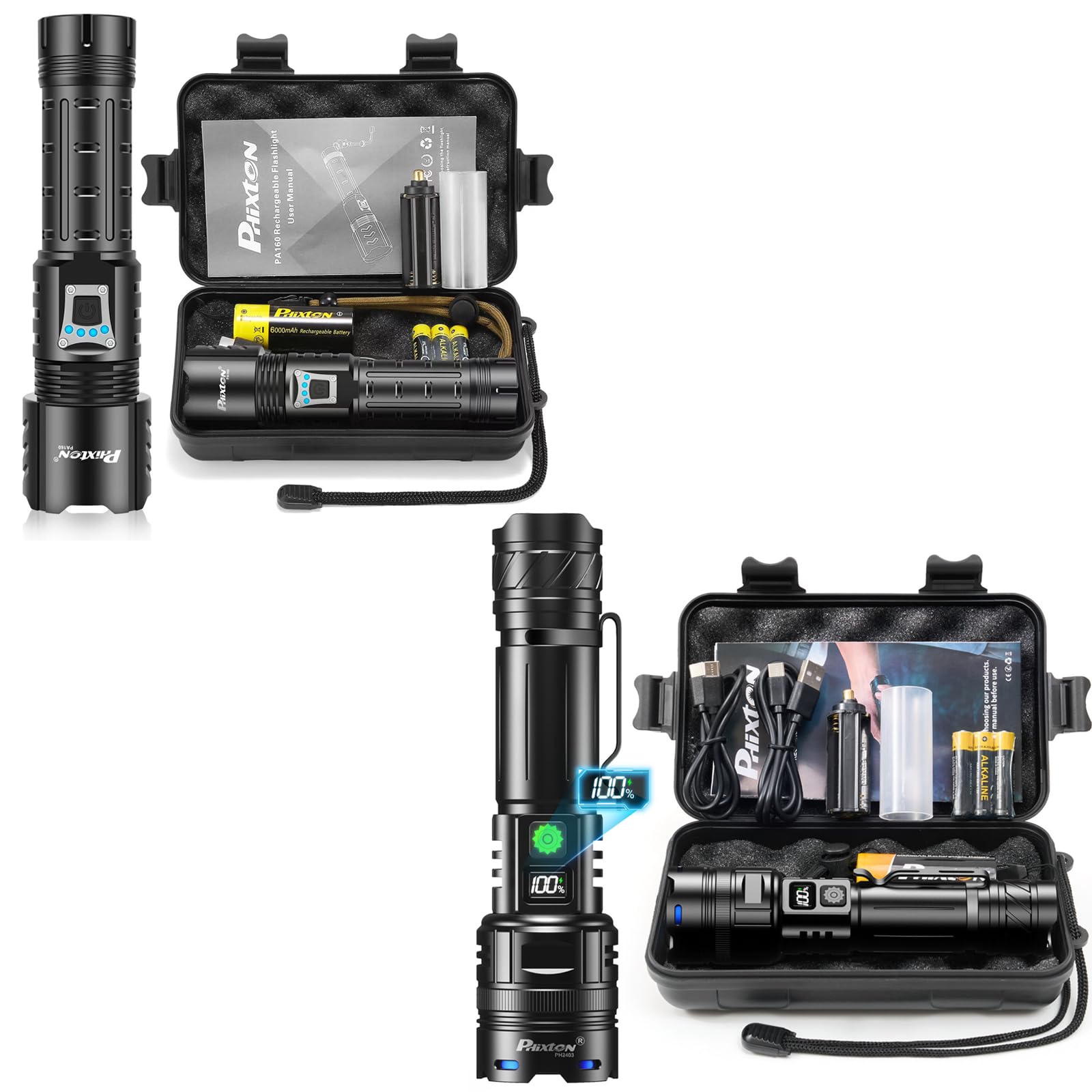
Image: PHIXTON 2-Pack Rechargeable Flashlights (PH2403 and PA160) with accessories in a protective case.
PHIXTON PA160 Flashlight
The PA160 model offers versatile lighting with 5 modes and an adjustable focus feature, allowing you to switch between a wide floodlight and a concentrated spotlight. It also functions as a power bank for charging other devices.

Image: PHIXTON PA160 Rechargeable Flashlight and its included accessories in a carrying case.
PHIXTON PH2403 Flashlight
The PH2403 model is designed for simplicity and powerful illumination with a single, super bright mode. It features a compact size with a clip for easy portability.

Image: PHIXTON PH2403 Rechargeable Flashlight and its included accessories in a carrying case.
Setup
Initial Charging
Before first use, fully charge both flashlights. Both models feature a built-in high-capacity battery and utilize USB-C for charging.
- Locate the USB-C charging port on the flashlight.
- Connect the provided USB-C cable to the flashlight and plug the other end into a USB power source (e.g., wall adapter, computer, power bank).
- The power indicator lights will show the charging status. For PH2403, a percentage display indicates charge level. For PA160, multiple LED indicators show charge level (e.g., 4 lights for >75%).
- Charging typically takes 3-5 hours for a full charge. Disconnect the cable once fully charged.

Image: PHIXTON PH2403 flashlight connected to a USB-C charger, showing fast and safe charging.

Image: PHIXTON PA160 flashlight showing USB-C charging, USB discharging, and power indicators.
Operating Instructions
Power On/Off
Press the power button located on the flashlight body to turn the flashlight on or off.
PH2403: Single Mode Operation
The PH2403 operates in a single, super bright mode. Simply press the power button to turn it on or off. There are no adjustable brightness settings for this model.

Image: PHIXTON PH2403 flashlight demonstrating its super bright single mode illumination.
PA160: Mode Switching and Focus Adjustment
The PA160 offers multiple lighting modes and an adjustable focus beam.
Lighting Modes:
With the flashlight on, press the power button repeatedly to cycle through the 5 available modes:
- High: Maximum brightness for powerful illumination.
- Middle: Moderate brightness for general use.
- Low: Reduced brightness for extended battery life or close-range tasks.
- Strobe: Flashing light for signaling or disorientation.
- SOS: International Morse code signal for emergencies.

Image: PHIXTON PA160 flashlight illustrating its 5 lighting modes: High, Middle, Low, Strobe, and SOS.
Focus Adjustment:
To adjust the beam focus, gently pull or push the head of the flashlight. This allows you to transition between:
- Floodlight: A wide, diffused beam suitable for illuminating a large area (e.g., a room up to 500 m²).
- Spotlight: A narrow, concentrated beam for long-range visibility (e.g., up to 3280 ft).

Image: PHIXTON PA160 flashlight demonstrating adjustable focus between floodlight and spotlight modes.
Power Indicator
Both flashlights feature power indicators to display the remaining battery life. The PH2403 shows a percentage, while the PA160 uses a series of LED lights (e.g., 4 lights for >75%, 1 light for <25%). Monitor these indicators to know when to recharge.
USB Discharging (PA160 Only)
The PA160 can function as a power bank to charge other USB devices. To use this feature:
- Open the protective cover of the USB output port on the PA160.
- Connect your device's charging cable to the USB output port.
- The flashlight will begin to discharge, charging your connected device.
Maintenance
Cleaning
Wipe the flashlight body with a soft, damp cloth. Do not use abrasive cleaners or solvents, as they may damage the finish or internal components. Ensure the charging port cover is securely closed to maintain water resistance.
Storage
Store the flashlights in a cool, dry place away from direct sunlight and extreme temperatures. If storing for an extended period, recharge the batteries every 3-6 months to maintain battery health.
Battery Care
The flashlights contain built-in lithium-ion batteries. Avoid fully depleting the battery frequently, as this can reduce its lifespan. Recharge promptly when the power indicator shows low battery.
Troubleshooting
- Flashlight not turning on:
- Ensure the battery is charged. Connect to a USB power source and check the charging indicator.
- Verify the power button is pressed firmly.
- Dim light output:
- The battery may be low. Recharge the flashlight.
- For PA160, ensure it is not in a lower brightness mode. Cycle through modes to select High.
- Charging issues:
- Check the USB-C cable for damage and ensure it is securely connected to both the flashlight and the power source.
- Try a different USB power adapter or port.
- PA160 not charging other devices:
- Ensure the PA160 has sufficient battery charge.
- Verify the charging cable for the external device is functional and properly connected to the PA160's USB output port.
Specifications
| Feature | Detail |
|---|---|
| Brand | PHIXTON |
| Models Included | PH2403, PA160 |
| Light Source Type | LED |
| White Brightness | Up to 1,000,000 Lumens (combined peak output) |
| Power Source | Battery Powered (Built-in Lithium Ion) |
| Charging Interface | USB-C |
| Runtime | 5-15 hours (depending on mode and model) |
| Water Resistance Level | Waterproof |
| Special Features | Rechargeable, USB Charging, USB Discharging (PA160), Adjustable Focus (PA160), Power Indicators |
| Color | Black |
| Included Components | Battery, USB-C Cables |
Safety Information
- Eye Safety: Do not look directly into the flashlight beam or shine it into the eyes of others. The high intensity light can cause temporary vision impairment or permanent eye damage.
- Children: Keep flashlights out of reach of children.
- Heat: The flashlight head may become warm during prolonged use on high settings. This is normal.
- Charging: Use only the provided or certified USB-C cables and appropriate power adapters for charging.
- Disassembly: Do not attempt to disassemble or modify the flashlight. This will void the warranty and may cause damage or injury.
- Water Resistance: While waterproof, avoid prolonged submersion or operating the flashlight underwater beyond its specified rating. Ensure charging port covers are sealed before exposure to water.
Warranty and Support
PHIXTON products are designed for reliability and performance. For warranty information, technical support, or any questions regarding your PHIXTON flashlights, please refer to the contact information provided with your purchase or visit the official PHIXTON website. Please have your model number (PH2403 or PA160) and purchase details ready when contacting support.