
1. Introduction
This manual provides detailed instructions for the installation, operation, and maintenance of your HCSTVCON HC-HK45A 4K HDMI PTZ Camera. Please read this manual thoroughly before using the product to ensure proper functionality and to prevent damage. Keep this manual for future reference.
2. Product Overview
The HCSTVCON HC-HK45A is a high-performance 4K PTZ (Pan-Tilt-Zoom) camera designed for professional video applications such as video conferencing, live streaming, church services, and educational environments. It features a 1/2.8" HD CMOS sensor, 20x optical zoom, and multiple output interfaces.
Key Features:
- 4K Ultra HD Resolution: Captures video at up to 3840x2160 resolution with an 8.5-megapixel sensor, providing clear and lifelike images.
- 20x Optical Zoom: Equipped with a 20x optical zoom lens and a 58.7° wide-angle view, offering precise autofocus and distortion-free coverage.
- Multiple Output Interfaces: Simultaneous video streaming via HDMI, USB3.0, and LAN (IP streaming) at up to 4K30fps.
- Power over Ethernet (PoE) Support: Simplifies installation by allowing power and data transmission over a single Ethernet cable.
- Smooth PTZ Movement: Offers horizontal rotation from -168° to +168° and vertical movement from -30° to 90° for flexible camera positioning.
- Advanced Noise Reduction: Utilizes 2D and 3D noise reduction technology for clear images in low-light conditions.
- Extensive Compatibility: Supports various video compression formats (YUY2, H265, MJPG, H264) and is compatible with platforms like Zoom, vMix, OBS, Skype, and GoToMeeting.
- Multiple Control Methods: Controllable via IR remote, RS232, and RS485 serial ports, with support for VISCA/Pelco-D/Pelco-P protocols.
Package Contents:
- HCSTVCON HC-HK45A PTZ Camera
- IR Remote Control
- Power Adapter
- Mounting Brackets (for ceiling, wall, or tripod)
- User Manual

Image 2.1: HCSTVCON HC-HK45A PTZ Camera, IR remote control, and mounting bracket.
3. Setup
3.1 Physical Installation
The camera offers flexible mounting options including hanging, wall mounting, or tripod mounting. Ensure the camera is securely installed in the desired location using the provided mounting brackets.

Image 3.1: Illustration of available mounting options for the camera.
3.2 Connecting the Camera
The camera supports multiple connectivity options. Choose the appropriate connection method based on your setup requirements.
- Power Connection: Connect the provided power adapter to the DC 12V port on the camera. If using Power over Ethernet (PoE), connect an Ethernet cable from a PoE-enabled switch or injector to the LAN port.
- HDMI Output: Connect an HDMI cable from the camera's HDMI port to a display, capture card, or video switcher for high-definition video output.
- USB3.0 Output: Connect a USB3.0 cable from the camera's USB3.0 port to a computer for direct video capture and streaming.
- LAN (IP Streaming): Connect an Ethernet cable to the LAN port for IP streaming. This also enables PoE if your network equipment supports it.
- Audio Input: Connect an external microphone or audio source to the LINE IN port for audio integration.
- Control Ports (RS232/RS485): Connect a serial control cable to the RS232 or RS485 ports for external PTZ control via a joystick or control system.

Image 3.2: Rear panel connections of the camera.
4. Operating Instructions
4.1 Powering On/Off
After connecting the power, the camera will automatically power on. The power indicator light will illuminate. To power off, disconnect the power supply.
4.2 PTZ Control
The camera's pan, tilt, and zoom functions can be controlled using the included IR remote control or via external serial controllers (RS232/RS485).
- Pan: Rotate the camera horizontally (-168° to +168°).
- Tilt: Adjust the camera vertically (-30° to 90°).
- Zoom: Adjust the optical zoom (20x) to magnify or reduce the field of view.
- Focus: The camera features auto-focus. Manual focus adjustment may be available via control software or remote.
4.3 Presets
The camera supports preset positions for quick recall of specific camera angles and zoom levels.
- IR Remote Presets: Up to 10 preset positions can be stored and recalled using the IR remote control.
- Serial Control Presets: Up to 255 preset positions can be configured and recalled via VISCA/Pelco-D/Pelco-P protocols using an external controller.
4.4 IP Streaming
For IP streaming, connect the camera to your network via the LAN port. The camera supports ONVIF, SRT, RTSP, and RTMP protocols. Refer to the camera's network settings for configuration details, typically accessible via a web browser.
4.5 Software Compatibility
The camera is compatible with popular video conferencing and streaming software, including Zoom, vMix, OBS, Skype, and GoToMeeting. Ensure your software is updated to the latest version for optimal performance.

Image 4.1: Included IR Remote Control.
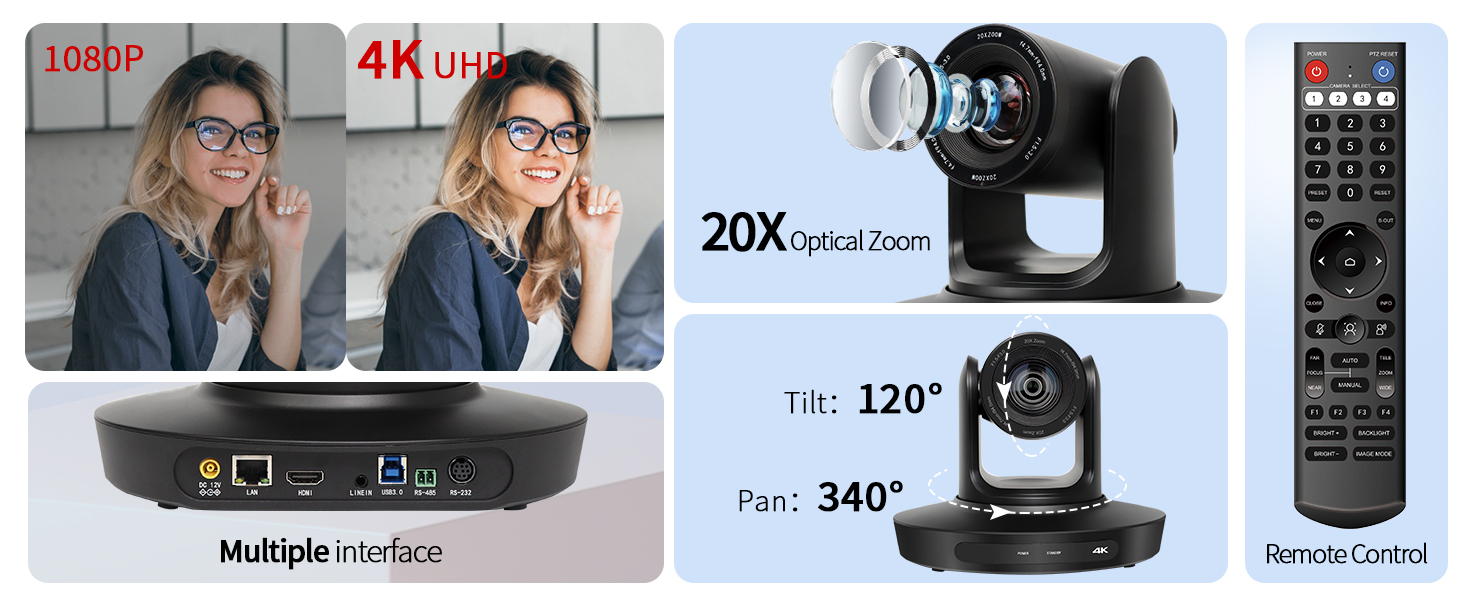
Image 4.2: Overview of camera features including resolution, zoom, PTZ range, and control.
5. Maintenance
5.1 Cleaning
- Gently wipe the camera body with a soft, dry cloth.
- For the lens, use a specialized lens cleaning cloth and solution to avoid scratches.
- Do not use strong detergents or abrasive materials.
5.2 Storage
When not in use for extended periods, store the camera in a dry, dust-free environment. Avoid extreme temperatures and humidity.
6. Troubleshooting
If you encounter issues with your camera, refer to the following common problems and solutions:
| Problem | Possible Cause | Solution |
|---|---|---|
| No power indicator | Power cable loose; No power from outlet/PoE switch. | Check power connections; Verify power outlet/PoE functionality. |
| No video output | Incorrect cable connection; Input source not selected on display; Driver issue (USB). | Ensure HDMI/USB/LAN cables are securely connected; Select correct input on display; Install/update USB drivers. |
| PTZ control not responding | IR remote battery low; Incorrect serial port settings; Camera not in control mode. | Replace IR remote batteries; Verify RS232/RS485 settings (baud rate, address); Ensure camera is powered on and ready. |
| Poor image quality | Insufficient lighting; Dirty lens; Incorrect resolution settings. | Improve lighting conditions; Clean the camera lens; Adjust output resolution settings. |
| IP streaming issues | Network connectivity problems; Incorrect IP settings; Firewall blocking. | Check network cable and connection; Verify camera's IP address and network settings; Adjust firewall rules if necessary. |
7. Specifications
| Feature | Detail |
|---|---|
| Model Number | HC-HK45A |
| Sensor | 1/2.8" HD CMOS |
| Maximum Resolution | 3840x2160 (4K) at 30fps |
| Effective Pixels | 8.5 Megapixels |
| Optical Zoom | 20x |
| Field of View | 58.7° (Wide-angle) |
| Focus Type | Auto Focus |
| Pan Range | -168° to +168° |
| Tilt Range | -30° to 90° |
| Video Outputs | HDMI, USB3.0, LAN (IP Streaming) |
| Audio Input | LINE IN |
| Control Interfaces | IR Remote, RS232, RS485 |
| Network Protocols | ONVIF, SRT, RTSP, RTMP |
| Video Compression | YUY2, H265, MJPG, H264 |
| Mounting Options | Hanging, Wall Mounting, Tripod Mounting |
| Dimensions (L x W x H) | 8.8 x 6.8 x 6.8 inches |
| Weight | 5.74 pounds |
| Color | Black |
| Indoor/Outdoor Usage | Indoor |
8. Warranty and Support
The HCSTVCON HC-HK45A 4K HDMI PTZ Camera comes with a 2-year warranty. Additionally, lifetime technical support is provided to assist you with any questions or issues you may encounter.
For technical assistance or warranty claims, please contact HCSTVCON customer support through the retailer where the product was purchased or visit the official HCSTVCON website for contact information.