
Neoteck Professional Pinless and Spherical Inductive Moisture Meter Kit User Manual
Model: Pinless Moisture Meter & Spherical Inductive Moisture Meter
1. Introduction
This manual provides detailed instructions for the Neoteck Professional Pinless and Spherical Inductive Moisture Meter Kit. This kit includes two distinct devices designed for non-destructive moisture detection in various materials such as wood, walls, and concrete. Please read this manual thoroughly before operating the devices to ensure proper use and to maximize their performance and longevity.
2. Safety Information
Please observe the following safety precautions to prevent injury and damage to the devices:
- Do not attempt to open or modify the devices.
- Keep the devices away from water and excessive humidity, unless specifically designed for such environments (e.g., measuring moisture).
- Avoid dropping the devices or subjecting them to strong impacts.
- Store the devices in a dry, cool place when not in use.
- Use only the specified charging cables and power sources for the rechargeable meter.
- Keep out of reach of children.
3. Package Contents
Upon opening the package, verify that all items are present:
- Neoteck Pinless Moisture Meter
- Neoteck Spherical Inductive Moisture Meter
- USB Charging Cable (for Spherical Meter)
- Storage Pouch (for each meter)
- User Manual

Image 1: Contents of the Neoteck Professional Pinless and Spherical Inductive Moisture Meter Kit, showing both meters, charging cable, and storage pouches.
4. Product Overview
4.1. Neoteck Pinless Moisture Meter
This meter uses non-invasive technology to detect moisture without damaging the surface. It features an LCD display, mode selection buttons, and audible alerts.

Image 2: The Neoteck Pinless Moisture Meter, highlighting its upgraded sensor chip for accurate, quick, and non-intrusive measurements.
4.2. Neoteck Spherical Inductive Moisture Meter
This meter also offers non-destructive measurement with a spherical sensor, providing a deeper measurement depth. It features a large LCD screen and USB rechargeable functionality.

Image 3: The Neoteck Spherical Inductive Moisture Meter, showing its 2.9-inch large HD color LCD screen and non-destructive inductive measurement capability.
5. Setup
5.1. Pinless Moisture Meter
This meter typically uses standard batteries. Insert batteries according to the polarity markings in the battery compartment. (Batteries may not be included in all packages).
5.2. Spherical Inductive Moisture Meter
The spherical meter is USB rechargeable. Before first use, fully charge the device using the provided USB cable and a compatible USB power adapter (not included).
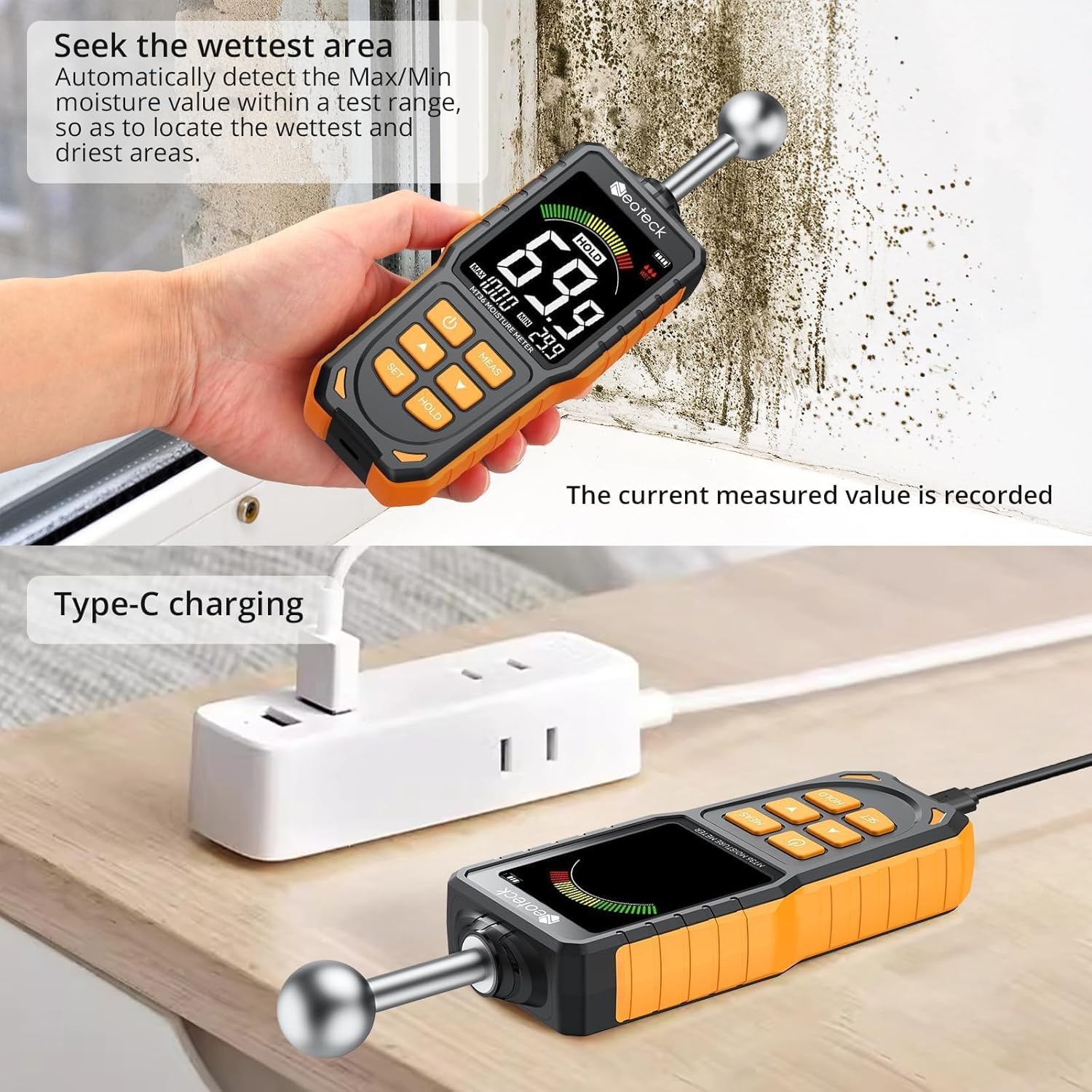
Image 4: The Spherical Inductive Moisture Meter connected to a power source via its Type-C charging port.
6. Operating Instructions
6.1. Pinless Moisture Meter Operation
- Turning On: Press and hold the power button (U) to turn on the meter.
- Alert Value Setting: Press the SET button to adjust the alert threshold for moisture levels.
- Selecting Measurement Mode: Press the MODE button to cycle through the available modes: SOFTWOOD, HARDWOOD, WALL, and MASONRY. Ensure the correct mode is selected for the material being tested.
- Start Measuring: Place the back of the meter flat against the surface of the material you wish to measure. The display will show the moisture content.
- Interpreting Readings: The large LCD color display and analog bar will indicate the moisture level. An audible alarm will sound if the moisture content exceeds the set alert value.

Image 5: Step-by-step guide for operating the Pinless Moisture Meter, including turning on, setting alerts, selecting modes, and starting measurement.

Image 6: Examples of the Pinless Moisture Meter's LCD display indicating DRY, MID, and WET moisture conditions with corresponding percentage readings.

Image 7: The Pinless Moisture Meter demonstrating its four measurement modes: WALL, MASONRY, SOFTWOOD, and HARDWOOD, with typical measurement ranges.
6.2. Spherical Inductive Moisture Meter Operation
- Turning On: Press the power button (U) to turn on the meter.
- Calibration: Calibration is required after booting up. Allow the device to calibrate for approximately 30 minutes for optimal accuracy.
- Measurement: Place the spherical sensor against the surface of the material. The meter will non-destructively measure moisture content up to a depth of 5-40mm.
- Interpreting Readings: The large LCD screen displays the moisture percentage. A 3-color indicator (green for dry, yellow for risk, red for wet) provides a quick visual assessment.
- Hold Function: Press the HOLD button to freeze the current reading on the display.
- Max/Min Detection: The meter can automatically detect and display the maximum and minimum moisture values within a test range, helping to locate the wettest and driest areas.

Image 8: The Spherical Inductive Moisture Meter in action, demonstrating its non-destructive measurement capability and 5-40mm measuring depth.
7. Maintenance
- Cleaning: Wipe the devices with a soft, dry cloth. Do not use abrasive cleaners or solvents.
- Storage: Store the meters in their protective pouches in a dry, cool environment, away from direct sunlight and extreme temperatures.
- Battery Replacement (Pinless Meter): Replace batteries when the low battery indicator appears on the display.
- Charging (Spherical Meter): Recharge the spherical meter when the battery indicator shows low power.
8. Troubleshooting
8.1. No Power
- Pinless Meter: Check battery installation and ensure batteries are not depleted. Replace if necessary.
- Spherical Meter: Ensure the device is fully charged. Connect to a USB power source and allow it to charge.
8.2. Inaccurate Readings
- Ensure the meter is placed flat against the surface (Pinless Meter).
- Ensure the spherical sensor is in full contact with the surface (Spherical Meter).
- Verify that the correct material mode is selected (Pinless Meter).
- Allow the Spherical Meter to complete its calibration after booting.
- Avoid measuring near strong electromagnetic fields.
8.3. Display Not Working
- Check power supply (batteries/charge).
- If the issue persists, contact customer support.
9. Specifications
9.1. Neoteck Pinless Moisture Meter
- Measurement Principle: Non-invasive, dielectric
- Measurement Modes: Softwood, Hardwood, Wall, Masonry
- Accuracy: ±4%
- Display: Large LCD Color Display with Analog Bar
- Alerts: Visual (color display) and Audible
- Power: Battery operated (type not specified, typically AAA or 9V)
9.2. Neoteck Spherical Inductive Moisture Meter
- Measurement Principle: Non-destructive, dielectric
- Measurement Depth: 5-40mm
- Measurement Range: 0-100%
- Accuracy: ±2.5% (at 25°C)
- Display: 2.9 Inch Large HD Color LCD Screen
- Indicators: 3-Color Moisture Level (Dry, Risk, Wet)
- Features: Hold Function, Max/Min Detection, Automatic Shutdown (after 30 minutes by default)
- Power: USB Rechargeable (Type-C)
- Measurable Materials: Gypsum, Cement-based materials, Wood, Paper, Leather, Tile, Gypsum board
9.3. Moisture Level Alarm Thresholds (Spherical Inductive Meter)
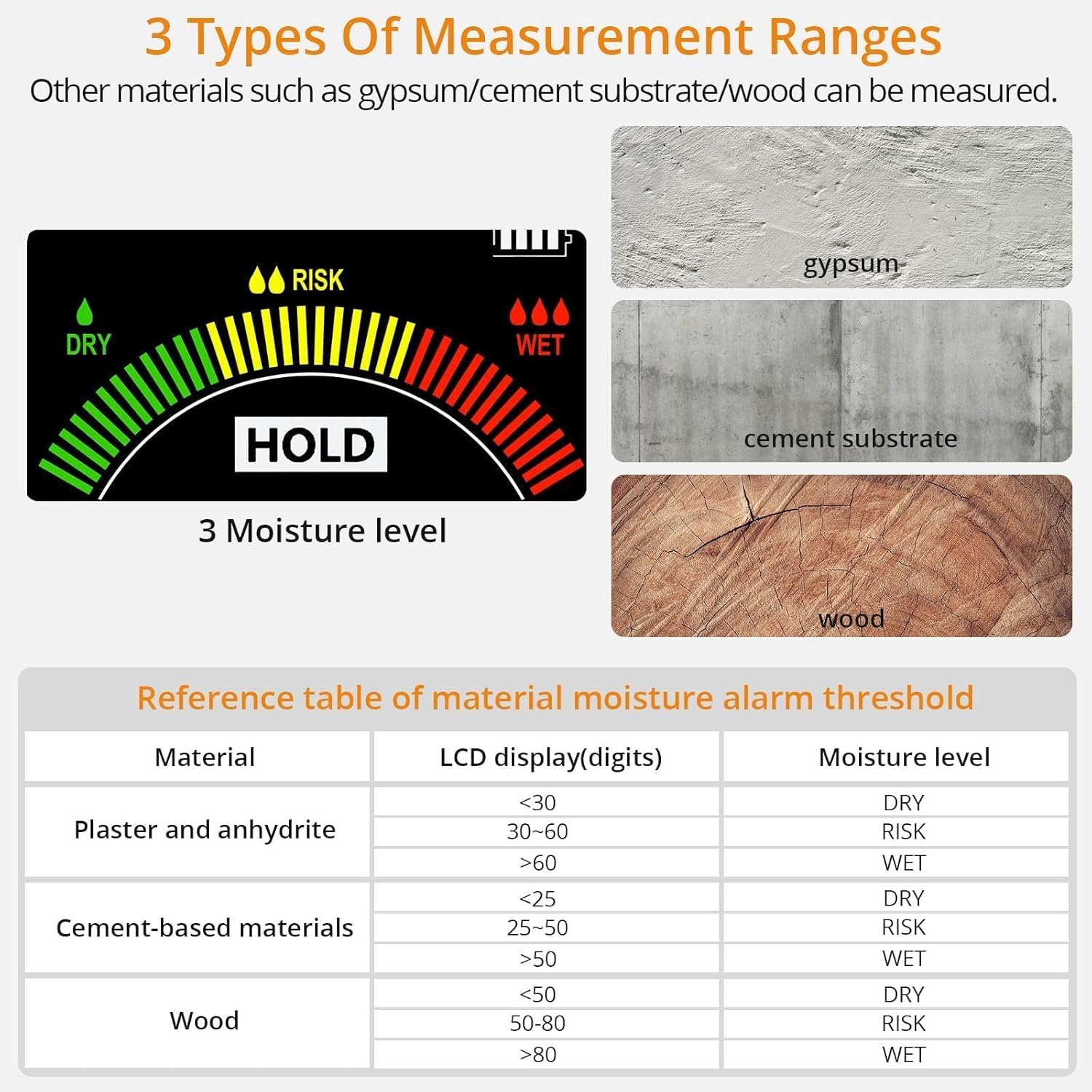
Image 9: The Spherical Inductive Moisture Meter's display showing the 3-color moisture level indicator (Dry, Risk, Wet) and a reference table for material moisture alarm thresholds for plaster, cement-based materials, and wood.
| Material | LCD Display (Digits) | Moisture Level |
|---|---|---|
| Plaster and anhydrite | <30 | DRY |
| 30-60 | RISK | |
| >60 | WET | |
| Cement-based materials | <25 | DRY |
| 25-50 | RISK | |
| >50 | WET | |
| Wood | <50 | DRY |
| 50-80 | RISK | |
| >80 | WET |
10. Warranty and Support
Neoteck products are designed for reliability and performance. For warranty information, technical support, or service inquiries, please refer to the contact information provided on the product packaging or visit the official Neoteck website. Please have your product model and purchase date available when contacting support.
ASIN: B0DK6KMRML


