
1. Product Overview
The Prime 3-Socket Smart Outdoor Plug is a robust solution for controlling your outdoor electrical devices. This 2-pack offers three independent outlets per unit, allowing for versatile management of various outdoor electronics. It supports control via a dedicated mobile application, an included remote control, and voice commands through popular smart home assistants.

Image 1: Prime 3-Socket Smart Outdoor Plug 2-Pack with WiFi and Remote Control capabilities.
2. Setup
2.1 Initial Plug-in
- Ensure the outdoor electrical outlet is powered off before plugging in the smart plug.
- Plug the Prime 3-Socket Smart Outdoor Plug into a standard 125V/60Hz outdoor-rated electrical outlet.
- Power on the outdoor electrical outlet. The smart plug's indicator light should illuminate.
2.2 Mobile App Installation and Pairing
For full control and automation features, download the BN-LINK Smart app (or compatible app as specified in the product packaging) from your device's app store. Follow the in-app instructions for pairing. Note that only 2.4GHz Wi-Fi networks are supported for connection.
Video 1: This video demonstrates the process of setting up and pairing the smart outdoor plug with the mobile application, including Wi-Fi network requirements.
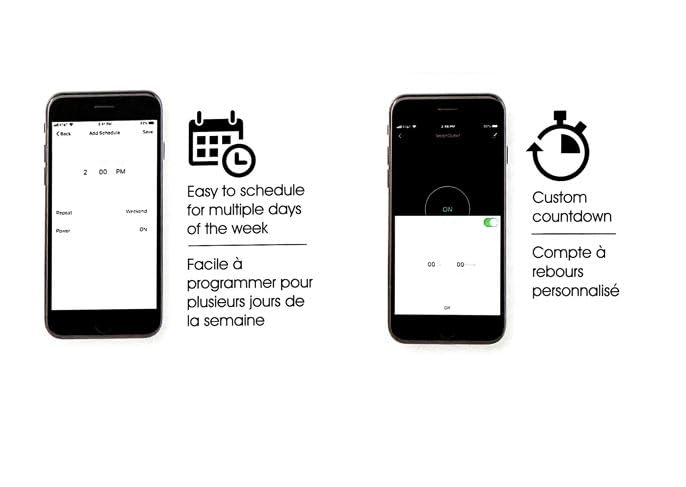
Image 2: The mobile app interface showing options for scheduling and custom countdowns for connected devices.
2.3 Remote Control Pairing
The included remote control is typically pre-paired with the smart plug. If re-pairing is necessary, refer to the troubleshooting section or the detailed instructions in the product's physical manual.
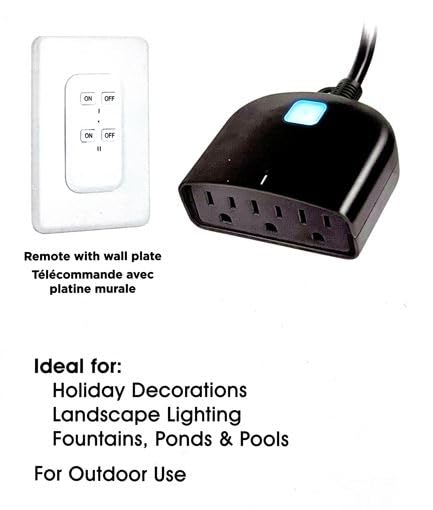
Image 3: The remote control unit, designed for convenient manual operation of the smart plug.
3. Operating
3.1 Manual Control
Press the power button on the smart plug unit to manually turn all three independent outlets on or off simultaneously. Each outlet can also be individually controlled via the mobile app.
3.2 Remote Control Operation
Use the included remote control to switch the connected devices on or off from a distance. The remote typically has dedicated ON/OFF buttons for easy operation.
Video 2: This video demonstrates the use of the remote control for the outdoor smart plug.
3.3 App Control and Scheduling
Through the mobile app, you can:
- Turn each of the three independent outlets on or off individually.
- Set custom schedules for automatic power on/off at specific times or days.
- Utilize countdown timers for temporary operation.
3.4 Voice Control
The smart plug is compatible with voice assistants such as Amazon Alexa, Google Home, and Siri. Once integrated with your smart home system, you can use voice commands to control the connected devices.
4. Maintenance
The Prime 3-Socket Smart Outdoor Plug is designed for outdoor use with IP44 weatherproof protection. While it can withstand rain and splashes, it is not designed to be submerged in water. Ensure the plug is oriented downwards when plugged into an outdoor outlet to allow water to shed off.
- Cleaning: Disconnect the plug from power before cleaning. Wipe with a damp cloth. Do not use harsh chemicals or abrasive cleaners.
- Storage: When not in use for extended periods, store the smart plug in a dry, protected area.
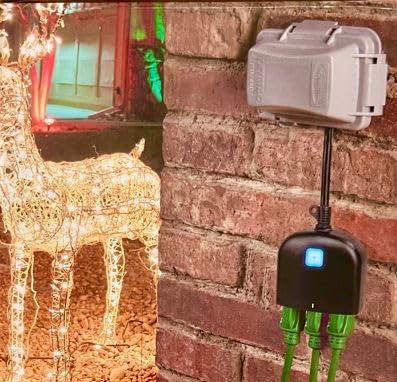
Image 4: The Prime 3-Socket Smart Outdoor Plug installed in an outdoor environment, demonstrating its intended use.
5. Troubleshooting
- Device not connecting to Wi-Fi: Ensure your Wi-Fi network is 2.4GHz. The smart plug does not support 5GHz networks. Move the smart plug closer to your Wi-Fi router if signal is weak.
- Remote control not working: Check the battery in the remote control. If the issue persists, you may need to re-pair the remote with the smart plug. Refer to the product's physical manual for specific re-pairing instructions.
- Outlets not responding: Verify the smart plug is securely plugged into a live electrical outlet. Check if the main power button on the unit is functioning.
- Resetting the device: To reset the smart plug, unplug it from the power outlet for at least 10 seconds, then plug it back in. For a factory reset, press and hold the power button on the unit for approximately 5-10 seconds until the indicator light blinks rapidly.
6. Specifications
| Feature | Specification |
|---|---|
| Product Dimensions | 12.4 x 7.5 x 2.4 cm; 520 g |
| Manufacturer | PRIME Wire & Cable Inc |
| Manufacturer Reference | 1829553 |
| Operation Mode | ON-OFF-ON |
| Current Rating | 15 Amps |
| Operating Voltage | 125 Volts |
| Contact Type | Normally Closed |
| Connector Type | Plug In |
| Switch Type | Push Button |
| Terminal | Through Hole |
| Material | Plastic |
| Wi-Fi Standard | 802.11 b/g/n, 2.4GHz |
| Security Support | WPA/WPA2 |
7. Warranty & Support
Specific warranty information for the Prime 3-Socket Smart Outdoor Plug (Model 1829553) is not available in this document. Please refer to the product packaging or contact Prime Wire & Cable Inc. directly for warranty details and customer support.
For additional assistance, you may visit the manufacturer's website or consult the full product manual included with your purchase.


