
1. Product Overview
The Enbrighten Plug-In LED Light Bar is designed to provide high-quality, customizable illumination for various indoor spaces such as kitchens, offices, and workbenches. This 36-inch fixture offers 2,386 lumens of fully diffused light and features adjustable color temperature settings, full-range dimming, and the ability to link with other Enbrighten LED light bars for synchronized control.
Key features include:
- 36-inch LED Plug-in Fixture: Provides 2,386 lumens of diffused, high-quality illumination.
- Adjustable Color Temperature: Five settings ranging from 2700K (soft white) to 6500K (cool daylight).
- Press-and-Hold Dimming: Easily adjust brightness levels.
- Simultaneous Control: One-touch sync feature for controlling multiple linked fixtures.
- Easy Installation: Includes all necessary mounting hardware and a 5 ft. power cord.
- Linkable Design: Connect up to 30 fixtures using included 18-inch linking cords.

Image 1.1: The Enbrighten 36-inch LED Light Bar shown in its retail packaging, highlighting its length and key features like 2385 lumens, plug-in capability, dimmable function, and white-select option.
2. Setup and Installation
Before installation, ensure the power source is disconnected. The light bar is designed for indoor use and can be mounted under cabinets or similar surfaces.
2.1 Package Contents
- Enbrighten 36-inch LED Light Bar
- Mounting Hardware (screws, mounting clips)
- 5 ft. Power Cord with Flat Plug
- 18-inch Linking Cord (for connecting multiple units)
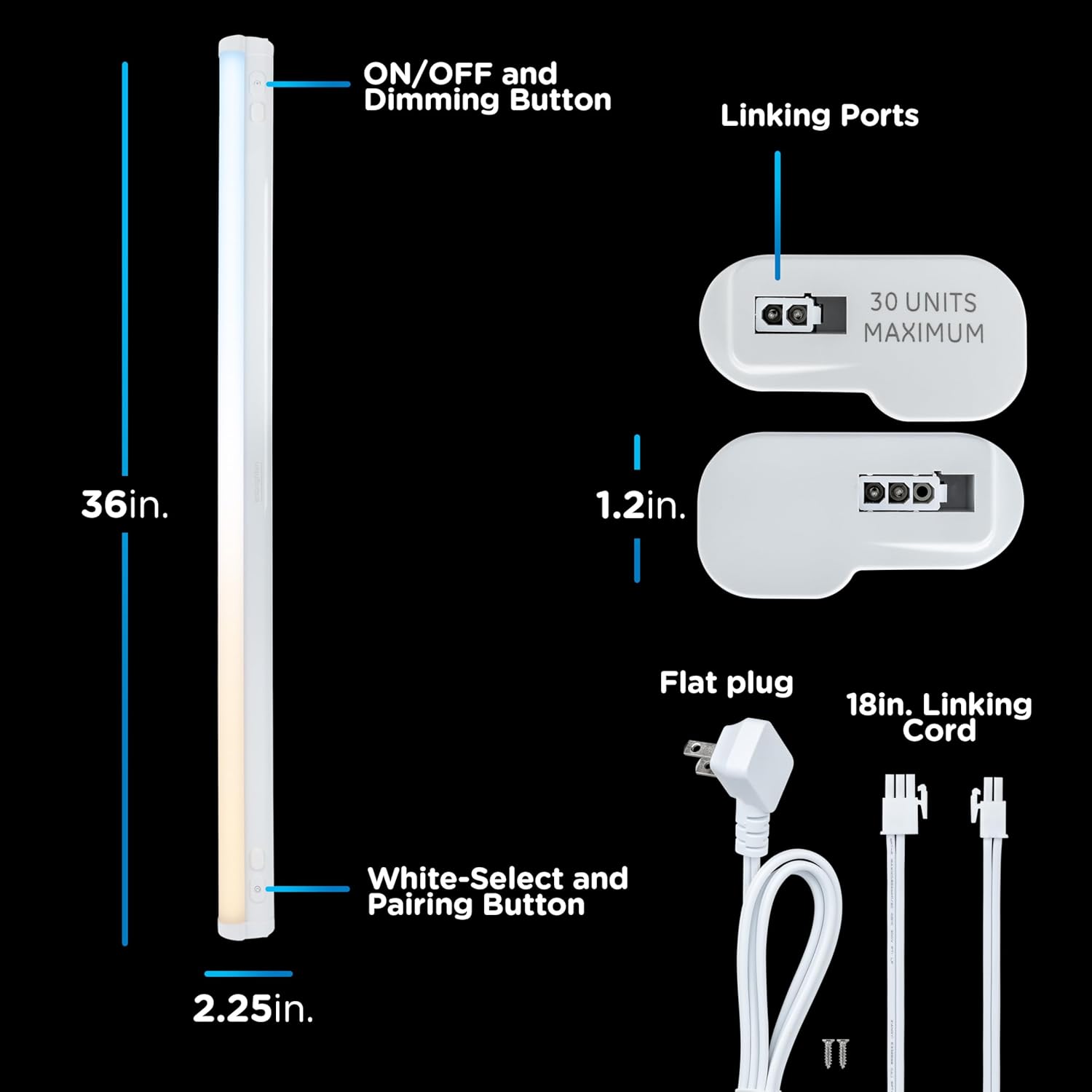
Image 2.1: A diagram illustrating the 36-inch length and 2.25-inch width of the light bar, along with its ON/OFF and Dimming Button, White-Select and Pairing Button, Linking Ports (maximum 30 units), flat plug, and 18-inch linking cord.
2.2 Mounting Instructions
- Choose Location: Select a flat, stable surface under a cabinet or shelf where you want to install the light bar. Ensure it is within reach of a power outlet.
- Mark Mounting Points: Hold the light bar in the desired position and mark the locations for the mounting clips using a pencil. Ensure marks are level.
- Install Mounting Clips: Secure the mounting clips to the marked locations using the provided screws.
- Attach Light Bar: Snap the Enbrighten LED Light Bar into the installed mounting clips.
- Connect Power: Plug the 5 ft. power cord into the light bar and then into a standard wall outlet.
2.3 Linking Multiple Fixtures
To extend your lighting system, you can link up to 30 Enbrighten LED light bars. Use the included 18-inch linking cords to connect the linking ports on adjacent light bars. Ensure all linked fixtures are securely mounted before operation.

Image 2.2: A close-up view of two Enbrighten light bars being connected using an 18-inch linking cord, demonstrating the linkable fixture feature for expanding lighting coverage.
3. Operating Instructions
The Enbrighten LED Light Bar features intuitive controls for power, dimming, and color temperature adjustment.
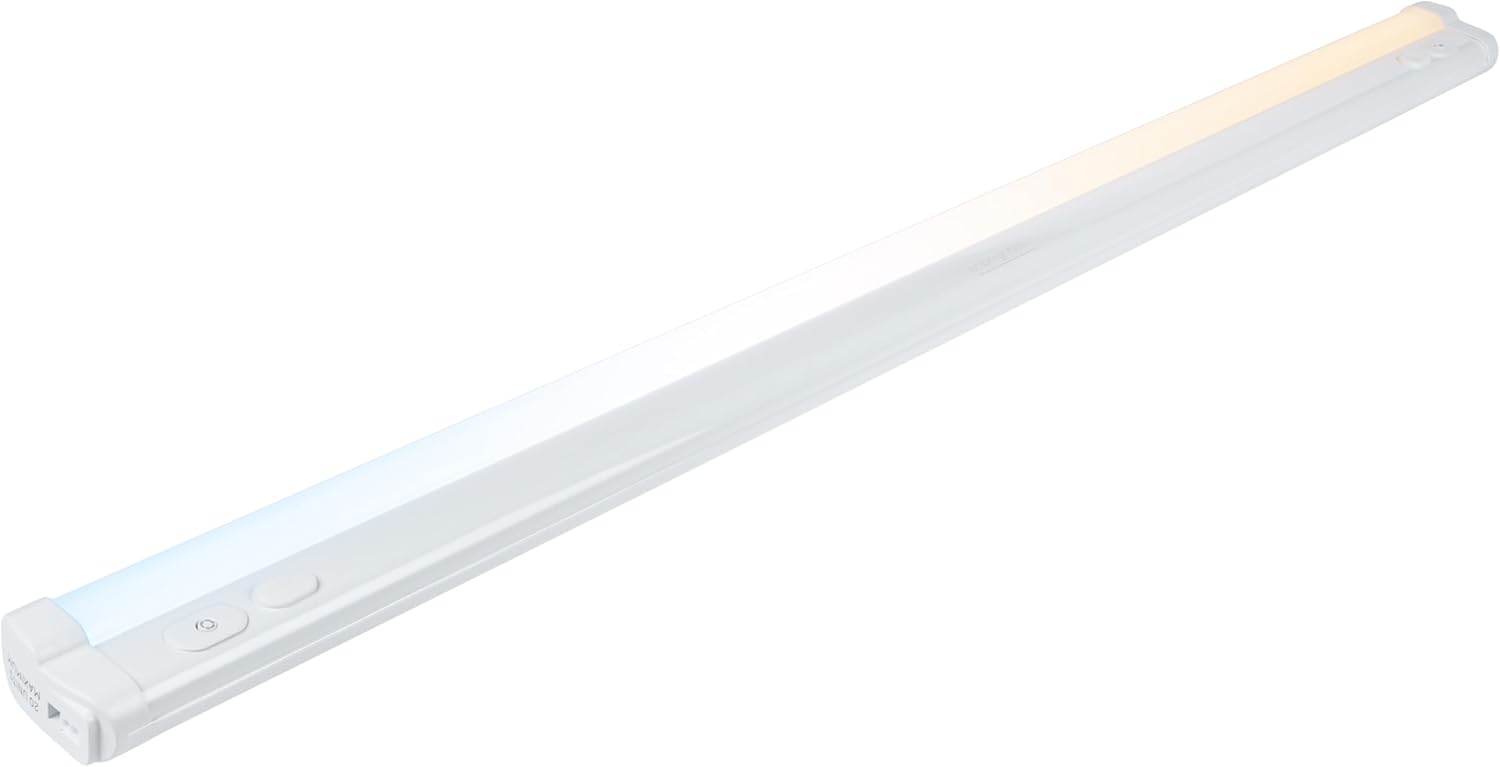
Image 3.1: The Enbrighten light bar showcasing its sleek design and the integrated control buttons for operation.
3.1 Power ON/OFF and Dimming
- Power ON/OFF: Press the ON/OFF button (typically the larger, circular button) once to turn the light bar on or off.
- Dimming: While the light is on, press and hold the ON/OFF button to adjust the brightness level. The light will cycle through its dimming range. Release the button when the desired brightness is reached. The light will blink once when the maximum or minimum brightness level is achieved.
3.2 Adjusting Color Temperature
The light bar offers five color temperature options to suit different preferences and environments.
- Change Color Temperature: Press the White-Select and Pairing Button (typically the smaller button with a sun icon) to cycle through the five available color temperatures:
- 2700K (Soft White)
- 3000K (Warm White)
- 4000K (Cool White)
- 5000K (Daylight)
- 6500K (Cool Daylight)

Image 3.2: Visual representation of the five selectable color temperatures (2700K, 3000K, 4000K, 5000K, 6500K) and their effect on a kitchen environment, demonstrating the adjustable white feature.
3.3 One-Touch Sync Control
When multiple Enbrighten LED light bars are linked, the one-touch sync feature allows you to control all connected fixtures simultaneously from any single unit.
- Synchronized Control: Any adjustment made to the brightness or color temperature on one linked light bar will automatically apply to all other connected light bars. Pressing the ON/OFF button on one unit will also turn all linked units on or off.

Image 3.3: A person adjusting one of the under-cabinet light bars in a kitchen, with arrows illustrating that the settings are synchronized across all paired fixtures with a single touch.
4. Maintenance
The Enbrighten LED Light Bar requires minimal maintenance to ensure optimal performance and longevity.
4.1 Cleaning
- Disconnect Power: Always unplug the light bar from the power outlet before cleaning.
- Wipe Down: Use a soft, dry, or slightly damp cloth to wipe the surface of the light bar.
- Avoid Harsh Chemicals: Do not use abrasive cleaners, solvents, or harsh chemicals, as these can damage the finish or internal components.
4.2 General Care
- Indoor Use Only: This product is designed for indoor use. Do not expose it to water, high humidity, or extreme temperatures.
- Handle with Care: Avoid dropping the light bar or subjecting it to strong impacts.
- Ventilation: Ensure adequate airflow around the light bar to prevent overheating, although LED lights generate minimal heat.
5. Troubleshooting
If you encounter issues with your Enbrighten LED Light Bar, refer to the following common problems and solutions.
| Problem | Possible Cause | Solution |
|---|---|---|
| Light does not turn on. | No power to the unit; loose connection; faulty outlet. | Ensure the power cord is securely plugged into the light bar and the wall outlet. Test the outlet with another device. Check if the circuit breaker has tripped. |
| Light flickers or dims unexpectedly. | Unstable power supply; loose connection; incompatible dimmer (if using external). | Ensure the power connection is stable. If linked, check connections between units. This light bar has built-in dimming; avoid connecting to external dimmers unless specified. |
| Linked lights do not sync. | Improper linking cord connection; too many units linked. | Verify that all linking cords are securely connected between units. Ensure you have not exceeded the maximum of 30 linked units. |
| Cannot change color temperature. | Button not pressed correctly; internal malfunction. | Ensure you are pressing the correct "White-Select and Pairing Button". If the issue persists, try unplugging and re-plugging the unit. |
6. Specifications
| Attribute | Detail |
|---|---|
| Brand | Enbrighten |
| Model Name | Enbrighten Plug-in Dimmable CCT Adjustable UCF |
| Model Number | 82788-T1 |
| ASIN | B0DK647KP4 |
| UPC | 030878827881 |
| Size | 36 inch |
| Color | White |
| Material | Plastic |
| Style | Under Counter Light |
| Product Dimensions | 37.7"L x 4"W x 1.4"H |
| Power Source | Corded Electric |
| Voltage | 120 Volts (AC) |
| Wattage | 12 watts |
| Brightness | 2385 lumens |
| Efficiency | 198.83 lumens per watt |
| Light Source Type | LED |
| Light Color Options | Soft White (2700K), Warm White (3000K), Cool White (4000K), Daylight (5000K), Cool Daylight (6500K) |
| Control Method | Push Button (Remote optional, sold separately) |
| Special Features | Linkable, Selectable Brightness, Selectable White |
| Indoor/Outdoor Usage | Indoor |
| Item Weight | 1.4 pounds |
| Manufacturer | Jasco Products Company, LLC |
7. Warranty and Support
7.1 Warranty Information
The Enbrighten Plug-In LED Light Bar comes with a Limited Lifetime Warranty. For specific terms and conditions, please refer to the warranty documentation included with your product or visit the manufacturer's official website.
7.2 Customer Support
For technical assistance, troubleshooting, or warranty claims, please contact Enbrighten customer support. You can typically find contact information on the product packaging or the official Enbrighten website. Please have your model number (82788-T1) and purchase date available when contacting support.
For more information and product updates, visit the Enbrighten Store on Amazon.