
Desiontal YT1500 Pro
User Manual for Desiontal YT1500 Pro Motorized Tripod Head
Model: YT1500 Pro
1. Product Overview
The Desiontal YT1500 Pro is an advanced motorized pan-tilt head designed for cameras, smartphones, and other recording devices. It offers precise 360° horizontal rotation and 52° vertical adjustment, controlled wirelessly via a 2.4G remote. This device is engineered to enhance filming efficiency for panoramic shots, live broadcasting, and various video production needs, supporting equipment up to 2.2kg.
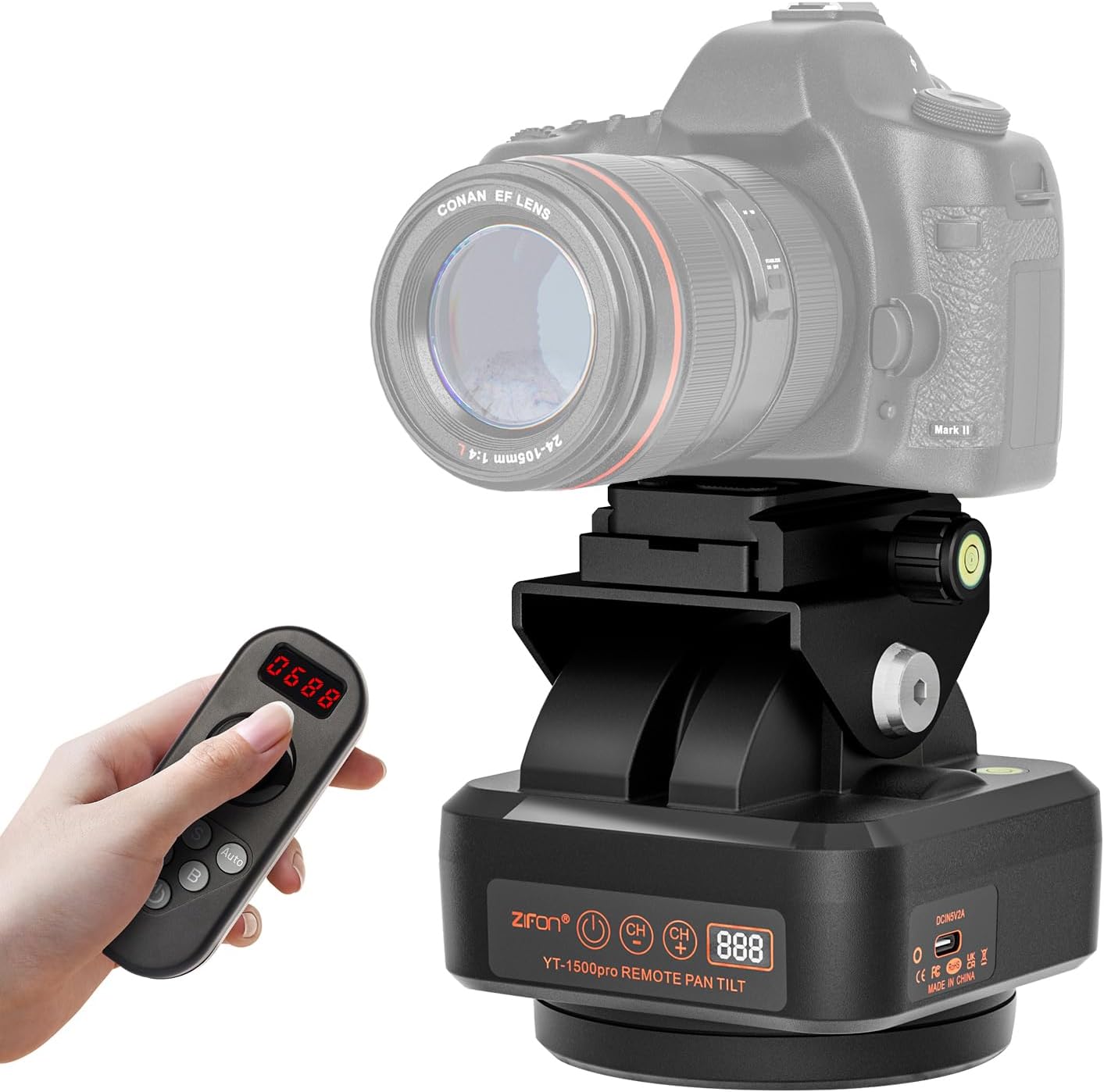
Image 1.1: The YT1500 Pro motorized tripod head shown with its wireless remote control and a mounted DSLR camera. This image illustrates the primary components of the system.
2. What's in the Box
- YT1500 Pro Motorized Head x 1
- Remote Control x 1
- Cell Phone Clip x 1
- USB-Type C Charging Cable x 1
- AAA Battery x 2 (for remote control)
3. Key Features
- 360° Horizontal & 52° Vertical Adjustment: Enables comprehensive panoramic and tilt shooting with precise control.
- Adjustable Rotating Speeds: Features 8 distinct speed levels for smooth and controlled movement.
- 2.4G Wireless Remote Control: Offers a 40m (131.23ft) control distance for convenient operation.
- A/B Point Switching: Allows setting and smooth transitioning between two predefined points.
- Automatic Rotation Function: Supports automated horizontal and vertical rotation via remote control.
- IP66 Grade Waterproof: Designed for both indoor and outdoor use, offering protection against water ingress.
- Wide Compatibility: Equipped with a 1/4" screw quick release plate for cameras/camcorders and 1/4" screw holes for mounting on tripods/monopods. Includes a phone clip for smartphones.
- Built-in 2000mAh Battery: Provides 8-10 hours of operation and supports Type-C charging.
- High Definition Digital Display: Both the head and remote feature displays for monitoring channel, power level, and speed.
- Load Capacity: Supports devices up to 2.2kg (4.85 lbs).
4. Product Components
Familiarize yourself with the various parts of the YT1500 Pro motorized head for optimal use.

Image 4.1: Labeled diagram of the YT1500 Pro motorized head, highlighting key components such as the quick release plate, 1/4" screw, locking torque knob, horizontal bubble level, channel adjustment buttons, power switch, digital display screen, Type-C charging port, and rechargeable indicator light.
5. Setup Guide
- Charge the Motorized Head: Connect the provided USB-Type C charging cable to the Type-C port on the motorized head and a suitable USB power adapter (not included). The rechargeable light will indicate charging status. Ensure the device is fully charged before first use.
- Install Remote Control Batteries: Open the battery compartment on the back of the remote control and insert the two AAA batteries provided, observing correct polarity.
- Mount the Motorized Head: The YT1500 Pro has a 1/4" screw hole at its base. Securely mount it onto a tripod, monopod, or light stand.
- Attach Your Device:
- For Cameras/Camcorders: Use the 1/4" screw quick release plate on top of the motorized head. Attach your camera to this plate and then slide the plate into the head's receiver, securing it with the locking mechanism.
- For Smartphones: Attach the included phone clip to the 1/4" screw on the quick release plate. Insert your smartphone into the clip, ensuring it is held securely by the soft rubber pads.
- Power On: Press the power switch on the motorized head to turn it on. The digital display will illuminate.
6. Operating Instructions
6.1. Channel Synchronization
For the remote control to operate the motorized head, both devices must be set to the same channel. The head's display shows the channel (first two digits) and power level (third digit). The remote's display shows channel (first two digits), horizontal speed (third digit), and vertical speed (fourth digit).
- Use the "+" and "-" buttons on the motorized head to adjust its channel.
- On the remote control, use the channel adjustment buttons to match the head's channel.
6.2. Basic Movement Control
Use the joystick on the remote control to manually adjust the pan (horizontal) and tilt (vertical) angles.

Image 6.1: The 2.4G joystick remote control in use, demonstrating wireless operation of the motorized head with a camera mounted on a tripod.

Image 6.2: Visual representation of the YT1500 Pro's movement capabilities, including 360 degrees of horizontal rotation and 52 degrees of vertical tilt (26 degrees to the right and 26 degrees to the left from center).
6.3. Adjusting Rotation Speed
The motorized head supports 8 adjustable rotating speeds. The speed values are displayed on the remote control's screen (third and fourth digits). Adjust the speed using the remote's controls as needed for your filming requirements.
6.4. A/B Point Switching
This feature allows you to set two specific points (A and B) and smoothly switch between them.
- Manually move the head to your desired Point A using the joystick.
- Press the "A" button on the remote control to set Point A.
- Manually move the head to your desired Point B.
- Press the "B" button on the remote control to set Point B.
- Once both points are set, you can press the "A" or "B" button to make the head smoothly move to the respective preset point.
6.5. Automatic Rotation
The YT1500 Pro supports automatic horizontal and vertical rotation.
- Horizontal Auto Rotation: Press the "AUTO" button and simultaneously move the left and right joystick on the remote control to initiate continuous horizontal rotation.
- Vertical Auto Rotation: Press the "AUTO" button and simultaneously move the joystick up and down on the remote control to initiate continuous vertical rotation.
Note: When the head rotates vertically, especially during automatic movement, a motor noise of approximately 50 decibels may be audible at a distance of 30cm (11.8in). This noise is inherent to the high-power motor and typically does not affect audio recording unless an onboard microphone is used very close to the unit.
6.6. Vertical and Horizontal Shooting Modes
The design allows for easy switching between horizontal and vertical shooting orientations, particularly useful for smartphone users.

Image 6.3: Examples of the YT1500 Pro configured for both horizontal and vertical smartphone shooting, illustrating its adaptability for different content creation needs.
7. Maintenance
- Cleaning: Wipe the device with a soft, dry cloth. Do not use harsh chemicals or abrasive cleaners.
- Storage: Store the motorized head and remote in a cool, dry place away from direct sunlight and extreme temperatures.
- Battery Care: For prolonged storage, it is recommended to fully charge the built-in battery every 3-6 months to maintain its lifespan. Remove AAA batteries from the remote if not used for extended periods to prevent leakage.
- Water Resistance: While the unit is IP66 waterproof, avoid submerging it in water. Ensure the Type-C charging port cover is securely closed when not charging, especially in wet environments.
8. Troubleshooting
| Problem | Possible Cause | Solution |
|---|---|---|
| Motorized head does not power on. | Low battery or unit is off. | Ensure the power switch is in the ON position. Charge the motorized head using the Type-C cable. |
| Remote control is unresponsive. | Dead or incorrectly installed AAA batteries; incorrect channel. | Replace AAA batteries in the remote, ensuring correct polarity. Verify that the remote and head are set to the same channel. |
| Head movement is jerky or inconsistent. | Overload; low battery; obstruction. | Ensure the mounted device does not exceed the 2.2kg load capacity. Charge the motorized head. Check for any physical obstructions. |
| Audible noise during vertical tilt. | Normal operation characteristic. | This is a known characteristic of the high-power motor during vertical movement (approx. 50dB at 30cm). It typically does not affect external audio recording. Consider using an external microphone if onboard audio is affected. |
| Digital display is dim or not working. | Low battery or display issue. | Charge the motorized head. If the issue persists after charging, contact customer support. |
9. Specifications
| Feature | Detail |
|---|---|
| Model Number | YT1500 Pro |
| Product Dimensions (L x W x H) | 4.33 x 4.33 x 4.72 inches (11 x 11 x 12 cm) |
| Item Weight | 2.27 pounds (36.3 ounces / 1.03 kg) |
| Maximum Weight Recommendation | 2.2 Kilograms (4.85 lbs) |
| Horizontal Rotation | 360 degrees |
| Vertical Adjustment | 52 degrees |
| Adjustable Speeds | 8 levels |
| Wireless Control Technology | 2.4G |
| Remote Control Distance | 40 meters (131.23 feet) |
| Battery Type (Head) | Built-in 2000mAh rechargeable Lithium Ion |
| Battery Life (Head) | 8-10 hours |
| Charging Port | Type-C |
| Waterproof Rating | IP66 |
| Compatible Devices | Cameras, Cellphones |

Image 9.1: Dimensions of the YT1500 Pro motorized head, indicating its compact size.
10. Warranty and Support
Desiontal products are designed for reliability and performance. For warranty information, technical support, or any inquiries regarding your YT1500 Pro motorized head, please refer to the contact information provided with your purchase or visit the official Desiontal website. Keep your purchase receipt as proof of purchase for warranty claims.
Manufacturer: Desiontal
ASIN: B0DK5CCGGV
Ask a question about this manual
Ask about setup, troubleshooting, compatibility, parts, safety, or missing instructions. Manuals+ will review the question and use this page’s manual context to help answer it.