
Introduction
This manual provides detailed instructions for the safe and efficient operation of your LIBODD KWS-AC301L B Wattmeter. Please read this manual thoroughly before use and retain it for future reference. This device is designed to measure AC voltage, current, power, energy, timing, temperature, power factor, and frequency within the specified ranges.
Product Features

The KWS-AC301L B Wattmeter features a full viewing angle color screen and a dedicated metering chip for accurate measurements.
- 8 Major Functions: Measures current, timing, electrical energy, voltage, power, temperature, power factor, and frequency.
- Durable Construction: Made with PVC flame retardant material and features an all-round buckle design for stable and safe installation.
- Clear Display: Full-view color screen ensures easy and clear observation of readings.
- Accurate Measurement: Utilizes a dedicated metering chip for simple, convenient, and fast calculation of data.
- Wide Application: Suitable for various electrical monitoring needs, promoting efficient electricity usage.
Package Contents
The KWS-AC301L B package includes the following items:
- Meter (KWS-AC301L B) x 1
- Transformer x 1 (Note: For 20A models, the transformer is built into the instrument and not supplied separately.)
- Temperature Sensing Line x 1
- Communication Cable x 1
Specifications

Product dimensions and details on current transformers.
| Parameter | Value |
|---|---|
| Model | KWS-AC301L B |
| Voltage Measurement Range | AC 50-300V |
| Current Measurement Range | 0-20A / 0-100A (depending on model/transformer) |
| Functions | Voltage, Current, Power, Energy, Timing, Temperature, Power Factor, Frequency |
| Display | Full-view color LED screen |
| Material | PVC Flame Retardant |
| Package Dimensions | 1.18 x 0.79 x 0.39 inches |
| Item Weight | 0.353 ounces (approx. 10 grams) |
| Manufacturer | LIBODD |
Setup and Installation
The KWS-AC301L B model includes a 485 communication interface and a temperature sensor interface for enhanced monitoring capabilities. Ensure proper wiring according to electrical safety standards.

The KWS-AC301L B features RS485 communication and a temperature sensor interface.
Current Transformer Installation:
- For models requiring an external transformer, connect it as per the wiring diagram (not provided in source, but implied by image).
- The opening and closing transformer with a buckle is designed for easy disassembly.
- Closed-type transformers require the circle center string for installation.
- For 20A models, the transformer is built-in.
Communication and Temperature Sensor Connection:
- Connect the communication cable to the RS485 interface (A+, B- terminals).
- Connect the temperature sensing line to the dedicated temperature sensor interface.
Important: All electrical installations should be performed by a qualified professional to ensure safety and compliance with local regulations.
Operation
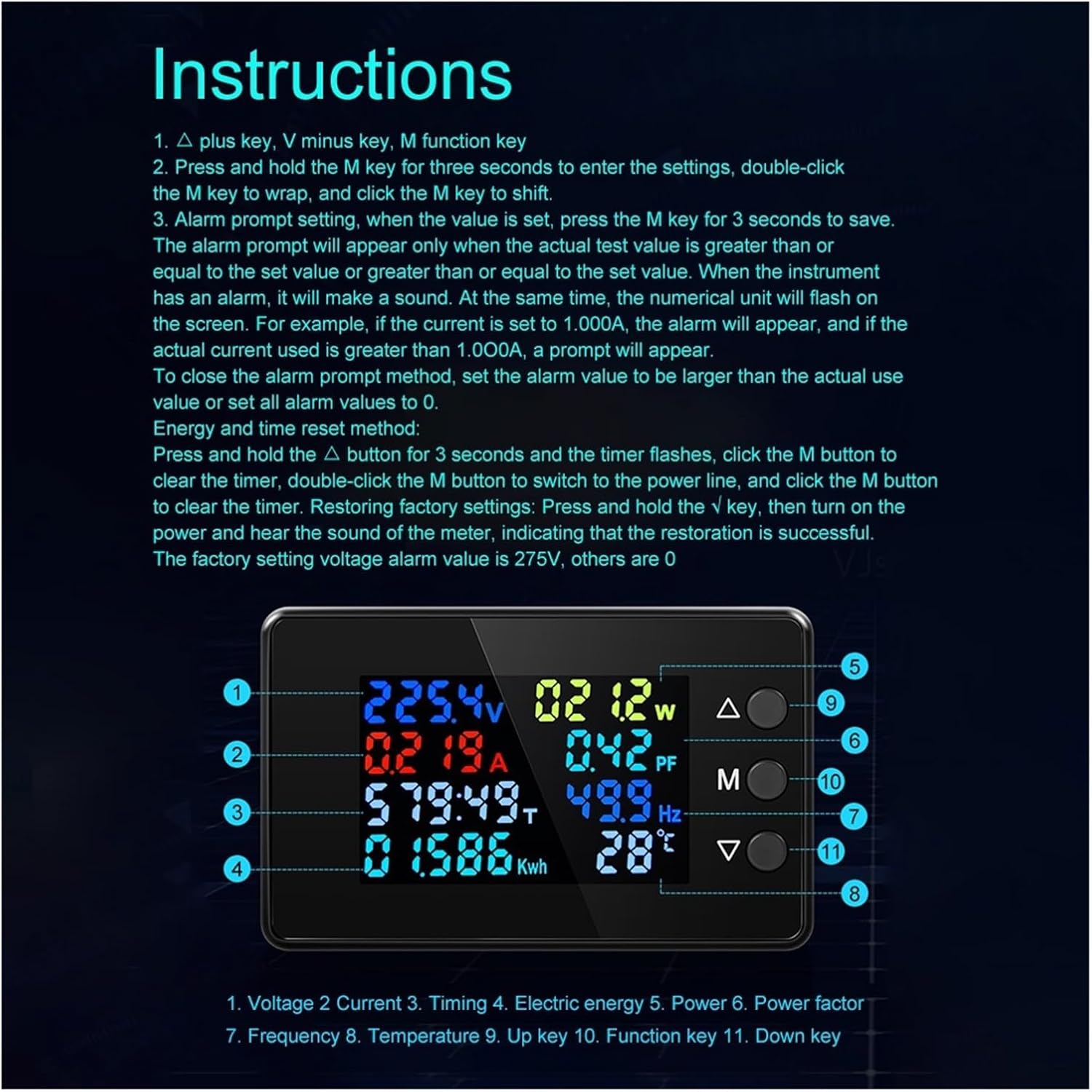
Overview of the KWS-AC301L B display and control buttons.
Button Functions:
- Up Key (Δ): Used for navigation and increasing values in settings.
- M Key: Function key, used for entering settings, confirming selections, and shifting parameters.
- Down Key (∇): Used for navigation and decreasing values in settings.
General Operation and Settings:
- Entering Settings: Press and hold the M key for three seconds to enter the settings menu.
- Navigating Settings:
- Double-click the M key to wrap through different setting parameters.
- Click the M key once to shift between digits or options within a parameter.
- Use the Up (Δ) and Down (∇) keys to adjust values.
Alarm Settings
The device can be configured to trigger an alarm when specific measurement values are met or exceeded.
- Setting Alarm Values:
- Enter the settings menu (press and hold M for 3 seconds).
- Navigate to the desired alarm parameter (e.g., current alarm, voltage alarm) using the M key.
- Adjust the alarm value using the Up (Δ) and Down (∇) keys.
- Once the value is set, press and hold the M key for 3 seconds to save the setting.
- Alarm Indication: When an alarm condition is met (actual test value is greater than or equal to the set value), the instrument will emit an audible sound, and the numerical unit on the screen will flash. For example, if the current alarm is set to 1.000A, an alarm will trigger if the actual current reaches or exceeds 1.000A.
- Disabling Alarm Prompts: To turn off an alarm prompt, set the alarm value higher than any expected actual value, or set the specific alarm value to 0.
The factory default voltage alarm value is 275V; all other alarm values are set to 0 by default.
Reset Functions
Electric Energy and Timing Reset:
- Press and hold the Up (Δ) button for 3 seconds. The timing display will flash.
- Click the M button once to clear the timing.
- Double-click the M button to switch to the electric energy display.
- Click the M button once to clear the electric energy.
Restoring Factory Settings:
To restore the device to its original factory settings:
- Ensure the device is powered off.
- Press and hold the Down (∇) key.
- While holding the Down (∇) key, turn on the power.
- Release the Down (∇) key after hearing an audible sound from the meter, indicating successful restoration.
Application Scenarios
The LIBODD KWS-AC301L B Wattmeter is versatile and can be used in various settings to monitor electrical parameters of connected appliances. It helps in understanding electricity consumption and optimizing usage.

Examples of how the wattmeter can be integrated into electrical systems for monitoring.
Common applications include:
- Monitoring power consumption in residential or commercial settings.
- Integrating into electrical distribution boards for real-time data.
- Analyzing electrical parameters of specific appliances or circuits.
- Educational purposes for understanding electrical principles.
Troubleshooting
This section addresses common issues you might encounter with your KWS-AC301L B Wattmeter.
- No Display/Power:
- Check power connections to ensure they are secure and correctly wired.
- Verify the power source is within the specified AC 50-300V range.
- Incorrect Readings:
- Ensure the current transformer is correctly installed and oriented.
- Confirm that the wiring for voltage and current inputs is correct.
- Perform a factory reset to rule out software configuration issues.
- Alarm Constantly Triggering:
- Review your alarm settings. The alarm triggers if the actual value is equal to or greater than the set value.
- Adjust the alarm threshold to a higher value or set it to 0 to disable.
- Communication Issues (KWS-AC301L B only):
- Check the RS485 communication cable connections for proper polarity (A+, B-).
- Ensure the PC software (if used) is correctly configured for the device.
If you continue to experience issues, please contact customer support.
Warranty and Support
Information regarding warranty coverage and customer support is typically provided with your purchase documentation. Please refer to the packaging or included warranty card for specific details.
For technical assistance or inquiries, please contact LIBODD customer service through the retailer where the product was purchased or visit the official LIBODD website (if available).
Manufacturer: LIBODD
Model Number: 1005004488031318