1. Product Overview
This manual provides essential information for the safe installation, operation, and maintenance of the Generic YENCONG914 Miniature Circuit Breaker. This device is designed for overload and short-circuit protection in AC 230V electrical circuits, featuring a 1-pole + neutral configuration and a 40A current rating, suitable for DIN rail mounting.
2. Safety Information
WARNING: Electrical shock hazard. Installation and maintenance should only be performed by qualified personnel. Always disconnect power before working on electrical circuits.
- Ensure the main power supply is disconnected before installation or servicing.
- Verify that the circuit breaker's specifications (voltage, current) match the requirements of your electrical system.
- Do not operate the circuit breaker with wet hands.
- Regularly test the circuit breaker as instructed in the maintenance section.
- This device is intended for indoor use in dry environments.
3. Product Features and Components
The YENCONG914 Miniature Circuit Breaker includes several key components for its operation and safety functions.
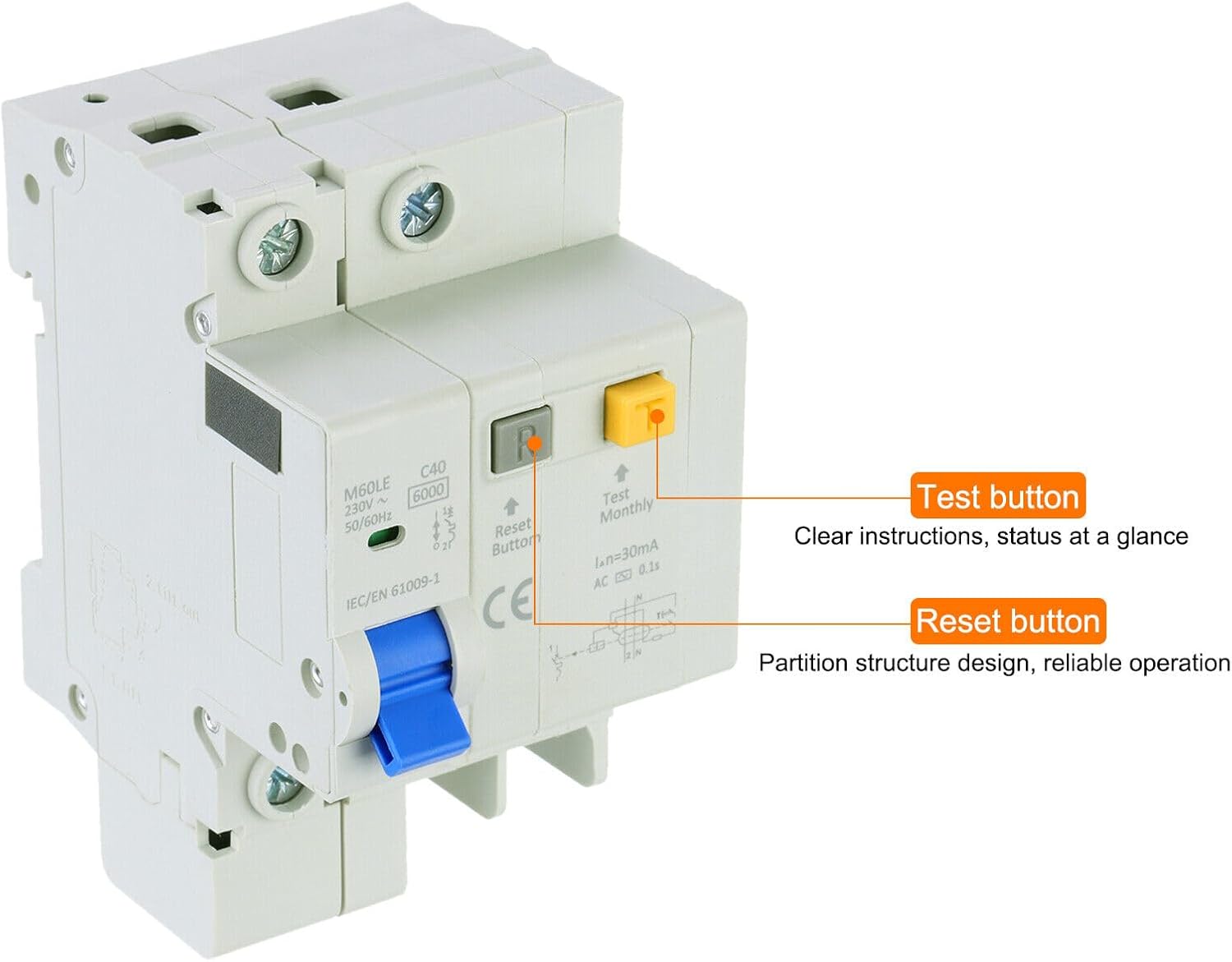
Image 3.1: Test and Reset Buttons. This image highlights the 'Test' button (yellow) and 'Reset' button (grey) on the circuit breaker. The 'Test' button is used for monthly functional checks, while the 'Reset' button is used to re-engage the breaker after it has tripped. Clear instructions and status indicators are designed for easy understanding.

Image 3.2: Detailed Component View. This image provides a closer look at the circuit breaker's components, including the 'Test' button, 'Reset' button, the blue 'Controller' switch for manual operation, and the 'Indicating window' which shows the breaker's status. The 'Argument' refers to the technical specifications printed on the device.
- Controller (Blue Switch): Used to manually switch the circuit breaker ON or OFF.
- Test Button (Yellow): Initiates a test of the residual current device (RCD) function to ensure it is operating correctly. This should be pressed monthly.
- Reset Button (Grey): Used to reset the circuit breaker after it has tripped due to an overload, short circuit, or earth leakage fault.
- Indicating Window: Displays the operational status of the circuit breaker (e.g., ON/OFF, tripped).
4. Specifications
The following are the technical specifications for the YENCONG914 Miniature Circuit Breaker:

Image 4.1: Product Dimensions. This image illustrates the physical dimensions of the circuit breaker, including its width of 66mm (2.6 inches), height of 93mm (3.66 inches), and depth of 54mm (2.13 inches). The rated voltage of AC 230V is also indicated.
| Parameter | Value |
|---|---|
| Model | YENCONG914 |
| Rated Voltage | AC 230V |
| Rated Current | 40A |
| Poles | 1P+N (1 Pole + Neutral) |
| Mounting Type | DIN Rail Mount |
| Standard | IEC/EN 61009-1 |
| Residual Current Sensitivity (IΔn) | 30mA |
| Tripping Time | AC 0.1s |
| Width | 66mm (2.6 inches) |
| Height | 93mm (3.66 inches) |
| Depth | 54mm (2.13 inches) |
5. Installation
Installation of this circuit breaker requires adherence to local electrical codes and safety standards. It is strongly recommended that installation be performed by a certified electrician.
- Power Disconnection: Before beginning any work, ensure the main power supply to the circuit is completely disconnected and locked out to prevent accidental re-energization.
- Mounting: The circuit breaker is designed for DIN rail mounting. Snap the breaker onto the standard 35mm DIN rail securely.
- Wiring:
- Connect the incoming live (phase) wire to the 'L' terminal and the incoming neutral wire to the 'N' terminal at the top of the breaker.
- Connect the outgoing live (phase) wire to the 'L' terminal and the outgoing neutral wire to the 'N' terminal at the bottom of the breaker.
- Ensure all connections are tight and secure to prevent loose contacts and overheating.
- Verification: Double-check all wiring connections for correctness and tightness.
- Power Restoration: Once installation is complete and verified, restore power to the circuit.
6. Operation
Operating the YENCONG914 Miniature Circuit Breaker is straightforward:
- Switching ON: Push the blue controller switch upwards to the 'ON' position. The indicating window should show the 'ON' status.
- Switching OFF: Push the blue controller switch downwards to the 'OFF' position. The indicating window should show the 'OFF' status.
- Tripped State: If an overload, short circuit, or earth leakage fault occurs, the breaker will automatically trip to the 'OFF' position. The indicating window will show the tripped status.
- Resetting After Trip: After identifying and resolving the fault that caused the trip, push the blue controller switch fully downwards to reset the internal mechanism, then push it upwards to the 'ON' position. If the breaker trips immediately again, do not force it; investigate the fault further.
7. Maintenance
Regular maintenance ensures the continued reliability and safety of your circuit breaker.
- Monthly Test: Press the yellow 'Test' button monthly. The circuit breaker should trip immediately. If it does not trip, the device may be faulty and should be replaced by a qualified electrician. After testing, reset the breaker by pushing the blue controller switch fully down, then up to the 'ON' position.
- Visual Inspection: Periodically inspect the circuit breaker for any signs of physical damage, discoloration, or loose connections.
- Cleaning: Ensure the circuit breaker is kept clean and free from dust and debris. Use a dry, soft cloth for cleaning. Do not use liquids or abrasive cleaners.
8. Troubleshooting
If you encounter issues with your circuit breaker, refer to the following troubleshooting guide:
- Breaker Trips Frequently:
- Overload: The circuit may be drawing too much current. Disconnect some appliances or devices from the circuit.
- Short Circuit: A direct connection between live and neutral wires. Inspect wiring and connected devices for damage.
- Earth Leakage Fault: Current is flowing to earth. Check appliances and wiring for insulation breakdown.
- Faulty Appliance: Disconnect appliances one by one to identify the faulty device.
- Breaker Does Not Reset:
- Ensure the fault that caused the trip has been resolved.
- Try pushing the controller switch fully down before attempting to push it up to 'ON'.
- If it still does not reset, the breaker itself may be faulty and requires replacement by a qualified electrician.
- Breaker Does Not Trip During Monthly Test:
- The residual current device (RCD) function may be faulty. The breaker must be replaced immediately by a qualified electrician.
If problems persist, consult a qualified electrician.
9. Warranty and Support
Specific warranty information for the Generic YENCONG914 Miniature Circuit Breaker is not provided in the product details. For any support or warranty inquiries, please refer to the retailer or manufacturer from whom the product was purchased.