
1. Introduction
This manual provides detailed instructions for the CHAKEYAKE T390 Series 4G Flip Phone. Designed for ease of use, this phone features large buttons, a clear display, and essential functions for seniors. Please read this manual thoroughly to understand the phone's capabilities and ensure proper operation.
2. Package Contents
Verify that all items listed below are included in your package:
- CHAKEYAKE T390 Series 4G Flip Phone
- Charging Base
- USB Type-C Charging Cable
- Power Adapter
- Rechargeable Lithium Battery
- User Manual
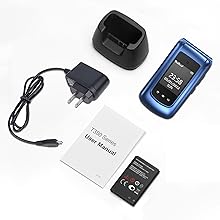
Image: Contents of the CHAKEYAKE T390 Series package, including the phone, charging base, cable, adapter, battery, and user manual.
3. Device Overview
The CHAKEYAKE T390 Series flip phone is designed for simplicity and functionality. It features a clamshell design with dual screens and large, easy-to-press buttons.
3.1 Key Features
- Dual Screens: A 2.4-inch internal display and a 1.77-inch external display for quick information.
- Large Buttons: Ergonomically designed for comfortable dialing and navigation.
- SOS Button: Dedicated emergency button on the back for quick assistance.
- High Volume: Clear and loud audio for calls and notifications.
- 4G Connectivity: Supports 4G LTE, 3G WCDMA, and 2G/GSM networks.
- Dual SIM Support: Allows for two SIM cards simultaneously.
- Type-C Charging & Charging Base: Convenient charging options.
- Integrated Functions: FM Radio, Alarm, Bluetooth, Camera, Flashlight, MP3 Player, Calculator, Calendar.

Image: Front view of the CHAKEYAKE T390 Series phone highlighting features like Message, Speed Dial, SOS Button, Camera, Multimedia, Alarm, Bluetooth, and Calendar icons.

Image: The CHAKEYAKE T390 Series phone in use, demonstrating loud volume, large screen, large font, and large buttons for user convenience.

Image: Illustration of the CHAKEYAKE T390 Series phone's dual screens, showing the 2.4-inch internal display and the 1.77-inch external display with time and date.
4. Setup
4.1 Battery Installation
- Remove the back cover of the phone by gently prying it open from the notch.
- Insert the provided lithium battery into the battery compartment, ensuring the gold contacts align with the phone's terminals.
- Replace the back cover, pressing firmly until it clicks into place.
4.2 SIM Card and Memory Card Installation
The phone supports dual Nano SIM cards and a Micro SD card for expanded storage.
- With the battery removed, locate the SIM card slots and the Micro SD card slot.
- Carefully insert your Nano SIM card(s) into the designated slots with the gold contacts facing down.
- If using, insert a Micro SD card into its slot.
- Reinstall the battery and back cover.

Image: Internal view of the CHAKEYAKE T390 Series phone showing the two Nano SIM card slots and the Micro SD card slot.
4.3 Charging the Phone
The phone offers two charging methods:
- Direct Charging: Connect the USB Type-C cable to the phone's charging port and the other end to the power adapter, then plug into a wall outlet.
- Charging Base: Place the phone into the charging base. Ensure the phone is correctly seated and the charging indicator appears on the screen. Connect the charging base to the power adapter.

Image: Illustration showing two charging methods for the CHAKEYAKE T390 Series phone: direct Type-C cable connection and placement in the charging base.
4.4 Power On/Off
- To Power On: Press and hold the Green Call Button until the screen lights up.
- To Power Off: Press and hold the Red End Call Button until the power off options appear, then select "Power Off".
5. Operating Instructions
5.1 Making and Receiving Calls
- To Make a Call: Enter the phone number using the keypad and press the Green Call Button.
- To Answer a Call: When the phone rings, press the Green Call Button.
- To End a Call: Press the Red End Call Button.
5.2 SOS Emergency Function
The SOS button is located on the back of the phone. It can be pre-set with up to 5 emergency contact numbers and a text message.
- Setting Up SOS Contacts: Navigate to the SOS settings in the phone's menu to add emergency numbers and customize the SOS text message.
- Activating SOS: In an emergency, press and hold the SOS Button on the back of the phone for 3 seconds.
- The phone will automatically dial the pre-set numbers one by one and send the emergency text message.

Image: Close-up of the CHAKEYAKE T390 Series phone's rear, showing the prominent SOS button and the loud speaker for clear audio.
5.3 Speed Dial
Assign frequently called numbers to speed dial keys for quick access.
- Access the Speed Dial settings in the phone's menu.
- Select a number key (e.g., 2-9) and assign a contact from your phonebook.
- To use, press and hold the assigned number key to dial the contact.
5.4 FM Radio
The phone includes a dedicated FM radio button for easy access to entertainment and news.
- Press the dedicated FM Button to launch the radio.
- Use the navigation keys to tune to different stations.
5.5 Alarm Clock
Set alarms for reminders such as medication, appointments, or daily routines.
- Press the dedicated Alarm Button or navigate to the Alarm Clock in the menu.
- Set the desired time and frequency for your alarms.
5.6 Flashlight
Activate the built-in flashlight for illumination in dark environments.
- Press and hold the designated Flashlight Button (or a specific key combination as per phone interface) to turn the flashlight on or off.

Image: The CHAKEYAKE T390 Series phone's flashlight function illuminating a dark area, demonstrating its utility.
5.7 Other Functions
- Bluetooth: Connect to compatible Bluetooth devices like headsets.
- Camera: Capture basic photos with the 0.3 MP camera.
- MP3 Player: Play audio files stored on the phone or memory card.
- Calculator: Perform basic arithmetic calculations.
- Calendar: View dates and manage simple events.
- Language Settings: The phone supports English, French, Portuguese, Spanish, Italian, German, and Dutch. Navigate to settings to change the language.
6. Maintenance
- Cleaning: Use a soft, dry cloth to clean the phone's exterior. Avoid liquid cleaners.
- Battery Care: Charge the battery regularly. Avoid extreme temperatures. If the phone will not be used for an extended period, charge it to about 50% before storing.
- Storage: Store the phone in a cool, dry place away from direct sunlight and moisture.
- Avoid Impact: Protect the phone from drops and impacts to prevent damage.
7. Troubleshooting
| Problem | Possible Solution |
|---|---|
| Phone does not power on. | Ensure the battery is correctly installed and charged. Connect the charger and try again. |
| Cannot make or receive calls. | Check if the SIM card is correctly inserted and activated. Verify network signal strength. Ensure airplane mode is off. |
| Poor call quality or low volume. | Adjust the call volume using the side buttons. Ensure the speaker is not obstructed. Move to an area with better network coverage. |
| Battery drains quickly. | Reduce screen brightness. Close unused applications. Limit background data usage. Ensure the phone is not in an area with very weak signal, which can increase battery consumption. |
| SOS function not working. | Verify that emergency contacts are correctly set up in the SOS settings. Ensure the phone has network signal. |
8. Specifications
- Brand: CHAKEYAKE
- Model: T390 Series
- Color: Blue
- Product Type: Flip Phone
- Screen Size: 2.4 inches (internal), 1.77 inches (external)
- Connectivity: 2G, 3G, 4G LTE
- Battery Composition: Lithium
- Installed RAM Size: 32 MB
- CPU Model: A Series A8
- Memory Storage Capacity: 16 GB (internal, supports external Micro SD)
- Wireless Carrier: All carriers (unlocked)
- SIM Card Slots: Dual SIM (Nano SIM)
- Camera: 0.3 MP
- Charging Port: USB Type-C
- Included: Charging Base
9. Warranty and Support
For warranty information and customer support, please refer to the documentation provided with your purchase or contact CHAKEYAKE customer service. The manufacturer is committed to providing 100% customer care and is available to assist with any inquiries.
Contact Information: Refer to the contact details provided on the product packaging or the official CHAKEYAKE website.