
UMIDIGI BISON GT2 PRO 4G
UMIDIGI Bison GT2 PRO 4G Smartphone User Manual
Model: BISON GT2 PRO 4G
Brand: UMIDIGI
1. Introduction
This manual provides essential information for the safe and efficient operation of your UMIDIGI Bison GT2 PRO 4G rugged smartphone. Please read this manual thoroughly before using the device to ensure proper functionality and to prevent damage.

Figure 1: UMIDIGI Bison GT2 PRO 4G Smartphone (Front and Back)
The image displays the UMIDIGI Bison GT2 PRO 4G smartphone, showcasing its rugged design from both the front and rear perspectives. The front features the display with a punch-hole camera, while the rear highlights the multi-camera setup and the textured, durable casing.
2. What's in the Box
Verify that all items are present in the package:
- UMIDIGI Bison GT2 PRO 4G Smartphone
- Screen Protector (pre-applied)
- Type-C Cable
- Power Adapter
- Quick Start Guide
3. Setup Guide
3.1. Charging the Device
Before initial use, fully charge the smartphone using the provided Type-C cable and power adapter. The device supports 18W fast charging. Connect the Type-C cable to the phone's charging port and the power adapter to a wall outlet.

Figure 2: Charging Indicator
This image shows a visual representation of the charging process, with a lightning bolt icon indicating power input to the device.
3.2. SIM Card and Micro-SD Card Installation
The UMIDIGI Bison GT2 PRO 4G supports dual Nano-SIM cards or one Nano-SIM card and one Micro-SD card for expanded storage up to 512GB. Locate the SIM tray on the side of the device. Use the SIM ejector tool (if provided) to open the tray. Carefully place the Nano-SIM(s) and/or Micro-SD card into the designated slots, ensuring correct orientation. Reinsert the tray firmly into the device.

Figure 3: SIM Card and Micro-SD Card Slots
The image illustrates the dual SIM and Micro-SD card tray configuration, alongside other key features like NFC, OTG, battery capacity, and FM radio, indicating the phone's versatile connectivity and storage options.
3.3. Initial Power On and Setup
Press and hold the power button until the UMIDIGI logo appears. Follow the on-screen prompts to complete the initial setup, including language selection, Wi-Fi connection, Google account login, and security settings (fingerprint sensor, AI Face Unlock).
4. Operating Your Smartphone
4.1. Display and Navigation
The device features a 6.5-inch Full HD+ display with a resolution of 2400x1080 pixels. It supports a 90Hz refresh rate and 180Hz ultra-high touch sampling rate for smooth interaction. Navigate the Android 12 operating system using touch gestures.

Figure 4: Display Refresh Rate
This image visually compares a standard 60Hz display with the UMIDIGI Bison GT2 PRO's 90Hz refresh rate, highlighting the smoother visual experience provided by the higher refresh rate.
4.2. Camera Functions
The UMIDIGI Bison GT2 PRO 4G is equipped with a versatile camera system:
- Main Camera: 64MP Ultra-clear primary sensor (f/1.8, FOV 81°) for detailed photos.
- Ultra-Wide Angle Camera: 8MP sensor (f/2.2, FOV 117°) for capturing broader scenes.
- Macro Camera: 5MP sensor (f/2.4, FOV 88°) for close-up shots (focus as close as 2.5cm).
- Front Camera: 24MP selfie camera for high-resolution self-portraits.
Available camera features include Ultra wide-angle mode, Steady handheld night photography, Macro mode, Portrait mode, Panorama mode, HDR, AI Beautify, Ultra wide-angle edge distortion correction, Dual LED flash, Face recognition, and Real-time filters.
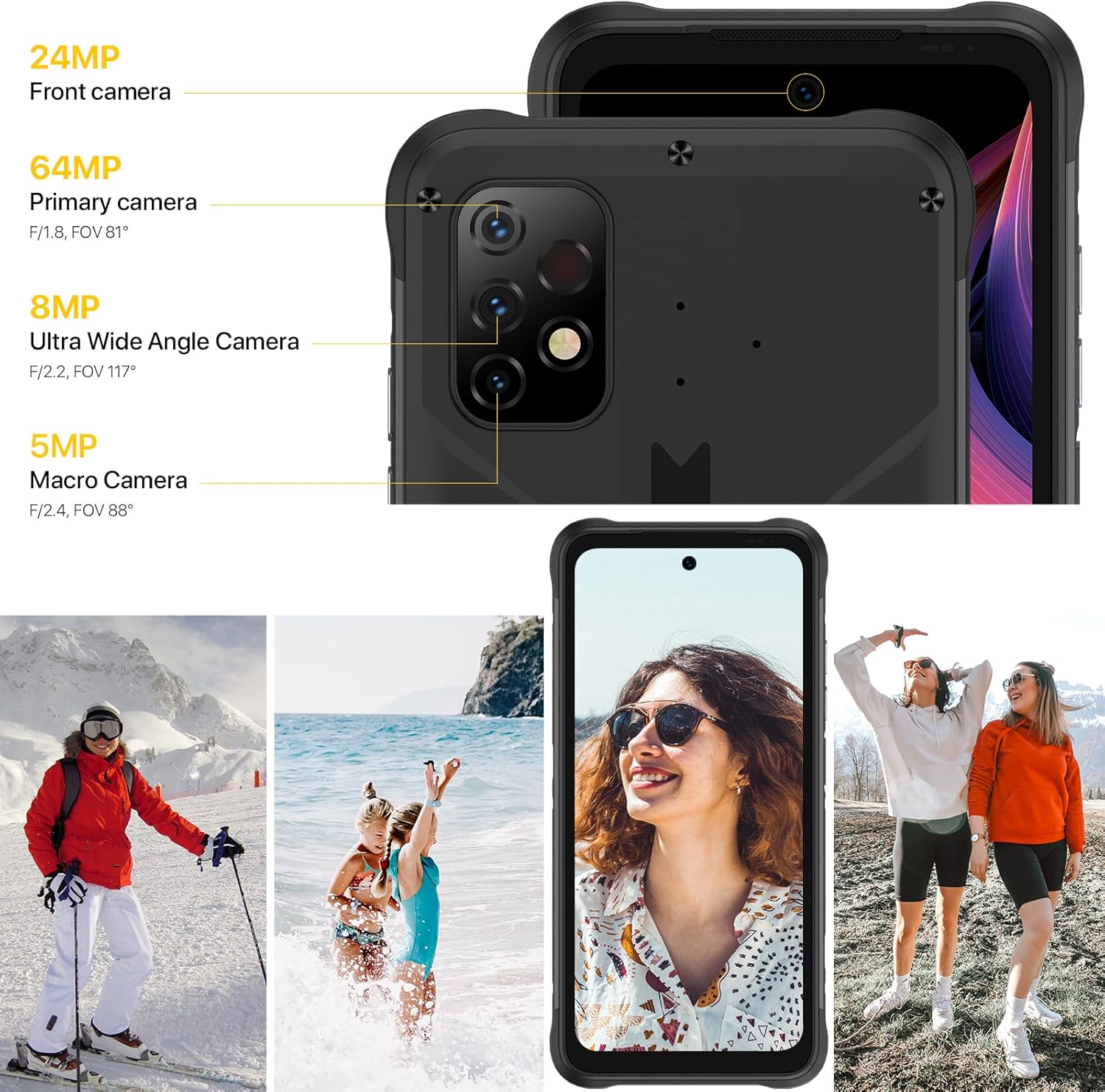
Figure 5: Camera System Overview
This image details the specifications of the smartphone's triple rear camera setup (64MP main, 8MP ultra-wide, 5MP macro) and the 24MP front camera, accompanied by sample photos demonstrating their capabilities in various scenarios.
4.3. Customizable Buttons
The device features two independent customizable buttons. These can be configured for quick access to functions such as SOS emergency, Push-to-Talk (PTT), flashlight, or recording. Access the settings menu to assign desired functions to these buttons.
4.4. Special Modes
- Underwater Mode: Activates specific settings for photography and video recording while submerged.
- Gloves Mode: Enhances touch screen sensitivity, allowing operation while wearing gloves.
4.5. Connectivity and Features
The UMIDIGI Bison GT2 PRO 4G supports 4G global networks, Bluetooth 5.0, 5G Wi-Fi, and NFC for contactless payments (Google Pay compatible). It also includes GPS, GLONASS, Beidou, and Galileo for precise navigation, a digital compass, and a headset-free FM radio.
5. Maintenance and Durability
The UMIDIGI Bison GT2 PRO 4G is designed as a rugged smartphone with enhanced durability features:
- IP68/IP69K Rating: Certified for water and dust resistance. It can withstand submersion in water and protection against high-pressure water jets.
- MIL-STD-810G Certified: Meets military standards for drop resistance, capable of withstanding drops from up to 1.8 meters.
- Temperature Tolerance: Operates reliably in extreme temperatures ranging from -40°C to 70°C.

Figure 6: Ruggedness Features (Water, Dust, Drop Resistance)
This image highlights the phone's robust construction, emphasizing its drop-proof, IP68/IP69K waterproof, and dustproof capabilities through various scenarios like being wet, covered in dust, and dropped.
Figure 7: Extreme Temperature Operation
This image illustrates the phone's ability to function in extreme cold (-40°C) and heat (70°C), showcasing its resilience in diverse environmental conditions.
To maintain the device's integrity, ensure all port covers are securely closed before exposure to water or dust. Clean the device with a soft, damp cloth. Avoid using harsh chemicals or abrasive materials.
6. Troubleshooting
If you encounter issues with your UMIDIGI Bison GT2 PRO 4G, refer to the following common solutions:
- Device Not Powering On: Ensure the battery is sufficiently charged. Connect the phone to the charger for at least 30 minutes before attempting to power it on again.
- Poor Battery Life: Optimize battery usage by reducing screen brightness, disabling unnecessary background apps, and turning off Wi-Fi, Bluetooth, or GPS when not in use.
- Connectivity Issues (Wi-Fi/Bluetooth/Mobile Data):
- Toggle Wi-Fi/Bluetooth/Mobile Data off and on.
- Restart the device.
- For mobile data, verify that your SIM card is correctly inserted and that the Access Point Name (APN) settings are configured according to your carrier's specifications. You may need to manually add or reset APN settings in your phone's network settings.
- Camera Quality Concerns: Ensure the camera lenses are clean and free from smudges. For optimal results, use appropriate lighting and camera modes.
- Device Overheating During Charging: It is normal for devices to warm up during charging, especially with fast charging. If the device becomes excessively hot, disconnect it from the charger and allow it to cool down. Ensure you are using the original charger and cable.
- Customizable Buttons Malfunction: Check the settings for the customizable buttons to ensure they are assigned correctly and not deactivated.
If the issue persists, consider performing a factory reset (back up your data first) or contact UMIDIGI customer support for further assistance.
7. Technical Specifications
| Feature | Specification |
|---|---|
| Model Name | BISON GT2 PRO 4G |
| Operating System | Android 12 |
| Processor | MediaTek Helio G95 Octa-Core |
| CPU Speed | 2 GHz |
| RAM | 8 GB |
| Internal Storage | 256 GB |
| Expandable Storage | Up to 512GB (Micro-SD) |
| Display Size | 6.5 inches |
| Display Resolution | 2400 x 1080 FHD+ |
| Refresh Rate | 90Hz |
| Touch Sampling Rate | 180Hz |
| Main Rear Camera | 64MP |
| Ultra-Wide Camera | 8MP |
| Macro Camera | 5MP |
| Front Camera | 24MP |
| Battery Capacity | 6150 mAh |
| Charging | 18W Fast Charge |
| Connectivity | 4G LTE, Wi-Fi (5G), Bluetooth 5.0, NFC |
| Navigation | GPS, GLONASS, Beidou, Galileo |
| Audio Jack | 3.5 mm |
| Durability Rating | IP68/IP69K, MIL-STD-810G |
| Package Dimensions | 7.87 x 4.41 x 2.01 inches |
| Item Weight | 1.21 pounds |
8. Warranty and Support
For detailed warranty information, please refer to the warranty card included with your product or visit the official UMIDIGI website. UMIDIGI provides customer support for product-related inquiries and technical assistance.
When using a SIM-free device, it is important to verify the frequency bands supported by your SIM card and carrier to ensure compatibility with the UMIDIGI Bison GT2 PRO 4G.
Official UMIDIGI Website: www.umidigi.com