
1. Product Overview
The Giecy Wireless Microphone Headset is a UHF mic system designed for clear audio transmission over distances up to 160 feet (50m). It features a high-sensitivity condenser microphone, automatic pairing, and a durable, adjustable design. This system is suitable for various applications including presentations, public speaking, and fitness instruction.

Figure 1: Giecy Wireless Microphone Headset components. The image shows the headset microphone, the compact receiver, and a 6.35mm adapter.
Key Features:
- Superior Sound Quality: High-sensitivity condenser mic for clear audio without whistling or feedback.
- Extended Range: Up to 160 feet (50m) transmission range with stable, interference-free performance.
- Easy Pairing: Automatic connection between transmitter and receiver upon power-on.
- Durable Design: Constructed from high-strength ABS material with an adjustable, flexible arm.
- Long Battery Life: Built-in 400mAh rechargeable lithium-ion batteries provide up to 6 hours of continuous use.
- Wide Compatibility: Works with voice amplifiers and PA systems via 3.5mm and 6.5mm microphone jacks.
2. Package Contents
Please verify that all items listed below are included in your package:
- Wireless Headset Microphone (Transmitter)
- UHF Receiver
- 6.35mm Adapter
- USB Charging Cable
- User Manual
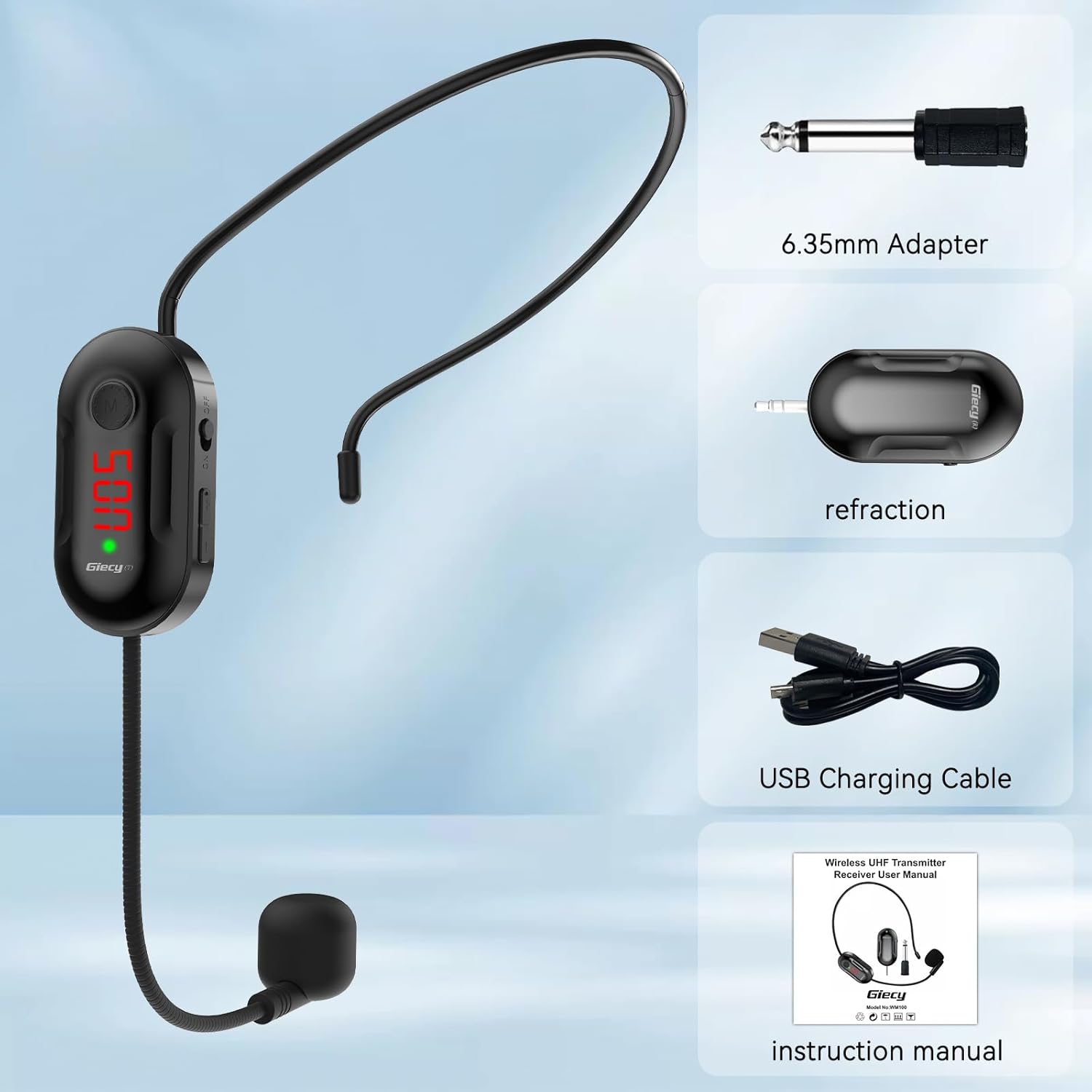
Figure 2: Included accessories. The image displays the 6.35mm adapter, the receiver, a USB charging cable, and the instruction manual.
3. Setup and Initial Use
3.1 Charging the Device
Both the transmitter (headset microphone) and receiver are equipped with built-in rechargeable lithium-ion batteries. Ensure both units are fully charged before first use.
- Connect the USB charging cable to the charging port (DC 5V) on both the transmitter and receiver.
- Connect the other end of the USB cable to a standard USB power source (e.g., computer USB port, USB wall adapter).
- During charging, a red light will be visible. The red light will turn off once the unit is fully charged.
- Charging time is approximately 2.5 hours. A full charge provides 6 hours of continuous use for music or 8-10 hours for amplification.

Figure 3: Simultaneous charging of the transmitter and receiver using the provided USB cable.
3.2 Powering On and Automatic Connection
The transmitter and receiver are designed to automatically connect upon power-on.
- Transmitter (Headset Mic): Press and hold the power button for 3 seconds to turn it on. The blue light will be continuously on, indicating a successful connection or readiness to connect.
- Receiver: Turn on the switch. If the blue light flashes, it indicates that the connection is not yet successful. If the blue light remains continuously on, it indicates a successful connection with the transmitter.

Figure 4: Key controls including the power button, volume adjustment buttons, and charging port.
3.3 Manual Pairing (If Automatic Fails)
If the transmitter and receiver do not connect automatically, you can manually pair them:
- First, turn on the receiver. The blue light will likely be flashing.
- Then, turn on the transmitter.
- While the transmitter is on, press and hold both the +/- buttons simultaneously for 1 second. The light on the transmitter will blink, indicating it is in pairing mode.
- Wait for the blue light on the receiver to stop flashing and remain continuously on. This indicates that the transmitter and receiver are successfully paired.
4. Operating Instructions
4.1 Connecting to an Audio System
The receiver is compatible with devices that have 3.5mm or 6.5mm microphone input jacks. It is designed for use with voice amplifiers and PA systems.
- Ensure the receiver is powered on and paired with the headset microphone.
- Plug the receiver directly into the 3.5mm microphone input jack of your amplifier or PA system.
- If your device has a 6.5mm microphone input, attach the provided 6.35mm adapter to the receiver before plugging it into the input jack.
- Note: Auxiliary jacks are not supported. This microphone system is not compatible with Android phones, iPhones, MacBooks, laptops, or Bluetooth speakers.

Figure 5: Illustrates wide compatibility with devices such as megaphones, sound field systems, car audio, and sound cards.
4.2 Adjusting Volume
The transmitter (headset microphone) allows for volume adjustment.
- Use the + button to increase the volume.
- Use the - button to decrease the volume.
- The default volume setting is 7.
4.3 Usage Scenarios
The Giecy Wireless Microphone Headset is versatile and suitable for:
- Conferences and presentations
- Speeches and public speaking events
- Web podcasts and YouTube videos
- Outdoor live streaming
- Yoga sessions and fitness instruction
- Gaming and promotional events

Figure 6: Examples of the headset in use for conventions, live broadcasts, teaching, and fitness instruction.

Figure 7: Illustration of the stable and reliable signal transmission over a 50-meter distance.
5. Care and Maintenance
- Cleaning: Wipe the headset and receiver with a soft, dry cloth. Avoid using harsh chemicals or abrasive cleaners.
- Storage: Store the device in a cool, dry place away from direct sunlight and extreme temperatures.
- Battery Care: To prolong battery life, avoid fully discharging the batteries frequently. Recharge them regularly, even if not in constant use.
- Water Exposure: This device is not waterproof. Avoid exposure to water or high humidity.
- Physical Damage: Handle the device with care to prevent physical damage. The adjustable arm, while flexible, should not be excessively bent or twisted.
6. Troubleshooting
6.1 No Sound or Intermittent Audio
- Check Power: Ensure both the transmitter and receiver are powered on.
- Check Battery: If the red light on the unit is continuously on, it indicates low power. Recharge the device.
- Check Connection: Verify that the receiver's blue light is continuously on, indicating a successful connection. If it's flashing, perform manual pairing as described in Section 3.3.
- Check Volume: Adjust the volume on the headset transmitter using the +/- buttons. Also, check the volume settings on your connected amplifier or PA system.
- Distance: Ensure the transmitter and receiver are within the 160 ft (50m) operating range and there are no major obstructions.
- Interference: While designed for interference-free performance, strong local radio frequency interference could potentially affect signal quality. Try moving to a different location if issues persist.
6.2 Device Not Pairing
- Follow the manual pairing instructions in Section 3.3 carefully.
- Ensure both units are fully charged.
- Power cycle both the transmitter and receiver, then attempt pairing again.
6.3 Incompatibility Issues
- This microphone system is specifically designed for voice amplifiers and PA systems.
- It is not compatible with:
- Android phones
- iPhones
- MacBooks
- Laptops (unless they have a dedicated microphone input that supports this type of receiver)
- Bluetooth speakers
- Devices with auxiliary (AUX) jacks
- Ensure you are using a 3.5mm or 6.5mm microphone input jack.
7. Product Specifications
| Feature | Specification |
|---|---|
| Brand | Giecy |
| Model Number | B0DK4KPVV9 |
| Microphone Form Factor | Headset |
| Connectivity Technology | UHF |
| Connector Type | Micro USB (for charging) |
| Power Source | Battery Powered (1 Lithium Ion battery included) |
| Battery Capacity | 400mAh (Transmitter & Receiver) |
| Continuous Use Time | Up to 6 hours (music), 8-10 hours (amplification) |
| Charging Time | Approx. 2.5 hours |
| Transmission Range | Up to 160 feet (50m) |
| Special Features | Adjustable Headband, Battery Indicator Light, Mute Function, Noise Reduction, Volume Control |
| Compatible Devices | Amplifier, Audio Interface, Karaoke Machine, PA System |
| Item Weight | 3.52 ounces (0.1 Kilograms) |
| Package Dimensions | 7.17 x 6.34 x 1.3 inches |
8. Warranty and Support
Specific warranty information for the Giecy Wireless Microphone Headset is not provided within this manual. For details regarding warranty coverage, returns, or technical support, please refer to the following:
- Your purchase documentation or receipt.
- The product listing page on the retailer's website (e.g., Amazon product page).
- Contact the seller directly through the platform where the product was purchased.
- Visit the official Giecy store or support website if available.
For further assistance, please contact the seller or manufacturer with your product model number (B0DK4KPVV9) and purchase details.