
Enbrighten 82785-T1
Enbrighten Under Cabinet Light Instruction Manual
Model: 82785-T1 | Brand: Enbrighten
1. Introduction
Thank you for choosing the Enbrighten 18-inch Plug-in LED Light Bar. This versatile fixture is designed to provide high-quality, diffused illumination for various spaces such as kitchens, offices, and workbenches. It features adjustable brightness, five color temperature settings, and the ability to link with other Enbrighten LED light bars for synchronized control.
What's Included:
- 18-inch LED Plug-in Light Fixture
- Mounting Hardware (screws, clips)
- 5 ft. Power Cord
- 18-inch Linking Cord

Image: The Enbrighten 18-inch Plug-in LED Light Bar shown with its retail packaging, highlighting its length and key features like plug-in, dimmable, and white-select capabilities.
2. Important Safety Information
Please read and understand all safety instructions before installing or operating this product. Failure to follow these instructions may result in electric shock, fire, or other hazards.
- Indoor Use Only: This product is designed for indoor use in dry locations. Do not expose to water or moisture.
- Electrical Safety: Ensure the power outlet matches the voltage requirements (120V AC). Do not overload electrical outlets.
- Installation: Install according to these instructions. If unsure, consult a qualified electrician.
- Cleaning: Disconnect power before cleaning. Use a soft, dry cloth. Do not use abrasive cleaners or solvents.
- No User-Serviceable Parts: Do not attempt to open or repair the fixture. There are no user-serviceable parts inside.
3. Setup and Installation
Installation of the Enbrighten LED Light Bar is straightforward. All necessary mounting hardware is included.
Mounting the Fixture:
- Choose a suitable location under a cabinet or shelf. Ensure the surface is clean and dry.
- Mark the desired mounting points for the included clips. Use a pencil to mark the screw locations.
- Drill pilot holes if necessary, then secure the mounting clips using the provided screws.
- Snap the Enbrighten LED Light Bar into the secured mounting clips. Ensure it is firmly in place.
Power Connection:
- Connect the 5 ft. power cord to the light bar's input port.
- Plug the power cord into a standard 120V AC wall outlet.
Linking Multiple Fixtures:
You can link up to 30 Enbrighten LED light bars together for expanded coverage and synchronized control.
- Ensure all fixtures are mounted securely.
- Use the included 18-inch linking cords to connect the output port of one fixture to the input port of the next.
- Only one fixture in the linked series needs to be connected to a power outlet.
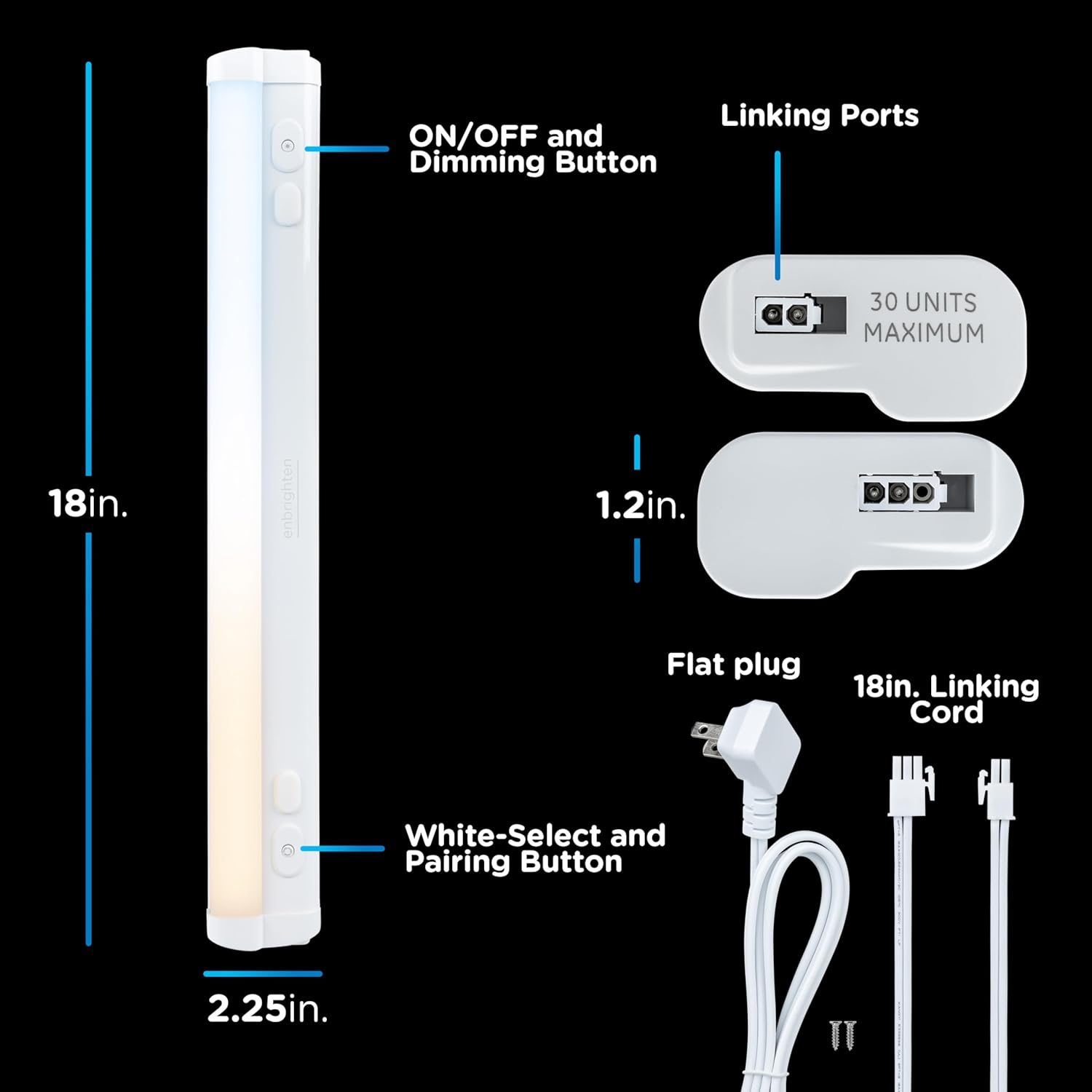
Image: A detailed diagram illustrating the dimensions of the 18-inch light bar (18in. length, 2.25in. width, 1.2in. height) and labeling its components including the ON/OFF and Dimming Button, White-Select and Pairing Button, Linking Ports, Flat Plug, and 18in. Linking Cord.

Image: Two Enbrighten LED light bars are shown connected by an 18-inch linking cord on a marble countertop, demonstrating how to upgrade a lighting system by connecting multiple fixtures.
4. Operating Instructions
The Enbrighten LED Light Bar offers intuitive controls for customized lighting.
Power ON/OFF and Dimming:
- Press the ON/OFF button (labeled with a power symbol) to turn the light on or off.
- To dim the light, press and hold the ON/OFF button. The brightness will cycle through its range. Release the button at your desired brightness level. The light will blink once when the maximum or minimum brightness is reached.
Adjusting Color Temperature:
The light bar features five selectable color temperature options:
- 2700K: Soft White
- 3000K: Warm White
- 4000K: Cool White
- 5000K: Daylight
- 6500K: Cool Daylight
Press the White-Select button (labeled with a sun symbol) repeatedly to cycle through these five color temperature settings.

Image: A visual representation of five distinct white light color temperatures (2700K Soft white, 3000K Warm white, 4000K Cool white, 5000K Daylight, 6500K Cool daylight) demonstrated in a kitchen environment, showing how the adjustable white feature can customize the ambiance.
One-Touch Sync Control (for Linked Fixtures):
When multiple Enbrighten LED light bars are linked, the one-touch sync feature allows you to control all connected fixtures simultaneously from any single light bar.
- Adjust the color temperature or brightness on one fixture, and all linked fixtures will update to match.
- Turning one fixture ON or OFF will also control all linked fixtures.

Image: A man is shown adjusting an Enbrighten under-cabinet light in a kitchen, with blue arrows indicating that other linked lights in the setup will synchronize their settings (brightness and color temperature) with this one, demonstrating the one-touch sync control feature.
5. Maintenance
The Enbrighten LED Light Bar requires minimal maintenance to ensure long-lasting performance.
- Cleaning: Before cleaning, ensure the light fixture is unplugged from the power outlet. Use a soft, dry, lint-free cloth to wipe down the surface. Do not use harsh chemicals, abrasive cleaners, or sprays directly on the fixture.
- Bulb Replacement: The LED lights are integrated and not user-replaceable. The fixture is designed for a long lifespan.
6. Troubleshooting
If you experience issues with your Enbrighten LED Light Bar, please refer to the following common problems and solutions:
| Problem | Possible Cause | Solution |
|---|---|---|
| Light does not turn on. | No power, loose connection, or faulty outlet. | Ensure the power cord is securely plugged into both the fixture and a working wall outlet. Test the outlet with another device. |
| Light flickers or dims unexpectedly. | Loose connection, power fluctuation, or incompatible dimmer (if using external). | Check all connections. Ensure the fixture is plugged directly into a standard outlet. If linked, check connections between fixtures. |
| Linked fixtures do not sync. | Improper linking connection or too many fixtures linked. | Verify that linking cords are properly connected between all fixtures. Ensure you have not exceeded the maximum of 30 linked units. |
If the problem persists after trying these solutions, please contact customer support.
7. Specifications
| Feature | Detail |
|---|---|
| Model Number | 82785-T1 |
| Size | 18 inch |
| Brightness | 1248 Lumens |
| Color Temperature | 2700K - 6500K (5 settings) |
| Power Source | Corded Electric (Plug-in) |
| Voltage | 120 Volts (AC) |
| Material | Plastic |
| Product Dimensions | 19.1"L x 4"W x 1.4"H |
| Item Weight | 14.4 ounces |
| Indoor/Outdoor Usage | Indoor |
| Control Method | Touch |
| Max Linked Units | 30 |
8. Warranty and Support
Warranty Information:
This Enbrighten product is backed by a Limited Lifetime Warranty. For detailed terms and conditions, please refer to the warranty documentation included with your purchase or visit the official Enbrighten website.
Customer Support:
If you have any questions, require technical assistance, or need to report an issue, please contact Enbrighten customer support. Contact information can typically be found on the product packaging or the official Enbrighten website.
For more information, visit: Enbrighten Store on Amazon
Ask a question about this manual
Ask about setup, troubleshooting, compatibility, parts, safety, or missing instructions. Manuals+ will review the question and use this page’s manual context to help answer it.