
1. Product Overview
The ZMRTDWO 24 Inch Oscillating Wall Mount Fan is a high-velocity fan designed for powerful air circulation in various indoor and outdoor environments. Featuring a durable all-metal construction and upgraded aluminum blades, this fan is built for longevity. It offers three speed options, automatic 90° oscillation, and 30° manual tilt adjustment for comprehensive cooling coverage. With an IP44 water-resistant rating and ETL certification, it is suitable for spaces such as patios, garages, workshops, and warehouses.

Figure 1.1: ZMRTDWO 24 Inch Oscillating Wall Mount Fan. This image displays the complete fan unit, including the fan head, wall mount bracket, and the wired control box.
Key Features:
- 3 Speed Options: Easily adjust airflow from low to high.
- Oscillation & Tilt: 90° automatic oscillation and 30° manual tilt for wide coverage.
- Powerful Airflow: Delivers up to 7200 CFM with a blowing distance of up to 30 ft.
- Durable Construction: All-metal casing and aluminum blades for enhanced durability.
- Weather Resistant: IP44 rated for water resistance, suitable for indoor and outdoor use.
- ETL-Certified: Ensures safety and quality standards are met.
2. Safety Instructions
Read all instructions carefully before using the fan. Failure to follow these instructions may result in electric shock, fire, or serious injury.
- Always unplug the fan from the power outlet before cleaning, servicing, or relocating.
- Do not operate the fan with a damaged cord or plug. If the cord or plug is damaged, contact qualified service personnel for repair or replacement.
- Do not run the power cord under carpeting. Do not cover the cord with throw rugs, runners, or similar coverings. Arrange the cord away from traffic areas where it will not be tripped over.
- This fan is rated IP44 for water resistance, meaning it is protected against splashing water from any direction. However, to protect the fan, avoid full exposure to heavy rain and high-humidity environments.
- Do not insert fingers or any other objects through the grille when the fan is operating.
- Ensure the fan is mounted securely to a sturdy wall structure capable of supporting its weight.
- This appliance is not intended for use by persons (including children) with reduced physical, sensory or mental capabilities, or lack of experience and knowledge, unless they have been given supervision or instruction concerning use of the appliance by a person responsible for their safety.
- Keep children and pets away from the fan during operation.
3. Product Components
Before beginning installation, ensure all components listed below are present and undamaged. Refer to the diagram for visual identification.

Figure 3.1: Exploded view of the ZMRTDWO Wall Mount Fan components. This image shows the main parts including the fan head with blades, motor housing, wall bracket, control box, and power cord.
- Fan Head Assembly (includes blades and front/rear grilles)
- Motor Housing
- Wall Mount Bracket
- Control Box with Power Cord
- Mounting Hardware (screws, anchors, etc.)
- Instruction Manual (this document)
4. Setup and Installation
This fan is designed for wall mounting. Follow these steps for secure and proper installation.
4.1 Choosing a Mounting Location:
- Select a sturdy wall surface (e.g., wood stud, concrete, brick) capable of supporting the fan's weight (approximately 24.4 lbs).
- Ensure there is sufficient clearance around the fan for oscillation and airflow.
- The location should be within reach of a suitable power outlet.
- For outdoor use, choose a location that offers some protection from direct, heavy rainfall, despite its water-resistant rating.
4.2 Installation Steps:
- Mark Drilling Points: Hold the wall mount bracket against the chosen wall location. Use a pencil to mark the positions for drilling holes.
- Drill Holes: Using an appropriate drill bit for your wall type, drill pilot holes at the marked locations.
- Insert Anchors (if necessary): If mounting into drywall or hollow walls, insert wall anchors into the drilled holes.
- Attach Wall Bracket: Secure the wall mount bracket to the wall using the provided screws. Ensure it is firmly attached and level.
- Mount Fan Assembly: Carefully lift the fan assembly and align it with the mounting arm on the wall bracket. Secure the fan to the bracket using the designated fasteners. Ensure all connections are tight.
- Connect Control Box: The control box is pre-wired to the fan. Ensure the power cord is routed safely and does not interfere with fan operation or oscillation.
- Final Check: Double-check all connections and mounting points to ensure the fan is securely installed before plugging it into a power outlet.
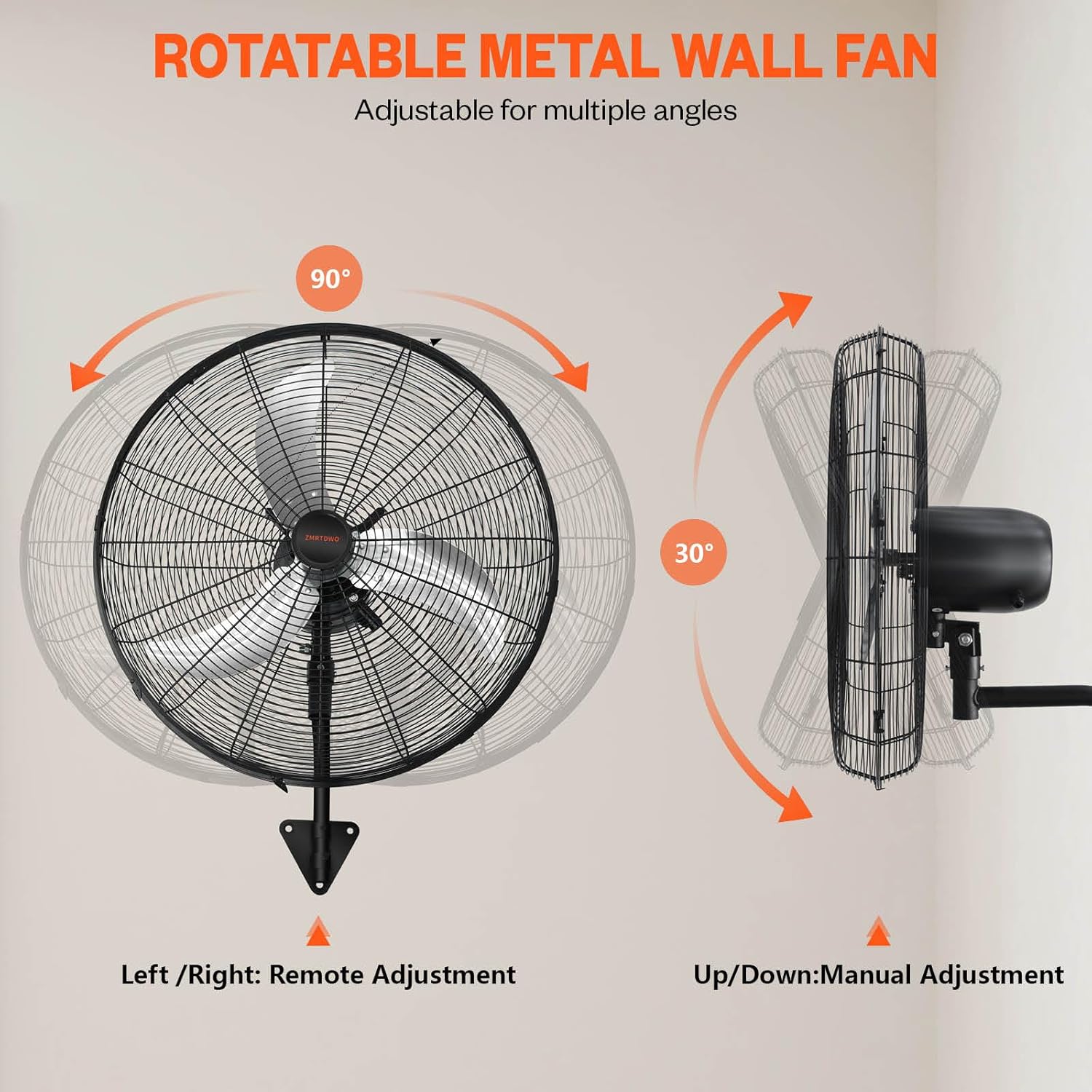
Figure 4.1: Diagram illustrating the fan's oscillation and manual tilt capabilities. This image also provides a visual reference for how the fan appears once mounted on a wall.
5. Operating Instructions
The ZMRTDWO Wall Mount Fan is equipped with a convenient control box for easy operation.
5.1 Powering On/Off:
- Plug the fan's power cord into a standard 120V/60Hz electrical outlet.
- Use the ON/OFF switch on the control box to power the fan on or off.
5.2 Adjusting Fan Speed:
The control box features a rotary switch or buttons to select from three fan speeds:
- Low: For gentle air circulation (approx. 5200 CFM).
- Medium: For moderate airflow (approx. 5800 CFM).
- High: For maximum air velocity (approx. 7200 CFM).

Figure 5.1: Illustration of the fan's three speed settings and corresponding CFM (Cubic Feet per Minute) values. This image helps visualize the airflow capacity at each setting.
5.3 Oscillation Control:
- The fan features a 90° automatic oscillation function.
- Use the dedicated oscillation switch or button on the control box to turn oscillation on or off.
5.4 Manual Tilt Adjustment:
- The fan head can be manually tilted up or down by 30° to direct airflow precisely where needed.
- To adjust the tilt, gently loosen the adjustment knob on the side of the fan head, position the fan to the desired angle, and then tighten the knob securely.
6. Maintenance
Regular maintenance ensures optimal performance and extends the lifespan of your fan. Always unplug the fan before performing any maintenance.
6.1 Cleaning:
- Exterior: Wipe the exterior surfaces of the fan with a soft, damp cloth. Do not use abrasive cleaners or solvents.
- Grilles and Blades: Dust and debris can accumulate on the grilles and blades, reducing airflow. Use a vacuum cleaner with a brush attachment or a soft brush to remove dust from the grilles. For deeper cleaning of the blades, it may be necessary to carefully remove the front grille (refer to assembly instructions for reverse steps). Ensure the fan is completely dry before plugging it back in.
- The IP44 rating means it can withstand splashes, but avoid direct high-pressure water jets or submerging any part of the fan.
6.2 Storage:
- If storing the fan for an extended period, clean it thoroughly and store it in a cool, dry place, protected from dust and moisture.
7. Troubleshooting
If you encounter issues with your fan, refer to the following common problems and solutions.
| Problem | Possible Cause | Solution |
|---|---|---|
| Fan does not turn on. | No power supply. Fan switch is off. | Ensure the fan is securely plugged into a working electrical outlet. Turn the fan switch to the ON position. |
| Reduced airflow. | Grilles or blades are dirty. Fan speed setting is too low. | Clean the fan grilles and blades as described in the Maintenance section. Increase the fan speed setting on the control box. |
| Fan makes unusual noise. | Loose parts or debris. Fan not mounted securely. | Unplug the fan and check for any loose components or foreign objects. Ensure the wall mount bracket and fan assembly are securely fastened. |
| Oscillation not working. | Oscillation function is off. | Activate the oscillation function using the dedicated switch on the control box. |
If the problem persists after attempting these solutions, please contact customer support.
8. Specifications
Detailed technical specifications for the ZMRTDWO 24 Inch Oscillating Wall Mount Fan.
| Attribute | Value |
|---|---|
| Brand | ZMRTDWO |
| Model Number | ZM002-ft |
| Style | 24 Inch - Oscillating |
| Color | Black |
| Power Source | Corded Electric |
| Product Dimensions (D x W x H) | 4.72"D x 29.9"W x 26.38"H |
| Item Weight | 24.4 pounds |
| Wattage | 170 watts |
| Voltage | 120V/60Hz |
| Special Features | Adjustable Tilt, Oscillating, Water Resistant (IP44) |
| Recommended Uses | Outdoor & Indoor (Garages, Gazebo, Patios, Warehouse, Workshops) |
| Mounting Type | Wall Mount |
| Noise Level | ≤ 65db |
| Power Cord Length | 6 ft (1.8 m) |

Figure 8.1: Diagram illustrating the fan's dimensions and key specifications. This image provides a visual representation of the fan's size from different angles.
9. Warranty and Support
For information regarding product warranty, please refer to the warranty card included with your purchase or contact the manufacturer directly. Keep your proof of purchase for warranty claims.
Customer Support:
If you have any questions, require technical assistance, or need to report an issue, please contact ZMRTDWO customer support through their official website or the contact information provided in your product packaging.