1. Introduction
This manual provides comprehensive instructions for the installation, operation, and maintenance of the LIBODD Tuya WiFi ZigBee Three Phase Two-Way Bidirectional Energy KWh Meter Monitor Wattmeter, including the G06 Hub. This device is designed for precise energy measurement and monitoring in three-phase electrical systems, offering advanced features such as remote control, data logging, and integration with smart home platforms.
2. Safety Information
Please read and understand all safety instructions before installing or operating this device. Failure to follow these instructions may result in electric shock, fire, or serious injury.
- Installation must be performed by a qualified electrician in accordance with local electrical codes and regulations.
- Ensure power is disconnected at the main circuit breaker before any installation or wiring.
- Do not operate the device if it appears damaged.
- Keep the device away from water and excessive humidity.
- The meter case material is UL 94 V-0, indicating a high level of flame retardancy.
- Operating Temperature: -25°C to +55°C.
- Storage Temperature: -40°C to +80°C.
- Humidity: < 90%, non-condensing.
- Pollution Degree: 2.
3. Package Contents
Verify that all components are present and undamaged:
- 1 x LIBODD Three Phase Two-Way Bidirectional Energy KWh Meter
- 1 x G06 Hub (if included in your specific model variant)
- 1 x User Manual (this document)

Image: The main energy meter unit with its digital display and connection terminals, alongside the compact G06 Hub, illustrating the primary components of the product package.
4. Product Overview and Features
The LIBODD Energy Meter is a sophisticated device designed for comprehensive energy monitoring and management. It offers a range of functions and features:
- Over Current Protection: Adjustable from 10-80A.
- Measurement Functions: Voltage meter, Ammeter, Energy meter (KWh), Wattmeter.
- Relay Control: Built-in relay for ON/OFF control, supporting remote pull-close control and prepaid management.
- Smart IoT Platform Integration: Equipped with a smart IoT platform for automatic wireless networking and remote meter reading.
- Multifunctional Parameter Measurement: Provides voltage, current, active power, reactive power, apparent power, power factor, and phase angle.
- Data Statistics & Storage: Bi-directional power, demand statistics, monthly statistics for the last 12 months, and daily statistics for the last 31 days.
- Event Logging: Records the last 50 relay operations and 10 SOE (Sequence of Events) events.
- LCD Display: Large LCD display with white backlight and adjustable backlight illumination time.

Image: A visual representation highlighting the key features of the smart WiFi energy meter, including its compatibility with TuyaSmart and Smart Life apps, and the various parameters it measures such as Total Active Energy, Voltage, Current, Power Factor, and Pulse.

Image: A side-angle view of the LIBODD energy meter, showcasing its compact design and the DIN rail mounting clips, providing a clearer perspective of its physical form factor.
5. Setup and Installation
Important: Ensure all power is OFF before proceeding with installation. This device is designed for TH35-7.5 DIN rail mounting.
- Mounting: Securely mount the energy meter onto a standard TH35-7.5 DIN rail within your electrical panel or enclosure.
- Wiring:
- Identify the L1, L2, L3 (Phase A, B, C) and N (Neutral) terminals on the meter.
- Connect the incoming three-phase power lines to the corresponding input terminals (e.g., L1, L2, L3, N).
- Connect the load lines to the corresponding output terminals.
- Ensure all connections are tight and secure to prevent loose contacts and overheating.
- G06 Hub Connection (if applicable): If your model includes the G06 Hub, follow its specific instructions for connection and pairing with the energy meter and your network.
- Power On: Once all wiring is complete and verified, restore power to the circuit. The meter's LCD display should illuminate.

Image: This image displays the physical dimensions of the energy meter (126mm width, 98mm height, 80mm depth) and a detailed wiring diagram for three-phase connections (L1, L2, L3, N, and load terminals), crucial for proper installation.

Image: A schematic diagram illustrating the two-way detection of power consumption, showing the flow from PV modules through an inverter, subsidized meter, distribution box, and bidirectional measurement to the low voltage network and load, along with a smartphone app interface displaying total energy and gross generation.
6. Operation
The energy meter can be operated via its LCD display and integrated with smart home applications like TuyaSmart or Smart Life for remote monitoring and control.
6.1. LCD Display Navigation
Use the buttons on the front panel to cycle through various measurement parameters such as voltage, current, active power, reactive power, and energy consumption (KWh). The display provides real-time data.
6.2. Smart App Integration (TuyaSmart/Smart Life)
- Download App: Download the TuyaSmart or Smart Life app from your smartphone's app store.
- Register/Login: Create an account or log in.
- Add Device: Follow the in-app instructions to add the energy meter. This typically involves putting the device into pairing mode (refer to the G06 Hub manual for specific pairing instructions if applicable) and connecting it to your WiFi network.
- Remote Monitoring: Once connected, you can remotely monitor all measured parameters, view historical data, and control the built-in relay (ON/OFF) from anywhere.
- Data Statistics: The app provides detailed statistics, including monthly electricity consumption for the last 12 months and daily consumption for the last 31 days.
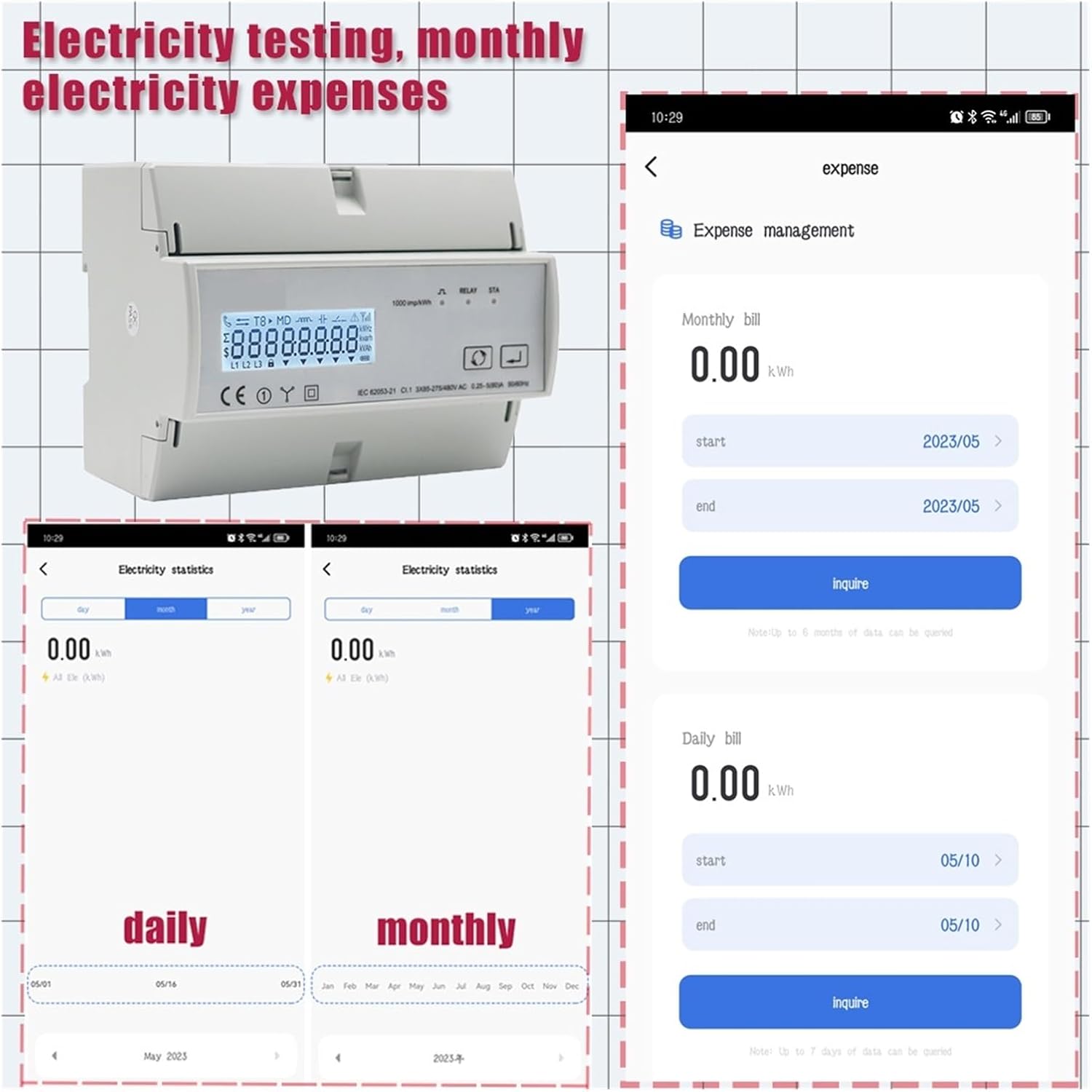
Image: Screenshots of a mobile application interface demonstrating electricity testing, daily and monthly electricity statistics, and expense management features, allowing users to track their energy consumption and costs.

Image: Mobile app screenshots showing the detailed readings for a three-phase energy meter, displaying current, active power, and voltage for each phase (Phase A, Phase B, Phase C), providing a comprehensive overview of the electrical system's status.
7. Maintenance
The LIBODD Energy Meter is designed for minimal maintenance. Follow these guidelines to ensure optimal performance and longevity:
- Cleaning: Periodically wipe the exterior of the device with a soft, dry cloth. Do not use abrasive cleaners or solvents.
- Inspection: Regularly inspect the wiring connections to ensure they remain tight and free from corrosion.
- Environment: Ensure the operating environment remains within the specified temperature and humidity ranges.
- Firmware Updates: Check the TuyaSmart/Smart Life app for any available firmware updates for the device and install them as recommended to ensure the latest features and security patches.
8. Troubleshooting
If you encounter issues with your energy meter, refer to the following common problems and solutions:
| Problem | Possible Cause | Solution |
|---|---|---|
| Device not powering on. | No power supply; incorrect wiring; faulty device. | Check main circuit breaker. Verify wiring connections. Contact support if issue persists. |
| No data displayed on LCD or app. | Incorrect wiring; device not paired with hub/app; network connectivity issues. | Verify wiring. Ensure G06 Hub is powered and connected. Re-pair device with app. Check WiFi signal strength. |
| Inaccurate readings. | Improper calibration (unlikely for new device); external interference; faulty current transformers (if external CTs are used). | Ensure wiring is correct and tight. Contact support for advanced diagnostics. |
| Remote control not working. | No internet connection; app issues; device offline. | Check internet connectivity. Restart app. Verify device status in app. |
9. Technical Specifications
| Parameter | Value |
|---|---|
| Model | Tuya WiFi ZigBee Three Phase Two-Way Bidirectional Energy KWh Meter |
| Voltage Range | 3 * 85/190V or 230/400VAC |
| Over Current Protection | 10-80A (adjustable) |
| Current Measurement Range | 0.25-80A, rated value 5A |
| Pulse Indicator Light | 1000 imp/kWh |
| Real Time Clock Timing Accuracy | 0.5 s/d |
| IP Protection Level | Display panel: IP51; Instrument body: IP30 |
| Dimensions (W x H x D) | 126 x 98 x 80 mm |
| Mounting Position | TH35-7.5 DIN rail mounting |
| Meter Case Material | UL 94 V-0 |
| Operating Temperature | -25°C to +55°C |
| Storage Temperature | -40°C to +80°C |
| Humidity | < 90%, non-condensing |
| Altitude | < 2000m |
| Vibration Resistance Index | Vibration frequency range: 10-150Hz, reference standard IEC600682-6 |
| Item Weight | 10 Grams |
| Number of Pieces | 1 |
10. Warranty and Support
LIBODD products are manufactured to high quality standards. For warranty information, please refer to the documentation provided with your purchase or contact your retailer. For technical support, troubleshooting assistance, or inquiries regarding your LIBODD product, please contact the manufacturer or your point of purchase.
For the most up-to-date support information, please visit the official LIBODD website or the support section of the TuyaSmart/Smart Life application.