
1. Introduction
This manual provides detailed instructions for the safe and effective use of your Medisana Heated Eye Mask with Sleep Headphones, Model SM 550. Please read this manual thoroughly before using the device and retain it for future reference.
The Medisana SM 550 is designed to provide soothing heat therapy to the eyes, combined with integrated Bluetooth headphones and white noise functions, to aid in relaxation and sleep. It is suitable for individuals seeking relief from dry eyes, eye fatigue, and to enhance sleep quality.
2. Safety Information
Important Safety Instructions: Read and follow all instructions carefully.
- Always ensure the sleep mask is properly positioned and not blocking your nose or mouth while sleeping.
- Do not use the mask if you have difficulty breathing or removing it by yourself.
- Keep the mask away from water and do not use it while charging.
- Consult a physician before use if you have any pre-existing eye conditions, skin sensitivities, or are pregnant.
- Do not use the device on infants, children, incapacitated individuals, or persons insensitive to heat.
- Discontinue use immediately if you experience any discomfort, irritation, or adverse reactions.
- Do not attempt to disassemble or repair the device yourself. Contact customer support for assistance.
3. Package Contents
Verify that all items are present in the package:
- Medisana Heated Eye Mask (SM 550) x 1
- Removable Cover x 1
- Storage Bag x 1
- USB-C Charging Cable x 1
- Cloth Pad for Velcro x 1 (for machine washing)
- User Manual (this document) x 1

The image above displays the Medisana Heated Eye Mask along with its accessories: a removable cover, a velvet storage bag, a USB-C charging cable, and a cloth pad designed to protect the Velcro during washing. The product box is also visible.
4. Setup
4.1 Charging the Device
Before first use, fully charge the eye mask. Connect the supplied USB-C charging cable to the charging port on the mask and to a compatible USB power adapter (not included). The charging indicator light will show the charging status. A full charge typically takes 1-2 hours.

This image highlights the 1200mAh battery, indicating approximately 110 minutes of working time and a fast charging duration of 1-2 hours.
4.2 Adjusting the Fit
The eye mask features an adjustable strap to ensure a comfortable and secure fit for various head circumferences.
- Place the eye mask over your eyes.
- Adjust the Velcro strap at the back of your head until the mask feels snug but not overly tight.
- Ensure the mask blocks out all light without putting excessive pressure on your eyes or nose. The 3D contoured design is intended to provide zero eye pressure and allow free blinking.
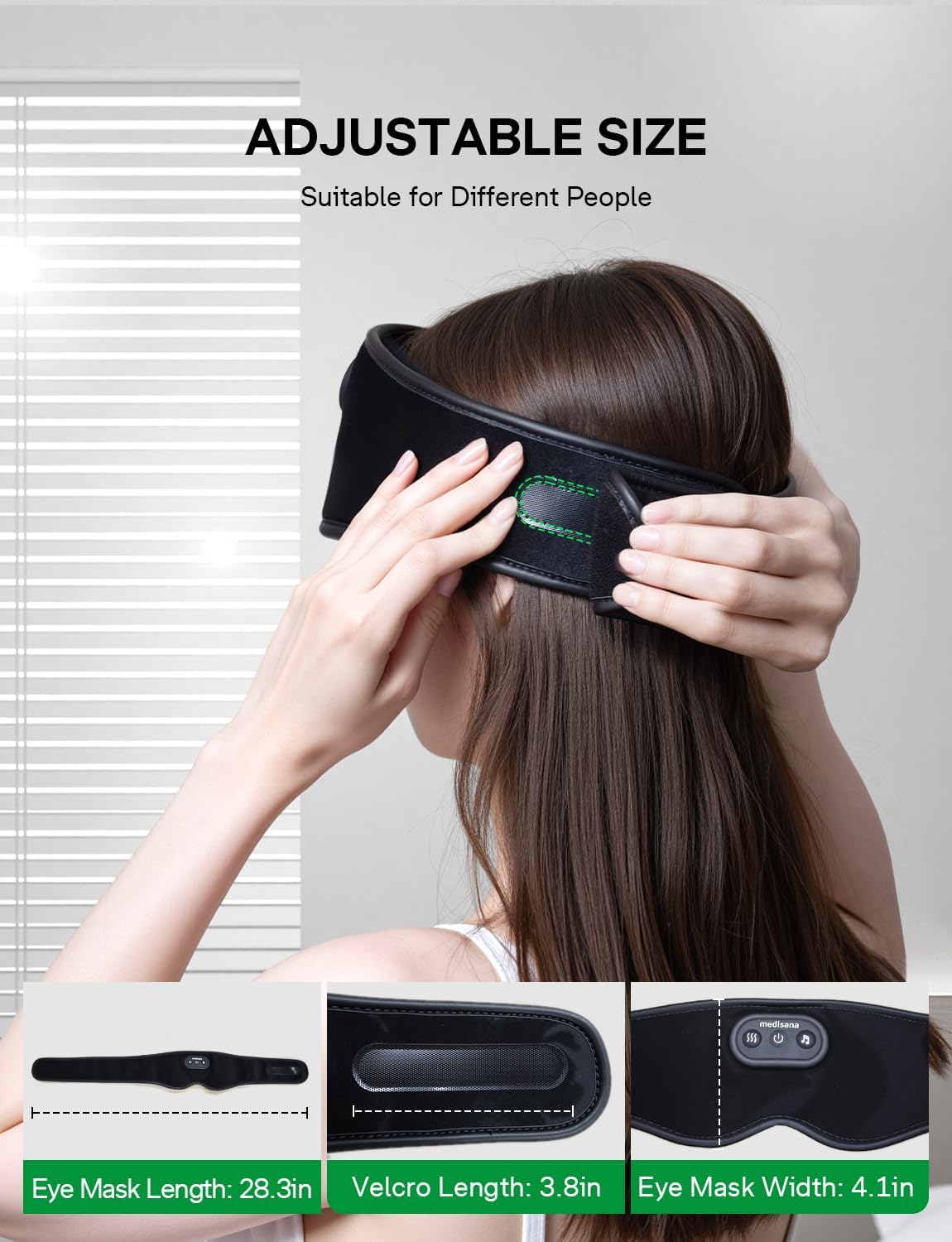
The image demonstrates how to adjust the eye mask using its Velcro strap. It also provides key dimensions: eye mask length (28.3 inches), Velcro length (3.8 inches), and eye mask width (4.1 inches).

This diagram illustrates the internal structure of the eye mask, highlighting the 3D contoured eye cups and the perforated design, which are engineered to prevent pressure on the eyes and allow for comfortable blinking.
5. Operating Instructions
The control panel is located on the front of the eye mask.

This image provides an overview of the Medisana eye mask, clearly showing the control buttons for heat, power, and music functions on the top surface. A person is also depicted wearing the mask, demonstrating its intended use.
5.1 Power On/Off
- Press and hold the Power Button (central button) for 3 seconds to turn the device on or off.
5.2 Heating Function
The eye mask offers two temperature levels and an automatic shut-off timer.
- With the device powered on, press the Heat Button (button with 'SSS' icon) to activate the heating function.
- Press the Heat Button again to cycle between temperature levels: Low Heat (120-130°F) and High Heat (130-140°F).
- The heating function is timed to automatically turn off after 15 minutes.

This image illustrates the two available heat settings: Low Heat, ranging from 120-130°F, and High Heat, ranging from 130-140°F, providing personalized comfort.
5.3 Bluetooth & Audio Functions
The eye mask features Bluetooth 5.4 for connecting to your mobile device and built-in white noise options.
- Bluetooth Pairing: With the device powered on, press and hold the Music Button (button with music note icon) for 3 seconds to enter Bluetooth pairing mode. The indicator light will flash. On your phone or tablet, search for "Medisana music sleep mask" in your Bluetooth settings and connect.
- Playing Music: Once paired, you can stream audio from your device. Use your phone/tablet to control playback.
- White Noise: Short press the Music Button to cycle through the 3 built-in natural white noise sounds (Waves, Water, Rain).
- Automatic Shut-off: The audio function (Bluetooth or white noise) will automatically turn off after 90 minutes.
- Volume Control: The device has 5 adjustable volume levels. Use the volume buttons on the mask (if present, otherwise control via connected device).

This image illustrates the audio capabilities of the eye mask, including Bluetooth connectivity, a 90-minute auto power-off feature, built-in music options, phone alert integration, and 5 adjustable volume levels.
6. Maintenance and Cleaning
Proper maintenance ensures the longevity and hygiene of your eye mask.
- Removable Cover: The outer cover of the eye mask is removable and washable. Gently detach the cover from the internal heating component.
- Washing: The removable cover can be hand washed or machine washed. If machine washing, use the provided cloth pad to cover the Velcro to prevent it from sticking to other items.
- Drying: Air dry the cover completely before reattaching it to the internal component.
- Internal Component: Do not wash the internal heating part. Wipe it clean with a dry or slightly damp cloth if necessary.
- Storage: When not in use, store the eye mask in the provided storage bag in a cool, dry place.

This image illustrates the process of removing the eye mask's outer cover for cleaning, emphasizing its removable and washable design for hygiene.
7. Troubleshooting
If you encounter issues with your Medisana Heated Eye Mask, refer to the following common solutions:
| Problem | Possible Cause | Solution |
|---|---|---|
| Device does not turn on. | Low battery or device is off. | Charge the device fully. Press and hold the Power Button for 3 seconds. |
| No heat or insufficient heat. | Heating function not activated or low battery. | Ensure the Heat Button is pressed. Check battery level and recharge if necessary. |
| Bluetooth not connecting. | Device not in pairing mode or already connected to another device. | Ensure the mask is in pairing mode (indicator flashing). Disconnect from other devices. Restart Bluetooth on your phone/tablet. |
| No sound from headphones. | Volume too low, device not connected, or audio source issue. | Increase volume on the mask and your connected device. Re-pair Bluetooth. Check audio playback on your source device. |
| Mask feels uncomfortable. | Strap too tight or improper positioning. | Adjust the Velcro strap for a looser fit. Reposition the mask to ensure it sits comfortably without pressing on the nose or eyes. |
8. Specifications
- Model Number: SM 550
- Brand: Medisana
- Color: Carbon Black
- Material: Premium Swan Velvet
- Battery: 1200mAh Lithium Polymer (included)
- Charging Time: 1-2 hours
- Working Time (Low Heat + Music): Up to 110 minutes
- Heat Levels: Low (120-130°F), High (130-140°F)
- Heat Timer: 15 minutes (automatic shut-off)
- Bluetooth Version: 5.4
- Audio Timer: 90 minutes (automatic shut-off)
- Special Features: 3D Contoured, Adjustable Strap, Bluetooth, Complete Blackout, Lightweight, 3 Built-in White Noises
- Package Dimensions: 11.77 x 3.74 x 2.13 inches
- Item Weight: 10.23 ounces
- Manufacturer: MEDISANA
9. Warranty and Support
The Medisana Heated Eye Mask SM 550 comes with a 1-year warranty from the date of purchase, covering manufacturing defects.
For warranty claims, technical support, or any questions regarding your product, please contact Medisana customer service through the retailer where the product was purchased or visit the official Medisana website for contact information.
Please retain your proof of purchase for warranty validation.