
SEESII Electric Tiller Model SEESII-CP3B2055US User Manual
Model: SEESII-CP3B2055US | Brand: Seesii
1. Important Safety Information
Before operating the SEESII Electric Tiller, it is crucial to read and understand all safety warnings and instructions provided in this manual. Failure to follow these instructions may result in electric shock, fire, and/or serious injury. Save all warnings and instructions for future reference.
- Always wear appropriate personal protective equipment, including eye protection, gloves, and sturdy footwear.
- Ensure the work area is clear of debris, rocks, and other objects that could be thrown by the blades.
- Keep hands, feet, and clothing away from moving parts, especially the tines.
- Disconnect the battery pack before making any adjustments, changing accessories, or storing the tiller.
- Do not operate the tiller in wet conditions or in the presence of flammable liquids or gases.
- Keep children and bystanders at a safe distance from the operating area.
- Use only the specified battery packs and charger for this tool.
2. Product Overview
The SEESII Electric Tiller Model SEESII-CP3B2055US is a cordless, battery-powered garden cultivator designed for efficient soil preparation. It features three adjustable speed settings, four detachable blades, and an ergonomic design for ease of use in various gardening tasks.
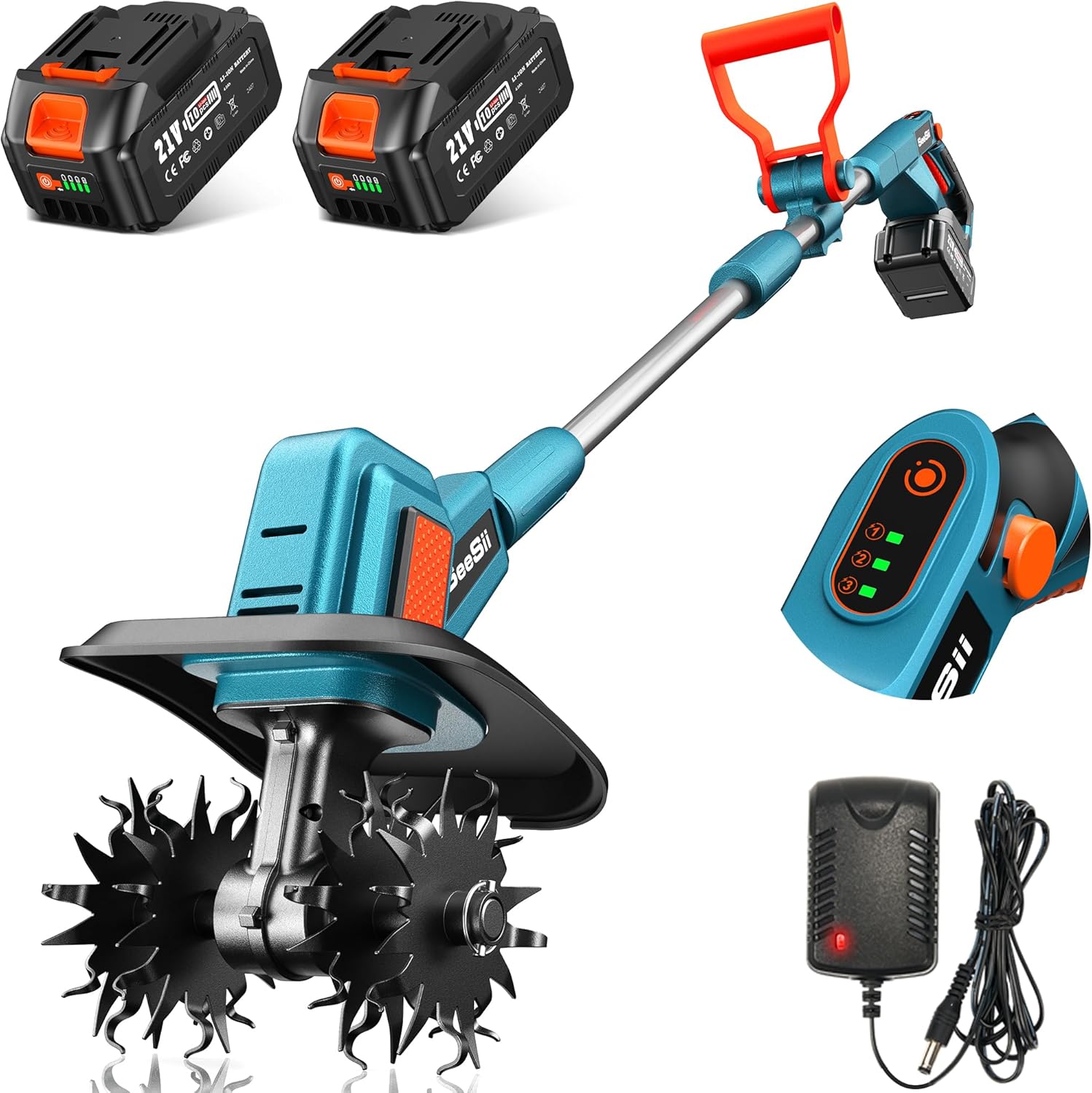
Figure 2.1: Overview of the SEESII Electric Tiller, including the main unit, two 4.0Ah batteries, and the battery charger.
3. Assembly Instructions
The SEESII Electric Tiller requires minimal assembly. Follow these steps to prepare your tiller for use:
- Attach the Handle: Secure the auxiliary handle to the main shaft using the provided fasteners. Ensure it is positioned comfortably for your height and grip.
- Connect the Shaft Sections: If the shaft comes in multiple pieces, align and connect them, ensuring the locking mechanism engages securely.
- Install the Blades: Carefully attach the four detachable blades to the tilling head. Ensure each blade is properly aligned with the axle holes and secured with the locking pins. Refer to the diagram for correct orientation.
- Insert Battery: Fully charge the two 4.0Ah Lithium-Ion batteries before first use. Insert a charged battery into the battery slot on the tiller handle until it clicks into place.

Figure 3.1: The four rugged blades of the tiller, designed for effective soil cultivation.
4. Operating Instructions
Operating your SEESII Electric Tiller is straightforward. Follow these guidelines for optimal performance and safety.
4.1 Battery Charging and Installation
- Use the provided charger to fully charge both 4.0Ah batteries. The charger indicator light will show when charging is complete.
- To install, slide a charged battery into the battery compartment on the tiller until it locks securely. To remove, press the release button and slide the battery out.

Figure 4.1: The 21V 4.0Ah Li-ion battery securely installed in the tiller, providing cordless operation.
4.2 Powering On and Speed Selection
- To power on, press and hold the safety button, then squeeze the trigger switch. Release the safety button once the tiller starts.
- The tiller features three speed settings (200 RPM, 250 RPM, 300 RPM) to adapt to different soil conditions. Use the speed selector button on the control panel to cycle through the settings.
| Speed Setting | RPM | Recommended Soil Type |
|---|---|---|
| Gear 1 | 200 RPM | Hard-packed soils |
| Gear 2 | 250 RPM | Moderately firm soils |
| Gear 3 | 300 RPM | Soft or loose soils |

Figure 4.2: The control panel displaying the three available speed settings for various soil conditions.
4.3 Tilling Technique
- Hold the tiller firmly with both hands. The ergonomic handle and safety button design ensure comfortable and secure operation.
- Guide the tiller slowly and steadily over the area to be cultivated. The tiller is designed to achieve a tilling width of 9 inches and a depth of 7 inches.
- Allow the blades to do the work; avoid forcing the tiller into the soil.
- For deeper cultivation, make multiple passes over the same area, gradually increasing depth.

Figure 4.3: Proper grip on the human-centric handle, highlighting the safety button for secure operation.

Figure 4.4: The SEESII Electric Tiller in use, demonstrating its effectiveness in loosening soil for gardening.
5. Maintenance
Regular maintenance ensures the longevity and optimal performance of your SEESII Electric Tiller.
- Blade Cleaning: After each use, disconnect the battery and carefully clean any soil, debris, or plant matter from the blades. Use a stiff brush or cloth. Inspect blades for damage or excessive wear.
- Battery Care: Store batteries in a cool, dry place away from direct sunlight and extreme temperatures. Do not store fully discharged batteries for extended periods. Charge them periodically if not in use.
- General Cleaning: Wipe down the tiller body with a damp cloth. Avoid using harsh chemicals or abrasive cleaners.
- Storage: Store the tiller in a dry, secure location, out of reach of children.
6. Troubleshooting
If you encounter issues with your SEESII Electric Tiller, refer to the following common problems and solutions:
| Problem | Possible Cause | Solution |
|---|---|---|
| Tiller does not start | Battery not installed correctly or discharged | Ensure battery is fully charged and properly seated. |
| Tiller loses power during operation | Battery charge is low | Replace with a fully charged battery. |
| Blades are not tilling effectively | Blades are clogged or worn | Disconnect battery, clean blades. Inspect for damage and replace if necessary. |
| Excessive vibration | Blades are bent or unbalanced | Disconnect battery, inspect blades for damage. Contact customer support if issue persists. |
If the problem persists after attempting these solutions, please contact Seesii customer support for further assistance.
7. Specifications
Detailed specifications for the SEESII Electric Tiller Model SEESII-CP3B2055US:
| Feature | Specification |
|---|---|
| Brand | Seesii |
| Model Number | SEESII-CP3B2055US |
| Power Source | Battery Powered |
| Battery Type | 2 x Lithium Ion (4.0Ah each, 8000mAh total) |
| Rotational Speed (RPM) | 200 / 250 / 300 RPM (3-speed settings) |
| Blades | 4 Pcs Detachable Blades (48 Steel Tines) |
| Tilling Width | 9 inches |
| Tilling Depth | 7 inches |
| Product Dimensions | 10.6"D x 13.6"W x 19.5"H |
| Item Weight | 16.07 pounds (7.3 Kilograms) |
| Material | Plastic |
8. Warranty and Customer Support
For warranty information, product support, or to purchase replacement parts, please refer to the documentation included with your product or visit the official Seesii store.
Seesii Store: https://www.amazon.com/stores/Seesii/page/706A8E74-772B-4D1E-A9E3-E6F32E74101D


