
1. Introduction
Thank you for choosing the U`King 5 Beam Effect DJ Laser Lights. This device is designed to produce dynamic and colorful laser light shows for various events and venues. It features five lenses projecting red, green, blue, yellow, and cyan colors, capable of creating over 100 distinct patterns and multi-colored beams. This manual provides essential information for safe and effective operation, including setup, control modes, maintenance, and troubleshooting.

Figure 1.1: U`King 5 Beam Effect DJ Laser Lights (4-pack shown). Each unit features five distinct laser outputs for varied color combinations.
2. Safety Information
Please read and understand all safety instructions before operating this device. Failure to comply may result in injury or damage to the product.
- Laser Classification: This product contains Class I lasers. Avoid direct eye exposure to the laser beams. Do not stare into the aperture.
- Power Supply: Use only the specified power cable and connect to a grounded outlet (AC100-240V, 50/60Hz).
- Ventilation: Ensure adequate ventilation around the unit to prevent overheating. Do not block ventilation openings.
- Environment: Operate in a dry environment. Avoid exposure to moisture, rain, or extreme temperatures.
- Installation: Securely mount the unit using appropriate hardware. Ensure it is stable and cannot fall.
- Maintenance: Refer to the maintenance section for cleaning and care. Do not attempt to service the unit yourself. Contact qualified personnel for repairs.
- Smoke Environment: For optimal visual effects, particularly dynamic beams and scanning patterns, operation in a smoke or fog-filled environment is recommended. Without smoke, only static pattern effects may be visible.

Figure 2.1: Example of laser beams in operation. Always exercise caution and avoid direct eye contact with laser outputs.
3. Package Contents
Verify that all items are present and in good condition upon opening the package.
- U`King 5 Beam Effect DJ Laser Light Unit(s)
- Power Cable
- Instruction Manual (this document)
4. Product Overview
The U`King 5 Beam Effect DJ Laser Light features a robust aluminum housing and multiple control options.

Figure 4.1: Front and side view with dimensions. The unit measures approximately 22.4" L x 6.1" W x 4.5" H.
Control Panel and Connections
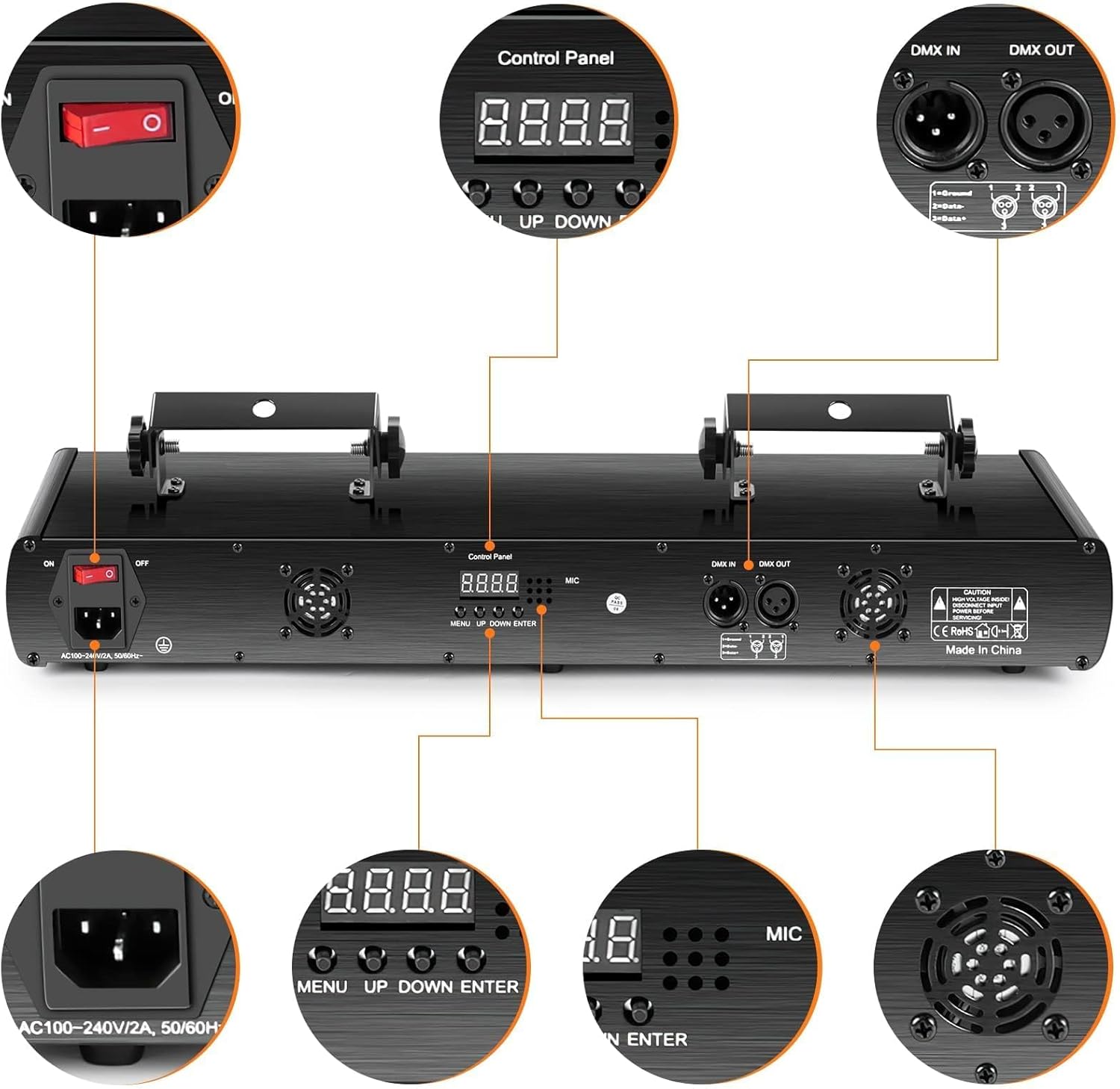
Figure 4.2: Rear control panel and connection ports.
- Power Switch: Toggles the unit on/off.
- AC Input: For connecting the power cable (AC100-240V, 50/60Hz).
- Control Panel: Features a digital display and four buttons (MENU, UP, DOWN, ENTER) for mode selection and parameter adjustment.
- DMX IN/OUT: 3-pin XLR connectors for DMX512 control.
- Cooling Fan: Ensures proper heat dissipation during operation.
5. Setup
- Unpacking: Carefully remove the laser light from its packaging.
- Placement/Mounting:
- Place the unit on a stable, flat surface, or mount it securely to a truss or ceiling using the integrated mounting brackets.
- Ensure the mounting location can support the weight of the fixture.
- Position the light to avoid direct eye exposure to the audience or performers.
- Maintain at least 6 inches (15 cm) of space around the unit for proper ventilation.
- Power Connection: Connect the provided power cable to the AC input on the rear of the unit, then plug it into a suitable grounded power outlet.
- DMX Connection (Optional): If using DMX control, connect a DMX cable from your DMX controller to the DMX IN port. For multiple units, daisy-chain them using DMX OUT to DMX IN connections.
- Power On: Flip the power switch to the "ON" position. The digital display will illuminate.
6. Operating Modes
The U`King 5 Beam Effect DJ Laser Light offers several operating modes, selectable via the control panel. Use the MENU button to cycle through modes, UP/DOWN to adjust parameters, and ENTER to confirm.
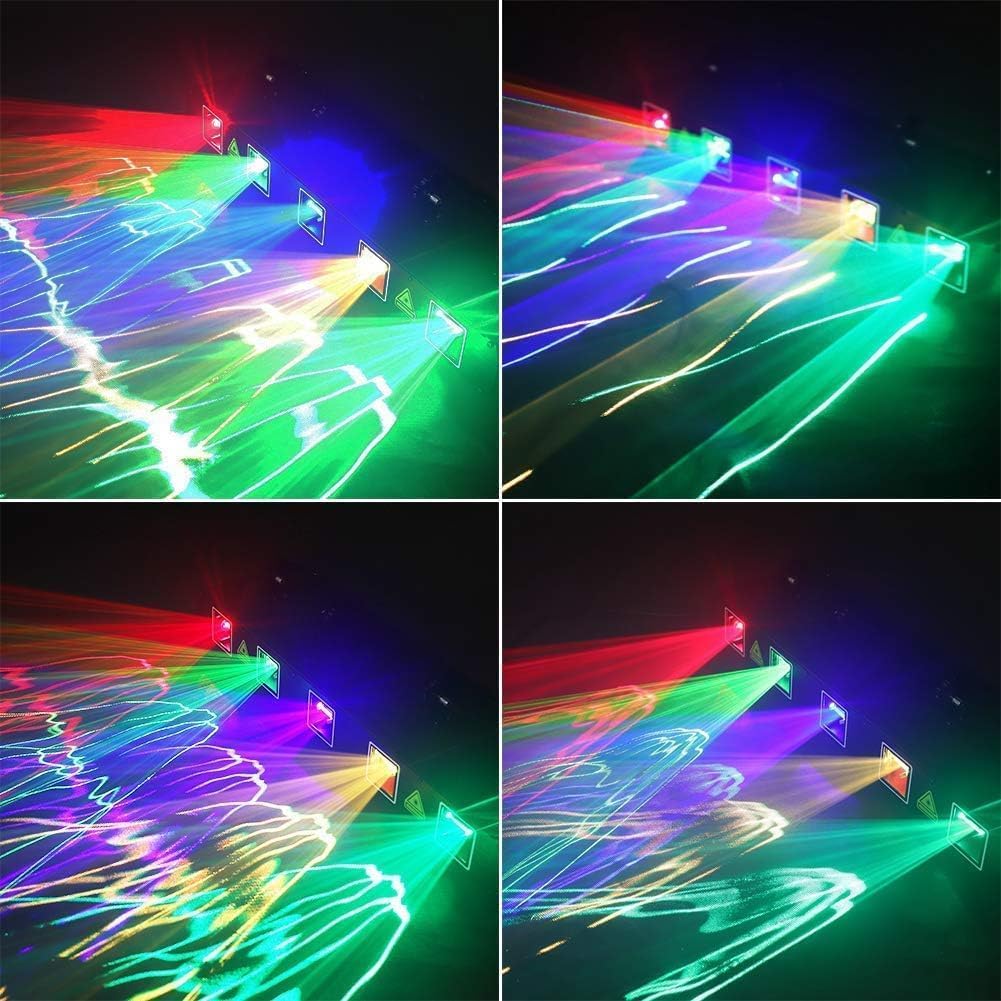
Figure 6.1: Examples of various laser patterns and effects.
6.1. Sound Activated Mode
In this mode, the laser patterns and colors react to the beat of ambient music or sound.
- Select "Sound" or "Voice" mode on the control panel.
- The built-in microphone detects sound, and the light effects will synchronize with the audio.
- Adjust microphone sensitivity if available, using the UP/DOWN buttons.
6.2. Self-Propelled (Auto) Mode
The unit cycles through its pre-programmed patterns and color combinations automatically.
- Select "Auto" mode on the control panel.
- The light will display a variety of patterns and effects without external input.
- Some models may allow adjustment of speed or pattern selection within Auto mode.
6.3. DMX Control Mode
For professional control and synchronization with other lighting equipment, use DMX512 mode.
- Connect the unit to a DMX controller as described in the Setup section.
- Select "DMX" mode on the control panel.
- Set the DMX address for the unit using the UP/DOWN buttons and ENTER to confirm. Refer to your DMX controller's manual and the laser light's DMX channel chart (not provided in this general manual, typically found in a dedicated DMX supplement).
- The DMX512 system allows for precise control over patterns, colors, movement, and other effects.
7. Maintenance
Regular maintenance ensures optimal performance and extends the lifespan of your laser light.
- Cleaning: Periodically clean the exterior of the unit with a soft, dry cloth. Ensure the laser output lenses are free of dust and smudges. Use a lens cleaning solution and a microfiber cloth if necessary.
- Ventilation: Keep the cooling fan and ventilation openings clear of dust and debris. Use compressed air to gently clear any blockages.
- Inspection: Regularly inspect the power cable and DMX cables for any signs of damage. Replace damaged cables immediately.
- Storage: When not in use, store the unit in a cool, dry place, away from direct sunlight and extreme temperatures.
8. Troubleshooting
| Problem | Possible Cause | Solution |
|---|---|---|
| No power | Power cable disconnected; power outlet fault; unit switch off. | Check power cable connection; test outlet with another device; ensure power switch is ON. |
| No laser output | Unit in standby mode; internal fault; laser aperture blocked. | Check operating mode; ensure lenses are clean; if problem persists, contact support. |
| Patterns not visible or weak | No smoke/fog in environment; ambient light too bright. | Introduce smoke or fog for beam visibility; reduce ambient lighting. |
| Sound Activated mode not responding | Microphone sensitivity too low; no sound detected; microphone blocked. | Increase microphone sensitivity; ensure sufficient sound level; check microphone opening for obstructions. |
| DMX control not working | Incorrect DMX address; faulty DMX cable; DMX controller issue; incorrect mode selected. | Verify DMX address and mode; check DMX cable connections; test with another DMX device or controller. |
| Unit is noisy | Normal operation sound from internal motors/fans; loose components. | Some mechanical noise is normal. If noise is excessive or unusual, contact support. Ensure unit is securely mounted. |
9. Specifications
- Model: ZQ03011US
- Brand: U`King
- Product Dimensions: 22.4" L x 6.1" W x 4.5" H
- Material: Aluminum
- Color: Black
- Light Source Type: Laser
- Laser Classification: Class I (Red, Green, Blue, Yellow, Cyan beams less than 0.3mW each)
- Power Source: Corded Electric (AC100-240V, 50/60Hz)
- Control Modes: Sound Activated, Self-Propelled (Auto), DMX512
- Manufacturer: Dongguan Tong Global Industrial Co., Ltd.
10. Warranty and Support
For warranty information or technical support, please contact U`King customer service through the retailer where the product was purchased or visit the official U`King website. Please have your model number (ZQ03011US) and purchase details ready.
U`King Store: Visit the U`King Store on Amazon