
BSA HMRGBD30CP
BSA 1x30mm Black Matte Red Dot Sight User Manual
Model: HMRGBD30CP
Introduction
The BSA 1x30mm Black Matte Red Dot Sight is designed for quick target acquisition and enhanced accuracy. It features a versatile red, green, and blue 5 MOA dot reticle, adjustable via an 11-position rheostat. This sight is powered by a 3V CR2032 battery and includes an integral mount compatible with both 3/8″ and 5/8″ Weaver-style rails. It is also fogproof and waterproof, ensuring reliable performance in various conditions.
Package Contents
- BSA 1x30mm Red Dot Sight
- CR2032 Battery
- Lens Caps
- Cleaning Cloth
- User Manual (this document)
Product Overview
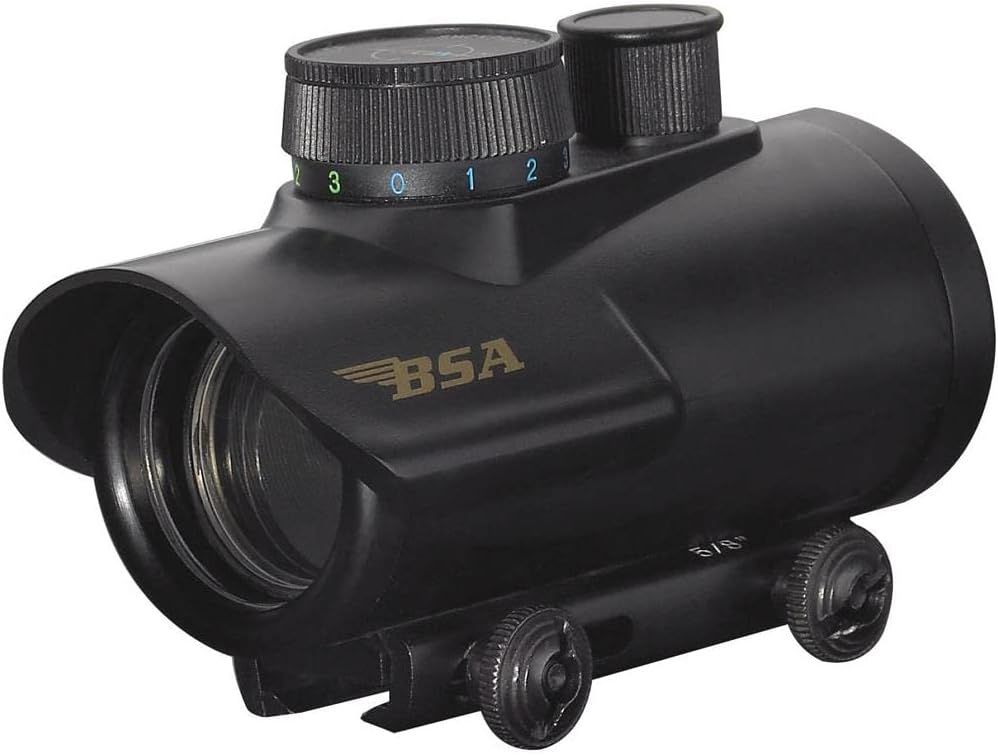
Figure 1: Front-side view of the BSA 1x30mm Red Dot Sight, showing the objective lens, rheostat, and adjustment turrets.

Figure 2: Side view of the BSA 1x30mm Red Dot Sight, highlighting the integral mount and adjustment turrets.
The BSA 1x30mm Red Dot Sight features a compact design with clearly marked adjustment controls. The top dial controls the reticle color and brightness, while the side and top turrets are for windage and elevation adjustments, respectively. The integral mount simplifies attachment to compatible rails.
Setup and Installation
1. Battery Installation
- Locate the battery compartment, typically on the side or top of the rheostat dial.
- Unscrew the battery cap counter-clockwise.
- Insert one 3V CR2032 battery with the positive (+) side facing outwards.
- Replace the battery cap and screw it clockwise until secure. Do not overtighten.
- Important: If the dot flashes or dims after a shot, check the battery and clean the contacts with rubbing alcohol. Consider replacing with a fresh, high-quality CR2032 battery.
2. Mounting the Sight
The BSA 1x30mm Red Dot Sight features an integral mount designed to fit both 3/8″ and 5/8″ Weaver-style rails.
- Ensure your firearm is unloaded and pointed in a safe direction.
- Loosen the mounting screws on the integral mount.
- Align the sight's mount with the rail on your firearm.
- Slide the sight onto the rail to your desired position.
- Tighten the mounting screws securely. Ensure the sight is firmly attached and does not wobble.
Operating Instructions
1. Powering On/Off and Brightness Adjustment
- The rheostat dial on top of the sight controls both power and brightness.
- Rotate the dial to turn the sight ON and select one of the 11 brightness settings.
- To turn the sight OFF, rotate the dial to the "0" position.
2. Reticle Color Selection
This sight offers red, green, and blue 5 MOA dot reticles. The color is selected via the rheostat dial. Each color typically has multiple brightness settings.
- Rotate the rheostat dial to cycle through the available colors (Red, Green, Blue) and their respective brightness levels.
- The green setting is often preferred for daylight use due to its high visibility.
3. Windage and Elevation Adjustment
The sight features 1/2 MOA click adjustments for precise zeroing.
- Elevation Adjustment: The top turret adjusts the vertical position of the dot (up/down).
- Windage Adjustment: The side turret adjusts the horizontal position of the dot (left/right).
- To adjust, remove the protective caps from the turrets. Use a small #2 screwdriver or a dime to turn the adjustment slots.
- Caution: Make small adjustments (1-4 clicks at a time). Avoid large, rapid adjustments as this can make zeroing difficult.
- Turn the adjustment screw in the direction you want the point of impact to move. For example, to move the impact up, turn the elevation turret in the "UP" direction.
Maintenance and Care
- Cleaning Lenses: Use a soft lens brush to remove any loose debris from the lenses. Then, gently wipe with a clean, soft terry or cotton towel, or a lens cleaning cloth. Avoid using harsh chemicals or abrasive materials.
- Cleaning Body: Wipe the body of the sight with a damp, soft cloth.
- Storage: When not in use, turn the sight off and store it in a cool, dry place, preferably with lens caps on to protect the optics.
- Battery: Remove the battery if the sight will not be used for an extended period to prevent leakage.
- Warning: Do not attempt to disassemble the sight. This will void the warranty and may damage the internal components.
Troubleshooting
| Problem | Possible Cause | Solution |
|---|---|---|
| Dot is dim or not visible. | Low battery, incorrect brightness setting, dirty lens. | Replace battery, adjust brightness dial, clean lenses. |
| Dot flashes or dims after a shot. | Loose battery, poor battery contact, weak battery. | Ensure battery cap is tight. Clean battery contacts. Replace battery with a new, quality CR2032. |
| Sight does not hold zero. | Loose mounting, damaged internal components. | Ensure mounting screws are securely tightened. If problem persists, contact customer support. |
| Dot appears distorted or flared. | Brightness setting too high for ambient light, astigmatism (user-related). | Reduce brightness. Try a different reticle color. (Note: Some dot distortion can be due to individual vision). |
Specifications
| Model Name | BSA 30 Scope with Illuminated Red, Green and Blue Dot Reticle, Black Matte, 1x30mm (HMRGBD30CP) |
| Brand | BSA |
| Magnification | 1x |
| Objective Lens Diameter | 30mm |
| Reticle | 5 MOA Dot (Red, Green, Blue) |
| Brightness Settings | 11-position rheostat |
| Adjustment Click Value | 1/2 MOA |
| Mounting Type | Integral Mount (fits 3/8″ and 5/8″ Weaver-style rails) |
| Power Source | 3V CR2032 Battery |
| Color | Black Matte |
| Material | Blend |
| Item Weight | 0.31 Pounds |
| Environmental Features | Fogproof, Waterproof |
Warranty and Support
Warranty Information
This BSA Red Dot Sight comes with a 1 Year Manufacturer Warranty. This warranty covers defects in materials and workmanship under normal use. Any unauthorized disassembly or modification of the product will void the warranty.
Customer Support
For technical assistance, warranty claims, or general inquiries, please contact BSA customer support. Refer to the product packaging or the official BSA website for the most current contact information.
Manufacturer: Gamo
Related documentsHMRGBD30CP


Ask a question about this manual
Ask about setup, troubleshooting, compatibility, parts, safety, or missing instructions. Manuals+ will review the question and use this page’s manual context to help answer it.