
APEXEL AP-TM6-JP
APEXEL 10X-20X HD Zoom Macro Lens User Manual
Model: AP-TM6-JP
1. Introduction
This user manual provides detailed instructions for the APEXEL 10X-20X HD Zoom Macro Lens. It covers product features, package contents, setup, operation, maintenance, and troubleshooting. Please read this manual carefully before using the product to ensure proper function and longevity.
2. Product Overview and Key Features
The APEXEL 10X-20X HD Zoom Macro Lens is designed to enhance mobile phone photography, allowing for detailed close-up shots of small objects. It offers variable magnification and a wide aperture for excellent image quality.
- Professional Optical Lens: Constructed with aerospace-grade aluminum alloy and a 3-layer high-quality glass lens. Features 3 to 5 layers of FMC coating technology for improved image clarity and sharpness.
- 10-20X Zoom Capability: The industry's first zoom macro lens for mobile phones. Focus distance ranges from 1.5 cm (20X magnification) to 4.5 cm (10X magnification). The focus ring allows for precise adjustment.
- Flexible Depth of Field: An ultra-large F1.05 aperture allows more light to enter the lens, providing better exposure in low-light conditions and creating a softer depth of field effect to highlight the subject.
- Multiple Usage Modes: Supports two modes: mobile phone photography and naked-eye observation. An included eyecup allows for direct observation of small objects.
- Wide Compatibility: Suitable for most smartphone models with a width between 70 to 100 mm (2.8 to 3.9 inches). Note: Not compatible with iPhone Mini and SE series. For iPhone 13 and newer models, and Samsung Galaxy S22/S23 Ultra, disable the camera's micro function before use.

Figure 2.1: Internal structure of the professional optical lens, highlighting its multi-layered glass elements and coatings for enhanced clarity.

Figure 2.2: Explanation of the 10X and 20X zoom magnification based on the distance from the object (4.5 cm for 10X, 1.5 cm for 20X).
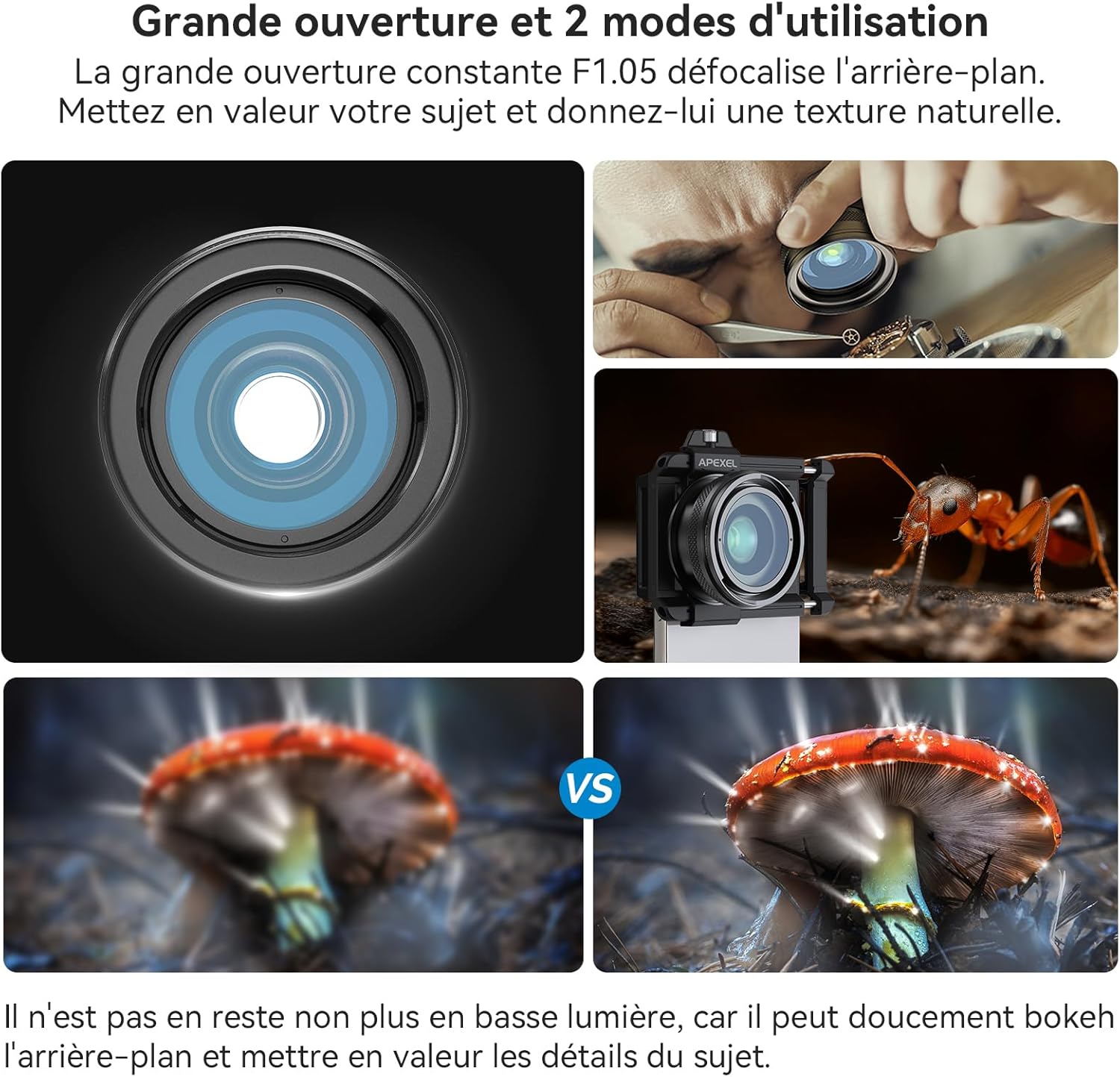
Figure 2.3: Illustration of the F1.05 large aperture's ability to create soft background blur and the two primary usage modes: phone photography and direct eye observation.
3. Package Contents
Please check the box for the following items:
- APEXEL 10X-20X HD Zoom Macro Lens
- Universal Mobile Phone Clip
- Cleaning Cloth
- User Manual
- EVA Gasket
4. Setup and Installation
Follow these steps to attach the APEXEL macro lens to your smartphone:
- Attach the Clip: Pull the stretch clip and insert your phone into it. Ensure the phone is securely held by the clip.
- Position the Clip: Loosen the screw on the clip, then slide and align the focus hole of the clip with your phone's main camera lens.
- Secure the Clip: Tighten the upper fixing screw to fix the position of the focus hole.
- Install the Lens: Align the thread of the macro lens with the thread on the mobile phone clip and rotate it clockwise to install.

Figure 4.1: Step-by-step guide for quick installation of the macro lens onto a smartphone.
Compatibility Notes:
- The clip accommodates smartphones with a width of 70 to 100 mm (2.8 to 3.9 inches).
- The lens is not compatible with iPhone Mini and SE series due to their smaller size.
- For iPhone 13 and newer models, and Samsung Galaxy S22/S23 Ultra, it is essential to disable the camera's micro function before using the lens to prevent interference and ensure proper focus.

Figure 4.2: Compatibility overview, showing the adjustable width of the phone clip to fit various smartphone models.
5. Operating Instructions
Once the lens is securely attached to your smartphone, you can begin capturing macro photos or observing small details.
5.1 Using for Photography
- Open Camera App: Launch your smartphone's camera application.
- Position Subject: Place the object you wish to photograph within the lens's working distance. For 20X magnification, the optimal distance is approximately 1.5 cm from the object. For 10X magnification, the optimal distance is approximately 4.5 cm.
- Adjust Focus: Rotate the focus ring on the macro lens until the image on your phone screen appears clear and sharp.
- Capture Photo: Once focused, take your picture as you normally would with your smartphone camera.

Figure 5.1: The APEXEL macro lens mounted on a smartphone, demonstrating its compact setup for mobile photography.
5.2 Using for Naked-Eye Observation
For direct observation without a phone:
- Attach Eyecup: If not already attached, install the eyecup onto the macro lens.
- Observe: Hold the lens with the eyecup to your eye and bring the object close to the lens. Adjust the distance and the focus ring until the object is clearly visible.
5.3 Tips for Optimal Use
- Lighting: Good lighting is crucial for macro photography. Use natural light or an external light source to illuminate your subject evenly.
- Stability: For sharper images, especially at higher magnifications, consider using a tripod or stabilizing your phone to minimize camera shake.
- Experiment: Practice with different subjects and lighting conditions to get the best results.
6. Maintenance
Proper care will extend the life of your APEXEL macro lens:
- Cleaning: Use the provided cleaning cloth to gently wipe the lens surfaces. For stubborn smudges, use a lens cleaning solution specifically designed for optical lenses. Avoid using abrasive materials or harsh chemicals.
- Storage: When not in use, store the lens in a clean, dry place, preferably in its original packaging or a protective pouch, to prevent dust and scratches.
- Avoid Impact: Protect the lens from drops or impacts, as this can damage the optical elements or the housing.
7. Troubleshooting
If you encounter issues with your APEXEL macro lens, refer to the following common problems and solutions:
7.1 Blurry Images
- Incorrect Focus: Ensure you are rotating the focus ring on the lens to achieve sharp focus.
- Incorrect Distance: Verify that the lens is at the correct working distance from the object (1.5 cm for 20X, 4.5 cm for 10X).
- Insufficient Light: Macro photography requires ample light. Ensure your subject is well-lit.
- Camera Shake: Hold your phone steady or use a tripod to prevent blur from movement.
- Phone Micro Function: For iPhone 13 and newer models, and Samsung Galaxy S22/S23 Ultra, ensure the camera's micro function (or focus enhancement) is disabled. This is a common cause of blurry or unfocusable images with external macro lenses.

Figure 7.1: Guide to disabling automatic macro mode on iPhone and focus enhancement on Samsung Galaxy S22/S23 Ultra, which can interfere with external macro lenses.
7.2 Lens Not Fitting Phone
- Check Phone Width: Ensure your phone's width is within the 70-100 mm (2.8-3.9 inches) compatibility range.
- Model Exclusion: Remember that iPhone Mini and SE series are not compatible.
- Proper Alignment: Make sure the clip's focus hole is perfectly aligned with your phone's main camera lens.
8. Specifications
| Feature | Specification |
|---|---|
| Brand | Apexel |
| Model Number | AP-TM6-JP |
| Color | Black (01) |
| Zoom Type | 10X-20X Variable Focal Length |
| Min Focal Length | 15 Millimeters |
| Max Focal Length | 45 Millimeters |
| Aperture | F1.05 |
| Lens Design | Macro Lens |
| Focus Type | Manual Focus |
| Lens Coating | FMC Coating |
| Image Stabilization | No Image Stabilization |
| Product Dimensions (L x W x H) | 5 x 5 x 5 cm; 210 grams |
| Water Resistance Level | Not Waterproof |
9. Warranty and Support
For warranty information and customer support, please refer to the documentation included with your purchase or visit the official APEXEL website. Keep your proof of purchase for any warranty claims.
Ask a question about this manual
Ask about setup, troubleshooting, compatibility, parts, safety, or missing instructions. Manuals+ will review the question and use this page’s manual context to help answer it.