1. Introduction
This manual provides detailed instructions for the installation, operation, and maintenance of the Generic NVR304-32E2-P16 Network Video Recorder. This NVR is designed for professional surveillance applications, offering robust features such as Ultra H.265/H.264 video formats, 32-channel input, 16 independent PoE interfaces, 4K HDMI output, and extensive storage capabilities with support for up to four 10TB SATA HDDs.
2. Safety Information
- Power Supply: Use only the specified power adapter. Ensure the power source is stable and meets the NVR's requirements.
- Ventilation: Do not block ventilation openings. Ensure adequate airflow to prevent overheating.
- Environment: Avoid exposing the NVR to extreme temperatures, humidity, dust, or corrosive environments.
- Handling: Handle the device with care. Avoid dropping or subjecting it to strong impacts.
- Servicing: Do not attempt to disassemble or repair the NVR yourself. Refer all servicing to qualified personnel.
3. Package Contents
Verify that all items are present in the package. If any items are missing or damaged, contact your supplier.
- Video Recorder (NVR304-32E2-P16)
- Installation Hardware
- Power Adapter
- Mouse
- Quick Start Guide
4. Product Overview
The NVR304-32E2-P16 is a high-performance Network Video Recorder designed for comprehensive surveillance systems. It supports up to 32 camera inputs and features 16 Power over Ethernet (PoE) interfaces for direct camera connection, simplifying installation. The NVR supports Ultra H.265/H.265/H.264 video compression for efficient storage and offers 4K (3840x2160) resolution output via HDMI for clear monitoring.
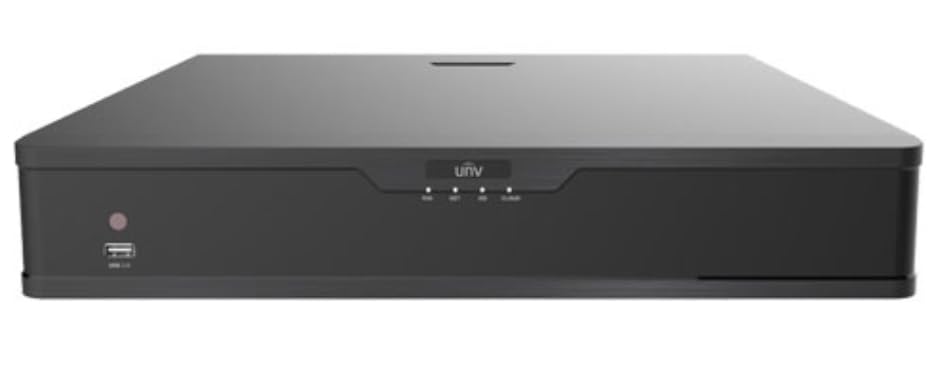
Figure 4.1: Front view of the Generic NVR304-32E2-P16 Network Video Recorder, showing various ports and indicators for connectivity and status monitoring.
Key Features:
- Supports Ultra H.265/H.265/H.264 video formats for efficient compression.
- 32-channel input with 16 independent PoE network interfaces.
- 1-ch HDMI and 1-ch VGA outputs, with HDMI supporting up to 4K (3840x2160) resolution.
- Records up to 12 Megapixels resolution.
- Supports 4 SATA HDDs with up to 10TB capacity each (total 40TB).
- RAID 1 and RAID 5 support for enhanced data redundancy.
5. Setup
5.1 Physical Installation
- Install Hard Disk Drives (HDDs): Open the NVR casing and securely mount the SATA HDDs. Connect the SATA data and power cables to each HDD.
- Connect Cameras: Connect your IP cameras to the NVR's PoE ports using Ethernet cables. For non-PoE cameras, connect them to a PoE switch or network and ensure they are on the same network as the NVR.
- Connect Display: Connect a monitor to the NVR's HDMI or VGA output port.
- Connect Network: Connect the NVR's LAN port to your network router or switch using an Ethernet cable.
- Connect Power: Connect the power adapter to the NVR and then to a power outlet. The NVR will power on automatically.
5.2 Initial Configuration
Upon first boot, the NVR will guide you through an initial setup wizard. Follow the on-screen prompts to:
- Set up a strong administrator password.
- Configure network settings (DHCP or static IP).
- Search for and add IP cameras.
- Initialize HDDs for recording.
- Set up date and time.
6. Operating
6.1 Live View and Recording
After initial setup, you can access the live view of connected cameras. The NVR supports continuous, scheduled, or motion-triggered recording. Configure recording schedules and motion detection zones through the NVR's web interface or local GUI.
6.2 Playback
To review recorded footage, navigate to the playback section. You can search for recordings by date, time, and event type. The NVR allows for synchronized playback of multiple channels.
6.3 Remote Access
Configure network settings to enable remote access via a web browser or mobile application. Ensure proper port forwarding or P2P settings are configured on your router for secure remote viewing.
7. Maintenance
7.1 Firmware Updates
Regularly check the manufacturer's website for firmware updates. Updating the firmware can improve performance, add new features, and enhance security. Follow the provided instructions carefully during the update process.
7.2 HDD Management
Monitor the health of your HDDs through the NVR's storage management interface. The NVR supports RAID 1 and RAID 5 for data redundancy, which helps protect against data loss in case of a single drive failure. Ensure proper RAID configuration for critical data.
7.3 System Backup
Regularly back up important configuration files and critical video footage to external storage devices or network locations.
8. Troubleshooting
- No Video Output: Check HDMI/VGA cable connections, ensure the monitor is on and set to the correct input. Verify NVR power.
- Cameras Not Connecting: Ensure cameras are powered, network cables are secure, and IP addresses are correct. Check PoE status for PoE cameras.
- No Recording: Verify HDDs are installed, initialized, and healthy. Check recording schedules and motion detection settings.
- Remote Access Issues: Confirm network connectivity, port forwarding rules on your router, and correct IP address/domain name.
- System Freezing/Lagging: Check network bandwidth, ensure NVR firmware is up to date, and verify HDD health. Reduce video resolution or frame rate if necessary.
9. Specifications
| Feature | Specification |
|---|---|
| Model Number | NVR304-32E2-P16 |
| Brand | Generic |
| Number of Channels | 32 |
| Connectivity Technology | Ethernet, HDMI, VGA |
| Media Format Digital Video | H.265, H.264 |
| Hard Disk Support | 4 SATA HDDs |
| Max Hard Disk Size | 10 TB per HDD |
| Video Output Resolution | Up to 4K (3840x2160) via HDMI |
| PoE Interfaces | 16 independent PoE ports |
| RAID Support | RAID 1, RAID 5 |
| Manufacturer | Uniview |
10. Warranty and Support
For specific warranty information and technical support, please refer to the documentation provided with your purchase or contact the manufacturer, Uniview, directly. Keep your purchase receipt as proof of purchase for warranty claims. The manufacturer's website typically provides resources such as FAQs, driver downloads, and contact information for customer service.


