
1. Introduction
This manual provides detailed instructions for the safe and effective use of your MAXRIENY A10 Smart Digital Multimeter. The A10 is a compact, auto-ranging multimeter designed for various electrical measurements, featuring a color LCD display and a rechargeable battery. Please read this manual thoroughly before operation and retain it for future reference.

The MAXRIENY A10 Smart Digital Multimeter, showcasing its compact design and color LCD screen.
2. Safety Information
Always adhere to basic safety precautions when using electrical testing equipment to prevent personal injury or damage to the meter or equipment under test.
- Do not exceed the maximum input values specified for each measurement range.
- Exercise extreme caution when working with voltages above 30V AC RMS, 42V peak, or 60V DC. These voltages pose a shock hazard.
- Ensure the test leads are in good condition, free from damage or exposed insulation.
- Do not operate the meter if it appears damaged or if the case is open.
- Always disconnect power to the circuit and discharge all high-voltage capacitors before measuring resistance, continuity, or capacitance.
- Use the correct function and range for each measurement.
- Keep fingers behind the finger guards on the test probes during measurements.
- Do not use the meter in wet environments or in the presence of explosive gas or dust.
3. Package Contents
Verify that all items are present and undamaged upon opening the package:
- 1 x MAXRIENY A10 Smart Digital Multimeter
- 1 x Pair of Test Leads
- 1 x Carrying Case
- 1 x Rechargeable Battery (built-in)
- 1 x Charging Cable
- 1 x User Manual (this document)
4. Product Overview
The MAXRIENY A10 features a sleek design with a large color LCD for clear readings and minimal controls for ease of use.
4.1. Display Features

A detailed view of the MAXRIENY A10's vibrant color LCD screen, designed for enhanced readability in various lighting conditions.
- Color LCD Display: Enhances readability, even in bright sunlight or low-light conditions.
- 3 Results Display: Shows up to three test results simultaneously, such as voltage, frequency, and an analog bar graph.

The MAXRIENY A10 Multimeter's screen showing three simultaneous test results, such as voltage, frequency, and an analog bar graph.
4.2. Controls and Ports
- Power Button: Turns the device on/off.
- Function Button (FUNC): Cycles through manual measurement modes when not in Smart mode.
- Hold Button: Freezes the current display reading.
- Input Jacks: For connecting test leads (COM, VΩHz, mAμA).
- USB-C Charging Port: For recharging the internal battery.
5. Setup
5.1. Charging the Battery
The MAXRIENY A10 is equipped with a built-in rechargeable 800mAh Li-ion battery. Before first use, or when the battery indicator shows low power, charge the device using the provided USB charging cable.
- Connect the small end of the charging cable to the USB-C port on the multimeter.
- Connect the standard USB end to a compatible USB power adapter (not included) or a computer USB port.
- The charging indicator on the multimeter will illuminate during charging and change status when fully charged.

The MAXRIENY A10 Multimeter connected to a USB charging cable, highlighting its rechargeable Li-ion battery.
5.2. Connecting Test Leads
Proper connection of test leads is crucial for accurate and safe measurements.
- Insert the black test lead into the 'COM' (Common) input jack.
- Insert the red test lead into the 'VΩHz' input jack for most voltage, resistance, and frequency measurements.
- For current measurements (mA/μA), insert the red test lead into the dedicated 'mAμA' input jack.
6. Operation
6.1. Power On/Off
Press and hold the power button to turn the multimeter on or off.
6.2. Smart Auto-Ranging Mode
The A10 features a smart mode that automatically identifies the test parameters (AC/DC voltage, resistance, continuity) and selects the appropriate range. This simplifies operation for general measurements.
6.3. Manual Measurement Modes
Press the 'FUNC' button to cycle through specific measurement modes if you need to manually select a function or if the smart mode does not automatically detect the desired parameter.
6.3.1. DC Voltage Measurement
Connect the test leads in parallel to the DC voltage source. The meter will automatically detect and display the DC voltage.
6.3.2. AC Voltage Measurement
Connect the test leads in parallel to the AC voltage source. The meter will automatically detect and display the AC voltage and frequency.
The MAXRIENY A10 Multimeter in use, measuring AC voltage within an electrical panel, displaying the reading on its screen.
6.3.3. Resistance Measurement (Ohms)
Ensure the circuit is de-energized. Connect the test leads across the component to measure its resistance.
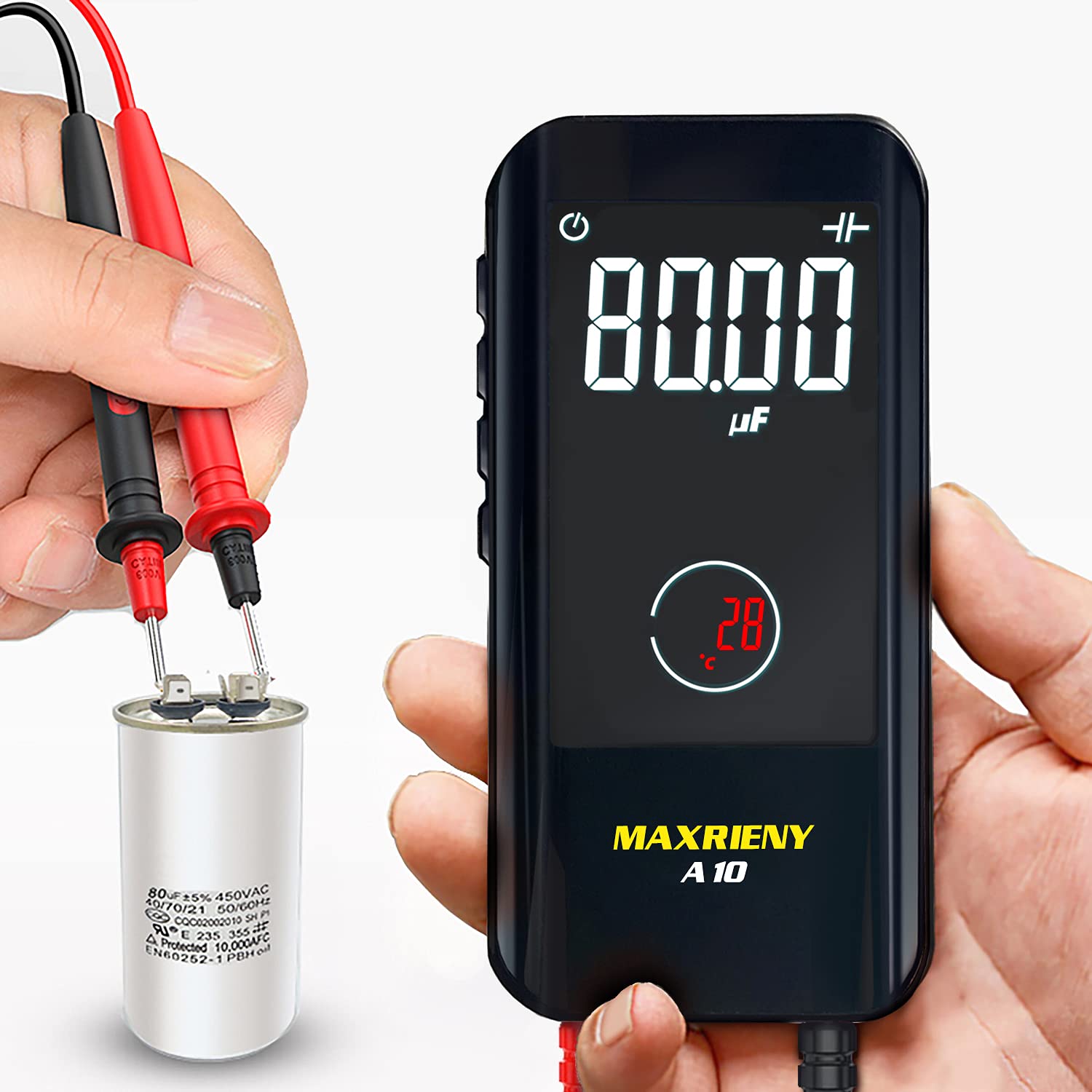
6.3.4. Capacitance Measurement
Ensure the capacitor is fully discharged before connecting the test leads across its terminals.

Demonstration of the MAXRIENY A10 Multimeter measuring capacitance on an electronic component using its test leads.
6.3.5. Diode Test
Ensure the diode is disconnected from the circuit. Connect the red lead to the anode and the black lead to the cathode. The meter will display the forward voltage drop.
6.3.6. Continuity Test
Ensure the circuit is de-energized. Connect the test leads across the circuit or component. An audible beep indicates continuity (resistance less than 50Ω).
6.3.7. Non-Contact Voltage (NCV) Detection
Hold the top of the multimeter near an AC voltage source without direct contact. The meter will indicate the presence of voltage with an alarm beep and a visual stripe display on the LCD.
6.3.8. Live Check
Similar to NCV, this function helps identify live wires. The meter will provide an alarm beep and a stripe display on the LCD when a live wire is detected.
Video demonstrating the Non-Contact Voltage (NCV) and Live Check functions of the MAXRIENY A10 Smart Digital Multimeter.
6.4. Data Hold Function
Press the 'Hold' button to freeze the current reading on the display. Press it again to release the hold and resume live measurements.
7. Maintenance
7.1. Cleaning
Wipe the meter's case with a damp cloth and mild detergent. Do not use abrasives or solvents. Ensure the meter is completely dry before use.
7.2. Storage
When not in use, store the multimeter and its accessories in the provided carrying case in a cool, dry place, away from direct sunlight and extreme temperatures.

The compact MAXRIENY A10 Multimeter easily fits into a pocket, illustrating its portability.
8. Troubleshooting
If you encounter issues with your MAXRIENY A10, refer to the following common problems and solutions:
- Meter does not power on: Ensure the battery is charged. Connect the charging cable and try again.
- Inaccurate readings: Check test lead connections. Ensure the correct measurement mode is selected (if not using Smart mode). Verify the circuit is de-energized for resistance/capacitance tests.
- No continuity beep: Ensure the resistance is below 50Ω. Check test leads for damage.
- NCV/Live Check not responding: Ensure the function is active. The presence of strong electromagnetic fields can interfere with detection.
For persistent issues, contact customer support.
9. Specifications
| Parameter | Specification |
|---|---|
| Max Display | 6000 counts |
| Display Type | Color screen, 3.2 inch |
| DC Voltage | 0V-600V ±(0.8%+3); Resolution: 0.001V |
| AC Voltage | 0V-600V ±(1.2%+5); Resolution: 0.001V |
| Resistance | 0.1Ω-10MΩ ±(1.2%+3), 10MΩ-60MΩ ±(2.0%+10); Resolution: 0.1Ω |
| Capacitance | 1nF-1.00mF ±(3.5%+8), 1mF-60.00mF ±(4.5%+10); Resolution: 0.001nF |
| Frequency | 10Hz-10MHz ±(2.0%+10) (ACV: 3V-600V); Resolution: 0.1Hz |
| Duty Cycle | 0.1%-99.9% ±(1.5%+5); Resolution: 0.1% |
| Diode Test | Auto identify diode if less than 3.0V |
| Continuity | Beeper sounds if resistance is less than 50Ω |
| V-Alert (NCV) | Alarm beep sounds, LCD screen display stripe |
| Live Check | Alarm beep sounds, LCD screen display stripe |
| Power | Rechargeable 3.7V battery (built-in) |
| Size | 113.3 x 54.2 x 22mm (4.46 x 2.13 x 0.87 inches) |
| Weight | 102g (3.6 ounces) |
10. Warranty & Support
MAXRIENY products are manufactured to high quality standards. For information regarding warranty coverage, technical support, or service, please refer to the warranty card included with your product or contact MAXRIENY customer service through the retailer where the product was purchased.